
Broom Riding AI Video Generator
A one-photo AI tool that turns a portrait into a 6-second vertical broom-flying video sized for TikTok and Reels.
Are you the maker? Claim this listing to keep info, pricing and screenshots current. Verified via your tool's domain email.
Broom Riding AI is the right pick for someone who wants to drop into the witch-broom TikTok trend fast, with a free preview before spending a cent and HD packs priced well below most single-scene competitors. The ceiling is low: one fixed scene type, 720p maximum, no editing controls, and no path to anything beyond this one trick. If you need general AI video creation or reusable production tools, Runway handles that and Broom Riding AI does not.
What is Broom Riding AI Video Generator?
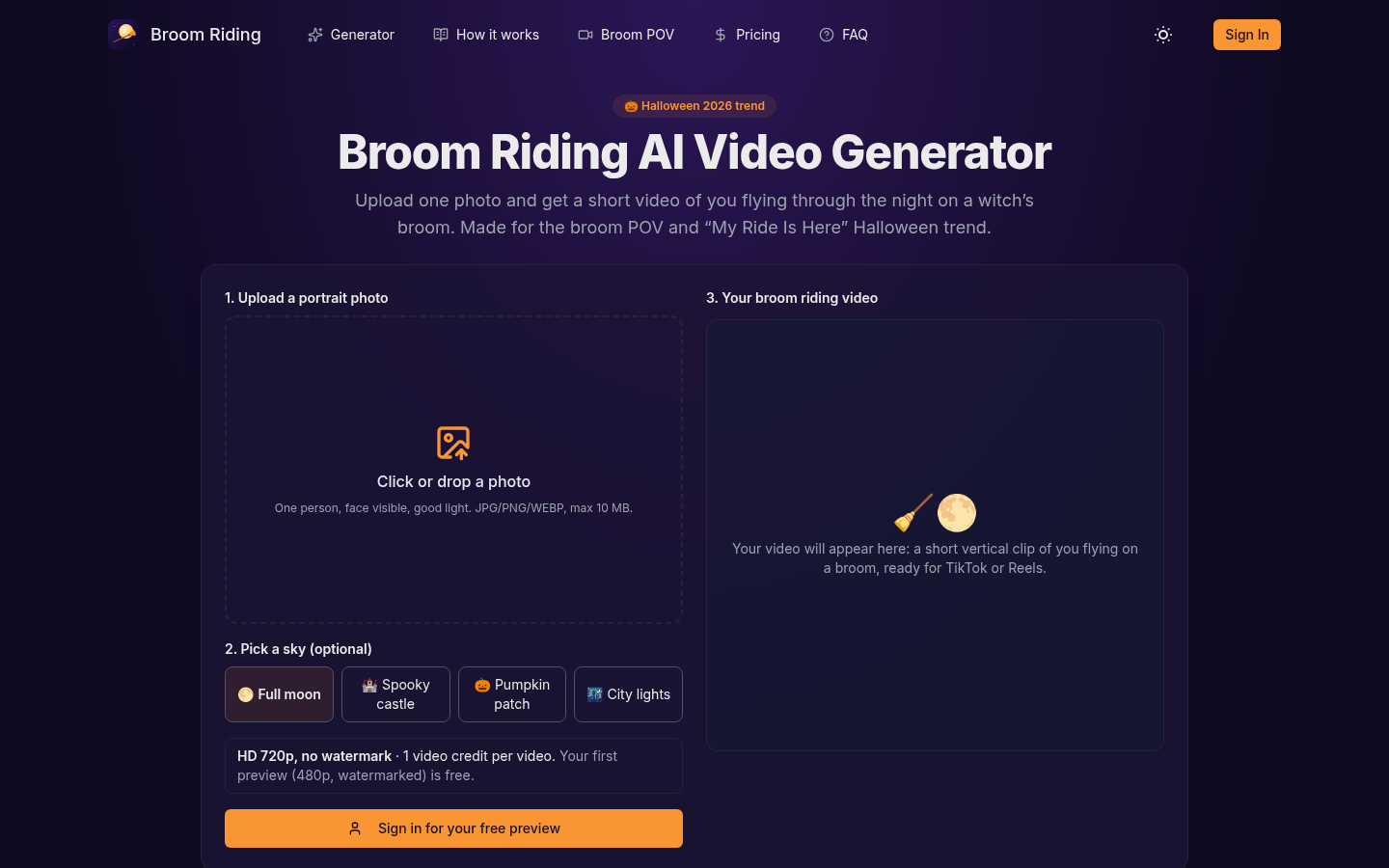
Broom Riding AI Video Generator is a web-based tool that converts a single portrait photo into a short vertical video of the subject flying on a witch's broom. Users choose from four sky settings, and the tool returns a roughly 6-second MP4 clip with sound, formatted for TikTok and Reels. Output is HD 720p with no watermark on paid tiers.
The service runs on a credit-pack model with no subscription. A free 480p watermarked preview is available once per account so users can evaluate the result before purchasing. Paid packs range from a single video at $2.99 to 15 videos at $14.99, with credits that never expire. It is aimed at individuals and social creators who want to participate in the Halloween broom-riding trend without filming or editing anything themselves.
How we scored Broom Riding AI Video Generator
Capability scores low at 13 because the tool does exactly one thing: one fixed scene, four sky presets, 720p ceiling, no prompts, no editing, no API. Named competitors like Runway offer orders of magnitude more creative control. Ease of use earns 22 out of 25 because the workflow genuinely cannot be simpler: upload a photo, pick a sky, get a video, with a free preview removing the main friction point of pay-before-you-see. Value lands at 20 because $1.00 per HD video in the Coven Pack is meaningfully cheaper than the $10-per-video rate common among direct competitors in this niche, and the no-expiry, no-subscription model is buyer-friendly. Delivery drops to 8 because no independent user sentiment, third-party reviews, or output samples could be found for getbroomriding.com specifically, making it impossible to verify that the generated videos actually place faces convincingly or match the quality implied by the pricing page. A tool asking for payment with zero verifiable third-party evidence of output quality represents a real delivery uncertainty that cannot be papered over.
Pros and cons
What we liked
- Genuinely low per-video cost: $1.00 each in the 15-video Coven Pack, well below the $10-per-video rate common among single-scene broom trend competitors.
- Free 480p preview before any payment, so you can confirm the tool placed your face correctly before committing a credit.
- No subscription and no credit expiry: pay once, use the credits whenever, with automatic refunds on failed generations.
Where it falls short
- Output is capped at 720p HD with no higher-resolution option, which limits usefulness for any display larger than a phone screen or for creators who want to repost at 1080p.
- Only four fixed sky backgrounds with no ability to supply a custom background, adjust the broom scene, or write any prompt, making every output from the same sky choice look nearly identical.
- The tool is built around a single seasonal trend; outside of Halloween or broom-riding viral moments, there is no other use case and no other template to fall back on.
Key features
Broom Riding AI Video Generator pricing
Free 480p watermarked preview (one per account, not downloadable). Paid HD 720p packs: Single at $2.99 for 1 video, Party Pack at $6.99 for 5 videos ($1.40 each), Coven Pack at $14.99 for 15 videos ($1.00 each). All packs are one-time payments with no subscription and credits that never expire.
| Plan | Price | Who it is for |
|---|---|---|
| Free Preview | $0 | One 480p watermarked preview video per account. Viewable on-site only, not downloadable. Automatically refunded if generation fails. |
| Single | $2.99 | 1 HD 720p video with no watermark, MP4 download, all 4 sky styles, credits never expire, failed videos refunded automatically. One-time payment. |
| Party Pack | $6.99 | 5 HD 720p videos ($1.40 per video) with no watermark, MP4 download, all 4 sky styles, credits never expire, failed videos refunded automatically. One-time payment. |
| Coven Pack | $14.99 | 15 HD 720p videos ($1.00 per video) with no watermark, MP4 download, all 4 sky styles, credits never expire, failed videos refunded automatically. One-time payment. |
Pricing reflects what we saw at time of review (2026-10). Always confirm current pricing on the tool's own site.
Who should use Broom Riding AI Video Generator?
This tool is built for the individual who sees the broom-riding trend on their For You page and wants their own version within minutes, not hours. A parent who wants to drop a funny clip of themselves or a friend into the trend, a Halloween-focused social account posting daily content through October, or a small creator who wants to batch five or fifteen videos for different people in their audience will get real value from the Coven Pack at $1.00 per video.
Anyone who needs video output above 720p, wants to customize the scene beyond four sky presets, or plans to use AI video for anything other than this specific trend should look elsewhere. Runway is the better fit for creators who need a general-purpose AI video and editing studio with far more control over output. HeyGen suits teams producing talking-head or avatar-driven video at scale, a completely different use case that Broom Riding AI does not touch.
Skip it if: Anyone needing general-purpose video generation, editing, or resolution above 720p
Tags
Frequently asked questions
Is the free preview actually free, or do I need a credit card to see it?+
The free preview is genuinely free and requires no payment. You get one 480p watermarked video per account, viewable on-site, with no card required to generate it.
What resolution do paid videos come in?+
Paid HD videos are 720p. The free preview is 480p. There is no 1080p or 4K option currently available.
Do my credits expire if I don't use them right away?+
No. Credits from any paid pack never expire. You can buy the Coven Pack's 15 credits now and use them months later.
What happens if my video fails to generate?+
The credit used for that video, or your free preview slot, is returned to your account automatically. No manual refund request is needed.
Can I use my own background or customize the broom scene?+
No. The tool offers four fixed sky styles: full moon, spooky castle, pumpkin patch, and city lights. There is no custom background upload, no prompt field, and no scene editing.
How much does one HD video cost, and what payment methods are accepted?+
One HD video costs $2.99 on its own, $1.40 each in the 5-video Party Pack, or $1.00 each in the 15-video Coven Pack. Payments are processed by Stripe and include major credit and debit cards plus Apple Pay, Google Pay, and Link where available.
More AI Video Tools
See all categoriesGet your tool listed on 300+ directories.
One listing here is a strong start. But the founders who get discovered everywhere are listed everywhere. Our sister site, Free AI Directories, submits your tool to 300+ AI directories for you, every single one by hand, by a real person.
It is a one-time payment of $49, no subscription, and you can follow along as the submissions land. Prefer the slow route? The same site keeps a free list of 450+ directories you can work through yourself.
Get my tool listed on 300+ directoriesOne-time payment, no subscription · 100% human submissions · Free list of 450+ directories included.