
Genjutsu AI Video Generator
A credit-based AI video tool for motion transfer and object swap, built for creators who want to recast viral clips with their own photos
Are you the maker? Claim this listing to keep info, pricing and screenshots current. Verified via your tool's domain email.
Genjutsu AI is best for social media creators who want to drop their own face, product, or outfit into a trending clip without rebuilding the motion from scratch. The free Basic plan gives only 18 one-time credits, enough for roughly one video, so meaningful use requires a paid subscription; Runway offers more general-purpose video editing depth if motion-transfer is not your primary need. Teams that need avatar-based video or talking-head content should skip this entirely and look at HeyGen instead.
What is Genjutsu AI Video Generator?
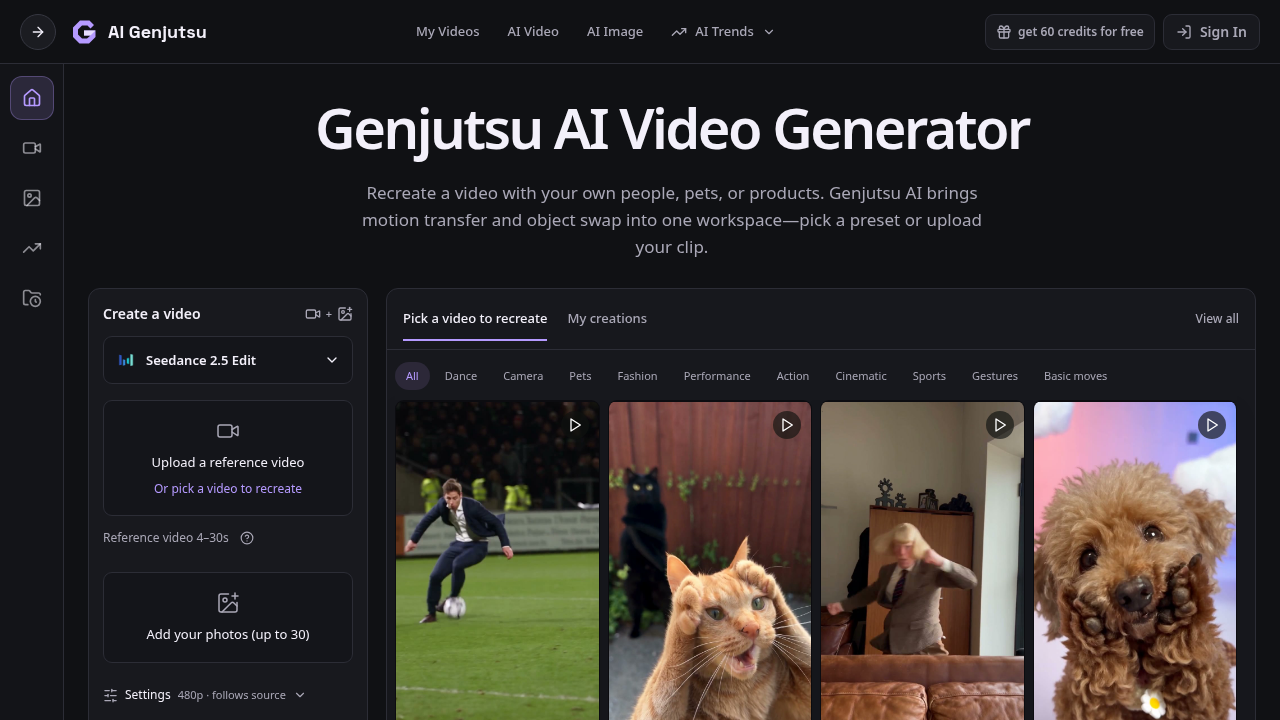
Genjutsu AI Video Generator (aigenjutsu.app) is a web-based AI video tool specializing in motion transfer and object swap. Users upload a reference clip of up to 30 seconds, attach up to 30 reference photos, and choose from multiple generation models including Seedance 2.5 and Kling 3.0 to recast the clip's characters, products, outfits, or environments while preserving the original motion and camera work. The tool also includes an AI image maker and a library of trend presets for users who prefer not to supply their own source footage.
The platform runs on a unified credit system that covers image generation, video generation, and motion transfer. Output can reach up to 4K for images and HD for video depending on the selected model, and all paid plans include watermark-free downloads and generation history. A free Basic tier provides 18 one-time signup credits with watermarked output, giving new users a limited preview before committing to a subscription.
How we scored Genjutsu AI Video Generator
Capability scores 17 because the multi-model selector (Seedance 2.5, Kling 3.0, GPT Image 2) and the dual Motion Transfer plus Object Swap workflow are genuinely useful, but the tool is a narrow specialist: it cannot do timeline editing, talking-head video, or longer-form content that named competitors like Runway handle natively. Ease of use scores 18 because the template-first workflow and pre-generation credit estimate lower the barrier for non-technical creators, though the model-selection complexity and the confusing multi-domain landscape add friction. Value scores 15 because the Basic free tier's 18 credits are barely enough for one watermarked video, the Starter plan at $100 per year delivers only 2,400 credits with expiry at period end, and the tool is a third-party API wrapper rather than a first-party model provider, meaning buyers pay a margin on top of the underlying model cost without a direct relationship with that provider. Delivery scores 13 because the tool is an independent intermediary with no disclosed contractual relationship with Higgsfield, creating real uncertainty about continuity of access; the brand-name confusion across at least seven similar domains also raises trust concerns that a human editor should verify before the score is finalized.
Pros and cons
What we liked
- Multi-model selector lets users choose between Seedance 2.5, Kling 3.0, and other engines per generation, rather than being locked into a single model.
- Credit cost is shown before every render, and failed generations automatically return credits, making spend predictable for client-billing workflows.
- Unified credit balance covers images, videos, and motion transfer, so there is no separate quota to track for each output type.
Where it falls short
- The free Basic plan's 18 one-time signup credits are enough for roughly one video, making it closer to a trial token than a usable free tier; meaningful testing requires a paid plan.
- aigenjutsu.app is an independent wrapper accessing Higgsfield's Genjutsu model, not the official Higgsfield product. Users have no direct relationship with the underlying model provider, which creates uncertainty about long-term model access if the API relationship changes.
- Subscription credits expire at the end of each billing period, so a Starter subscriber who generates fewer than 2,400 credits worth of content in a given year loses the remainder with no rollover.
Key features
Genjutsu AI Video Generator pricing
Free Basic plan with 18 one-time signup credits (roughly 1 video or 3 images, watermarked). Paid plans billed yearly: Starter at $8.30/month ($100 charged yearly, 2,400 credits/year); Pro at $30/month ($360 charged yearly, 21,600 credits/year, marked 40% off); Business at $49.90/month ($599 charged yearly, 48,000 credits/year, marked 50% off). Monthly pricing also available at higher rates. One credit balance covers images, videos, and motion transfer across all models.
| Plan | Price | Who it is for |
|---|---|---|
| Basic | Free | 18 one-time signup credits; covers up to 3 images or 1 video; generation history included; all downloads are watermarked; watermark-free downloads require a paid plan. |
| Starter | $8.30/month | $100 charged yearly; 2,400 credits per year; up to 400 images or up to 133 videos; access to Seedance 2.5, Kling 3.0 with Motion Control, GPT Image 2, and other models; up to 4K images and HD video depending on model; watermark-free downloads; generation history. |
| Pro | $30.00/month | $360 charged yearly (listed as 40% off, saving $238.80); 21,600 credits per year; up to 3,600 images or up to 1,200 videos; same model access as Starter; watermark-free downloads; generation history; credits usable across image and video models. |
| Business | $49.90/month | $599 charged yearly (listed as 50% off, saving $599.80); 48,000 credits per year; up to 8,000 images or up to 2,666 videos; same model access as lower tiers; watermark-free downloads; generation history; credits usable across image and video models. |
Pricing reflects what we saw at time of review (2026-10). Always confirm current pricing on the tool's own site.
Who should use Genjutsu AI Video Generator?
This tool fits solo content creators, social media managers, and small e-commerce teams who regularly need to insert their own likeness, products, or branding into trending video formats. A fashion brand wanting to show its clothing line moving through a viral dance clip, or a solo YouTuber who wants to recast a popular scene with their own face, will find the template library and multi-model selector genuinely useful. The credit-before-you-generate transparency also makes it practical for freelancers billing clients per deliverable.
Creators who need to produce talking-head videos, AI avatar presentations, or translated video content should look at HeyGen instead, which is purpose-built for that workflow and offers far more avatar and voice options. Editors who need a full non-linear editing environment alongside AI generation, or who want to work with longer-form content, will find Runway a better fit, since it combines generative tools with a proper timeline editor that aigenjutsu.app does not offer.
Skip it if: Teams needing avatar videos, talking heads, or general-purpose video editing
Tags
Frequently asked questions
Is there a genuinely usable free plan?+
The Basic plan is free and includes 18 one-time signup credits, which covers approximately 1 video or 3 images. All free-plan downloads are watermarked. It is enough to test the tool but not enough for regular use without paying.
What video models can I use?+
aigenjutsu.app gives access to Seedance 2.5, Kling 3.0 with Motion Control, and additional models listed on the generation screen. The model is selectable per generation, not locked to the plan tier.
How long can my source video be?+
Reference video length depends on the model: Seedance 2.5 accepts 2 to 30 seconds, Kling 3.0 accepts 3 to 30 seconds (or 3 to 10 seconds with the Match photo setting), and Wan 2.2 accepts 3 to 30 seconds.
Do unused credits roll over?+
Subscription credits expire at the end of each billing period and do not roll over. One-time credit packs purchased separately never expire.
Is aigenjutsu.app the official Higgsfield product?+
No. The site explicitly states it is an independent tool and is not affiliated with Higgsfield. It accesses the Higgsfield Genjutsu model via API but is a separate commercial product.
What is the refund policy?+
Refund requests must be submitted within 72 hours of purchase. Eligible refunds deduct the value of credits already used and may subtract a processing fee capped at 6% of the original purchase amount.
More AI Video Tools
See all categoriesGet your tool listed on 300+ directories.
One listing here is a strong start. But the founders who get discovered everywhere are listed everywhere. Our sister site, Free AI Directories, submits your tool to 300+ AI directories for you, every single one by hand, by a real person.
It is a one-time payment of $49, no subscription, and you can follow along as the submissions land. Prefer the slow route? The same site keeps a free list of 450+ directories you can work through yourself.
Get my tool listed on 300+ directoriesOne-time payment, no subscription · 100% human submissions · Free list of 450+ directories included.