
Hotel Lobby AI Generator
A credit-based tool that turns two photos into a Migos Hotel Lobby-style performance video, with no editing required.
Are you the maker? Claim this listing to keep info, pricing and screenshots current. Verified via your tool's domain email.
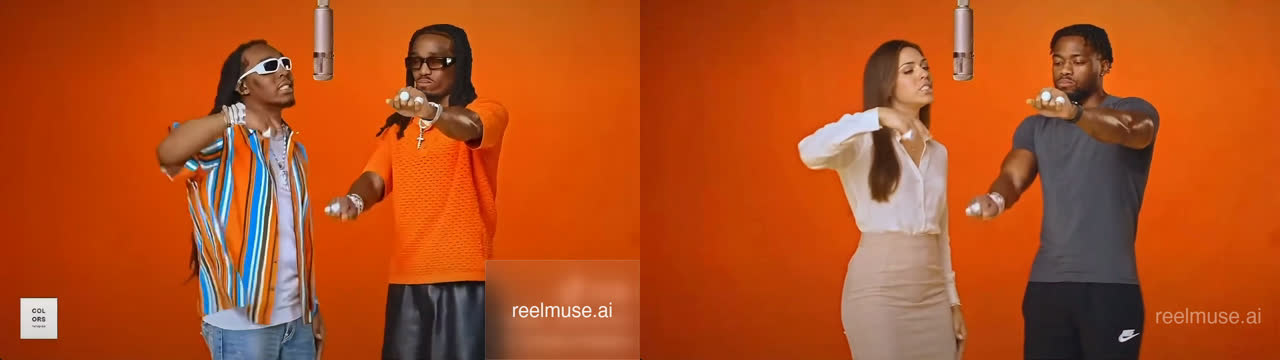
Best for casual social media creators who want the Hotel Lobby duet effect without touching a video editor. The tool does exactly one thing, costs credits per generation with no free tier confirmed on the live pricing page, and takes roughly seven minutes per video. Anyone needing general-purpose AI video creation or a free starting point should look at Runway or HeyGen instead.
What is Hotel Lobby AI Generator?
Hotel Lobby AI Generator is a web-based video creation tool that produces Migos Hotel Lobby-style performance clips from two uploaded photos. Users select their images, authenticate via email or Google, and submit a generation task that typically completes in around seven minutes, resulting in a downloadable MP4 file.
The tool targets social media creators who want to participate in the viral orange-booth duet trend without manual video editing. Each generation draws 600 credits from the user's account balance, and completed videos are stored in a history section for later download. The service is operated under the ReelMuse provider and is not affiliated with Migos, Quavo, Takeoff, or A COLORS SHOW.
How we scored Hotel Lobby AI Generator
Capability lands at 13 because the tool does exactly one thing, a single preset scene with no documented resolution options or clip length choices, while named competitors in the same niche offer 480p through 4K output and 5/10/15-second duration selection. Ease of use scores 18 because the zero-prompt, zero-timeline workflow is genuinely simple and the pre-login photo preview reduces friction, though the hidden pricing creates a stumbling block before the first generation. Value scores 10 because the pricing page publishes no dollar amounts for credits at all, forcing account creation before any cost comparison is possible, and payments are stated as generally non-refundable with a 14-day dispute window. Delivery scores 11 because the tool's own submitted description claims it is free while the live pricing page describes a paid credit system, the governing refund policy lives at a parent provider (ReelMuse) rather than the product domain, and no independent user sentiment exists to verify output quality claims.
Pros and cons
What we liked
- Zero-prompt, zero-timeline workflow: photo upload to MP4 with no editing knowledge required
- Private generation history stored in-account, with completed videos available for download after the ~7-minute queue
- Supports both email and Google login, with a single shared credit balance and history across both auth methods
Where it falls short
- The pricing page lists only the per-generation cost (600 credits) without publishing what credits actually cost in dollars, forcing users to create an account before seeing real prices
- Payments are stated as generally non-refundable, and billing errors must be reported within 14 days to a ReelMuse support address, not a hotellobbymigos.com contact, adding friction for disputes
- Single-effect tool with no resolution options, duration choices, or scene variants documented on the pricing page, while competing tools in the same niche offer 480p/720p/1080p/4K tiers and 5/10/15-second clip lengths
Key features
Hotel Lobby AI Generator pricing
Credit-based. Each generation costs 600 credits and requires a paid account balance. The pricing page does not list individual credit pack prices or named subscription tiers; only the per-generation credit cost of 600 is published. Payments are generally non-refundable, and billing errors must be reported within 14 days.
| Plan | Price | Who it is for |
|---|---|---|
| Credit Generation | 600 credits per generation | Two private photo uploads, one Hotel Lobby video task, progress tracking, in-page preview, and MP4 download. The dollar cost of credits is not published on the pricing page; users must sign in to see purchase options. Payments are generally non-refundable. |
Pricing reflects what we saw at time of review (2026-10). Always confirm current pricing on the tool's own site.
Who should use Hotel Lobby AI Generator?
This tool fits someone who saw the Hotel Lobby trend on TikTok or Reels, wants to drop themselves and a friend into the orange booth, and has no interest in learning video editing software. The zero-prompt, zero-timeline interface means a first-time user can go from photo upload to MP4 in a single session. It also suits a creator who posts trend-driven content regularly and wants a repeatable, fast output for that specific format.
Anyone who needs more than one video style, wants to know the dollar cost before creating an account, or needs a free tier to test quality should look elsewhere. Runway offers a broad AI video creation and editing environment with a free trial and multiple output styles. HeyGen is the better pick if the goal is talking-head or avatar video rather than a preset scene effect.
Skip it if: Anyone needing general-purpose AI video tools or a confirmed free tier
Hotel Lobby AI Generator alternatives
Tags
Frequently asked questions
How much does one Hotel Lobby video cost?+
Each generation costs 600 credits. The pricing page does not publish the dollar price of credits; you need to sign in to see purchase options.
How long does a generation take?+
The site estimates about seven minutes, but states this is not a guarantee. Queue load, content moderation, and provider availability can all affect completion time.
Is there a free tier or free trial?+
The live pricing page does not list a free tier. The submitted description claims the tool is free, but the pricing page describes a credit-based paid system with no mention of complimentary credits.
What happens if my generation fails?+
A slow or pending task is not automatically a failure. For a confirmed failed status, the site instructs you to keep the task ID and contact support at support@reelmuse.ai so the account record can be checked under the published refund policy.
Can I get a refund?+
Payments are stated as generally non-refundable except where law requires otherwise. Billing errors must be reported within 14 days to support@reelmuse.ai.
Do I need to know video editing to use this?+
No. The tool requires only two photo uploads and an account login. There is no prompt writing, timeline editing, or manual compositing involved.
More AI Video Tools
See all categoriesGet your tool listed on 300+ directories.
One listing here is a strong start. But the founders who get discovered everywhere are listed everywhere. Our sister site, Free AI Directories, submits your tool to 300+ AI directories for you, every single one by hand, by a real person.
It is a one-time payment of $49, no subscription, and you can follow along as the submissions land. Prefer the slow route? The same site keeps a free list of 450+ directories you can work through yourself.
Get my tool listed on 300+ directoriesOne-time payment, no subscription · 100% human submissions · Free list of 450+ directories included.