
LobbyClip
A pay-once AI video tool that turns two photos into Hotel Lobby-style duo clips, with no subscription required.
Are you the maker? Claim this listing to keep info, pricing and screenshots current. Verified via your tool's domain email.
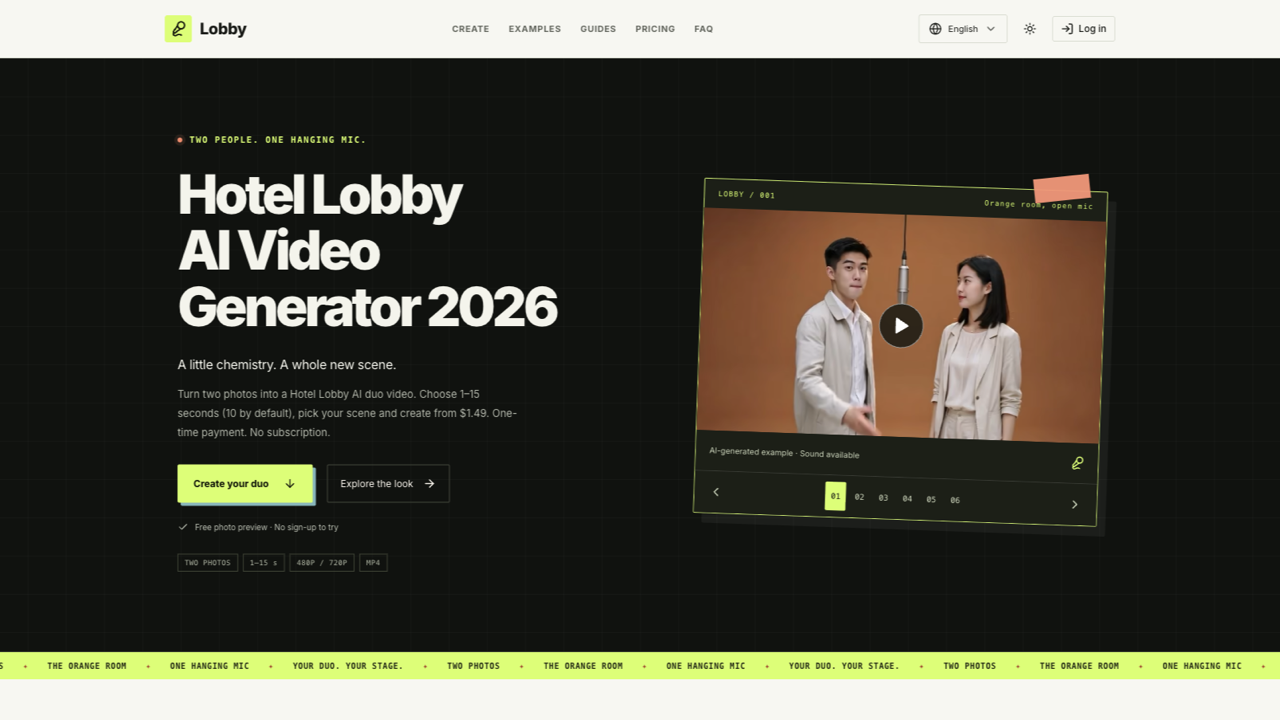
LobbyClip is the right pick for someone who wants a single Hotel Lobby-style video without committing to a monthly subscription. Its one-time credit model is genuinely unusual in a category dominated by recurring billing, but the tool does exactly one thing: that specific duo-video format, nothing else. If you need general-purpose AI video generation or any format beyond this viral template, Runway covers far more ground.
What is LobbyClip?
LobbyClip turns two reference photos into Hotel Lobby-style duo videos featuring a hanging microphone. Users can choose multiple scenes, a duration from 1 to 15 whole seconds, 480p or 720p output, and 9:16, 16:9 or 1:1 framing. A free browser-based composition tool lets users arrange their photos and download a static PNG preview without signing up. AI video generation is paid: a single 480p video starts at $1.49 and a 720p video at $2.49. One-time packs are available; there is no subscription and no free generated-video allowance.
How we scored LobbyClip
Capability scores 13 because the tool does exactly one thing: the Hotel Lobby duo template. Every named directory competitor (Runway, HeyGen, CaptionBolt) covers substantially more ground, and the 720p ceiling with no 1080p option is a concrete feature gap. Ease of use scores 20 because the pay-once model, no-signup preview tool, and straightforward photo-upload flow are genuinely low-friction for the specific task. Value scores 19 because $1.49 for a single video is a low entry point and the no-expiry credit model is fair, though the 720p doubling to $2.98 per video and the absence of any free generation keep it from scoring higher. Delivery scores 11 because no user sentiment data exists for this tool, the pricing page honestly discloses capacity and queue limits that could affect reliability, and the tool is operated by an independent studio with no public track record to evaluate against.
Pros and cons
What we liked
- One-time credit packs with no expiry and no subscription, genuinely rare in this category where monthly billing is the norm
- Supports three aspect ratios (9:16, 16:9, 1:1) and durations from 1 to 15 seconds, giving more framing flexibility than most single-template competitors
- Free browser-based photo layout tool available without an account, letting users preview composition before spending any credits
Where it falls short
- Generates only one video format: the Hotel Lobby duo template. There is no other template, no text-to-video, and no editing capability, making the tool useless the moment a user's interest moves past this single trend
- Generation is subject to daily service capacity limits as an independent studio, meaning queue delays are possible during peak demand with no guaranteed turnaround time
- 720p output costs two credits per video, effectively doubling the price to $2.98 for a single video at higher resolution, with no 1080p option available at any price
Key features
LobbyClip pricing
Strictly pay-as-you-go with no subscription. A single 480p video costs $1.49. Packs drop the per-video cost: 10 videos (480p) for $9.99 ($1.00 each), 30 videos for $27.99 ($0.93 each), and 100 videos for $89.99 ($0.90 each). 720p costs two credits per video, so the effective price doubles. Credits never expire. No free generation allowance; a free browser-based photo layout tool is available without sign-up.
| Plan | Price | Who it is for |
|---|---|---|
| Just this video | $1.49 | 1 video credit (480p). Covers one 480p video, 1 to 15 seconds, MP4 with generated audio. 720p uses 2 credits. |
| Starter | $9.99 | 10 video credits (480p), $1.00 per video. Same duration and format as above. Credits never expire. |
| Recommended | $27.99 | 30 video credits (480p), $0.93 per video. Credits never expire. |
| Studio | $89.99 | 100 video credits (480p), $0.90 per video. Credits never expire. |
Pricing reflects what we saw at time of review (2026-10). Always confirm current pricing on the tool's own site.
Who should use LobbyClip?
LobbyClip suits someone who wants to drop a friend, a couple, or two pets into the Hotel Lobby format for a social post or a gift, and wants to pay once without being enrolled in a monthly plan. A content creator who posts this style of clip occasionally, a small event company making personalized keepsakes, or anyone experimenting with the trend before committing to a larger platform will find the entry price low enough to try without risk.
Anyone who needs more than this one template should look elsewhere. Runway is the better choice for creators who want a full browser-based AI video studio with text-to-video, inpainting, and multi-format output. HeyGen fits teams that need talking-head avatar videos or video translation at scale. CaptionBolt is the right tool if your actual job is finishing short-form footage with captions rather than generating new clips from photos.
Skip it if: Anyone needing general AI video generation, editing, captions, or formats beyond the Hotel Lobby duo template
Frequently asked questions
Is there a free trial or free video generation?+
No. There is no free generated-video allowance. The free offering is a browser-based photo layout tool that produces a static PNG preview only. Every AI-generated video requires purchased credits.
Do unused credits expire?+
No. Credits purchased on any tier never expire, so buying the $89.99 Studio pack of 100 credits and using them over many months is a supported use case.
What happens if my video generation fails?+
Confirmed failed generations return credits automatically. Unconfirmed tasks keep credits reserved until the task is resolved, so credits are not permanently lost on a failed render.
What is the maximum video length and resolution?+
Duration maxes out at 15 seconds. The highest available resolution is 720p, which costs two credits per video. There is no 1080p option.
Can I use this for pets or non-human subjects?+
The submitted description notes that the tool accepts photos of people or pets, so non-human subjects are supported as one of the two photo inputs.
How much does a 720p video actually cost?+
720p uses two credits per video. At the single-video rate that is $2.98 (two credits at $1.49 each). Buying the $89.99 Studio pack brings the effective 720p cost to $1.80 per video.
More AI Video Tools
See all categoriesGet your tool listed on 300+ directories.
One listing here is a strong start. But the founders who get discovered everywhere are listed everywhere. Our sister site, Free AI Directories, submits your tool to 300+ AI directories for you, every single one by hand, by a real person.
It is a one-time payment of $49, no subscription, and you can follow along as the submissions land. Prefer the slow route? The same site keeps a free list of 450+ directories you can work through yourself.
Get my tool listed on 300+ directoriesOne-time payment, no subscription · 100% human submissions · Free list of 450+ directories included.