
Reference to Video AI
An AI video generator that uses a short reference clip to transfer motion and camera movement onto your own photos.
Are you the maker? Claim this listing to keep info, pricing and screenshots current. Verified via your tool's domain email.
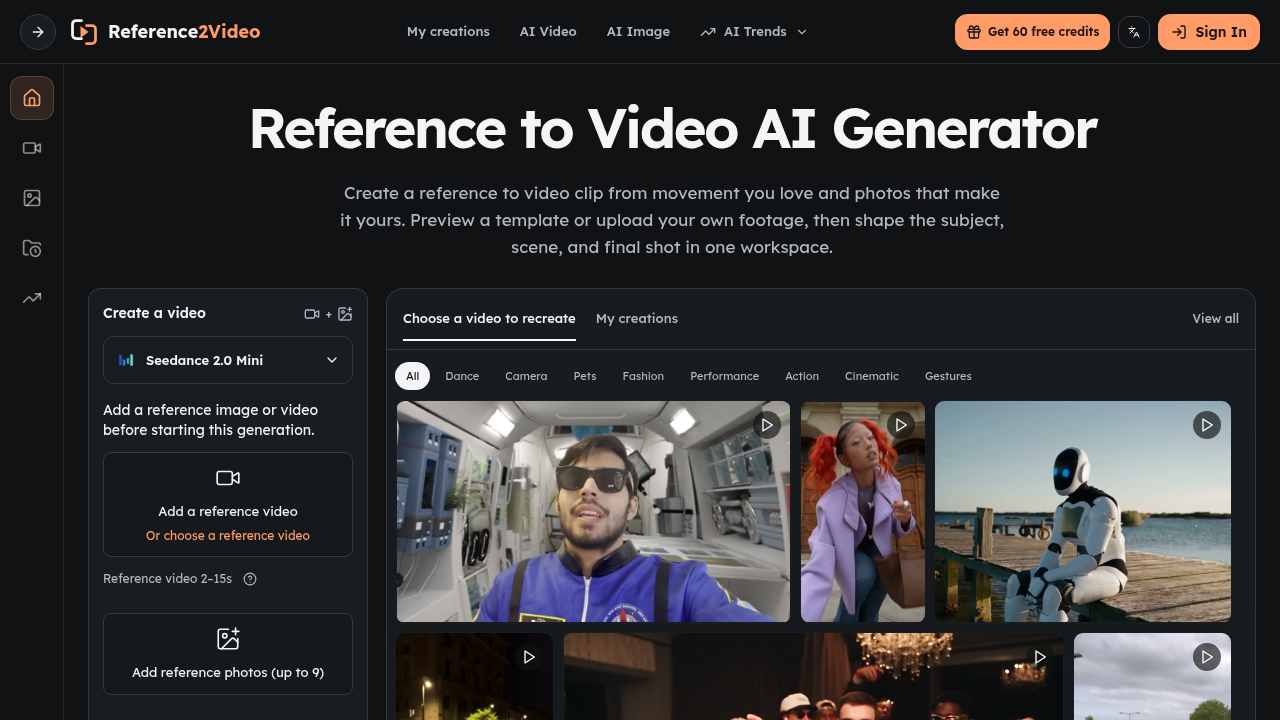
Reference2Video is the right pick for social creators and product marketers who want to replicate a specific motion or camera move without writing a detailed prompt. It does one thing most general-purpose video tools skip: letting a reference clip drive the output rather than a text description. Runway offers far more editing depth and model variety for anyone who needs post-generation control, and Reference2Video's credit system can feel opaque when costs vary by model, duration, and quality settings.
What is Reference to Video AI?
Reference2Video is a web-based AI video and image generator centered on reference-guided generation. Users upload a short video clip to supply motion and camera direction, then add photos to define the subject or scene, and the tool produces a new AI-generated clip that follows the reference's timing and movement. Supported models include Seedance 2.0 and several image generation options; the composer surfaces model-specific settings and credit costs before each job runs.
The platform supports text-to-video, image-to-video, and image generation workflows alongside its core motion-transfer use case. It is used primarily by social media creators, fashion and product marketers, and anyone who wants to replicate a specific motion without writing detailed prompts. Pricing runs on a credit system with a free entry tier and three paid subscription tiers billed monthly or yearly.
How we scored Reference to Video AI
Capability scores 17 because the reference-clip motion transfer is a genuinely differentiated input method, but the tool has no post-generation editing, no captions, no voiceover, and no avatar features that both Runway and HeyGen offer; it does one thing well and stops there. Ease of use scores 19 because the model-aware composer and pre-generation credit estimates reduce friction meaningfully, and the workflow is simple by design. Value scores 16 because the free tier's 10 starting credits are thin for real testing, subscription credits expire at period end (forfeiting unused Starter credits from a $100/year plan), and the credit cost per video is not transparently listed by model on the pricing page. Delivery scores 14 because no third-party reviews, user sentiment, or track record data were findable for this tool, making it impossible to confirm that outputs match the motion-transfer promise at scale; the score reflects genuine uncertainty rather than confirmed problems.
Pros and cons
What we liked
- Reference-clip input genuinely reduces prompt guesswork for motion-specific shots: camera path, timing, and action come from the clip, not from text description.
- Credit cost is shown before generation, so you can see the charge for a specific model, duration, and quality setting before committing.
- Free plan is accessible without a credit card: 10 credits on signup and 60 more available through weekly check-ins, enough to test the core workflow.
Where it falls short
- No post-generation editing whatsoever: no timeline, captions, voiceover, or export controls. Every output goes straight to download with no finishing tools, which is a real gap compared to Runway or Descript.
- Subscription credits expire at the end of each billing period, so unused credits on the Starter plan ($100/year, 2,400 credits) are forfeited if you do not generate consistently.
- The free tier's 10 starting credits are thin for meaningful testing: a single video generation at higher quality or longer duration can consume a significant share of that allowance, and the weekly check-in drip of 60 credits is slow.
Key features
Reference to Video AI pricing
Free plan gives 10 credits on signup plus 60 more via weekly check-ins. Paid plans are credit-based and billed yearly: Starter at $8.33/month ($100/year, 2,400 credits), Pro at $30/month ($360/year, 21,600 credits), and Business at $49.92/month ($599/year, 48,000 credits). Monthly billing is also available at higher rates. Subscription credits expire at period end; one-time credit packs never expire.
| Plan | Price | Who it is for |
|---|---|---|
| Free | Free | 10 credits on signup; earn 60 additional credits via weekly check-in. Basic image and video generation. No subscription required. |
| Starter | $8.33/month | Billed as $100/year. 2,400 credits per year (up to 400 images or up to 120 videos). AI image and video generation workflows, text-to-video and image-to-video, image reference uploads. Commercial usage follows supported model terms. Credits expire at period end. |
| Pro | $30.00/month | Billed as $360/year (list monthly rate $49.90/month). 21,600 credits per year (up to 3,600 images or up to 1,080 videos). All Starter features plus workspace history and credit estimates before generation. |
| Business | $49.92/month | Billed as $599/year (list monthly rate $99.90/month). 48,000 credits per year (up to 8,000 images or up to 2,400 videos). All Pro features. Marked as Best Value on the pricing page. |
Pricing reflects what we saw at time of review (2026-10). Always confirm current pricing on the tool's own site.
Who should use Reference to Video AI?
A solo creator who keeps seeing a trending dance or camera move on social media and wants to drop their own subject into that motion will get immediate value here. Same for a product marketer who wants a smooth orbit or reveal shot and has a reference clip to work from but no motion-graphics budget. The reference-clip input removes a lot of prompt guesswork that makes general-purpose tools frustrating for motion-specific work.
Anyone who needs to finish a video inside the same tool should look elsewhere. If you need captions, voiceover, a timeline, or avatar-based talking-head videos, Reference2Video has none of that. Runway is the better choice for creators who want generation plus editing in one place. HeyGen is the right call if your goal is avatar videos, talking photos, or video translation rather than motion transfer.
Skip it if: Teams needing full video editing, voiceover, or avatar features
Tags
Frequently asked questions
How many videos can I make on the free plan?+
The free plan starts with 10 credits and lets you earn 60 more through weekly check-ins. Video generation cost varies by model, duration, and quality, so the exact number of videos depends on your settings. The Starter paid plan ($100/year) includes 2,400 credits, which the pricing page estimates covers up to 120 videos.
Do unused credits roll over at the end of the month?+
No. Subscription credits expire at the end of each billing period. Only one-time credit packs, which are purchased separately and do not renew, never expire.
Can I use generated videos commercially?+
Commercial use is permitted subject to the Terms of Service, applicable law, your rights in the inputs and outputs, and any model-specific restrictions. The pricing page explicitly notes you should review those terms before publishing generated content.
What video models does Reference2Video support?+
The platform currently supports Seedance 2.0 and Seedance 2.0 Fast for video generation, with additional models listed on the composer. Image generation uses models including GPT Image 2 Nano and Banana Pro, among others.
Is there a monthly billing option, or is it yearly only?+
Both monthly and yearly billing are available. Yearly plans offer significant discounts: the Business plan drops from $99.90/month on monthly billing to $49.92/month on the annual plan. The pricing page notes some plans may be unavailable depending on payment provider configuration.
Does Reference2Video include any video editing tools?+
No. The tool generates video from references and prompts but has no timeline editor, caption tool, voiceover feature, or export controls. Output files are downloaded and finished in a separate application.
More AI Video Tools
See all categoriesGet your tool listed on 300+ directories.
One listing here is a strong start. But the founders who get discovered everywhere are listed everywhere. Our sister site, Free AI Directories, submits your tool to 300+ AI directories for you, every single one by hand, by a real person.
It is a one-time payment of $49, no subscription, and you can follow along as the submissions land. Prefer the slow route? The same site keeps a free list of 450+ directories you can work through yourself.
Get my tool listed on 300+ directoriesOne-time payment, no subscription · 100% human submissions · Free list of 450+ directories included.