
ThumbnailMake
AI thumbnail generator for YouTube, Shorts, and TikTok creators that produces four scored concepts per prompt.
Are you the maker? Claim this listing to keep info, pricing and screenshots current. Verified via your tool's domain email.
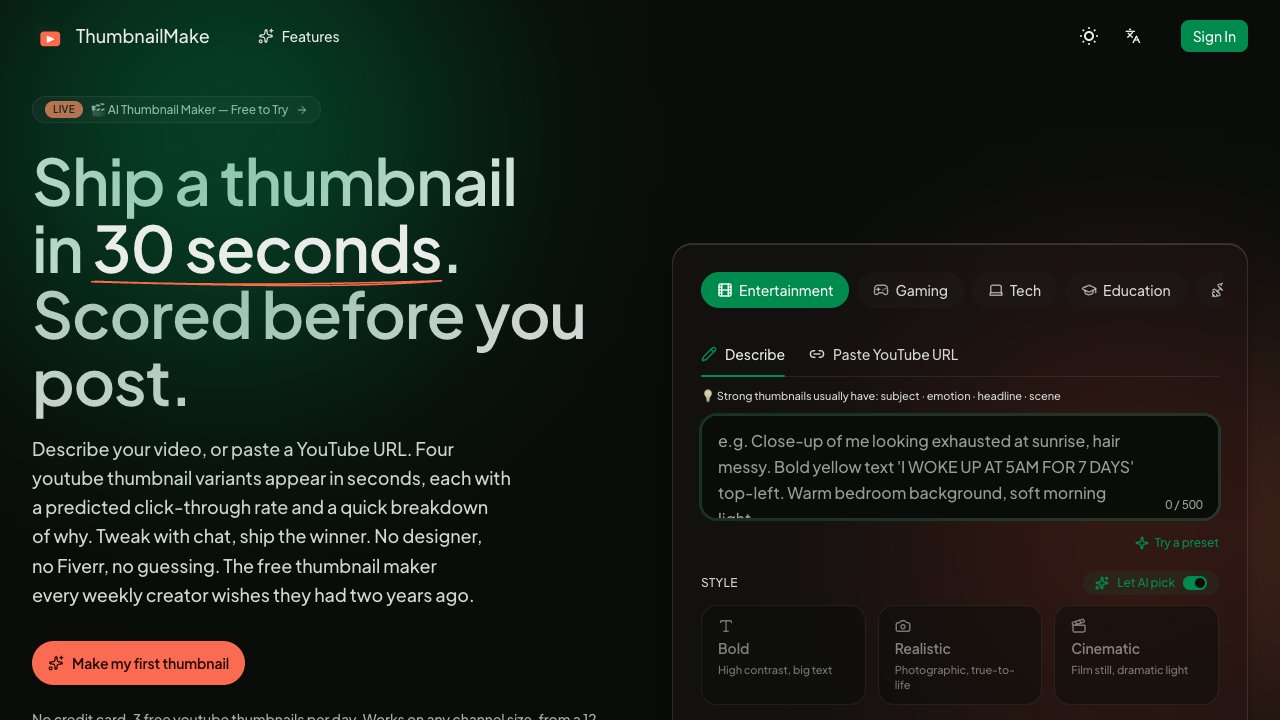
ThumbnailMake is the clearest choice for solo YouTube creators who want a first draft and a click-through prediction in one step, without opening a design tool. The CTR scoring is a genuine differentiator, but the credit math is tight: the $19.90 Starter plan covers only about 33 thumbnails a month, and there is no free tier with meaningful volume. Creators who need general-purpose AI image generation, or who want to own their output pipeline without per-thumbnail credit costs, should look at Leonardo.Ai instead.
What is ThumbnailMake?
ThumbnailMake is an AI thumbnail maker for YouTube, Shorts and TikTok creators. Describe your video in a sentence, or paste a YouTube URL so the title sets the visual direction. Every generation returns four distinct thumbnail concepts, so you compare options instead of re-rolling, and each one comes with a predicted click-through score and a short reason. Refine the winner by chat, switch between 16:9 and 9:16, and export 1280×720 for YouTube or 1080×1920 for Shorts and TikTok. Style presets and niche pages cover gaming (Minecraft, Fortnite, Roblox), vlogs, tutorials, tech, podcasts, reactions, food, fitness and finance. Free to try with no credit card; paid plans start at $19.9 a month and remove the watermark.
How we scored ThumbnailMake
Capability scores 18 because the four-concepts-plus-CTR-score output is a genuine differentiator over general image generators, and the YouTube URL auto-style and brand-style learning features are real and specific; the tool loses points for having no API, no layer editor, and no integrations, which named competitors like Leonardo.Ai offer. Ease of use scores 20 because the input model (describe or paste URL, get four options) is about as low-friction as thumbnail creation gets, and the free tier requires no card. Value scores 15 because the Starter plan at $19.90/month yields only 33 thumbnails, which is a thin allowance for a weekly creator, and the Pro plan at $29.90 is the realistic minimum for consistent use, putting the effective entry cost above many general-purpose image generators that cover far more output types for similar money. Delivery scores 15 because no third-party reviews surfaced to validate output quality claims, the CTR prediction methodology is undocumented, and the tool is web-only with no track record evidence available from public sources.
Pros and cons
What we liked
- Four thumbnail concepts generated per prompt, each with a CTR score and written rationale, so you compare rather than re-roll.
- YouTube URL input auto-styles the generation from the video title, removing the need to write a prompt from scratch.
- Pro plan's brand-style learning lets you upload a reference image so outputs match your channel's existing visual identity.
Where it falls short
- Credit caps are tight: the $19.90 Starter plan yields only about 33 thumbnails per month, which is fewer than one per day and will not cover a twice-weekly publishing schedule.
- No API access, no mobile app, and no documented integrations with YouTube Studio or design tools at any tier, limiting how it fits into an existing production workflow.
- The CTR prediction score is a proprietary estimate with no published methodology; there is no way to verify how it correlates with actual YouTube click-through data.
Key features
ThumbnailMake pricing
Three paid tiers: Starter at $19.90/month (100 credits, ~33 thumbnails), Pro at $29.90/month (300 credits, ~100 thumbnails), and Studio at $39.90/month (600 credits, ~200 thumbnails). Annual billing saves 20%. A free tier exists with 3 thumbnails per day and a watermark, no credit card required. No lifetime or one-time purchase option is listed.
| Plan | Price | Who it is for |
|---|---|---|
| Free | Free | 3 thumbnails per day, no credit card required. Watermark applied to downloads. |
| Starter | $19.90/mo | 100 credits per month (~33 thumbnails, ~8 full generation runs). Built-in CTR scoring, all niche and style presets, YouTube URL auto-style, 1280x720 HD download with no watermark, email support. |
| Pro | $29.90/mo | 300 credits per month (~100 thumbnails). Everything in Starter plus Templates Gallery and style remixing, brand-style learning, Grow Channel CTR scan and Fix-with-AI, 2K HD upscale (5 credits per image), priority email and chat support. |
| Studio | $39.90/mo | 600 credits per month (~200 thumbnails). Everything in Pro plus 4K export (8 credits per image), custom watermark upload, multi-channel management for up to 3 channels, 10% bonus credits on top-ups, priority generation queue. |
Pricing reflects what we saw at time of review (2026-10). Always confirm current pricing on the tool's own site.
Who should use ThumbnailMake?
A solo YouTuber publishing one or two videos a week who currently spends time in Canva or Photoshop guessing at what will get clicked is the clearest fit. The CTR prediction gives a concrete reason to pick one concept over another, and the YouTube URL input means you can skip writing a prompt entirely. The Pro plan at $29.90/month is the realistic entry point for anyone publishing consistently, since Starter's 33-thumbnail monthly cap runs out fast.
Creators who need to produce thumbnails at scale across many channels, or who want to edit generated images with fine-grained control, will hit the tool's limits quickly. The Studio plan caps multi-channel management at three connected channels, and there is no layer-based editor or direct export to design tools. For those users, Leonardo.Ai offers a more flexible image generation pipeline with broader output controls and a token-based plan that is not locked to a single content format.
Skip it if: Teams or agencies needing unlimited output, or creators who want a general-purpose image generator rather than a thumbnail-specific tool.
Frequently asked questions
Is there a free plan, and does it require a credit card?+
Yes. The free tier gives 3 thumbnails per day with no credit card required. Downloads on the free plan include a small watermark.
How many thumbnails does each paid plan actually cover per month?+
Starter ($19.90/mo) covers roughly 33 thumbnails (100 credits). Pro ($29.90/mo) covers roughly 100 thumbnails (300 credits). Studio ($39.90/mo) covers roughly 200 thumbnails (600 credits). Each four-option generation run costs more than one credit, so a full generation run on Starter accounts for about 12 credits.
Can I export thumbnails for Shorts and TikTok, not just YouTube?+
Yes. The tool exports 1280x720 for YouTube and 1080x1920 for Shorts and TikTok. Higher-resolution exports (2K and 4K) are available on Pro and Studio plans at an additional credit cost per image.
What is the brand-style learning feature and which plan includes it?+
Brand-style learning lets you upload a reference thumbnail image so the AI matches your channel's existing visual style in future generations. It is available on the Pro plan ($29.90/mo) and above.
Does the Studio plan support multiple YouTube channels?+
Yes. Studio supports up to three connected channels, includes a priority generation queue, and adds a 10% bonus on credit top-up purchases.
Is there an annual billing discount?+
Yes. Switching to annual billing saves 20% across all paid plans.
More AI Image Generators tools
See all categoriesGet your tool listed on 300+ directories.
One listing here is a strong start. But the founders who get discovered everywhere are listed everywhere. Our sister site, Free AI Directories, submits your tool to 300+ AI directories for you, every single one by hand, by a real person.
It is a one-time payment of $49, no subscription, and you can follow along as the submissions land. Prefer the slow route? The same site keeps a free list of 450+ directories you can work through yourself.
Get my tool listed on 300+ directoriesOne-time payment, no subscription · 100% human submissions · Free list of 450+ directories included.