
Video Blackout
Windows desktop software that permanently burns face and license-plate redaction into H.264 video, entirely offline.
Are you the maker? Claim this listing to keep info, pricing and screenshots current. Verified via your tool's domain email.
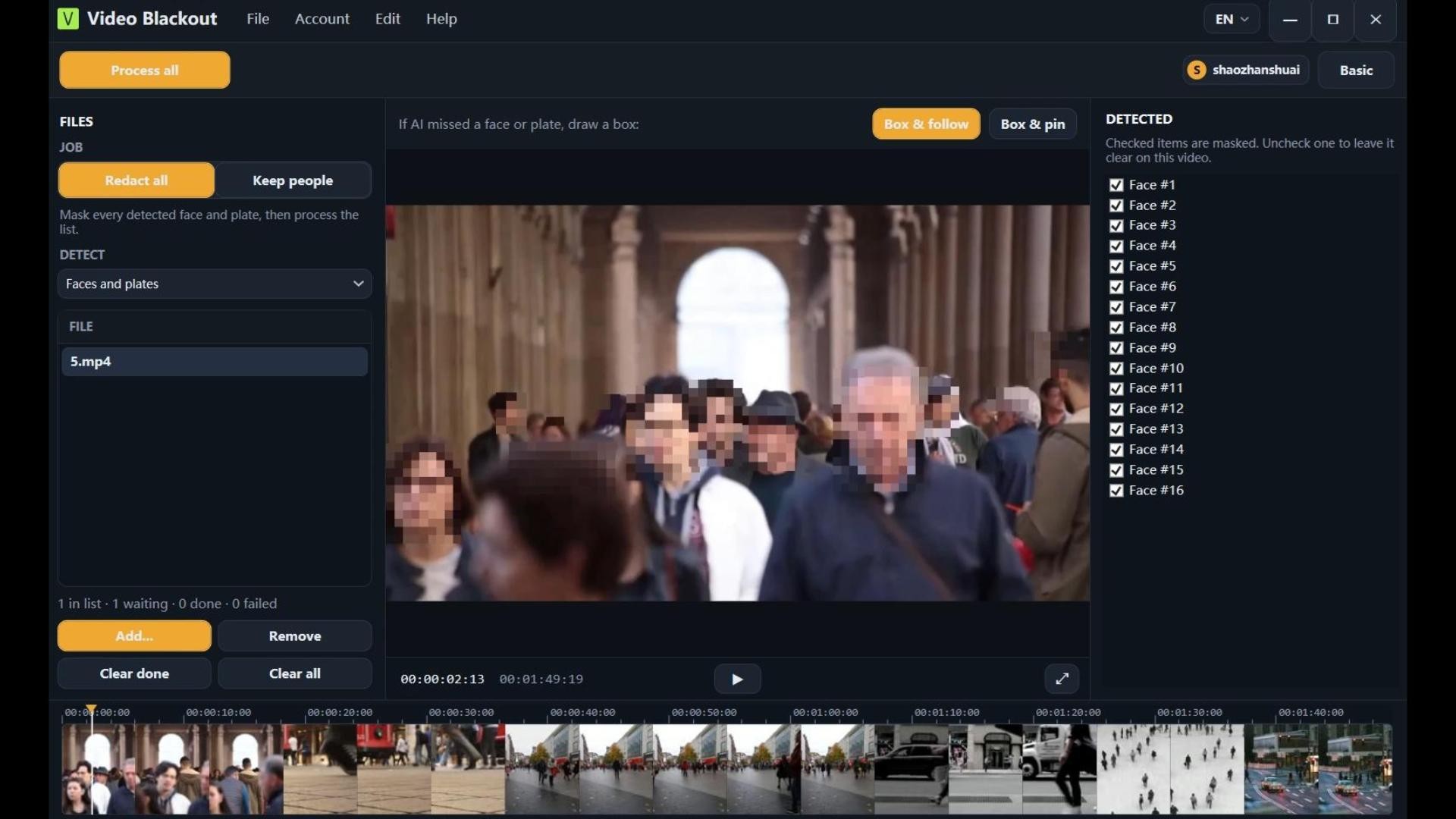
Video Blackout is the right pick for law enforcement, legal teams, and compliance officers who need provably permanent redaction with zero cloud exposure. Its pixel burn-in approach is technically stronger than overlay-based tools, but the Windows-only constraint and a single paid tier with no published per-seat or volume pricing make it a poor fit for mixed-OS teams or high-volume operations. If you need browser-based editing or work on Mac or Linux, look elsewhere.
What is Video Blackout?
Video Blackout is a Windows 10/11 desktop application that redacts faces, license plates, and audio from video files without uploading footage to any server. On-device AI detects faces and plates automatically; operators can add manual bounding boxes for other identifiers and mark audio time ranges for mute or beep replacement. Exports are new H.264 MP4 files with redaction written directly into the pixel data, making the mask permanent and irremovable.
The software targets law enforcement bodycam review, CCTV disclosure, FOIA response, and GDPR/DSAR compliance. A free tier allows single-video processing up to 10 minutes with a watermark on the export. A paid plan removes the watermark and watermark branding for production use. The app is available in eight languages and is designed to work on air-gapped networks after initial activation.
How we scored Video Blackout
Capability scores 18 because the permanent pixel burn-in and air-gap operation are genuinely differentiated for the compliance niche, but the tool handles only two auto-detect targets (faces and plates), has no document or image redaction, and no API or batch processing was found, leaving it well behind broader platforms for any team with mixed-format needs. Ease of use scores 18 because the workflow is deliberately linear (detect, review, mark, export) with no editing background required, and the free tier lets anyone evaluate it on real footage, though Windows-only installation adds friction for mixed-OS teams. Value scores 15 because the $29.00 paid tier's billing period is unconfirmed, there is no published multi-seat or volume pricing, and a team of even three operators has no clear path to a team plan, making per-operator cost opaque. Delivery scores 15 because no independent user reviews, third-party audits, or documented track record were found; the offline architecture is credible and the technical claims are internally consistent, but the absence of any external validation means the score cannot go higher without evidence.
Pros and cons
What we liked
- Pixel-level burn-in on export means the redaction is genuinely irremovable, not a player overlay that forensic tools can strip.
- Fully air-gap capable after activation: no footage, no telemetry, and no processing leaves the local Windows machine.
- Free tier lets operators evaluate the full detection and export workflow on real footage before paying, with no time limit on the trial period itself.
Where it falls short
- Windows-only with no Mac, Linux, browser, or mobile path, which excludes any mixed-OS team or operator who works away from a Windows workstation.
- Only one schema.org-listed paid tier at $29.00 with no published per-seat, volume, or enterprise pricing, making it hard to budget for a team of more than one operator.
- No document or image redaction: the tool explicitly does not handle PDFs, Word files, spreadsheets, or still images, so agencies with mixed-format disclosure obligations need a second tool.
Key features
Video Blackout pricing
Free tier available with a watermark on all exports and a 10-minute video length cap. One paid plan at $29.00 (exact billing period not confirmed from available sources). No published enterprise or volume tier found.
| Plan | Price | Who it is for |
|---|---|---|
| Free | Free | Single video at a time, up to 10 minutes per video, full detection and export workflow available, but all exports carry a visible watermark. No time limit on how long you can use the free tier. |
| Paid | $29.00 | Watermark-free production exports. Exact billing period (monthly or one-time) and any per-seat or usage limits were not confirmed from available sources. |
Pricing reflects what we saw at time of review (2026-10). Always confirm current pricing on the tool's own site.
Who should use Video Blackout?
Video Blackout fits a narrow but real audience well: a police department processing bodycam footage before public release, a local authority responding to CCTV subject-access requests, or a legal team preparing FOIA disclosures where chain-of-custody rules prohibit uploading evidence to a third-party cloud. The permanent burn-in export gives those users something they can hand to opposing counsel or a regulator without worrying that the redaction can be reversed.
Anyone outside that profile should think carefully before committing. Solo video creators, marketing teams, and podcast editors have no use for evidence-grade redaction and will find the tool's feature set too narrow. Mac users are simply excluded. Teams that need to redact PDFs, images, or audio files alongside video should look at Descript (already in this directory) for transcript-driven editing workflows, or at a dedicated document-redaction platform for mixed-format compliance work. If the requirement is browser-based collaboration on video with AI assistance, Runway is the stronger fit.
Skip it if: Mac or Linux users, browser-first teams, or anyone needing document redaction alongside video.
Frequently asked questions
Does the video ever leave my computer during redaction?+
No. Face and plate detection, preview, and export all run on the local Windows machine. The website is used only for download, account management, and plan activation, not for processing footage.
Can someone remove the redaction from the exported file?+
Not from the export. Video Blackout rewrites the marked pixel regions in the H.264 frame buffer before encoding, so the exported MP4 contains no hidden clear copy, overlay track, or mask layer. The original source file is left untouched on your machine as the system of record.
What does the free tier actually limit?+
Free exports are limited to one video at a time, a maximum of 10 minutes per video, and all exports carry a visible watermark. The full detection and export workflow is otherwise available to evaluate.
How much does the paid plan cost?+
The pricing page lists one paid offer at $29.00. The billing period (monthly subscription or one-time purchase) and any per-seat terms were not confirmed from available public sources at review time.
Does it work on Mac or in a browser?+
No. Video Blackout is a Windows 10 and Windows 11 desktop application only. There is no Mac build, Linux build, browser interface, or mobile app.
Can it redact PDFs or images, not just video?+
No. The tool explicitly handles video files only. It does not edit PDFs, Word documents, spreadsheets, still images, or audio-only files.
More AI Video Tools
See all categoriesGet your tool listed on 300+ directories.
One listing here is a strong start. But the founders who get discovered everywhere are listed everywhere. Our sister site, Free AI Directories, submits your tool to 300+ AI directories for you, every single one by hand, by a real person.
It is a one-time payment of $49, no subscription, and you can follow along as the submissions land. Prefer the slow route? The same site keeps a free list of 450+ directories you can work through yourself.
Get my tool listed on 300+ directoriesOne-time payment, no subscription · 100% human submissions · Free list of 450+ directories included.