
Vivify Realtime Face Swap
Browser-based live face swap with webcam input, three swap modes, and a virtual camera client for OBS, Zoom, and Teams.
Are you the maker? Claim this listing to keep info, pricing and screenshots current. Verified via your tool's domain email.
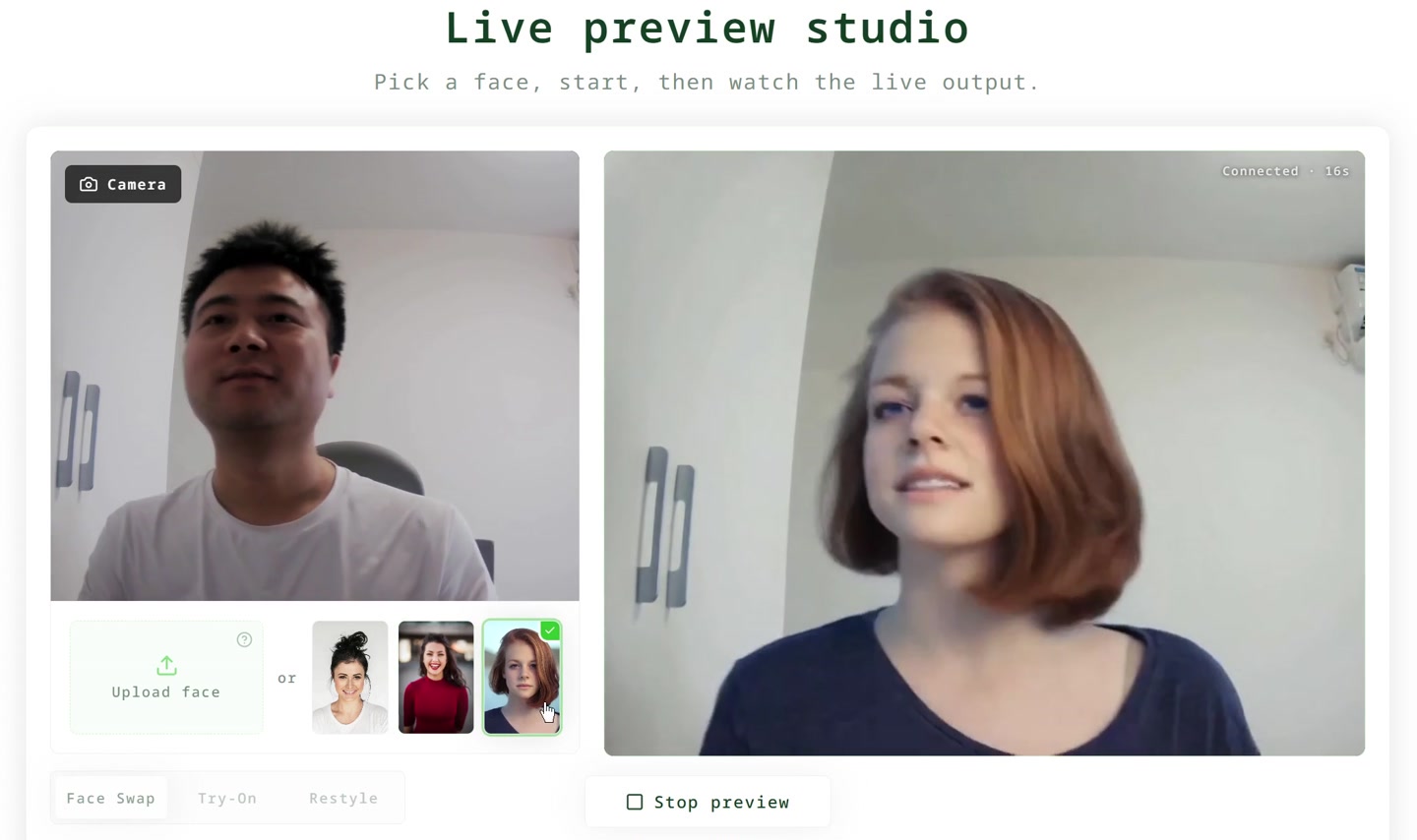

Streamers and creators who want a no-GPU live face swap that works inside OBS or Zoom without a local model will find Vivify's browser-plus-desktop approach genuinely practical. The credit model means every minute of live output costs real money, and the Lucy model burns credits roughly five times faster than XMAX 2.0, so session costs can surprise you. If you need AI avatar video rather than a live camera feed, HeyGen is a better fit.
What is Vivify Realtime Face Swap?
Vivify Realtime Face Swap runs in the browser. Pick a reference face, allow the webcam and click Start. The AI regenerates the live camera view, following your expressions, head turns and pose, so it is not a static paste. Modes: Live Try-On and Restyle. Models: XMAX 2.0 and Decart Lucy 2.5. The Vivify Live Client (Windows 10/11, macOS 13+ Apple Silicon) adds a "Vivify Camera" virtual camera for OBS, Zoom, Teams, Meet and Discord. The browser preview does not record the camera feed.
How we scored Vivify Realtime Face Swap
Capability scores 18 because the three live modes (Face Swap, Try-On, Restyle) and dual-model choice are genuinely differentiated from static clip-based tools, but the Lucy model's steep credit cost limits practical access to its output for most plan tiers. Ease of use scores 19 because the browser-first approach with no local GPU requirement lowers the setup bar considerably, and the virtual camera client covers the main production workflow without complex configuration. Value scores 14 because the credit math is punishing for live use: the Basic plan's roughly 16 minutes of XMAX swap per month is thin for any regular streaming workflow, and the Lucy model effectively cuts that to 3 minutes; the $39 credit pack entry point for non-subscribers is reasonable for occasional use but the per-minute cost at scale is high relative to local-model alternatives. Delivery scores 17 because no independent user sentiment was found to verify output quality claims, the 88-second free trial is too short to meaningfully evaluate the product before paying, and the camera privacy claim is stated but unverified by third parties.
Pros and cons
What we liked
- No local GPU required: all processing runs in the cloud, so the virtual camera output works on ordinary laptops.
- Three distinct live modes (Face Swap, Live Try-On, Restyle) cover a wider range of creator workflows than most single-mode face swap tools.
- Virtual camera client integrates directly with OBS, Zoom, Teams, Meet, and Discord on both Windows 10/11 and macOS 13+ Apple Silicon.
Where it falls short
- Credit consumption is steep for the Lucy model: the same 500-credit budget that buys roughly 16 minutes of XMAX 2.0 live swap yields only about 3 minutes with Lucy, making extended Lucy sessions expensive on lower-tier plans.
- The free trial is capped at 88 seconds of live preview, which is enough to see the effect but not enough to judge latency, consistency, or quality across different lighting conditions.
- API access is locked to the Max Quarterly plan at $62.30/month; developers or teams wanting to build on top of the live swap output have no lower-cost entry point.
Key features
Vivify Realtime Face Swap pricing
No permanent free tier. New users get 88 seconds of live preview free. Paid plans are credit-based: Basic Quarterly at $10.56/month (billed $31.68 every 3 months) for 500 credits/month; Pro Quarterly at $23.20/month (billed $69.60 every 3 months) for 2,150 credits/month; Max Quarterly at $62.30/month (billed $186.90 every 3 months) for 8,500 credits/month with 10 team seats and API access. One-time credit packs are also available: $39 for 2,000 credits and $99 for 7,500 credits, both non-expiring.
| Plan | Price | Who it is for |
|---|---|---|
| Free Preview | Free | 88 seconds of live face swap preview in the browser. No account required to try, but no ongoing free access beyond the initial session. |
| Basic Quarterly | $10.56/month | Billed $31.68 every 3 months. 500 credits/month, covering approximately 16 minutes of Live Face Swap (XMAX 2.0) or 3 minutes (Lucy). Commercial use allowed, no watermark. Credits usable across images, edits, and videos. |
| Pro Quarterly | $23.20/month | Billed $69.60 every 3 months. 2,150 credits/month, covering approximately 72 minutes of Live Face Swap (XMAX 2.0) or 13 minutes (Lucy). Add-on credit packs at 20% off. Commercial use, no watermark. |
| Max Quarterly | $62.30/month | Billed $186.90 every 3 months. 8,500 credits/month, covering approximately 283 minutes of Live Face Swap (XMAX 2.0) or 51 minutes (Lucy). Includes 10 team seats with shared credits and API access. Commercial use, no watermark. |
| Small Credit Pack | $39 | 2,000 credits, never expire. No subscription required. Covers approximately 66 minutes of Live Face Swap. Commercial use, no watermark. |
| Studio Credit Pack | $99 | 7,500 credits, never expire. No subscription required. Covers approximately 250 minutes of Live Face Swap. Commercial use, no watermark. |
Pricing reflects what we saw at time of review (2026-10). Always confirm current pricing on the tool's own site.
Who should use Vivify Realtime Face Swap?
A Twitch or YouTube streamer who wants to broadcast as a character or branded persona without owning a high-end GPU is the clearest fit. The virtual camera output slots into OBS with no extra configuration, and the browser-side processing means even a mid-range laptop can run it. The Live Try-On mode also has a real use case for fashion or shopping content creators who want to demo outfits on a live feed rather than editing static photos.
Anyone who needs more than a few hours of live swap per month should do the credit math before committing. At the Pro Quarterly rate, 2,150 credits gives about 72 minutes of XMAX 2.0 live swap per month, which is thin for a daily streamer. Heavy users will find the Max plan or credit packs necessary, pushing the monthly cost well above comparable local-model tools. If your goal is AI avatar videos rather than a live camera feed, HeyGen produces polished talking-head and avatar content from uploaded scripts without any credit-per-minute pressure on live sessions.
Skip it if: Users who want unlimited live sessions or pre-recorded AI avatar videos
Frequently asked questions
How much live face swap time do I get on the Basic plan?+
The Basic Quarterly plan includes 500 credits per month. That translates to roughly 16 minutes of live swap using the XMAX 2.0 model or about 3 minutes using the Lucy model. Credits are shared with image and video generation, so actual swap time depends on what else you use.
Does Vivify save or record my webcam feed?+
The product page states the camera feed is not saved and cannot be viewed by other users. The browser preview does not include a recording or export function.
Can I use the live swap output in OBS or Zoom?+
Yes, but only with the Vivify Live Client desktop app installed. It creates a virtual camera that OBS, Zoom, Teams, Meet, and Discord recognize as a standard camera input. The browser-only preview does not expose a virtual camera.
Is there a free plan beyond the initial preview?+
No. The free access is limited to 88 seconds of live preview in the browser. After that, you need a paid subscription or a one-time credit pack starting at $39 for 2,000 credits.
What is the difference between XMAX 2.0 and the Lucy model?+
Both handle live face swap, but they differ in credit cost and output style. XMAX 2.0 is significantly more credit-efficient; the Lucy model costs roughly five times more credits per minute of live swap, so it is better suited to short, quality-critical sessions.
Do unused credits expire?+
On subscription plans, unused credits carry over to the next month. One-time credit packs (the $39 and $99 options) never expire.
More AI Video Tools
See all categoriesGet your tool listed on 300+ directories.
One listing here is a strong start. But the founders who get discovered everywhere are listed everywhere. Our sister site, Free AI Directories, submits your tool to 300+ AI directories for you, every single one by hand, by a real person.
It is a one-time payment of $49, no subscription, and you can follow along as the submissions land. Prefer the slow route? The same site keeps a free list of 450+ directories you can work through yourself.
Get my tool listed on 300+ directoriesOne-time payment, no subscription · 100% human submissions · Free list of 450+ directories included.