
Wedding AI
A one-time-payment tool that turns your photos and wedding details into a personalized HD invitation video in both landscape and portrait
Are you the maker? Claim this listing to keep info, pricing and screenshots current. Verified via your tool's domain email.
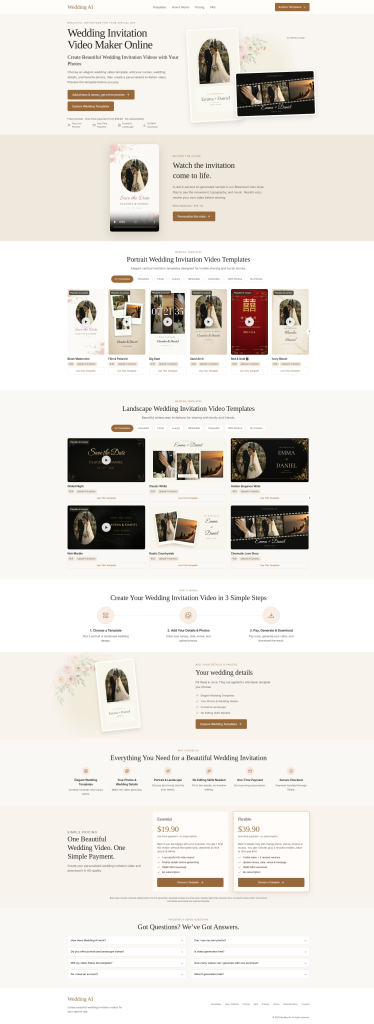
Wedding AI is the right pick for couples who want a finished, shareable invitation video without learning video software or committing to a subscription. The tradeoff is narrow scope: it does one thing, and Runway or HeyGen offer far more creative control for anyone who wants to go beyond a template. Skip it if you need custom motion graphics, voiceover, or anything beyond a photo-driven template video.
What is Wedding AI?
Not every invitation lives on a phone. Wedding AI's landscape 16:9 templates are meant for messaging apps, email and even TV screens, which helps when older relatives prefer watching on something bigger. Designs such as Classic White, Rustic Countryside and Noir Marble keep the layout clean, and your names, date and venue are placed into the template for you, so there is no timeline to edit. Browse the templates at https://weddingai.studio/
How we scored Wedding AI
Ease of use is the tool's genuine strength: a free preview before payment, unlimited pre-generation editing, and a no-timeline workflow earn a high mark there. Value is moderate; $19.90 to $39.90 one-time is fair for a single-use deliverable, but the Essential tier's single render with no revision is a real constraint for a product category where details routinely change. Capability is limited by design: fixed template layouts, no font or timing control, and a scope that covers exactly one use case put it well below general-purpose tools like Runway. Delivery scores low because no independent user reviews, press coverage, or third-party validation for weddingai.studio were found, making it impossible to confirm that the product delivers what it claims at scale; the absence of any social presence compounds this uncertainty.
Pros and cons
What we liked
- One-time payment with no subscription: $19.90 or $39.90 covers everything, including both 16:9 and 9:16 MP4 formats in a single purchase.
- Free watermarked preview before payment means you see the finished result before committing any money, removing the main risk of buying a template-based product blind.
- Dual-format output (landscape for email and TV, portrait for WhatsApp and Instagram) is automatic on both tiers, not an upsell.
Where it falls short
- No free tier and no trial render: the free preview is watermarked, so you cannot share or test the actual deliverable without paying at least $19.90.
- Template lock-in is real: font choices, layout positioning, and animation style are fixed by the template. There is no way to adjust timing, swap a transition, or reposition a text element, which is a specific limitation that general-purpose tools like Runway do not have.
- Single-use scope means the tool has no value after the wedding. You are paying for one video, and the platform offers nothing for post-wedding content, highlight reels, or any other video need.
Key features
Wedding AI pricing
Two one-time payment tiers: Essential at $19.90 (one HD render in 16:9 and 9:16) and Flexible at $39.90 (one initial render plus three revised renders). No subscription, no recurring charges. Free watermarked preview before any payment.
| Plan | Price | Who it is for |
|---|---|---|
| Essential | $19.90 | One final HD render delivered as both a 16:9 and 9:16 1080p MP4. Unlimited editing before generation. No subscription. Best for couples satisfied with their preview and not expecting to revise details. |
| Flexible | $39.90 | One initial HD render plus three revised renders (four successful videos total), each delivered in 16:9 and 9:16 at 1080p. Revisions can update names, date, venue, photos, or music. No subscription. Failed renders are free and never count against the total. |
Pricing reflects what we saw at time of review (2026-10). Always confirm current pricing on the tool's own site.
Who should use Wedding AI?
Couples who want a shareable invitation video but have no interest in learning video editing software. The workflow is close to filling out a form: enter your details, upload photos, pick music, watch the free preview, and pay only if you like what you see. That process suits someone planning a wedding who has dozens of other tasks and does not want to spend an afternoon in a timeline editor.
The Flexible tier at $39.90 is specifically useful for couples who are still finalizing logistics. If the ceremony time or venue changes after the first send, you have three more renders to update the video without paying again. That said, anyone who wants a custom animated intro, a voiceover, or a video style that goes beyond photo-driven templates should look at Runway instead, which offers a full browser-based video creation environment with far more creative latitude.
Skip it if: Anyone needing custom animation, voiceover, or ongoing video production beyond a single wedding invite.
Wedding AI alternatives
Frequently asked questions
Can I see the video before I pay?+
Yes. Wedding AI generates a full watermarked preview at no cost. You only pay ($19.90 or $39.90) when you decide to download the clean HD version.
What happens if the render fails?+
Failed renders are free and do not count against your render allowance on either plan. Only successful HD exports are deducted.
What file formats and resolutions do I get?+
Both tiers deliver 1080p MP4 files in two aspect ratios: 16:9 for email, screens, and TV, and 9:16 for WhatsApp, Instagram, and phones.
What is the difference between Essential and Flexible?+
Essential ($19.90) gives you one final HD render. Flexible ($39.90) gives you that same initial render plus three additional revised renders, so you can update details like the venue time or music after the first version is sent.
Is there a subscription or recurring charge?+
No. Both plans are one-time payments. Nothing renews, and there are no hidden fees after purchase.
Can I change the font or reposition text in the template?+
Based on the product's design, layout and typography are fixed by the template. You can change the content (names, date, venue, message, photos, music) but not the visual structure of the template itself.
More AI Video Tools
See all categoriesGet your tool listed on 300+ directories.
One listing here is a strong start. But the founders who get discovered everywhere are listed everywhere. Our sister site, Free AI Directories, submits your tool to 300+ AI directories for you, every single one by hand, by a real person.
It is a one-time payment of $49, no subscription, and you can follow along as the submissions land. Prefer the slow route? The same site keeps a free list of 450+ directories you can work through yourself.
Get my tool listed on 300+ directoriesOne-time payment, no subscription · 100% human submissions · Free list of 450+ directories included.