
ClipTalk
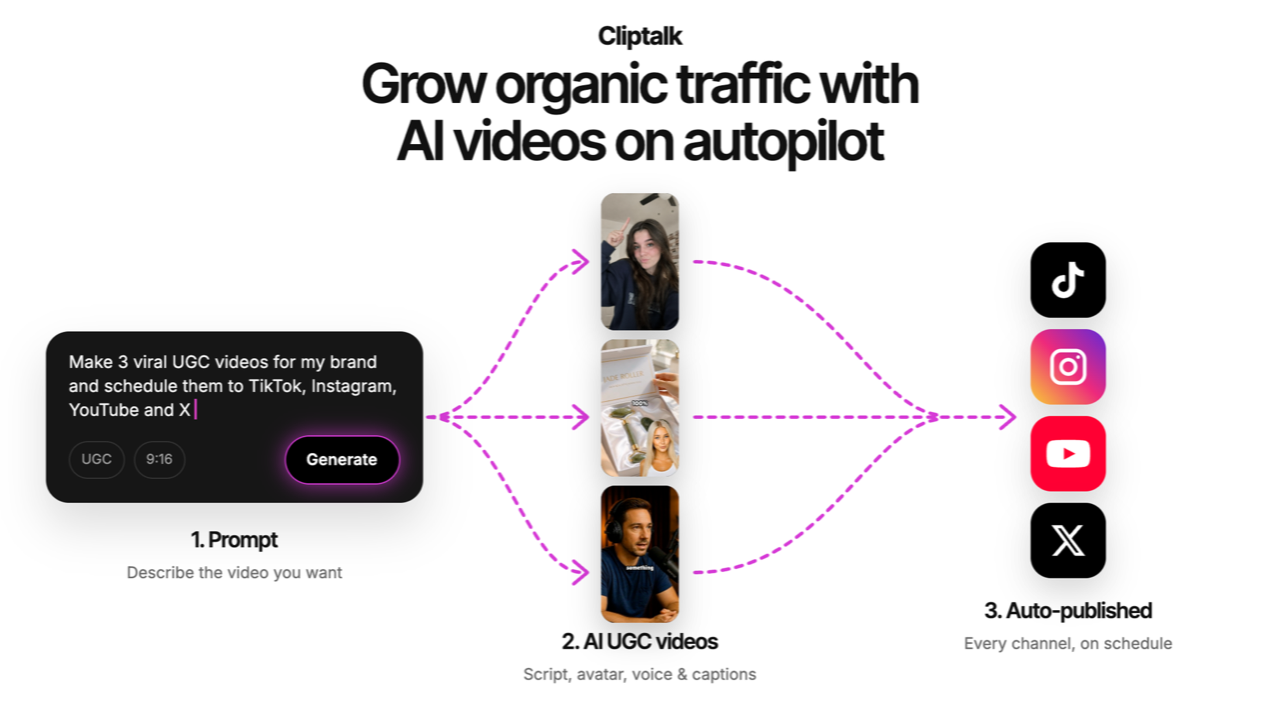
AI video tool that turns a text prompt, URL, or script into a ready-to-post short-form video with voiceover, captions, B-roll, and music.
Are you the maker? Claim this listing to keep info, pricing and screenshots current. Verified via your tool's domain email.
ClipTalk is the right pick for solo creators and small teams who need to ship a high volume of short-form videos without touching a timeline editor. Its MCP integration with Claude and ChatGPT is genuinely unusual for this price range, but output quality on the Basic tier lags behind what Runway produces at a similar monthly cost. If you need avatar-led videos with realistic lip-sync, HeyGen does that job better.
What is ClipTalk?
ClipTalk is an AI-powered video creation platform, operated by Cliptalk.pro Inc., that converts text prompts, scripts, articles, and website URLs into finished short-form videos for TikTok, Instagram Reels, and YouTube Shorts. The tool handles script generation, AI visuals, B-roll selection, voiceover in 75+ language voices, auto-captions, and background music in a single automated workflow, exporting a ready-to-post MP4 without requiring any manual editing.
The platform runs on a credit-based model with a free tier (500 credits, approximately five videos) and paid plans from $19 to $59 per month. It supports voice cloning, natural-language editing commands, AI talking characters, and template types covering UGC ads, faceless stories, explainers, and music videos. Pro subscribers get full REST API access and an MCP server that connects ClipTalk to Claude, ChatGPT, and Cursor for automated video generation inside existing AI workflows.
How we scored ClipTalk
Capability scores 18 because the end-to-end pipeline from URL or prompt to MP4 is genuinely complete, and the MCP integration with Claude and ChatGPT is a real differentiator at this price point; however, AI visual quality lags behind Runway and avatar realism falls short of HeyGen, so it does not lead the category on output. Ease of use scores 20 because the no-timeline, prompt-driven workflow has a very low floor for new users, and editing features are credit-free. Value scores 17 because the Basic plan at $19/month yields only about 15 videos, which is thin for an active creator, and voice cloning plus the Opus 5.5 agent require jumping to the $59/month Pro tier; the gap between Starter+ and Pro is steep for what is withheld. Delivery scores 15 because the tool is legitimate and actively maintained, but third-party review sites show meaningfully different pricing and credit figures from the live page, suggesting the product has changed rapidly and marketing claims have not always kept pace; the 'price locked in for life' promotional framing also warrants scrutiny before a buyer commits.
Pros and cons
What we liked
- MCP server integration lets Pro users generate videos directly from Claude, ChatGPT, or Cursor, a workflow connection rare at this price point.
- Editing features including auto-captions, silence removal, and the built-in timeline editor do not consume credits, so your monthly allowance goes entirely toward generation.
- The URL-to-video pipeline accepts product pages, blog posts, and articles as inputs, not just raw text, which cuts the copy-paste step for content repurposing.
Where it falls short
- The Basic plan at $19/month caps generation at roughly 15 videos per month (3,000 credits), which is thin for anyone publishing daily across multiple platforms.
- Voice cloning and the Opus 5.5 AI agent are gated behind the Pro tier; the Starter+ plan at $39/month gets neither, which is a meaningful gap between the two mid-range options.
- Output quality on AI-generated visuals is adequate for social media but noticeably below what Runway's video generation produces, particularly for motion quality and scene coherence.
Key features
ClipTalk pricing
Free tier gives 500 credits (roughly 5 videos). Basic is $19/month for 3,000 credits. Starter+ is $39/month for 8,000 credits with unlimited editing and 75+ language AI voices. Pro is $59/month (currently offered at a locked-in $39/month promotional rate) for 14,000 credits, Opus 5.5 AI agent, full API and MCP access, and unlimited media storage. All plans get 50% off on annual billing. Editing features like auto-captions and silence removal do not consume credits.
| Plan | Price | Who it is for |
|---|---|---|
| Free | Free | 500 credits (approximately 5 videos). Access to the editor and auto-captions. Watermark on exported videos. |
| Basic | $19/mo | 3,000 credits per month (approximately 15 videos or 600 AI images). High quality AI models. Yearly plan available at 50% off. |
| Starter+ | $39/mo | 8,000 credits per month (approximately 40 videos or 2,000 AI images). 75+ language AI voices. High quality AI models. Unlimited editing. Cancel anytime. Yearly plan available at 50% off. |
| Pro | $59/mo | 14,000 credits per month (approximately 90 videos or 4,000 AI images). 75+ language AI voices. High and Pro quality AI models. Opus 5.5 powered AI agent. Full API and MCP access for Claude and ChatGPT. Unlimited media storage. Price currently locked at $39/mo for new subscribers. Yearly plan available at 50% off. |
Pricing reflects what we saw at time of review (2026-10). Always confirm current pricing on the tool's own site.
Who should use ClipTalk?
ClipTalk fits creators running faceless YouTube Shorts or Reels channels who need to publish several times a week without filming anything. A solo operator repurposing blog posts into social clips, or a small marketing team turning product pages into video ads, will get real mileage from the URL-to-video pipeline. The Starter+ plan at $39/month covers roughly 40 videos per month, which is a reasonable volume for an active content calendar.
Developers and AI-forward teams building automated content pipelines will find the MCP and REST API access on the Pro plan genuinely useful. That said, if your priority is realistic AI avatar videos with accurate lip-sync, HeyGen is the better tool: it is purpose-built for avatar-led content and produces more convincing on-camera results. If you need serious post-production control over existing footage, Descript's transcript-based editing approach gives you far more precision than ClipTalk's generation-first workflow.
Skip it if: Creators who need photorealistic AI avatars or frame-level editing precision
ClipTalk alternatives
Tags
Frequently asked questions
Does ClipTalk have a free plan?+
Yes. The free tier includes 500 credits, enough for approximately five videos. No credit card is required to sign up.
How many videos can I make per month on each paid plan?+
Basic ($19/month) covers roughly 15 videos. Starter+ ($39/month) covers roughly 40 videos. Pro ($59/month, currently locked at $39/month for new subscribers) covers roughly 90 videos. These estimates are based on ClipTalk's own credit-to-video conversion figures.
Do auto-captions and editing features use up my credits?+
No. Auto-captions, silence removal, and the built-in editor do not consume credits. Credits apply only to AI generation tasks like image, video, and audio synthesis.
What is the MCP integration and which plan includes it?+
ClipTalk's MCP server lets you trigger video generation directly from Claude, ChatGPT, or Cursor without opening the ClipTalk interface. This is available on the Pro plan only.
Can I monetize videos made with ClipTalk?+
Yes. ClipTalk states that videos are unique and original, created with generative AI models, and can be monetized. The Pro plan adds voice cloning and custom visual styles for further personalization.
Is voice cloning available on all plans?+
No. Voice cloning is gated to the Pro tier. The Basic and Starter+ plans provide access to AI voices but not the ability to clone your own voice.
More AI Video Tools
See all categoriesGet your tool listed on 300+ directories.
One listing here is a strong start. But the founders who get discovered everywhere are listed everywhere. Our sister site, Free AI Directories, submits your tool to 300+ AI directories for you, every single one by hand, by a real person.
It is a one-time payment of $49, no subscription, and you can follow along as the submissions land. Prefer the slow route? The same site keeps a free list of 450+ directories you can work through yourself.
Get my tool listed on 300+ directoriesOne-time payment, no subscription · 100% human submissions · Free list of 450+ directories included.