Cliptray
A free-to-start clipboard manager for Windows, Mac, and Linux with unlimited history, cross-device sync, and context-aware Smart Paste.
Are you the maker? Claim this listing to keep info, pricing and screenshots current. Verified via your tool's domain email.
Cliptray is the right pick for a solo developer or writer who wants a one-time-purchase clipboard manager with cross-platform sync and no monthly fee. The free tier is genuinely usable but caps pinned clips at 5 and history at 24 hours, so the lifetime upgrade is where the real value sits. With only 65 reported users at review time, anyone who needs a proven, battle-tested tool should look at a more established alternative.
What is Cliptray?
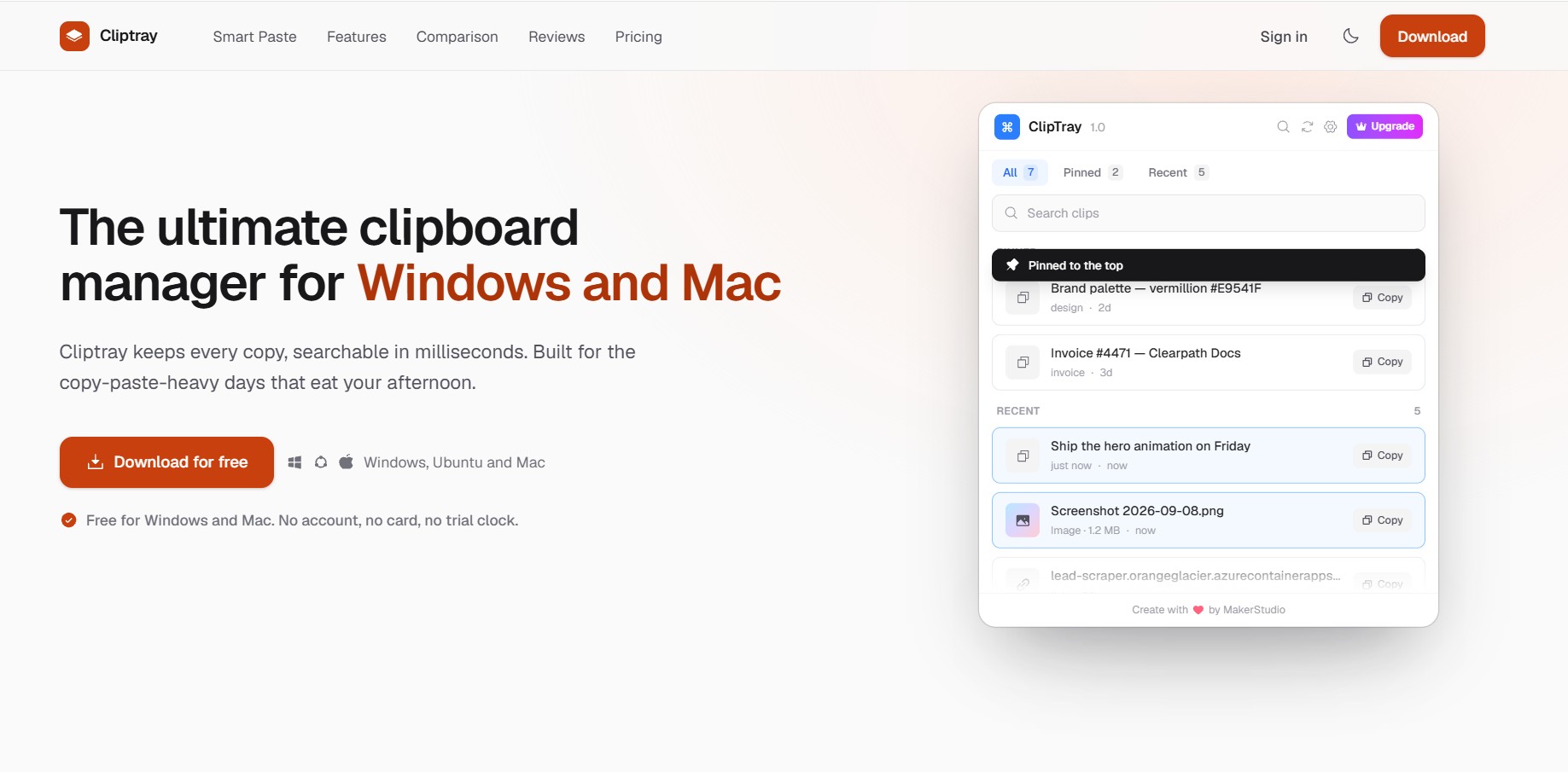
Cliptray is a free clipboard manager for Windows, macOS, and Linux that saves your clipboard history, lets you instantly search, pin, and organize copied content, and securely syncs it across devices. Copy smarter, work faster, and never lose important text, links, or images again.
How we scored Cliptray
Capability scores 17 because Smart Paste is a genuinely differentiated feature and the core clipboard functions are solid, but the absence of text expansion, macros, or folder organization leaves gaps that established competitors fill. Ease of use scores 20 because the free download requires no account or card, the interface is minimal, and the hotkey system is straightforward. Value scores 16 because the $29 lifetime price is fair in isolation, but the 24-hour history cap on the free tier is aggressive enough to push most users toward the paid upgrade quickly, and the product is unproven. Delivery scores 5 because the site itself reports only 65 total users with 3 active in the past week: the sync infrastructure, Smart Paste reliability, and cross-platform behavior have not been validated at any meaningful scale, and a tool this early-stage cannot credibly claim to deliver on its promises for a general audience.
Pros and cons
What we liked
- Smart Paste ranks clipboard contents by field context on-device with no server call, a genuinely differentiated feature not common in free clipboard managers.
- One-time lifetime pricing with no subscription, end-to-end encrypted sync across Windows, Mac, and Linux included.
- Privacy Mode actively excludes passwords and API keys from history, addressing a real security concern most clipboard managers ignore.
Where it falls short
- Only 65 reported users at review time means the cross-platform sync and Smart Paste ranking have not been validated at any meaningful scale, which is a real reliability risk.
- The free tier caps clipboard history at 24 hours and pinned clips at 5, which is tight enough that most users will hit the wall quickly and face the upgrade decision.
- No text expansion, macro support, or folder-based organization, features that established clipboard managers like ClipClip offer, leaving power users with more complex snippet workflows underserved.
Key features
Cliptray pricing
Free tier available at $0 with limited history (24 hours) and up to 5 pinned clips. A one-time lifetime upgrade enables unlimited history and pins, priority support, and all future updates. The lifetime price appears to be $29 based on available sources, but the cliptray.io pricing page did not render a confirmed figure; see reviewer flag.
| Plan | Price | Who it is for |
|---|---|---|
| Free | $0 | Clipboard history for the past 24 hours, up to 5 pinned clips, cross-device sync, tags and filters, editable clips. No account or credit card required. |
| Lifetime | $29 | Unlimited clipboard history, unlimited pinned clips, everything in Free, priority support, and all future updates. One-time payment. |
Pricing reflects what we saw at time of review (2026-10). Always confirm current pricing on the tool's own site.
Who should use Cliptray?
Cliptray fits a solo developer, designer, or writer who regularly switches between Windows and Mac and is tired of re-copying things they already had. The tag and pin system is genuinely useful for anyone who maintains a small library of reusable snippets, like invoice numbers, boilerplate email text, or frequently used code fragments. The Privacy Mode makes it safer than a generic clipboard history for anyone who handles credentials.
Anyone running a team workflow, needing admin controls, or wanting a tool with years of public track record should look elsewhere. The directory's closest productivity-adjacent option is Maxdesk, which handles team-facing support workflows rather than clipboard management, but if your real need is structured text reuse across a team rather than personal clipboard history, that is the direction to explore.
Skip it if: Teams needing enterprise deployment, or anyone who needs a tool with a large, proven user base behind it.
Tags
Frequently asked questions
Is Cliptray actually free, or does it require a card to start?+
The free tier is $0 with no account, no credit card, and no trial clock. It caps clipboard history at 24 hours and pinned clips at 5.
How much does the lifetime upgrade cost?+
The lifetime plan is a one-time payment of $29, which enables unlimited history, unlimited pins, priority support, and all future updates.
Does Smart Paste send my clipboard data to a server?+
No. According to the product page, Smart Paste runs entirely on your device with no model to download and no server call. Your clipboard contents are never uploaded for ranking.
Which operating systems does Cliptray support?+
Cliptray runs on Windows, macOS, and Linux (Ubuntu). Cross-device sync works across all three platforms.
How does Privacy Mode work?+
When Privacy Mode is on, Cliptray detects passwords and API keys and skips them entirely, so they never appear in your history or sync to other devices.
How many people are currently using Cliptray?+
The product page reported 65 total users at review time, with 3 active in the past week. This is a very early-stage user base.
More AI Business Tools
See all categoriesGet your tool listed on 300+ directories.
One listing here is a strong start. But the founders who get discovered everywhere are listed everywhere. Our sister site, Free AI Directories, submits your tool to 300+ AI directories for you, every single one by hand, by a real person.
It is a one-time payment of $49, no subscription, and you can follow along as the submissions land. Prefer the slow route? The same site keeps a free list of 450+ directories you can work through yourself.
Get my tool listed on 300+ directoriesOne-time payment, no subscription · 100% human submissions · Free list of 450+ directories included.