
Extender Video
A pay-per-action web tool that continues AI-generated Kie clips by 6 seconds, with no subscription required.
Are you the maker? Claim this listing to keep info, pricing and screenshots current. Verified via your tool's domain email.
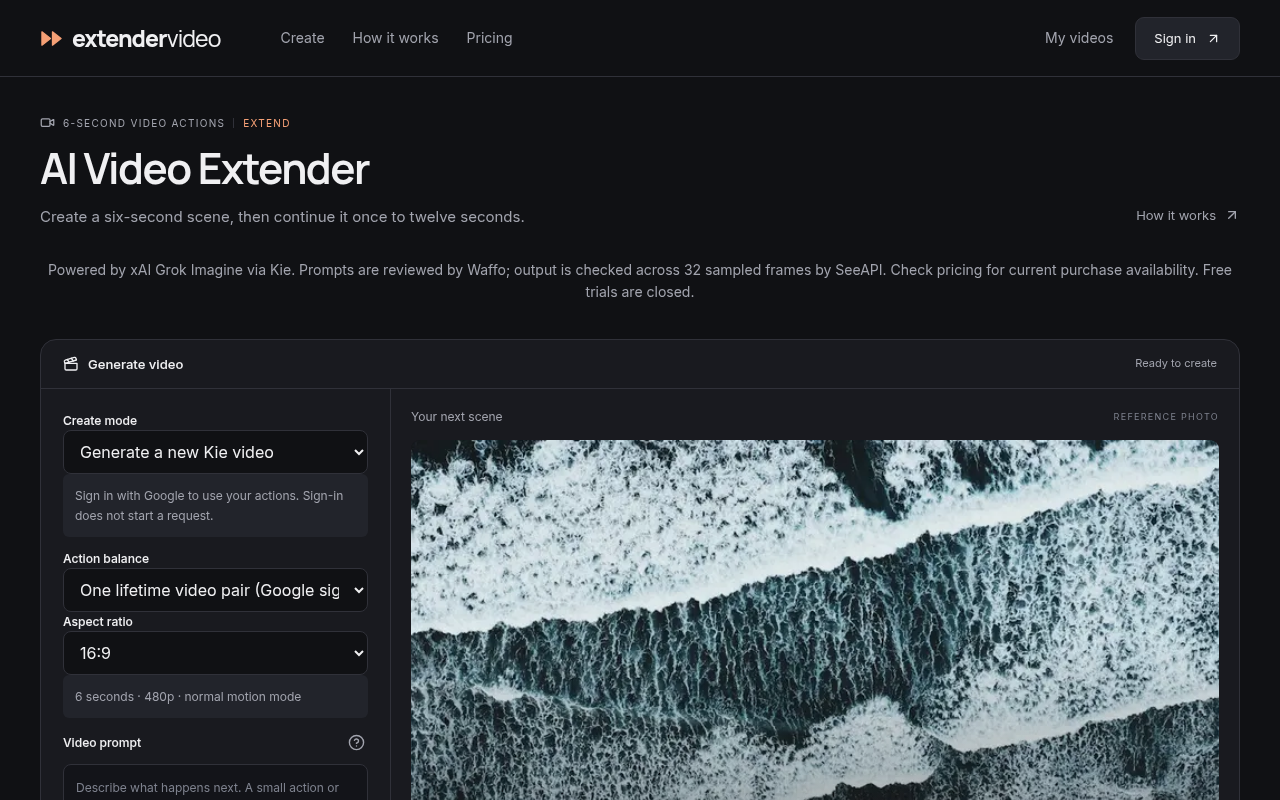
Extender Video is the right pick only if you already have Kie-generated clips and want a no-subscription way to add 6 seconds to them. Runway and similar tools accept uploaded footage from any source and offer far more control over output length and resolution. Anyone who needs to extend their own original footage, work above 480p, or buy access right now should look elsewhere.
What is Extender Video?
Extender Video is a web-based AI video continuation tool that adds 6 seconds of AI-generated footage to existing Kie-model clips. Users sign in with Google, purchase a one-time pack of video actions, and submit their original 6-second Kie videos for extension. The output is a 12-second clip rendered at a 480p model tier.
The tool targets people who produce short AI-generated clips with Kie and want occasional continuation without committing to a monthly subscription. Actions do not expire, failed generations restore the used action, and there is no recurring charge. Local video uploads and repeated extensions beyond 12 seconds are not supported.
How we scored Extender Video
Capability scores 10 because the tool does exactly one thing (extend a Kie clip by 6 seconds to 12 seconds at 480p) and explicitly cannot extend footage from any other source, a restriction that no named directory competitor shares. Ease of use scores 14 because the workflow is genuinely minimal and the action accounting is transparent, but the tool cannot actually be used right now, which caps any usability score. Value scores 12 because the one-time pack model is conceptually fair at roughly $0.78 to $0.95 per action, but 480p output at those prices is weak compared to competitors offering higher resolutions for similar or lower per-generation costs, and the inability to purchase today makes value theoretical. Delivery scores 8 because purchases are disabled, free trials are closed, and there is no public user sentiment or third-party coverage to confirm the tool delivers on its claims; a product that cannot be bought or tested at review time has a serious delivery gap regardless of how the pricing page reads.
Pros and cons
What we liked
- No subscription: action packs are one-time purchases that never expire, so occasional users pay only for what they use.
- Transparent action accounting: failed generations restore the action automatically, and the cost per operation (one action per 6-second pass) is unambiguous before you commit.
- Designed specifically for Kie clip continuation, so the workflow is minimal and focused rather than buried inside a general-purpose editor.
Where it falls short
- Purchases are not yet open as of October 2026, meaning the tool cannot actually be used regardless of willingness to pay.
- Only Kie-generated 6-second originals can be extended; local uploads and footage from any other source or AI model are explicitly unsupported, a restriction no major competitor shares.
- Output is capped at a 480p model tier (verified example: 752x416 pixels) with no higher-resolution option listed, making the output unsuitable for anything beyond social or preview use.
Key features
Extender Video pricing
Two one-time action packs: 20 actions for $19 or 50 actions for $39. One action covers one 6-second generation or one 6-second extension. Purchases are listed as not yet available. No free tier and no subscription option.
| Plan | Price | Who it is for |
|---|---|---|
| 20 Video Actions | $19 | 20 one-time actions; each action covers one 6-second Kie generation or one 6-second extension; actions never expire; 480p output tier; purchases not yet available. |
| 50 Video Actions | $39 | 50 one-time actions; each action covers one 6-second Kie generation or one 6-second extension; actions never expire; 480p output tier; purchases not yet available. |
Pricing reflects what we saw at time of review (2026-10). Always confirm current pricing on the tool's own site.
Who should use Extender Video?
The only realistic current user is someone already producing content with the Kie AI video model who occasionally needs a slightly longer clip and prefers paying once rather than subscribing. A social media creator who generates Kie clips and wants a 12-second version for a specific post fits the intended use case.
Anyone outside that narrow profile should look elsewhere. Filmmakers, marketers, or creators working with footage from cameras, screen recordings, or other AI generators will find that Extender Video simply refuses their source material. For those users, Runway accepts uploaded clips from any source, offers multi-second extension with far more resolution headroom, and is available to purchase and use today.
Skip it if: Anyone needing to extend non-Kie footage, work above 480p, or access the tool today
Extender Video alternatives
Tags
Frequently asked questions
Can I extend a video I recorded myself or generated with a tool other than Kie?+
No. Extender Video only extends original 6-second videos generated by the Kie AI model. Local uploads and clips from other sources are explicitly unsupported.
How much does it cost per video extension?+
One action covers one extension pass. The 20-action pack costs $19 (about $0.95 per action) and the 50-action pack costs $39 (about $0.78 per action). A full create-plus-extend workflow uses two actions.
Can I extend a clip more than once to get something longer than 12 seconds?+
No. The pricing page states that only the original generated clip can be continued once, to a maximum of 12 seconds. Repeated extensions are not available.
Is there a free trial?+
No. The pricing page explicitly states that free trials are currently closed, and there is no free tier.
Can I buy actions right now?+
Not as of October 2026. The pricing page shows both packs but marks purchases as not yet available. There is no waitlist or pre-purchase option listed.
What resolution will my extended clip be?+
Output is at a 480p model tier. The verified example on the pricing page is 752x416 pixels, though dimensions and aspect ratio may vary.
More AI Video Tools
See all categoriesGet your tool listed on 300+ directories.
One listing here is a strong start. But the founders who get discovered everywhere are listed everywhere. Our sister site, Free AI Directories, submits your tool to 300+ AI directories for you, every single one by hand, by a real person.
It is a one-time payment of $49, no subscription, and you can follow along as the submissions land. Prefer the slow route? The same site keeps a free list of 450+ directories you can work through yourself.
Get my tool listed on 300+ directoriesOne-time payment, no subscription · 100% human submissions · Free list of 450+ directories included.