
Audio Cutter AI
Browser-based audio editor that lets you cut and clip recordings by describing what you want in plain language.
Are you the maker? Claim this listing to keep info, pricing and screenshots current. Verified via your tool's domain email.
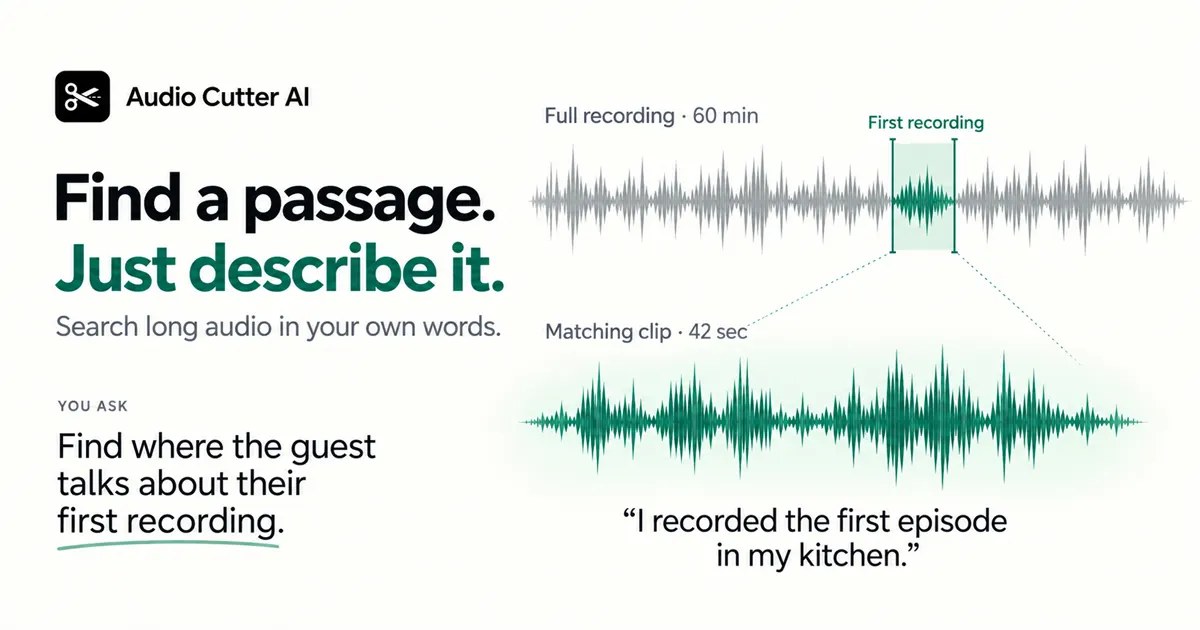
Audio Cutter AI is the right pick for podcasters, educators, and interviewers who need to pull clips from long recordings without touching a timeline. Its natural-language search across transcripts is genuinely useful, but it offers no mixing, no multi-track editing, and no desktop app, so it sits well below a DAW or even a tool like Waveroom Mastering for anything beyond clip extraction. Anyone who needs to process audio in bulk, apply effects, or work with more than three formats should look elsewhere.
What is Audio Cutter AI?
Audio Cutter AI is a web-based audio editing tool that accepts MP3, WAV, and M4A files up to 3 GB, as well as YouTube links converted to audio. Users type natural-language prompts to locate passages by topic, cut at exact timestamps, isolate a single speaker, or split a long recording into equal-length clips, then preview and export results as combined or separate MP3 or WAV files.
The tool requires no account or credit card for basic use and runs entirely in the browser. It is used by podcast producers, educators, interviewers, and video editors who need to extract specific segments from recordings without manually scrubbing a waveform timeline. A silence-removal option is available at export.
How we scored Audio Cutter AI
Capability lands at 16 because the tool does one thing well (semantic clip extraction) but has no audio effects, no multi-track support, no API, and no desktop app, leaving it well below what even mid-tier audio editors offer. Ease of use scores 20 because the no-login, drag-and-drop, prompt-driven workflow genuinely removes friction for its target users. Value scores 18 because 240 free monthly credits with no card required is a fair entry point, but the complete absence of publicly listed paid tiers means users who need more have no transparent upgrade path. Delivery scores 9 because the pricing page lists no plans despite the privacy policy referencing premium subscriptions and billing, the credit system is opaque, and vendor accuracy claims (99% content accuracy, 84% time saved) are unverified marketing figures with no methodology, all of which are delivery-side trust gaps that a buyer would reasonably care about.
Pros and cons
What we liked
- Semantic search across transcripts lets you find a passage by topic without scrubbing a waveform, a genuine time-saver for long interview and podcast recordings.
- No account or credit card required to start; 240 free credits per month means casual users can work without any payment friction.
- Accepts YouTube links directly and converts them to audio, removing a manual download step that most browser-based cutters require.
Where it falls short
- No audio effects whatsoever: no noise reduction, EQ, compression, or volume normalization, so clips often need post-processing in a separate tool before they are publish-ready.
- Export formats are limited to MP3 and WAV only; the upload page accepts M4A but the contact page lists FLAC as supported while the export side does not, creating format inconsistency that is specific to this tool's partially documented feature set.
- The credit system is opaque: the pricing page lists no paid tiers or credit top-up options publicly, so users who exhaust their 240 monthly credits have no clear path to buying more without contacting support.
Key features
Who should use Audio Cutter AI?
Podcast producers who regularly need to pull a guest's answer on a specific topic will get the most out of this tool. The semantic search across transcripts replaces the tedious process of listening through a full recording to find a timestamp. Educators cutting a 90-minute lecture into focused lesson segments, and researchers pulling relevant excerpts from interview recordings, are equally well served.
Anyone who needs to do more than extract clips should look elsewhere. If your work involves noise reduction, EQ, compression, or any form of audio mastering, Waveroom Mastering (already in this directory) handles that job and offers a free starter tier. If you need AI-generated voiceovers or voice cloning rather than editing existing recordings, ElevenLabs is the more appropriate tool.
Skip it if: Audio engineers or producers who need mixing, effects, or multi-track editing
Frequently asked questions
Is Audio Cutter AI really free to use?+
Yes. No login or credit card is required to start. The tool provides 240 free credits per month for AI audio editing. No publicly listed paid tiers were found at review time.
What file formats can I upload and export?+
Uploads accept MP3, WAV, and M4A files up to 3 GB, plus YouTube links converted to audio. Exports are MP3 or WAV only.
Can I use it to isolate one speaker from a meeting recording?+
Yes. You can prompt the tool to keep only a selected speaker's remarks from a multi-person recording, then export the result as a separate clip.
Does it do noise reduction or audio mastering?+
No. Audio Cutter AI handles cutting, splitting, silence removal, and clip extraction only. It has no noise reduction, EQ, compression, or mastering features.
What happens when I run out of free credits?+
The pricing page does not list paid top-up options or premium tiers publicly. The privacy policy references premium subscriptions, but no prices or tier names were available at review time.
Is there a desktop app or API?+
No. Audio Cutter AI is web-only with no desktop application and no publicly documented API access.
More AI Voice, Audio & Music tools
See all categoriesGet your tool listed on 300+ directories.
One listing here is a strong start. But the founders who get discovered everywhere are listed everywhere. Our sister site, Free AI Directories, submits your tool to 300+ AI directories for you, every single one by hand, by a real person.
It is a one-time payment of $49, no subscription, and you can follow along as the submissions land. Prefer the slow route? The same site keeps a free list of 450+ directories you can work through yourself.
Get my tool listed on 300+ directoriesOne-time payment, no subscription · 100% human submissions · Free list of 450+ directories included.