Audio2MIDI
Browser-based audio-to-MIDI converter that turns MP3s, WAV files, and hummed melodies into editable MIDI, sheet music, and guitar tab.
Are you the maker? Claim this listing to keep info, pricing and screenshots current. Verified via your tool's domain email.
Audio2MIDI is the right pick for musicians and arrangers who need a no-install, browser-based way to pull MIDI and sheet music out of recordings, especially solo-instrument or piano tracks. Its credit-based model is transparent and pay-as-you-go, but multitrack MIDI is locked behind the $19.99/month Premium tier, and there is no free trial or signup credits to test quality before spending money. Anyone primarily needing voice synthesis, mastering, or general audio production should look elsewhere entirely.
What is Audio2MIDI?
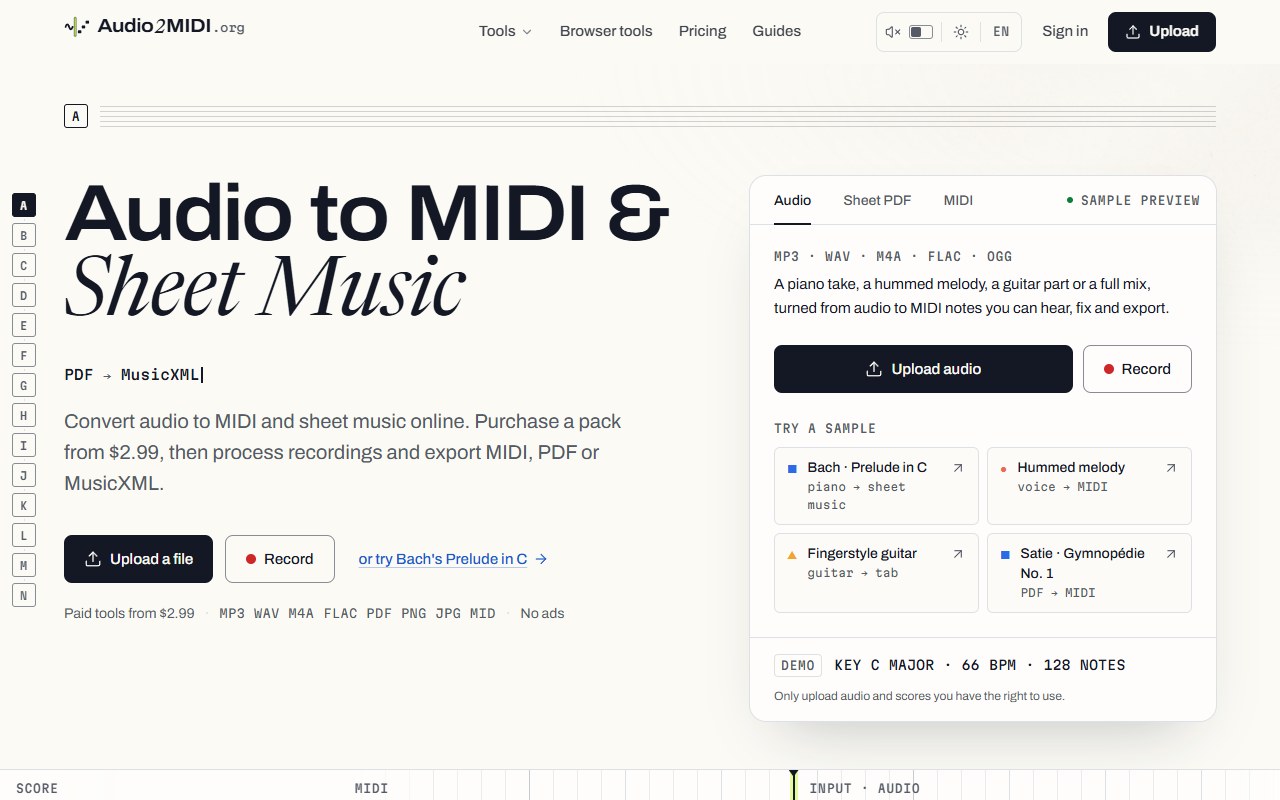
Audio2MIDI turns recordings into music you can edit. Convert MP3, WAV, M4A, FLAC or a hummed melody to MIDI notes, PDF scores to MIDI and MusicXML, MIDI to PDF sheet music, and guitar recordings to tab. Hear the result and quantize the timing before you export MIDI, PDF, MusicXML or guitar tab, then open it in MuseScore, Dorico, Sibelius, Logic Pro or Ableton Live. Transcription models detect the pitch, start and length of each note; it works best on solo piano or a single instrument.
It is for Musicians, producers, arrangers, music teachers and students.
Main features:
- Audio to MIDI from MP3, WAV, M4A, FLAC, OGG or live voice / humming
- Audio to sheet music: export PDF and MusicXML
- PDF or image scores to MIDI and MusicXML
- MIDI to PDF sheet music
- Guitar recordings to tab
- Detects key, BPM and chords; quantize to 1/8, 1/16 or 1/32
- No ads
How we scored Audio2MIDI
Capability scores 18 because the feature set is genuinely broad for a browser tool: audio to MIDI, humming input, stem separation, multitrack MIDI, guitar tab, score scanning, and MIDI to sheet music are all present or imminent, and the per-credit rate card is specific and transparent. It loses points because multitrack MIDI is gated behind a higher tier, score scanning is not yet live, and the tool's own documentation acknowledges accuracy limits on polyphonic material. Ease of use scores 20 because the browser-only, no-install approach with upfront cost display and automatic refunds on failures is genuinely low-friction for the target user. Value scores 14 because there is no free tier and no trial, meaning buyers must spend at least $2.99 blind; the Pro plan at $9.99/month for only 80 credits (roughly 80 minutes of basic transcription) is thin compared to desktop alternatives that charge once, and multitrack MIDI requiring a $19.99/month plan is a meaningful paywall for a core producer feature. Delivery scores 14 because no independent user sentiment was findable to verify that the tool delivers on its claims, two advertised features (score scanning, batch jobs) are listed as coming soon rather than live, and the absence of any confirmed social presence or third-party coverage makes it difficult to assess track record.
Pros and cons
What we liked
- Transparent credit pricing: the exact cost in credits is shown before every job runs, and failed jobs are automatically refunded to your balance.
- Covers the full transcription workflow in one browser tool: audio to MIDI, audio to sheet music, PDF score scanning, MIDI to PDF, guitar tab, and stem separation without installing anything.
- One-time credit packs (starting at $2.99 for 10 credits) let occasional users pay per project without a subscription commitment.
Where it falls short
- No free tier and no trial credits: you must purchase before testing output quality, which is a real risk given that transcription accuracy drops significantly on polyphonic or complex mixes.
- Multitrack MIDI export, the feature most useful to producers working with full mixes, is locked to the Premium tier ($19.99/month) and above; Pro subscribers at $9.99/month get only single-track stem export.
- Score scanning (PDF or image to MIDI) is listed as 'opening soon' on the pricing page as of the review date, meaning a feature prominently advertised in the submitted description is not yet fully available to all users.
Key features
Audio2MIDI pricing
No free tier and no trial credits. Subscriptions start at $9.99/month (Pro, 80 credits) up to $39.99/month (Studio, 500 credits). One-time credit packs available from $2.99 for 10 credits. Annual plans save roughly 17%.
| Plan | Price | Who it is for |
|---|---|---|
| Credit Pack 10 | $2.99 | 10 credits that never expire. Enough for one song: HQ transcription up to 10 minutes, a 5-minute song with stems, or 3 score pages. No subscription required. |
| Credit Pack 50 | $9.99 | 50 credits that never expire, at approximately $0.20 per credit. Suitable for a few songs a month without a subscription. |
| Credit Pack 150 | $24.99 | 150 credits that never expire, at approximately $0.17 per credit. Lower rate for bigger projects or busy periods. |
| Pro (monthly) | $9.99/mo | 80 credits per month (approximately 80 minutes of HQ audio). All browser tools included. HQ transcription, guitar tabs, fast exports with no daily cap and no watermark, stem separation with single-track export. Multitrack MIDI, batch jobs, and priority queue not included. |
| Pro (yearly) | $99.00/yr | 80 credits per month, same features as monthly Pro. Saves approximately 17% versus monthly billing. |
| Premium (monthly) | $19.99/mo | 240 credits per month (approximately 240 minutes of HQ audio). Everything in Pro plus stems with multitrack MIDI export, batch up to 10 files at once (coming soon), priority queue (coming soon), and every export format:.mid, PDF, MusicXML, tab, WAV. |
| Premium (yearly) | $199.00/yr | 240 credits per month, same features as monthly Premium. Saves approximately 17% versus monthly billing. |
| Studio (monthly) | $39.99/mo | 500 credits per month (approximately 500 minutes of HQ audio). Everything in Premium. Designed for frequent transcription, stems, and larger workloads. Can top up with one-time credit packs. |
| Studio (yearly) | $399.00/yr | 500 credits per month, same features as monthly Studio. Saves approximately 17% versus monthly billing. |
Pricing reflects what we saw at time of review (2026-11). Always confirm current pricing on the tool's own site.
Who should use Audio2MIDI?
Solo musicians who record piano, guitar, or single-instrument performances and want to turn those recordings into sheet music or DAW-ready MIDI files will get the most out of Audio2MIDI. A piano teacher who records student pieces and needs printable scores, or a songwriter who hums a melody and wants it in notation software, fits the tool's sweet spot well. Producers working with full mixes can use the stem-separation and multitrack MIDI features, but only on the Premium plan ($19.99/month) or above.
Anyone who needs to evaluate transcription quality before committing money should look elsewhere: there are no free credits and no trial period. Waveroom Mastering is the better choice for users whose primary need is polishing a finished audio track rather than extracting notes from it. Users who need voice cloning, text-to-speech, or dubbing should go to ElevenLabs or Murf AI instead, as those tools are built for audio generation, not transcription.
Skip it if: Users who want to test before paying, or who need voice synthesis or audio mastering
Audio2MIDI alternatives
Frequently asked questions
Is there a free trial or free credits to test the tool?+
No. The pricing page states explicitly: no free trial or signup credits. You must purchase a credit pack (minimum $2.99 for 10 credits) or a subscription before running any server-side job. Browser utilities like the MIDI player and chord finder are included after any purchase.
How many credits does a typical song cost?+
One credit equals one minute of high-quality audio transcription. A 5-minute song costs 5 credits for basic MIDI transcription, 10 credits if you want stems and multitrack MIDI (2 credits per minute), or 15 credits for stems plus multitrack on a 5-minute track. The exact cost is shown before each job runs.
Do I need to install any software?+
No. Audio2MIDI runs entirely in the browser. There is no desktop app, plugin, or extension to install. Exports open in MuseScore, Dorico, Sibelius, Logic Pro, or Ableton Live after download.
Which plan do I need for multitrack MIDI export?+
Multitrack MIDI export, which gives you a separate MIDI track per instrument from a full mix, requires the Premium plan at $19.99/month or the Studio plan at $39.99/month. The Pro plan ($9.99/month) includes stem separation but only single-track MIDI export.
How accurate is the transcription on complex recordings?+
The tool itself states it works best on solo piano or a single instrument. Polyphonic full-mix transcription is supported but accuracy drops with recording complexity. The stem-separation step before multitrack transcription helps, but results on dense arrangements will vary.
What happens if a transcription job fails?+
Failed jobs are automatically refunded. The pricing page states that reserved credits go back to your balance automatically if a server job does not complete successfully.
More AI Voice, Audio & Music tools
See all categoriesGet your tool listed on 300+ directories.
One listing here is a strong start. But the founders who get discovered everywhere are listed everywhere. Our sister site, Free AI Directories, submits your tool to 300+ AI directories for you, every single one by hand, by a real person.
It is a one-time payment of $49, no subscription, and you can follow along as the submissions land. Prefer the slow route? The same site keeps a free list of 450+ directories you can work through yourself.
Get my tool listed on 300+ directoriesOne-time payment, no subscription · 100% human submissions · Free list of 450+ directories included.