
Baile Charme AI
Browser-based generator that turns one photo into a 10- or 15-second charme dance video set at an AI-made Rio street party.
Are you the maker? Claim this listing to keep info, pricing and screenshots current. Verified via your tool's domain email.
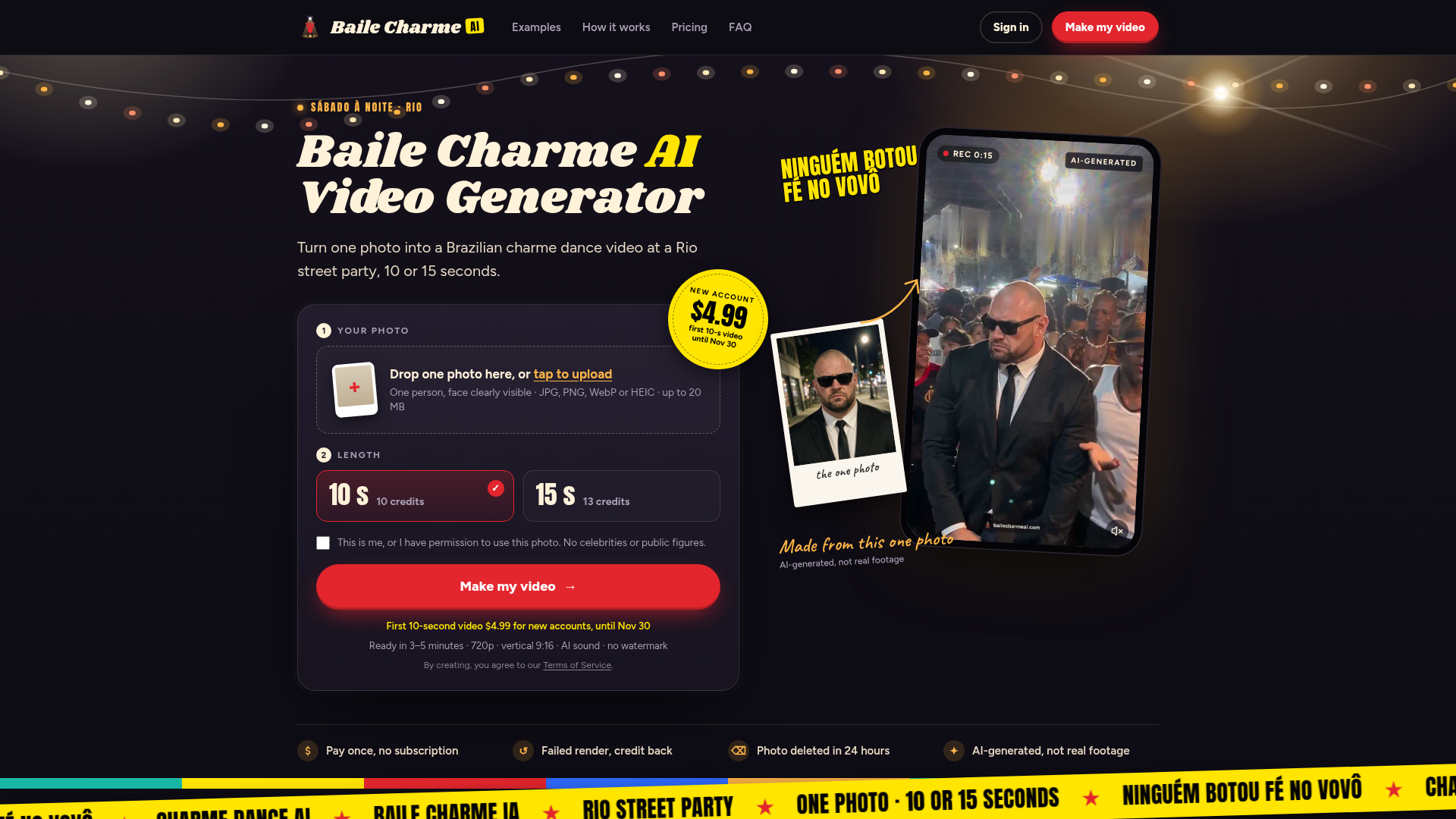
Baile Charme AI is the clearest choice for anyone who wants to drop into the baile charme TikTok trend without filming anything or touching a CapCut template. The output is locked to one specific dance style and one scene, so it has zero flexibility compared to a general AI video tool like Runway. Skip it if you need anything beyond a single-person charme clip: multi-person shots, custom scenes, and resolutions above 720p are all off the table.
What is Baile Charme AI?
Baile Charme AI is a browser-based generator for the baile charme trend on TikTok. Upload one clear photo of one person and the AI places them, in their own clothes, on an AI-made Rio night street party and has them dance charme, the slow synchronized Rio dance to R&B and soul. Choose a 10- or 15-second cut. You get a vertical 9:16 720p MP4 with AI sound and no watermark in about 3 to 5 minutes, ready for TikTok, Reels or Shorts. No app and no CapCut template needed. People and scenes are AI-generated, not real footage.
How we scored Baile Charme AI
Capability scores 14 because the tool does its one job (photo-to-charme-dance video) with a clear, working pipeline, but it is structurally limited to one person, one scene, one dance style, and a 720p ceiling, while Runway and other directory competitors handle arbitrary scenes, higher resolutions, and multi-shot editing. Ease of use scores 21 because the workflow is genuinely minimal: no app, no account setup beyond a credit purchase, and a browser-first experience with automatic credit refunds on failure. Value scores 15 because there is no free tier and no preview, the entry price is $6.99 (or $4.99 on the expiring first-purchase offer) for a single short video, and the per-video cost does not drop dramatically even at the highest Baile pack ($34.99 for eight 10-second videos, roughly $4.37 each). Delivery scores 13 because no independent user sentiment or third-party reviews were found to verify output quality claims, the tool is very new (listed October 2026), and the search surfaced several similarly branded competing sites that create brand confusion a buyer would need to navigate carefully.
Pros and cons
What we liked
- Zero-friction workflow: one photo, one credit purchase, one MP4 delivered in three to five minutes with no app or template required.
- Credits never expire and failed renders return their credits automatically, so there is no financial risk from a bad generation.
- Photos are deleted within 24 hours of render completion and are explicitly not used to train the tool's own models, which is a stronger privacy commitment than most trend-video tools make.
Where it falls short
- Hard-capped at one person per video and one scene type (Rio street party charme dance): there is no way to generate a different dance, a different setting, or a group shot, which is a structural limit no amount of credits can work around.
- Output resolution tops out at 720p with no higher-resolution option, which is below what Runway and other general AI video tools offer and may look soft on modern phone screens.
- No free preview or trial generation: the cheapest entry point is $4.99 (first-purchase offer, expiring November 30, 2026) or $6.99 at standard Solo pricing, so buyers must pay before seeing how their specific photo renders.
Key features
Baile Charme AI pricing
One-time credit packs only, no subscription. Solo: $6.99 for 10 credits (one 10-second video). Crew: $16.99 for 30 credits (three 10-second videos or two 15-second videos). Baile: $34.99 for 80 credits (eight 10-second videos or six 15-second videos). A first-purchase offer gives new accounts 10 credits for $4.99, valid until November 30, 2026. A 10-second video costs 10 credits; a 15-second video costs 13. Credits never expire and failed renders return their credits automatically.
| Plan | Price | Who it is for |
|---|---|---|
| First Purchase Offer | $4.99 | 10 credits (one 10-second video). Available once per new account only. Offer ends November 30, 2026. |
| Solo | $6.99 | 10 credits, enough for one 10-second video. Credits never expire. |
| Crew | $16.99 | 30 credits, enough for three 10-second videos or two 15-second videos. Marked as most popular; saves 19% versus Solo per credit. |
| Baile | $34.99 | 80 credits, enough for eight 10-second videos or six 15-second videos. Saves 37% versus Solo per credit. |
Pricing reflects what we saw at time of review (2026-10). Always confirm current pricing on the tool's own site.
Who should use Baile Charme AI?
This tool is built for a specific moment: a solo creator, a social media manager running a brand account, or someone who just saw the baile charme trend on their For You page and wants their own version posted before the trend cools. The workflow is genuinely fast. Upload a photo, pick 10 or 15 seconds, buy credits if you do not have them, and the video is ready in a few minutes with no editing required.
Anyone who needs more than that should look elsewhere. If you want to produce multiple people in one shot, customize the scene, work at 1080p, or generate video from text prompts rather than photos, Runway gives you a general-purpose AI video studio that handles all of those. If your goal is avatar-based video with a talking head rather than a dance clip, HeyGen is the better fit and is already in this directory.
Skip it if: Anyone needing multi-person shots, custom scenes, or higher than 720p output
Frequently asked questions
Is there a free trial or free preview before I pay?+
No. There is no free tier and no preview generation. The cheapest entry is the first-purchase offer at $4.99 for new accounts (one 10-second video), available until November 30, 2026. After that, the minimum spend is $6.99 for the Solo pack.
How long does it take to get my video?+
The tool estimates three to five minutes per render. That figure comes from the product's own documentation and applies to both the 10-second and 15-second cuts.
Can I put two people or a group in one video?+
No. Each video uses one photo of one person. Multi-person shots are not supported at this time.
What happens if my video fails to generate?+
The credits used for a failed render are returned to your account automatically. No support request is needed.
What resolution and format is the output?+
Every video is a vertical 9:16 MP4 at 720p with AI-generated sound and no watermark. There is no higher-resolution option currently available.
Do credits expire if I do not use them?+
Credits from any pack do not expire while the service is operating, according to the tool's own terms of service. There is no time limit on using them.
More AI Video Tools
See all categoriesGet your tool listed on 300+ directories.
One listing here is a strong start. But the founders who get discovered everywhere are listed everywhere. Our sister site, Free AI Directories, submits your tool to 300+ AI directories for you, every single one by hand, by a real person.
It is a one-time payment of $49, no subscription, and you can follow along as the submissions land. Prefer the slow route? The same site keeps a free list of 450+ directories you can work through yourself.
Get my tool listed on 300+ directoriesOne-time payment, no subscription · 100% human submissions · Free list of 450+ directories included.