
EarDub
Chrome and Edge extension that dubs YouTube, Udemy, Coursera, and Bilibili videos into 75 languages with synced AI voices, no upload
Are you the maker? Claim this listing to keep info, pricing and screenshots current. Verified via your tool's domain email.
EarDub is the right pick for students and self-learners who want to follow foreign-language video courses or tutorials without reading subtitles the whole time. The free tier's 30-minute daily cap is genuinely restrictive for anyone watching more than one lecture a day, and the tool only runs on desktop Chrome and Edge, so mobile learners are out. If you need to produce translated or dubbed video files rather than just watch them in your browser, HeyGen is the better fit.
What is EarDub?
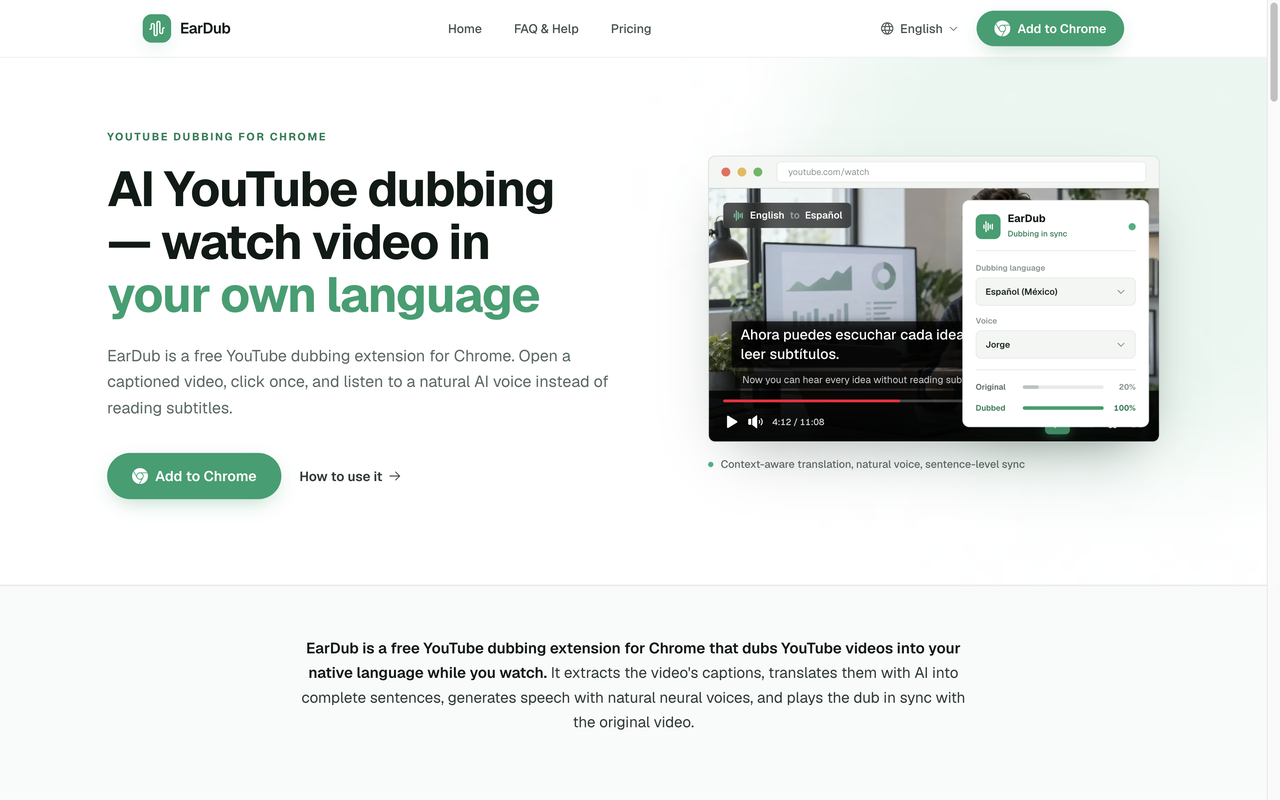
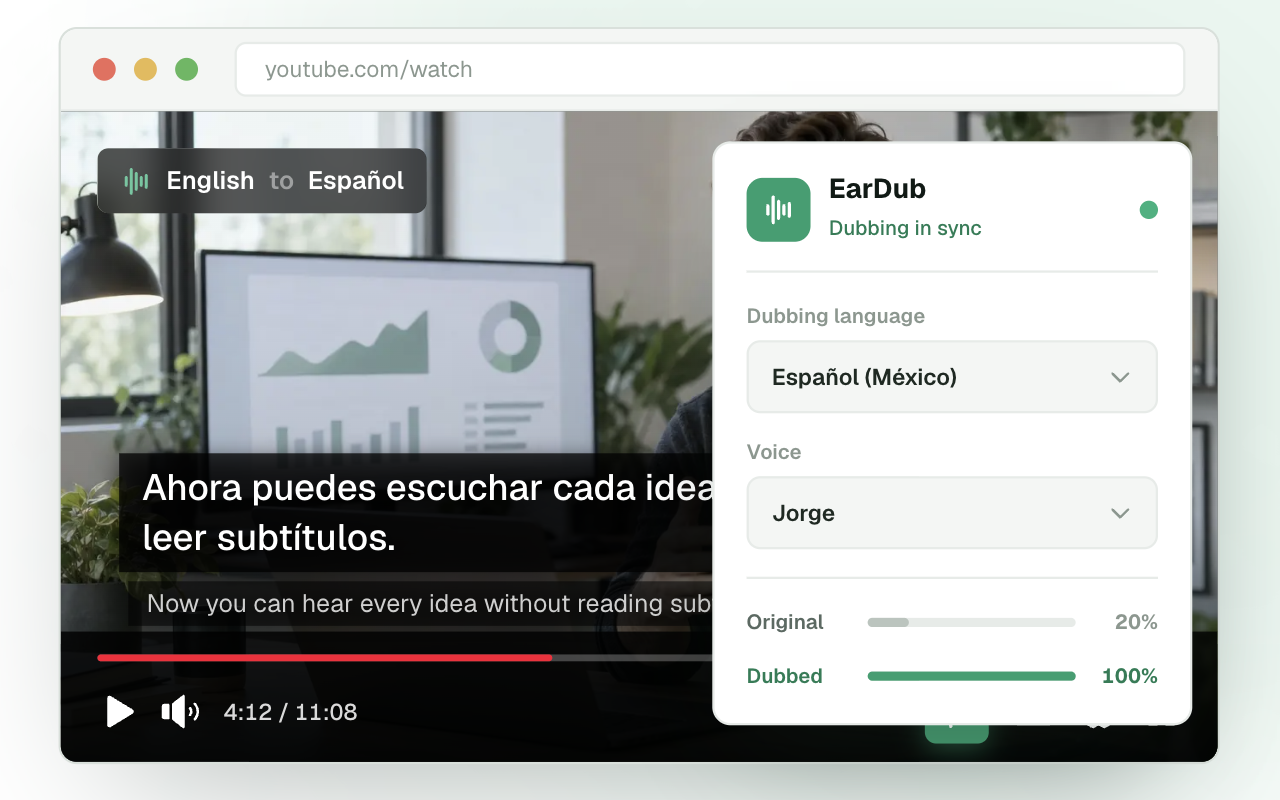
EarDub is a Chrome and Edge browser extension that dubs online videos into the viewer's language as they play, with no file upload or rendering required. It supports 75 languages and more than 300 AI voices, translates captions with full-video context awareness to keep terminology consistent, and synchronizes the dubbed audio to the original speaker. It works on YouTube, X, Bilibili, Gumroad, Udemy, and Coursera, and on paid plans it can dub videos that have no captions by recognizing the audio directly.
The tool is built for viewers rather than content creators. A free plan offers 30 minutes of dubbing per day with no credit card required. Paid plans add higher monthly dubbing quotas, longer per-video limits, more daily videos, and access to uncaptioned video dubbing. Chapter summaries and study notes (exportable to PDF or Word on Pro) are available for captioned videos of five minutes or more. EarDub runs only on desktop Chrome and Edge and does not support live streams.
How we scored EarDub
Capability scores 19 because the context-aware translation and auto-advance on course platforms are genuinely useful differentiators, but the hard exclusion of uncaptioned video dubbing on Udemy and Coursera (the two platforms most relevant to its core audience) is a real feature gap. Ease of use scores 21 because the install-click-listen flow has almost no friction and no upload step, which is the whole point of a browser extension. Value scores 20 because the free tier requires no card and the Pro plan at $19.99/month covers unlimited personal use, which is fair for the category. Delivery scores 12 because no user review data, ratings, or independent assessments surfaced in search, the product appears to be an indie tool with no documented track record of scale, and the social media presence could not be confirmed at all, making it hard to assess how reliably the service performs or how responsive support actually is.
Pros and cons
What we liked
- Context-aware translation keeps domain terms and idioms consistent across a full video, not just sentence by sentence.
- Free plan requires no credit card and gives 30 minutes of dubbing per day, enough to evaluate the quality before paying.
- Auto-advance on Udemy and Coursera means a dubbed course plays through without manual intervention between lectures.
Where it falls short
- The free plan's 30-minute daily cap resets every 24 hours with no rollover, so a single 45-minute lecture exhausts the day's quota and leaves nothing for a second video.
- Speech recognition for uncaptioned videos is not supported on Udemy or Coursera, only on YouTube, X, Bilibili, and Gumroad, which is a real gap for paid course learners.
- Desktop Chrome and Edge only: no mobile app, no Safari support, and no way to dub videos on a phone or tablet regardless of plan.
Key features
EarDub pricing
Free plan at $0/month with 30 minutes of dubbing per day (up to 180 minutes/month, up to 3 videos/day). Basic at $9.99/month for 60 hours of dubbing per month, up to 180 minutes per video, up to 20 videos per day. Pro at $19.99/month for unlimited dubbing time (fair use), any video length, unlimited videos per day. Yearly billing saves about 35% on Pro and about 30% on Basic. No credit card required for the free plan.
| Plan | Price | Who it is for |
|---|---|---|
| Free | $0/mo | 30 minutes of dubbing per day (up to 180 minutes per month), up to 60 minutes per video, up to 3 videos per day, chapter summaries on 3 videos per day, AI context-aware translation. No credit card required. Videos without captions and study notes are not included. |
| Basic | $9.99/mo | 60 hours of dubbing per month, up to 180 minutes per video, up to 20 videos per day, videos without captions included, chapter summaries, 3 study-note videos per month, AI context-aware translation, email support. Billed monthly; yearly billing saves approximately 30%. |
| Pro | $19.99/mo | Unlimited dubbing time (fair use), any video length, unlimited videos per day, videos without captions included, chapter summaries, study notes with PDF and Word export, AI context-aware translation, email response within 24 hours. Billed monthly; yearly billing saves approximately 35%. |
Pricing reflects what we saw at time of review (2026-10). Always confirm current pricing on the tool's own site.
Who should use EarDub?
EarDub fits anyone who regularly watches foreign-language video content on a desktop browser and wants to listen rather than read. The clearest use cases are students taking Udemy or Coursera courses in a language they are still learning, developers following English-language technical tutorials, and researchers or journalists who need to get through interview footage or documentary content in another language quickly. The auto-advance feature on Udemy and Coursera is a genuine time-saver for course learners working through multi-lecture series.
Anyone who needs a dubbed video file they can download, share, or publish should look elsewhere. HeyGen handles video translation and dubbing as a production output, including lip-sync on avatar videos, and is the right tool if the goal is delivering localized content to an audience rather than consuming it yourself. Mobile-first viewers will also find EarDub useless since it has no app and the extension does not run on phones or tablets.
Skip it if: Mobile viewers, live-stream watchers, or anyone who needs a dubbed video file to share
Tags
Frequently asked questions
Does EarDub work on videos without subtitles?+
Yes, but only on Basic ($9.99/month) and Pro ($19.99/month) plans, and only on YouTube, X, Bilibili, and Gumroad. Udemy and Coursera require captions on all plans.
Is there a free plan and what are its real limits?+
The free plan gives 30 minutes of dubbing per day with no credit card required. Minutes reset daily with no rollover, so a single lecture over 30 minutes will exhaust the day's quota. Videos without captions and study notes are not available on the free plan.
Does EarDub work on mobile?+
No. EarDub is a desktop browser extension for Chrome and Edge only. There is no iOS or Android app and no Safari support.
Does replaying a video use up my dubbing quota?+
No. Quota is counted by actual dubbed playback time, not by the number of times you open a video. Replaying the same video does not consume additional minutes.
What does 'unlimited' mean on the Pro plan?+
No cap on dubbing time, video length, or daily video count for normal personal viewing. Automated, commercial-scale, or shared-account use may be restricted under the terms of service.
Can I get a refund if I upgrade and change my mind?+
Eligible subscriptions can be refunded under conditions set out in EarDub's terms of service. You can cancel anytime under 'Manage subscription' and keep access until the end of the billing period.
More AI Video Tools
See all categoriesGet your tool listed on 300+ directories.
One listing here is a strong start. But the founders who get discovered everywhere are listed everywhere. Our sister site, Free AI Directories, submits your tool to 300+ AI directories for you, every single one by hand, by a real person.
It is a one-time payment of $49, no subscription, and you can follow along as the submissions land. Prefer the slow route? The same site keeps a free list of 450+ directories you can work through yourself.
Get my tool listed on 300+ directoriesOne-time payment, no subscription · 100% human submissions · Free list of 450+ directories included.