
FormFlux
AI form builder with unlimited free responses, conversational mode, and built-in Stripe payments for founders and small teams.
Are you the maker? Claim this listing to keep info, pricing and screenshots current. Verified via your tool's domain email.
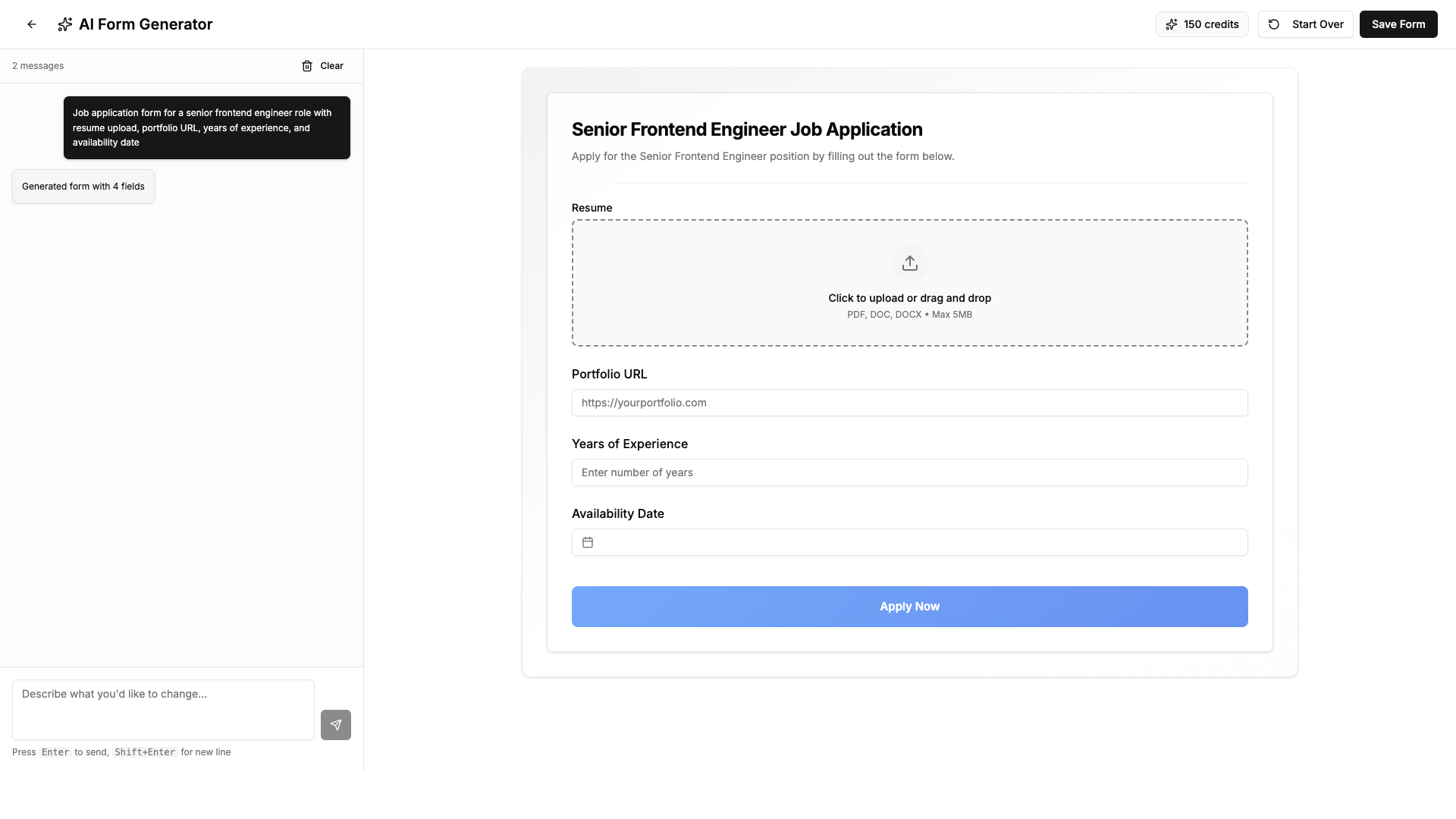
FormFlux is the right pick for a solo founder or small team that wants AI-generated forms, a clean conversational mode, and Stripe payments without paying a third-party cut, all under one roof. The AI generation is credit-gated, meaning free users get no AI credits at all and paid plans cap out at 500 credits per month on the $79 Business tier. Teams that need deep logic, enterprise compliance, or a mature template library will find Typeform or Jotform better equipped.
What is FormFlux?
FormFlux is a web-based form builder that uses AI to generate complete forms from plain-language descriptions. Users describe what they need, and the tool produces a form with appropriate field types, validation rules, and conditional logic, which can then be customized before publishing. Forms run in either a standard single-page layout or a conversational one-question-at-a-time mode. The platform covers surveys, lead capture, job applications, event registration, and payment collection via Stripe.
The free plan supports unlimited forms and responses with no response caps. Paid plans, starting at $19 per month, add AI generation credits, advanced analytics with field-level drop-off tracking, integrations with Zapier, Google Sheets, Slack, and Calendly, file uploads, CAPTCHA and password protection, and branding removal. A one-time Lifetime Pro option is available at $199 for users who prefer to avoid recurring subscriptions.
How we scored FormFlux
Capability scores 19 because the dual-mode forms, calculated fields on the free plan, field-level analytics, and zero-fee Stripe payments are genuinely useful features that most competitors charge more for, but the AI credit system is thin at the lower tiers (50 credits/month on Starter) and the 10MB file upload cap is a hard ceiling with no upgrade path. Ease of use scores 20 because the drag-and-drop builder with live preview, AI generation from plain English, and a clean pricing page suggest low onboarding friction, though the tool is web-only with no mobile app. Value scores 20 because the $199 Lifetime Pro is a strong deal for a solo user or small team, and the free plan's unlimited responses beat Typeform's 100-response cap at $29/month; the Starter at $19/month is competitive for what it includes. Delivery scores 13 because FormFlux has zero published user reviews on Capterra and GetApp as of this review, making it impossible to verify that the product delivers on its claims at scale; the complete absence of social proof for a tool that has been listed on multiple directories is a meaningful trust gap, and the AI credit gating on the free plan contradicts the implicit promise of the headline feature.
Pros and cons
What we liked
- Unlimited forms and responses on every plan, including free, with no response caps that force upgrades mid-campaign.
- Stripe payments included from the $29 Pro plan with no platform transaction fee on top of Stripe's standard rate.
- Dual display modes (standard and conversational) available on all plans, including free, without needing a separate tool or premium toggle.
Where it falls short
- AI generation is completely unavailable on the free plan: zero credits are included, so the tool's headline feature requires a paid subscription to try at all.
- File uploads cap at 10MB per file across all paid tiers, with no higher limit available even on the $79 Business plan, which will block use cases involving video, large PDFs, or design files.
- No mobile app: FormFlux is web-only, so form builders and respondents on mobile are working through a browser with no native experience.
Key features
FormFlux pricing
Free plan at $0 forever with unlimited forms and responses but no AI credits. Starter at $19/month (50 AI credits, 1 seat). Pro at $29/month (150 AI credits, 3 seats, Stripe payments). Business at $79/month (500 AI credits, 10 seats). Lifetime Pro one-time at $199 (equivalent to Pro features, 150 AI credits/month, 3 seats, forever). AI credit top-ups available at $10 for 25 credits.
| Plan | Price | Who it is for |
|---|---|---|
| Free | $0 | Unlimited forms and responses, all basic field types, standard and conversational modes, share via link, export responses in CSV or JSON. No AI credits, no integrations, no analytics, no embeds, no branding removal. |
| Starter | $19/month | Everything in Free plus 50 AI credits/month, 1 seat, advanced analytics and drop-off tracking, all integrations (Zapier, Google Sheets, Slack, etc.), file uploads up to 10MB each, auto-fetch branding from URL, brand presets, email notifications and auto-responders, all embed types and QR codes, CAPTCHA and rate limiting and password protection, response limits and close-after-date, branding removal, priority support. |
| Pro | $29/month | Everything in Starter plus 150 AI credits/month, 3 team seats, and Stripe payment collection. |
| Business | $79/month | Everything in Pro plus 500 AI credits/month and 10 team seats. |
| Lifetime Pro | $199 one-time | All Pro features permanently: 150 AI credits/month, 3 team seats, Stripe payments, all integrations, analytics, embeds, branding removal, and priority support. No recurring subscription. |
Pricing reflects what we saw at time of review (2026-09). Always confirm current pricing on the tool's own site.
Who should use FormFlux?
A solo founder who needs a lead capture form, a job application flow, and a payment-enabled checkout form without subscribing to three separate tools is the clearest fit. The $29 Pro plan covers all three in one place, and the Lifetime Pro at $199 makes sense for anyone who expects to use it for two or more years. Small marketing teams of up to 10 people can share a Business plan at $79 per month and get 500 AI credits to draft forms across campaigns.
Anyone who needs a free tool with no credit card and no AI gating should look at Google Forms instead. Teams that need a polished, template-rich experience with enterprise SSO and compliance features will be better served by Typeform or Jotform, both of which have longer track records and larger template libraries than FormFlux currently offers.
Skip it if: Enterprise teams needing compliance, audit trails, or a large established template ecosystem.
FormFlux alternatives
Tags
Frequently asked questions
Does the free plan include AI form generation?+
No. The free plan includes zero AI credits. AI generation starts with the Starter plan at $19/month, which includes 50 credits per month. Free users can still build forms manually with the drag-and-drop editor.
What does FormFlux charge on top of Stripe payments?+
Nothing. FormFlux takes no platform fee on transactions. You pay Stripe's standard processing rate only. Payment collection requires the Pro plan at $29/month or higher.
Is there a lifetime deal available?+
Yes. The Lifetime Pro plan costs $199 as a one-time payment and gives you Pro-level features permanently, including 150 AI credits per month and 3 team seats, with no recurring subscription.
What is the file upload size limit?+
File uploads are capped at 10MB per file on all paid plans, including Business at $79/month. There is no higher-limit tier listed on the pricing page.
How many team members can I add?+
Starter supports 1 seat, Pro and Lifetime Pro support 3 seats, and Business supports 10 seats. The pricing page mentions an enterprise plan inquiry option for larger teams.
What happens to my responses if I cancel a paid plan?+
The pricing page lists a FAQ about cancellation but does not display the answer in the extracted content. This should be verified directly on the site before publishing.
More AI Productivity Tools
See all categoriesGet your tool listed on 300+ directories.
One listing here is a strong start. But the founders who get discovered everywhere are listed everywhere. Our sister site, Free AI Directories, submits your tool to 300+ AI directories for you, every single one by hand, by a real person.
It is a one-time payment of $49, no subscription, and you can follow along as the submissions land. Prefer the slow route? The same site keeps a free list of 450+ directories you can work through yourself.
Get my tool listed on 300+ directoriesOne-time payment, no subscription · 100% human submissions · Free list of 450+ directories included.