
Genjutsu AI
One-time credit packs for motion-transfer video generation: swap faces, outfits, or scenes while keeping the original clip's movement.
Are you the maker? Claim this listing to keep info, pricing and screenshots current. Verified via your tool's domain email.
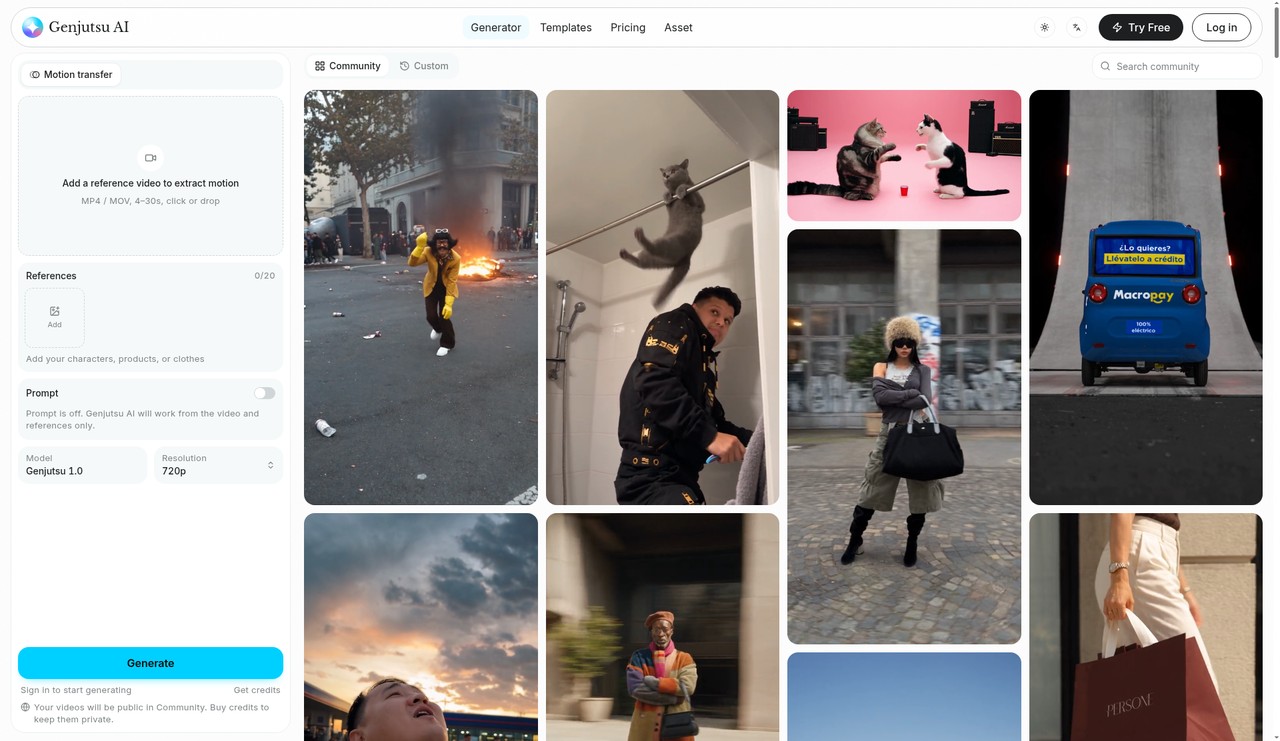
Genjutsu AI is the right pick for social creators who want to drop their own photos into a viral clip's motion without committing to a monthly subscription. Its per-second credit pricing is transparent and the no-expiry policy is genuinely buyer-friendly, but output tops out at 1080p and the credit math gets expensive fast at higher resolutions compared to subscription-based rivals like Runway. Anyone who needs text-to-video generation, advanced editing timelines, or avatar-based talking-head videos should look elsewhere.
What is Genjutsu AI?
Genjutsu AI is a web app that turns a reference clip into a new video. Upload a 4-30s video (or pick a community template), add up to 20 reference images (face, outfit, product, scene), and it recreates the original motion, camera moves and timing. It works by motion transfer, with output from 480p to 1080p. No subscription: one-time credit packs that never expire, failed generations are refunded automatically, and the exact credit cost is shown before you generate. New users get 50 free credits.
How we scored Genjutsu AI
Capability scores 16 because the tool does motion transfer well on paper but is strictly single-purpose: no text-to-video, no audio tools, no editing timeline, and a 1080p output ceiling that named competitors like Runway exceed with broader model access. Ease of use scores 20 because the pre-generation credit display, automatic refund on failure, and template library all reduce friction meaningfully for a non-technical user. Value scores 17 because the no-expiry, no-subscription credit model is genuinely buyer-friendly, but the per-clip cost at 1080p ($5 to $6.50 per 15-second clip) is steep for high-volume creators, and the $9 Starter pack covers roughly one 1080p clip before it is gone. Delivery scores 13 because no independent user reviews, sentiment data, or third-party coverage specific to genjutsu.app could be found, the tool exists in a crowded namespace of similarly named unaffiliated products which creates real consumer confusion, and the submitted description's claim of up to 20 reference images could not be verified against the live pricing page.
Pros and cons
What we liked
- No-subscription credit model with credits that never expire makes it genuinely low-commitment: buy once, use whenever.
- Credit cost is shown on the Generate button before every render, and failed generations are refunded automatically, removing the usual guesswork around AI generation costs.
- Community template library lets users skip sourcing a reference clip entirely, lowering the barrier to chasing trending formats.
Where it falls short
- High-resolution output is expensive per clip: a single 15-second video at 1080p costs 165 credits, meaning the $9 Starter pack covers roughly one clip at that resolution before it is exhausted.
- No API access, no team workspace, and no desktop app are listed anywhere on the site, making it unsuitable for developers or teams wanting to integrate generation into a broader pipeline.
- The tool is strictly motion-transfer only: there is no text-to-video mode, no timeline editor, and no audio tools, so any post-generation editing requires a separate application.
Key features
Genjutsu AI pricing
Three one-time credit packs: Starter at $9 for 230 credits (~$0.039/credit), Pro at $39 for 1,110 credits (~$0.035/credit, saves 10%), and Max at $99 for 3,000 credits (~$0.033/credit, saves 15%). Credits never expire. New accounts receive 50 free credits valid for 30 days. No subscription, no auto-renewal. Generation costs 3 credits/second at 480p, 7 at 720p, and 11 at 1080p.
| Plan | Price | Who it is for |
|---|---|---|
| Free Credits (New Accounts) | Free | 50 credits on signup, valid for 30 days only. Enough to test a short clip at 480p or 720p before purchasing a pack. |
| Starter | $9 | 230 credits, one-time payment, no subscription. Credits never expire. Approximately 5 videos at 480p, 2 at 720p, or 1 at 1080p for a 15-second clip. No watermark, commercial use included. |
| Pro | $39 | 1,110 credits, one-time payment, saves 10% vs. Starter (~$0.035/credit). Approximately 24 videos at 480p, 10 at 720p, or 6 at 1080p for a 15-second clip. Credits never expire, no watermark, commercial use included. |
| Max | $99 | 3,000 credits, one-time payment, saves 15% vs. Starter (~$0.033/credit). Approximately 66 videos at 480p, 28 at 720p, or 18 at 1080p for a 15-second clip. Credits never expire, no watermark, commercial use included. Failed generations refunded automatically. |
Pricing reflects what we saw at time of review (2026-10). Always confirm current pricing on the tool's own site.
Who should use Genjutsu AI?
Genjutsu AI fits solo creators and small social media teams who regularly chase viral video formats. A TikTok or Reels creator who wants to insert themselves or a product into a trending motion clip, without paying a monthly fee during slow months, will find the no-subscription credit model genuinely useful. The community template library also makes it accessible to someone who does not have a source clip ready: pick a format, upload a photo, generate.
Anyone running a production studio, building avatar-based explainer videos, or needing a full post-production workflow should look elsewhere. Runway is the stronger choice for teams that need text-to-video generation, multi-track editing, and a broader model library under a predictable monthly plan. HeyGen is the right pick if the goal is talking-head avatar videos or AI-powered video translation rather than motion transfer from a source clip.
Skip it if: Teams needing text-to-video, talking-head avatars, or a full editing timeline
Frequently asked questions
Do Genjutsu AI credits expire?+
Credits purchased in any pack never expire. The 50 free credits given to new accounts are the only exception: those are valid for 30 days only.
How much does a 15-second video cost at 1080p?+
At 11 credits per second, a 15-second clip at 1080p costs 165 credits. From the $9 Starter pack (230 credits), that is roughly $6.46 per clip. From the $99 Max pack (3,000 credits), the same clip costs about $5.45.
Is there a subscription option?+
No. Genjutsu AI sells only one-time credit packs at $9, $39, and $99. Nothing renews automatically and nothing needs to be canceled.
What happens if my generation fails?+
Failed and timed-out generations are refunded to your credit balance automatically. Refunded credits do not expire.
Can I use generated videos in ads or sell products with them?+
Yes. The terms of service permit commercial use including ads, storefronts, and social media. The site notes that you should only upload photos you have the right to use and must not use someone else's likeness without permission.
Do I need my own source video to use Genjutsu AI?+
No. The community template library provides pre-built motion clips. You can pick a template, add your own reference photos, and generate without uploading any footage of your own.
More AI Video Tools
See all categoriesGet your tool listed on 300+ directories.
One listing here is a strong start. But the founders who get discovered everywhere are listed everywhere. Our sister site, Free AI Directories, submits your tool to 300+ AI directories for you, every single one by hand, by a real person.
It is a one-time payment of $49, no subscription, and you can follow along as the submissions land. Prefer the slow route? The same site keeps a free list of 450+ directories you can work through yourself.
Get my tool listed on 300+ directoriesOne-time payment, no subscription · 100% human submissions · Free list of 450+ directories included.