
GStory Image to Video AI
A credit-based image-to-video converter for creators who want animated clips without editing software.
Are you the maker? Claim this listing to keep info, pricing and screenshots current. Verified via your tool's domain email.
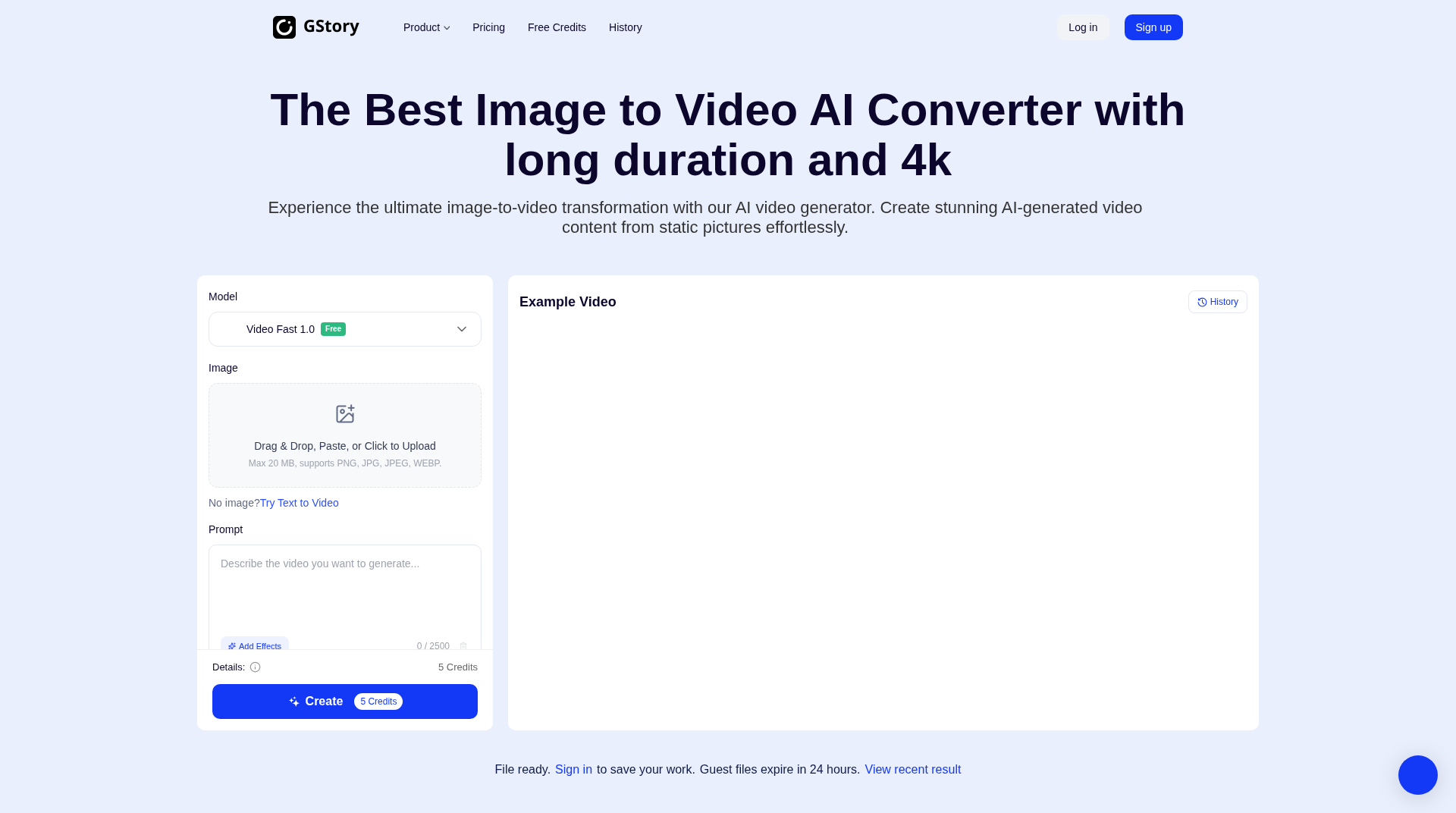
GStory suits solo creators and marketers who need fast, no-install image-to-video clips for social media and can tolerate a credit-per-generation cost model. Runway offers substantially more control over motion, camera movement, and output fidelity for anyone willing to pay more. If you need reliable 4K output, multi-scene editing, or API access for production workflows, GStory's current feature set will leave you short.
What is GStory Image to Video AI?
GStory Image to Video AI turns a still image, plus an optional text prompt, into a short video. It suits creators and marketers who want animated clips fast without editing skills. A free tier lets you try it before paying.
How we scored GStory Image to Video AI
Ease of use scores well because the no-install, no-sign-in guest workflow and single-prompt interface genuinely lower the barrier to entry, and the 60-second duration ceiling is a real differentiator at this price point. Capability lands in the mid-teens because the 'Video Fast 1.0' model label and the absence of any independent benchmark data undercut the bold Kling AI and Veo3 comparisons on the homepage; the tool does many things adequately but leads in none of them compared to Runway. Value is weak: the pricing page publishes no named paid tiers or monthly prices, making cost forecasting impossible for a buyer, and the 50-credit free allowance (10 video generations) runs out quickly. Delivery scores low because the G2 rating claim (5.0 from 1,500+ reviews) could not be independently verified, the pricing transparency gap is a real trust issue, and the marketing claims significantly outpace the evidence available about actual output quality.
Pros and cons
What we liked
- No installation and no sign-in required for basic use; guest generations are available immediately, with files held for 24 hours.
- Supports video durations up to 60 seconds, which is longer than many entry-level image-to-video tools that cap at 4 or 5 seconds.
- Broad platform coverage beyond image-to-video: watermark removal, background removal, 4K enhancement, subtitle generation, and video translation are all accessible under one account and credit balance.
Where it falls short
- The pricing page lists only a single named tier (Free Account) and does not publish clear monthly subscription prices or credit bundle costs, making it genuinely difficult to forecast what ongoing use will cost before you start spending credits.
- Guest-generated files expire after 24 hours and are not saved, which means any workflow requiring review-and-download cycles across a day risks losing output without a paid account.
- The platform self-compares to Kling AI and Veo3 on its homepage, but those are purpose-built generation models with significantly more motion fidelity; GStory's 'Video Fast 1.0' model label suggests a speed-optimized rather than quality-optimized approach, and no independent benchmark data exists to validate the 4K quality claim.
Key features
GStory Image to Video AI pricing
Free account with 50 credits on signup (plus 30 credits for referrals); each image-to-video generation costs 5 credits. Credits in subscription plans are priced at $0.030 each. A third-party source references a 100-credit/month plan at $2.99, but the live pricing page only names the Free Account tier and does not list named paid subscription tiers with monthly prices. Paid credit top-ups are implied but not detailed on the visible pricing page.
| Plan | Price | Who it is for |
|---|---|---|
| Free Account | Free | 50 credits on signup plus 30 credits for referring friends. Free previews of all features. Image-to-video costs 5 credits per generation; image generation costs 2 credits per image; video translation costs 4 credits per 10 seconds. No sign-in required for limited guest use, but guest files expire after 24 hours. |
| Credit Subscriptions (details unconfirmed) | $0.030 per credit in subscription plans | Subscription plans price credits at $0.030 each. A third-party source references a 100-credit/month option at $2.99, but named paid tiers with monthly prices are not published on the visible pricing page. Full tier details require verification against the live pricing page. |
Pricing reflects what we saw at time of review (2026-11). Always confirm current pricing on the tool's own site.
Who should use GStory Image to Video AI?
A freelance photographer or e-commerce seller who wants to animate product shots for Instagram Reels or TikTok will get real value here. The no-install, no-timeline workflow means you can go from a JPEG to a downloadable video clip in under a minute, and the 50 free signup credits cover ten test generations before any money changes hands. Social media managers producing high volumes of short animated posts will also find the per-credit model workable at scale, provided output quality meets their standards.
Anyone building a production video workflow, running a team that needs consistent branded output, or requiring API access to automate generation should look elsewhere. Runway is the better fit for that audience: it offers camera motion controls, a proper editing environment, and a track record with professional video teams that GStory has not yet established.
Skip it if: Production teams needing fine-grained motion control or API-driven video pipelines
Frequently asked questions
Do I need to create an account to use GStory Image to Video AI?+
No. Guest use is available without sign-in, but generated files expire after 24 hours and are not saved to a history. Signing up for a free account preserves your work and gives you 50 credits.
How much does one image-to-video generation cost?+
Each generation costs 5 credits. Free accounts start with 50 credits (10 free generations), and subscription plan credits are priced at $0.030 each.
What video lengths does the tool support?+
The tool supports durations of 3, 5, and up to 60 seconds per clip, which is longer than many competing entry-level image-to-video tools.
What image formats and file sizes are accepted?+
The uploader accepts PNG, JPG, JPEG, and WEBP files up to 20 MB.
Is there an API for automated or bulk generation?+
One third-party source mentions API access for business and e-commerce workflows, but the public pricing page does not list an API tier or confirm availability. Verify directly with GStory before building any integration.
How does GStory compare to Kling AI or Veo3 in output quality?+
GStory's own marketing page claims quality rivaling Kling AI and Veo3, but no independent benchmark data supports this. The current generation model is labeled 'Video Fast 1.0', suggesting speed is prioritized over maximum fidelity.
More AI Video Tools
See all categoriesGet your tool listed on 300+ directories.
One listing here is a strong start. But the founders who get discovered everywhere are listed everywhere. Our sister site, Free AI Directories, submits your tool to 300+ AI directories for you, every single one by hand, by a real person.
It is a one-time payment of $49, no subscription, and you can follow along as the submissions land. Prefer the slow route? The same site keeps a free list of 450+ directories you can work through yourself.
Get my tool listed on 300+ directoriesOne-time payment, no subscription · 100% human submissions · Free list of 450+ directories included.