
Image 2 Image
A browser-based workspace for prompt-driven image editing, with side-by-side before/after comparison and one-time credit packs that never
Are you the maker? Claim this listing to keep info, pricing and screenshots current. Verified via your tool's domain email.
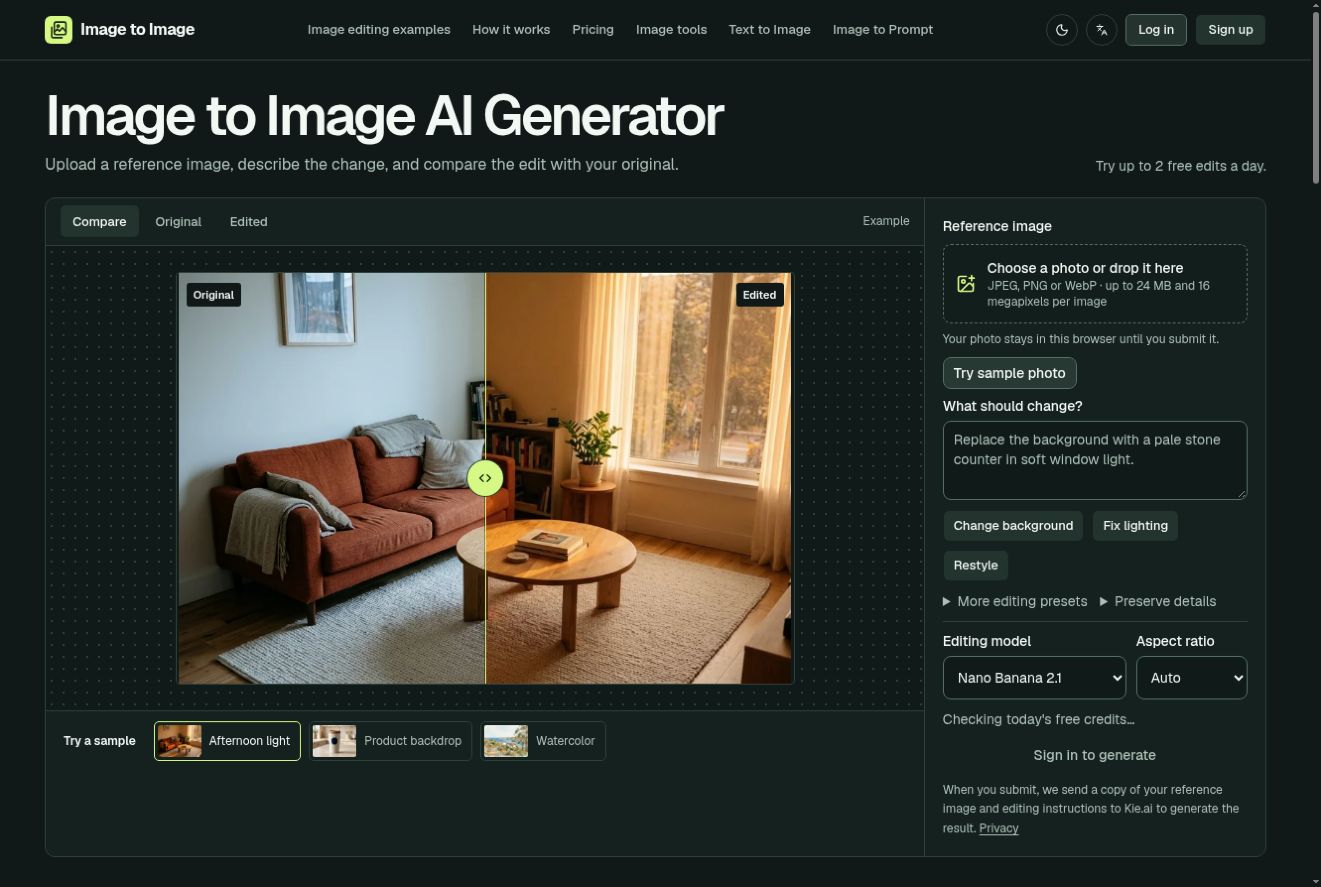
Image 2 Image suits occasional editors who want a low-commitment, pay-once tool for background swaps, lighting changes, and style transfers without a monthly subscription. Its one-time credit model is genuinely unusual in this category, but the tool is thin on model choice and advanced controls compared to Leonardo.Ai. Anyone doing high-volume or professional creative work will outgrow it fast.
What is Image 2 Image?
Image 2 Image is a browser-based image to image workspace. Start with a photo or illustration, describe a change to its background, lighting or style, then compare and download the result. It also offers image-to-prompt descriptions, text-to-image generation and style transfer. Crop and resize tools are free. The homepage offers up to two guest edits daily while the trial is open; signed-in AI generation uses credits.
How we scored Image 2 Image
Capability lands at 14 because the tool covers only single-image editing with no batch processing, no API, no named model, and no style-consistency features, while named directory competitors like Leonardo.Ai offer all of these even on lower tiers. Ease of use scores 18 because the workflow is genuinely simple, the credit cost is shown before generation, and free crop/resize tools lower the barrier to entry. Value scores 16: the non-expiring one-time packs starting at $6.99 are a real differentiator, but the 6 starter credits and two guest edits are thin compared to Leonardo.Ai's resetting daily free allowance, and the per-edit cost at higher resolutions is opaque without knowing the underlying model. Delivery scores 10 because no independent user reviews specific to image-2-image.com were found, the underlying model is undisclosed, and the tool's actual output quality cannot be verified from available evidence, which is a meaningful trust gap for a buyer considering a purchase.
Pros and cons
What we liked
- One-time credit packs with no expiry date, starting at $6.99 for 140 credits, are a genuinely rare pricing model in a category dominated by monthly subscriptions.
- Credit cost per generation is shown inside the editor before you commit, so there are no surprise charges when switching models or resolution settings.
- Free crop and resize tools require no account or credits, giving the site a usable no-cost entry point beyond the 6 starter credits.
Where it falls short
- The tool does not disclose which AI model powers its image-to-image edits on the pricing or features page, making it impossible to benchmark output quality against named competitors before buying.
- No batch processing, API access, or project-level style consistency tools exist at any credit tier, which is a hard limit that competitors like Leonardo.Ai clear even on lower paid plans.
- The guest trial (up to two edits per day without signing in) and the 6 starter credits on signup are thin compared to free tiers from directory competitors; Leonardo.Ai provides daily token allowances that reset, giving new users far more room to evaluate the tool before spending money.
Key features
Image 2 Image pricing
Five one-time credit packs ranging from $6.99 (140 credits, about 70 edits) to $99.99 (3,600 credits, about 1,800 edits). Credits never expire. New accounts receive 6 free starter credits after email verification. No monthly subscription option listed. Default edits at 1K resolution cost 2 credits each; higher-resolution or alternative model settings cost more credits, shown before generation.
| Plan | Price | Who it is for |
|---|---|---|
| Starter | $6.99 | 140 image credits (about 70 edits at default 1K settings). One-time purchase, credits never expire. New accounts also receive 6 free starter credits after email verification. |
| Essential | $19.99 | 500 image credits (about 250 edits at default 1K settings). One-time purchase, credits never expire. |
| Plus | $29.99 | 900 image credits (about 450 edits at default 1K settings). One-time purchase, credits never expire. |
| Studio | $49.99 | 1,600 image credits (about 800 edits at default 1K settings). One-time purchase, credits never expire. |
| Max | $99.99 | 3,600 image credits (about 1,800 edits at default 1K settings). One-time purchase, credits never expire. |
Pricing reflects what we saw at time of review (2026-11). Always confirm current pricing on the tool's own site.
Who should use Image 2 Image?
A blogger or small business owner who needs to swap product backgrounds or refresh a handful of photos each month will find Image 2 Image's one-time credit packs genuinely practical. The $6.99 Starter pack covering roughly 70 edits is a low-risk entry point, and the side-by-side comparison view makes it easy to decide whether an edit is worth keeping before downloading.
Anyone running a design studio, managing a content pipeline, or needing consistent character identity across dozens of outputs should look elsewhere. Leonardo.Ai offers far deeper model selection, style-locking, and a free tier with daily token allowances that reset, making it a better fit for creators who generate images regularly. Midjourney's subscription model, starting at $10 per month, gives high-volume users unlimited fast generations that a credit-pack tool simply cannot match at scale.
Skip it if: Professional designers or high-volume creators who need model depth, batch processing, or API access
Image 2 Image alternatives
Frequently asked questions
Do unused credits expire?+
No. All five credit packs are one-time purchases and the credits never expire, according to the pricing page.
How many edits does each credit pack cover?+
At default 1K resolution settings, each edit costs 2 credits. The Starter pack ($6.99, 140 credits) covers about 70 edits; the Max pack ($99.99, 3,600 credits) covers about 1,800 edits. Higher-resolution or alternative model settings cost more credits, and the editor shows the cost before you generate.
Can I try the tool before buying credits?+
New accounts receive 6 starter credits after email verification. Guest users (no account) can run up to two AI edits per day while the guest trial is open. Crop and resize tools are free with no account required.
What file formats does the tool accept?+
The tool accepts JPG, PNG, and WEBP uploads for image editing.
Is there a subscription plan or only one-time packs?+
The pricing page lists only one-time credit packs. No monthly or annual subscription option is shown.
Which AI model powers the image edits?+
The site does not publicly name the underlying model on its pricing or features pages. The editor does show the credit cost of different model and resolution options before generation, but model names are not disclosed in publicly available documentation.
More AI Image Generators tools
See all categoriesGet your tool listed on 300+ directories.
One listing here is a strong start. But the founders who get discovered everywhere are listed everywhere. Our sister site, Free AI Directories, submits your tool to 300+ AI directories for you, every single one by hand, by a real person.
It is a one-time payment of $49, no subscription, and you can follow along as the submissions land. Prefer the slow route? The same site keeps a free list of 450+ directories you can work through yourself.
Get my tool listed on 300+ directoriesOne-time payment, no subscription · 100% human submissions · Free list of 450+ directories included.