
Image26 (GPT Images 2.6)
An independent web generator for GPT Image 2.6 stills, animated GIFs, and SVG exports, built for creators who want direct access without
Are you the maker? Claim this listing to keep info, pricing and screenshots current. Verified via your tool's domain email.
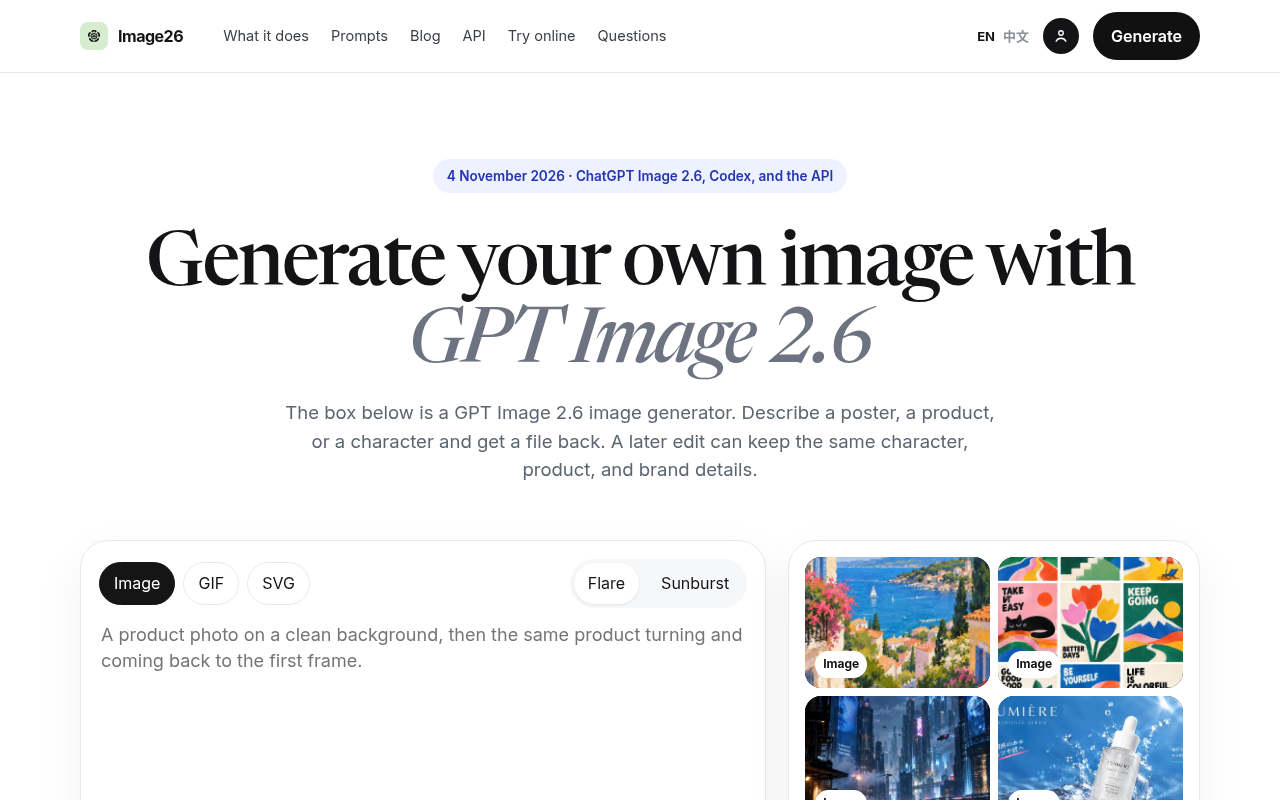
Image26 suits marketers and solo creators who want a dedicated browser interface for GPT Image 2.6 without routing through ChatGPT or the raw API. Its Flare and Sunburst modes, mark-and-edit, and SVG export are genuinely useful, but the credit-pack pricing offers less volume than Leonardo.Ai at a comparable price point. Anyone who already pays for ChatGPT Plus or a direct OpenAI API account should skip it entirely, since the underlying model is already available to them.
What is Image26 (GPT Images 2.6)?
Image26 (gptimages26.com) is an independent web-based generator and editor built on OpenAI's GPT Image 2.6 model. It produces still images, 9-frame animated GIFs, and SVG graphics from text prompts, and supports region-specific edits through a mark-and-edit tool that changes one part of an image while leaving the rest unchanged.
The tool offers two generation modes: Flare for fast drafts and Sunburst for consistent output across multiple edits of the same character, product, or brand asset. Quality and planning complexity are set separately, giving users control over generation cost and detail level. Image26 operates on a paid credit-pack model and is not affiliated with OpenAI.
How we scored Image26 (GPT Images 2.6)
Capability lands at 17 because the three-output-type coverage (still, GIF, SVG) plus mark-and-edit and dual generation modes are genuinely useful features for a single-model wrapper, but the GIF output is fixed at 9 frames with no documented timing control, and the tool adds nothing beyond what the underlying GPT Image 2.6 model already does natively in ChatGPT. Ease of use scores 17 for a clean, focused interface with a prompt library and per-generation credit previews, offset by the complete absence of a free tier that would let new users learn the tool without financial commitment. Value scores 12 because the Basic plan at $9.90/month for 200 credits is a direct markup on a model already included in ChatGPT's free and paid plans; any user with an existing OpenAI subscription is paying twice for the same output, which is a structural value problem specific to this tool. Delivery scores 12 because Image26 is a brand-new tool with no documented user reviews, no confirmed social presence, and a business model that depends on continued API access to a third-party model it does not control; the thin public track record and the wrapper-dependency risk both weigh against a higher score here.
Pros and cons
What we liked
- Covers three output types (still image, GIF, SVG) from a single prompt interface, which most single-model wrappers do not offer.
- Flare mode returns a result in roughly 6 seconds at low quality, making rapid iteration practical without waiting through a full generation cycle.
- Mark-and-edit lets users change a specific region of an image without regenerating the whole scene, preserving product details and brand consistency.
Where it falls short
- No free tier at all: the Basic plan starts at approximately $9.90/month for 200 credits, so there is no way to test output quality before spending money.
- The tool is a wrapper around a model already available inside ChatGPT on every plan and via the OpenAI API, meaning any user with an existing OpenAI subscription is paying twice for the same model.
- GIF output is fixed at 9 frames and 200ms per frame with no documented option to change frame count or timing, which limits use cases beyond short social loops.
Key features
Image26 (GPT Images 2.6) pricing
Paid credit packs only, no free tier. Basic plan is approximately $9.90/month for 200 credits; Pro plan is approximately $19.90/month for 500 credits. Annual billing reduces the cost by roughly 40%. Payments processed via PayPal.
| Plan | Price | Who it is for |
|---|---|---|
| Basic | $9.90/mo | Approximately 200 credits per month. Paid via PayPal. Annual billing available at roughly 40% off the monthly rate. |
| Pro | $19.90/mo | Approximately 500 credits per month. Paid via PayPal. Annual billing available at roughly 40% off the monthly rate. |
Pricing reflects what we saw at time of review (2026-11). Always confirm current pricing on the tool's own site.
Who should use Image26 (GPT Images 2.6)?
Image26 fits a specific gap: the creator or small marketing team that wants GPT Image 2.6 output on demand but does not have a ChatGPT Plus subscription or the technical setup for direct API calls. A freelance social media manager who needs quick product shots and reaction GIFs without managing API keys will find the interface approachable. A small e-commerce brand that wants consistent product visuals across multiple edits, using Sunburst mode, is another reasonable fit.
Anyone already paying for ChatGPT Plus, Pro, or Business should look elsewhere; the underlying model is already included in those plans at no extra per-image cost. For users who want a richer creative platform with more model options and a larger community, Leonardo.Ai offers a token-based plan with broader output types and a free tier to test before committing money.
Skip it if: Users who already have ChatGPT Plus, Pro, or direct OpenAI API access
Frequently asked questions
Is Image26 made by OpenAI?+
No. Image26 (gptimages26.com) is an independent third-party tool that uses the GPT Image 2.6 model via the OpenAI API. It has no affiliation with OpenAI.
Is there a free trial or free tier?+
No. Image26 operates on paid credit packs only. The Basic plan starts at approximately $9.90/month for 200 credits, with no documented free credits for new accounts.
How much does each image cost in credits?+
The site states that a Flare, standard-quality still image costs about 1 credit. Higher quality settings and GIF or SVG outputs consume more credits; the exact per-format costs are shown in the generator before you confirm a generation.
Can I use Image26 if I already have ChatGPT Plus?+
Technically yes, but it makes little financial sense. GPT Image 2.6 is included in ChatGPT on every plan, including the free tier for basic images, so Plus subscribers would be paying again for the same model through Image26's credit system.
What GIF settings does Image26 support?+
GIFs are generated at 9 frames and 200ms per frame. There is no documented option to change the frame count or frame rate within the current interface.
What payment methods does Image26 accept?+
The site processes payments via PayPal. No other payment methods are documented on the pricing page.
More AI Image Generators tools
See all categoriesGet your tool listed on 300+ directories.
One listing here is a strong start. But the founders who get discovered everywhere are listed everywhere. Our sister site, Free AI Directories, submits your tool to 300+ AI directories for you, every single one by hand, by a real person.
It is a one-time payment of $49, no subscription, and you can follow along as the submissions land. Prefer the slow route? The same site keeps a free list of 450+ directories you can work through yourself.
Get my tool listed on 300+ directoriesOne-time payment, no subscription · 100% human submissions · Free list of 450+ directories included.