
KwaFlux
Local AI desktop app for Windows and Mac that repairs, upscales, and retouches video, photos, and audio without uploading your files.
Are you the maker? Claim this listing to keep info, pricing and screenshots current. Verified via your tool's domain email.
KwaFlux is the clearest choice for creators who want a perpetual-license alternative to subscription-only tools like Topaz Video AI, covering video, photo, and audio enhancement in one offline app for a one-time $199.99. Its breadth is real, but output quality versus a dedicated specialist like Topaz has not been independently benchmarked, and the app is desktop-only with no browser or mobile option. If you need cloud-based generative video creation rather than enhancement of existing footage, look at Runway instead.
What is KwaFlux?
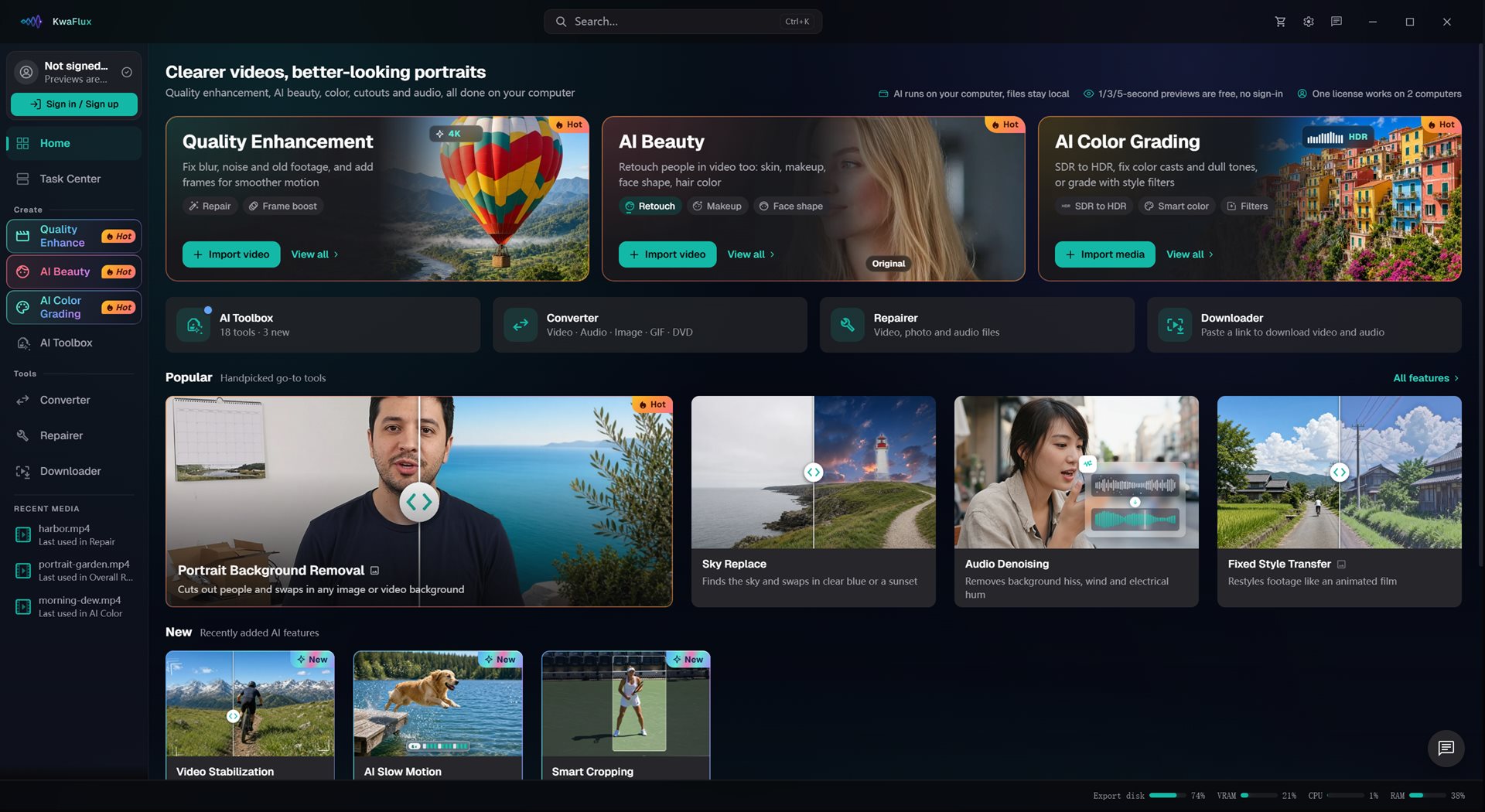
KwaFlux is a local AI desktop application for Windows and Mac that processes video, photo, and audio enhancement entirely on the user's own GPU. Media files are never uploaded, and there are no per-job credits or cloud queues. The app ships with more than 30 modules covering video upscaling to 4K, frame interpolation up to 144 fps, AI color grading including SDR-to-HDR conversion, background and object removal, AI beauty retouching, audio denoising, vocal separation, subtitle editing, and file repair and conversion utilities.
KwaFlux is sold under three license types: a monthly subscription at $35.99/month, a yearly subscription at $79.99/year, and a one-time Perpetual License at $199.99. Every tier activates the full feature set on up to two devices, with Windows and Mac supported in any combination. Free 1-, 3-, and 5-second previews are available without an account, letting users evaluate AI output on their own clips before purchasing.
How we scored KwaFlux
Capability scores 20 because the 30-plus module count covering video, photo, audio, and file utilities in one local app is genuinely broad, and specific features like frame interpolation up to 144 fps and SDR-to-HDR grading are concrete differentiators; the score stops short of the top range because no independent quality benchmarks exist and the site itself declines to make a quality comparison against named rivals. Ease of use scores 19 based on the no-account free preview system and a clear three-tier pricing structure with no credit complexity, though the desktop-only constraint and lack of visible documentation depth prevent a higher mark. Value scores 21 because the $199.99 Perpetual License covering all modules on 2 devices with no recurring fees is a concrete, verifiable price advantage over Topaz Video AI at $299/year, and the monthly entry point at $35.99 is reasonable for occasional use. Delivery scores 12 because no independent user sentiment, third-party reviews, or output-quality evidence was found; the product's claims rest entirely on vendor-produced copy and a GitHub readme, which is thin for a paid tool asking $199.99, and the major-version upgrade caveat on the perpetual license is a real trust question for a product sold on ownership economics.
Pros and cons
What we liked
- Perpetual License at $199.99 covers all 30-plus modules on 2 devices with no recurring fees, a concrete cost advantage over subscription-only rivals like Topaz Video AI at $299/year.
- Fully offline processing: AI runs on the user's GPU and media is never uploaded, which matters for sensitive footage and removes cloud queue delays.
- Free 1-, 3-, and 5-second previews across every AI module require no account, so buyers can test results on their own clips before spending anything.
Where it falls short
- The Perpetual License explicitly covers free updates only within the current major version; a future major-version upgrade would require a separate purchase, a meaningful caveat for a tool sold partly on ownership economics.
- No independent output-quality benchmarks exist for KwaFlux versus Topaz Video AI or other dedicated upscalers; the site itself states it compares price and license type, not image quality, leaving buyers without a clear quality signal.
- Desktop-only with no browser access, no mobile app, and no API; users who need to process files remotely or integrate enhancement into an automated pipeline have no path to do so.
Key features
KwaFlux pricing
Three tiers, no free export. 1 Month License at $35.99/month (renews monthly, cancel anytime). 1 Year License at $79.99/year (roughly $6.67/month, renews yearly). Perpetual License at $199.99 as a one-time payment. All tiers include every module and 2-device activation. A 14-day refund applies to first purchases before paid export is materially used. Prices exclude tax.
| Plan | Price | Who it is for |
|---|---|---|
| 1 Month License | $35.99 | All 30-plus modules, 2-device activation (Windows and Mac in any mix), monthly renewal that can be cancelled anytime. Tax excluded. |
| 1 Year License | $79.99 | All 30-plus modules, 2-device activation, yearly renewal cancellable anytime. Unused time is credited if upgrading to the Perpetual License. Approximately $6.67/month. Tax excluded. |
| Perpetual License | $199.99 | One-time payment for all 30-plus modules, 2-device activation, no renewals. Free updates within the current major version. 14-day refund on first purchase before paid export is materially used. Tax excluded. |
Pricing reflects what we saw at time of review (2026-11). Always confirm current pricing on the tool's own site.
Who should use KwaFlux?
Solo video editors, archivists, and hobbyist filmmakers who regularly work with older or low-quality footage will get the most out of KwaFlux. The perpetual license makes particular sense for anyone who processes media in batches and resents per-minute cloud billing, or for anyone handling sensitive footage (medical, legal, personal) that cannot leave their machine. A freelancer who restores family archives, a YouTuber who shoots in low light and needs consistent denoising, or a small production house that wants one tool covering video, photo, and audio cleanup without managing multiple subscriptions are all natural fits.
If your work centers on generating new video from text prompts or building AI avatar content rather than enhancing existing footage, KwaFlux is the wrong tool entirely. Runway is the better pick for generative video creation and browser-based collaborative editing. If you need AI-driven talking-head or avatar video for marketing, HeyGen covers that use case and KwaFlux does not.
Skip it if: Creators who need generative AI video creation or a browser-based workflow
Frequently asked questions
Is there a free version of KwaFlux?+
There is no free export tier. The app lets you run 1-, 3-, and 5-second previews across all AI modules without creating an account, but exporting full results, converting files, repairing files, and downloading from a link all require an active paid plan.
What does the Perpetual License actually cost and what does it cover?+
The Perpetual License is a one-time payment of $199.99 (tax excluded). It covers every module in the app, activates on 2 devices, and includes free updates within the current major version. A future major-version upgrade would be sold separately.
Does KwaFlux upload my video files to the cloud?+
No. All AI processing runs on your own GPU and media files are never uploaded to a server. There is no cloud queue and no per-minute processing fee.
Can I use one license on both a Windows PC and a Mac?+
Yes. Every plan supports 2 devices in any Windows and Mac combination. You can remove a device from your dashboard to free up a slot when switching machines.
How does the monthly plan compare to the perpetual license in cost?+
The 1 Month License costs $35.99/month. At that rate, roughly six months of billing equals the $199.99 Perpetual License price, after which the perpetual option costs nothing more.
What is the refund policy?+
KwaFlux offers a 14-day refund on your first purchase, provided paid export has not been materially used. The refund is processed through Stripe.
More AI Video Tools
See all categoriesGet your tool listed on 300+ directories.
One listing here is a strong start. But the founders who get discovered everywhere are listed everywhere. Our sister site, Free AI Directories, submits your tool to 300+ AI directories for you, every single one by hand, by a real person.
It is a one-time payment of $49, no subscription, and you can follow along as the submissions land. Prefer the slow route? The same site keeps a free list of 450+ directories you can work through yourself.
Get my tool listed on 300+ directoriesOne-time payment, no subscription · 100% human submissions · Free list of 450+ directories included.