NeuralSound
Browser-based AI stem splitter that separates vocals, instruments, and up to six tracks from any audio or video file.
Are you the maker? Claim this listing to keep info, pricing and screenshots current. Verified via your tool's domain email.
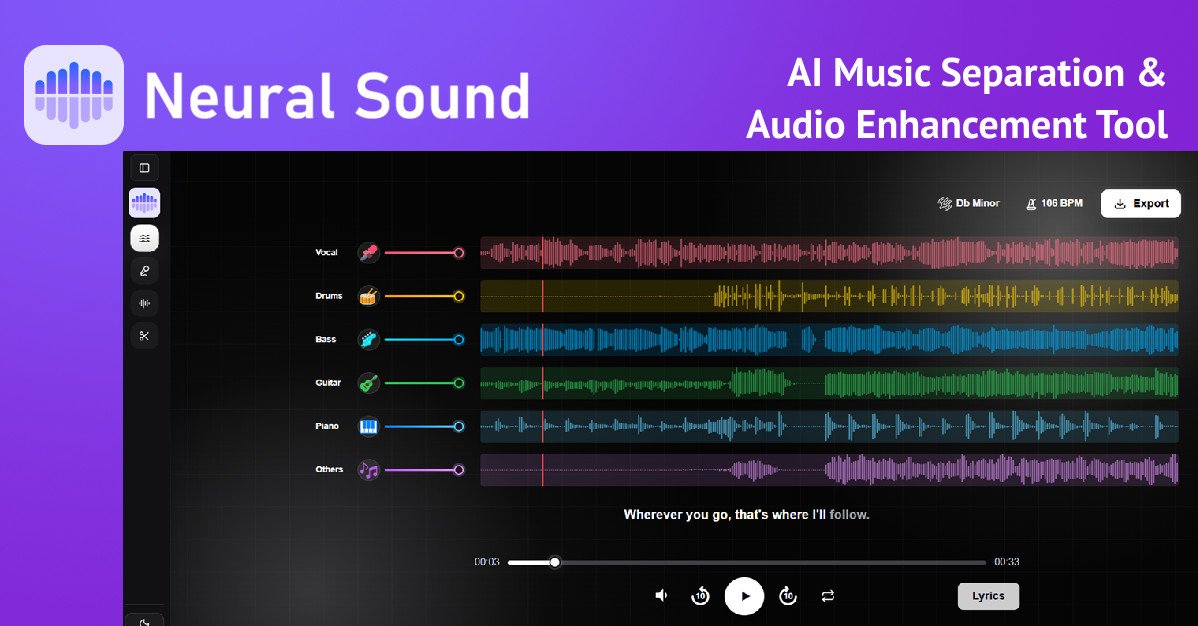
NeuralSound is the right pick for a musician or karaoke creator who needs fast, browser-based stem separation without installing anything. Its credit-pack pricing is cheaper per minute than many subscription rivals at the Professional tier, but the free tier is limited to 30-second previews, which makes it harder to evaluate before buying. If you need voice cloning, text-to-speech, or anything beyond source separation, look elsewhere entirely.
What is NeuralSound?
NeuralSound is an AI audio source separation platform developed by Neural Sound LLC. It runs in the browser and as a native app on iOS and Android, letting users upload audio or video files and split them into individual stems including vocals, drums, bass, guitar, piano, and other instruments, with no software installation required.
The platform covers vocal removal, instrumental isolation, background music removal, acapella extraction, and full multi-stem splitting in 2-track, 4-track, and 6-track modes. Additional tools include time-synchronized lyrics for practice, pitch shifting, tempo control, section looping, and a karaoke video maker available in the mobile apps. It is used by musicians, DJs, producers, content creators, and karaoke enthusiasts.
How we scored NeuralSound
Capability scores well because 6-stem separation with a Hi-Fi 2-track mode and a published benchmark against named competitors is a genuinely stronger feature set than most browser-based tools in this category offer. Ease of use is high: no installation, broad format support, and a clean three-step workflow keep friction low. Value is pulled down by the 30-second preview cap, which forces buyers to spend money before they can hear full results on their own tracks, and by the absence of any flat monthly plan, making costs unpredictable for frequent users. The Professional pack at $29.99 for 600 minutes is reasonable for burst use but not for daily workflows. Delivery scores in the low teens because no substantial independent user review corpus was found to validate quality claims, the free tier is functionally a teaser rather than a usable product, and the feature split between mobile and web creates an inconsistent experience that the marketing does not clearly disclose.
Pros and cons
What we liked
- Six-stem separation mode (vocals, drums, bass, guitar, piano, other) with a Hi-Fi 2-track option is more granular than most browser-based competitors offer.
- Publishes a reproducible benchmark with 35 playable audio samples comparing its separation quality against Moises and Fadr, a rare show of transparency in this category.
- Professional credit pack ($29.99 for 600 minutes) works out to about five cents per minute, making it cost-effective for project-based or burst workloads compared to monthly subscription tools.
Where it falls short
- The free tier is capped at 30-second previews only, so you cannot hear a full stem separation before purchasing credits. This is a meaningful barrier for first-time buyers evaluating quality on their own tracks.
- Pricing is credit packs with no recurring subscription option visible on the pricing page, which means heavy daily users cannot budget a flat monthly cost and may find per-minute pricing adds up unpredictably.
- The mobile apps (iOS and Android) include AI music generation and a karaoke video maker that do not appear in the web tool, creating a feature gap depending on which platform you use.
Key features
NeuralSound pricing
Three one-time credit packs: Starter ($9.99 for 120 minutes), Creator ($19.99 for 240 minutes), and Professional ($29.99 for 600 minutes). Free use is limited to 30-second previews only. No recurring subscription tier was found on the pricing page.
| Plan | Price | Who it is for |
|---|---|---|
| Free Preview | Free | 30-second preview of any separated stem. No full-length downloads without purchasing credits. |
| Starter | $9.99 | 120 minutes of audio processing. Described as suited for hobbyists making cover songs or mashups. |
| Creator | $19.99 | 240 minutes of audio processing. Positioned for regular music production, remixes, and content creation. |
| Professional | $29.99 | 600 minutes of audio processing. Described as the best-value plan for high-volume projects and professional use. |
Pricing reflects what we saw at time of review (2026-10). Always confirm current pricing on the tool's own site.
Who should use NeuralSound?
A solo guitarist who wants to pull the bass and drums out of a reference track for practice, or a karaoke creator who needs clean instrumentals fast, will get real value here. The browser-first approach means no DAW plugin setup, and the per-minute credit model suits people who process audio in bursts rather than every day. The rehearsal features, pitch control, tempo adjustment, and synced lyrics, make it more than a one-click download tool for that audience.
Anyone who needs voice synthesis, text-to-speech, or voice cloning should skip NeuralSound entirely; it does not do any of those things. For that work, ElevenLabs is the stronger choice in this directory, covering realistic TTS and voice cloning at a comparable price point. Podcasters or video producers who need audio mastering rather than stem separation will find Waveroom Mastering a better fit, since it is purpose-built for that task.
Skip it if: Teams needing voice synthesis, TTS, or API access
NeuralSound alternatives
Frequently asked questions
Is NeuralSound actually free to use?+
Partially. You can upload a file and hear a 30-second preview of any separated stem at no cost. Full-length stem downloads require purchasing a credit pack, starting at $9.99 for 120 minutes of processing.
What file formats does NeuralSound accept?+
It accepts MP3, WAV, FLAC, and M4A for audio, and MP4, WebM, MOV, and AVI for video. No software installation is needed; processing happens in the browser.
How many stems can NeuralSound separate a track into?+
Up to six: vocals, drums, bass, guitar, piano, and other instruments. It also offers 2-stem and 4-stem modes, plus a Hi-Fi 2-track mode for higher-fidelity vocal and instrumental splits.
Does NeuralSound have a monthly subscription plan?+
No subscription plan was visible on the pricing page as of October 2026. Pricing is one-time credit packs: $9.99 for 120 minutes, $19.99 for 240 minutes, or $29.99 for 600 minutes.
Are the mobile apps the same as the web tool?+
Not entirely. The iOS and Android apps include AI music generation and a karaoke video maker that do not appear to be available in the browser-based web tool.
How long are uploaded files kept on NeuralSound's servers?+
According to the App Store listing, audio files are automatically deleted from NeuralSound's servers after 24 hours.
More AI Voice, Audio & Music tools
See all categoriesGet your tool listed on 300+ directories.
One listing here is a strong start. But the founders who get discovered everywhere are listed everywhere. Our sister site, Free AI Directories, submits your tool to 300+ AI directories for you, every single one by hand, by a real person.
It is a one-time payment of $49, no subscription, and you can follow along as the submissions land. Prefer the slow route? The same site keeps a free list of 450+ directories you can work through yourself.
Get my tool listed on 300+ directoriesOne-time payment, no subscription · 100% human submissions · Free list of 450+ directories included.