Notion AI
AI built into Notion for drafting, summarizing and searching your workspace.
Are you the maker? Claim this listing to keep info, pricing and screenshots current. Verified via your tool's domain email.
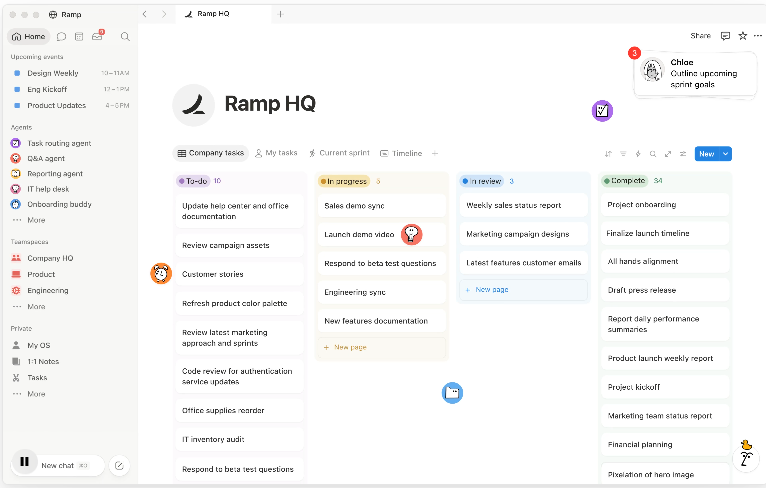
Notion AI is best for teams whose data already lives in Notion and who want AI that writes, searches, and automates inside that workspace. It falls short if your content lives outside Notion or if you need predictable AI usage costs. If you’re looking for a standalone AI chatbot or cheaper per-use pricing, consider ChatGPT or Claude instead.
What is Notion AI?
Notion AI brings AI features into the Notion workspace, letting users draft, rewrite, translate, summarize, and brainstorm directly inside pages. It also offers tools like AI Meeting Notes for transcribing and summarizing meetings, Enterprise Search across Notion and connected apps, and autonomous agents that can execute multi-step tasks. Access depends on your Notion plan: Free and Plus provide limited trial access, while Business and Enterprise enable the full AI suite. Notion AI is aimed at teams and individuals who already organize work inside Notion and want AI that works where their content lives.
How we scored Notion AI
Notion AI earns strong marks for capability with its deep integration into Notion and features like agents, meeting notes, and enterprise search. Ease of use is solid since it works inside a familiar workspace. Value is weaker because full AI requires Business pricing and credit-based usage can be unpredictable. Delivery is strong - features are real and integrated - but the credit model and limited trial on lower tiers hold it back.
Pros and cons
What we liked
- AI tools operate directly inside Notion pages, databases, and connected apps
- Business plan ($20/user/month) includes full AI suite: Agent, Meeting Notes, Enterprise Search, Research Mode
- Custom Agents let you automate multi-step workflows using triggers and run on-demand
Where it falls short
- Free and Plus only offer limited trial access - full AI requires Business or Enterprise
- AI usage is credit-based and can lead to unpredictable costs, especially with Custom Agents
- Not useful if your data lives outside Notion - standalone AI tools may serve better
Key features
Notion AI pricing
| Plan | Price | Who it is for |
|---|---|---|
| Free | $0 per member/month | Basic Notion features plus limited trial access to Notion AI |
| Plus | $10 per member/month | Everything in Free plus trial AI access and enhanced site customization |
| Business | $20 per member/month | Full Notion AI suite (Agent, Meeting Notes, Enterprise Search, Research Mode, image generation) |
| Enterprise | Custom pricing | All Business features plus advanced security, SCIM, audit logs, zero data retention |
Pricing reflects what we saw at time of review (2026-08). Always confirm current pricing on the tool's own site.
Who should use Notion AI?
If your team already stores most of its docs, notes, and workflows in Notion, and you want AI that writes, searches, and automates inside that environment, Notion AI makes sense. It’s especially useful for teams that want meeting transcription, workspace-wide search across Slack or Drive, or agents that act on your behalf. If your content lives mostly outside Notion or you need predictable, low-cost AI usage, you should look at standalone tools like ChatGPT or Claude instead.
Notion AI alternatives
Frequently asked questions
Which Notion plans include full AI features?+
Only the Business plan at $20 per user per month (or $24 billed monthly) and Enterprise include the full AI suite; Free and Plus only offer limited trial access.
How does Notion AI billing work for Custom Agents?+
Custom Agents consume Notion Credits at a rate of $10 per 1,000 credits, and you can run out of included credits and incur on-demand charges.
Can Notion AI search across other tools like Slack or Google Drive?+
Yes, Enterprise Search lets you query across Notion and connected apps like Slack, Google Drive, Jira, and more with cited results.
Is AI image generation available to all users?+
No, image generation is available only on Business and Enterprise plans and is limited to 10 generations per 24 hours and 30 per 30 days per user.
More AI Productivity Tools
See all categoriesGet your tool listed on 300+ directories.
One listing here is a strong start. But the founders who get discovered everywhere are listed everywhere. Our sister site, Free AI Directories, submits your tool to 300+ AI directories for you, every single one by hand, by a real person.
It is a one-time payment of $49, no subscription, and you can follow along as the submissions land. Prefer the slow route? The same site keeps a free list of 450+ directories you can work through yourself.
Get my tool listed on 300+ directoriesOne-time payment, no subscription · 100% human submissions · Free list of 450+ directories included.