
Spreadsheet to App
An AI builder that turns Excel, CSV, and Google Sheets into hosted web apps while keeping Google Sheets as the live database.
Are you the maker? Claim this listing to keep info, pricing and screenshots current. Verified via your tool's domain email.
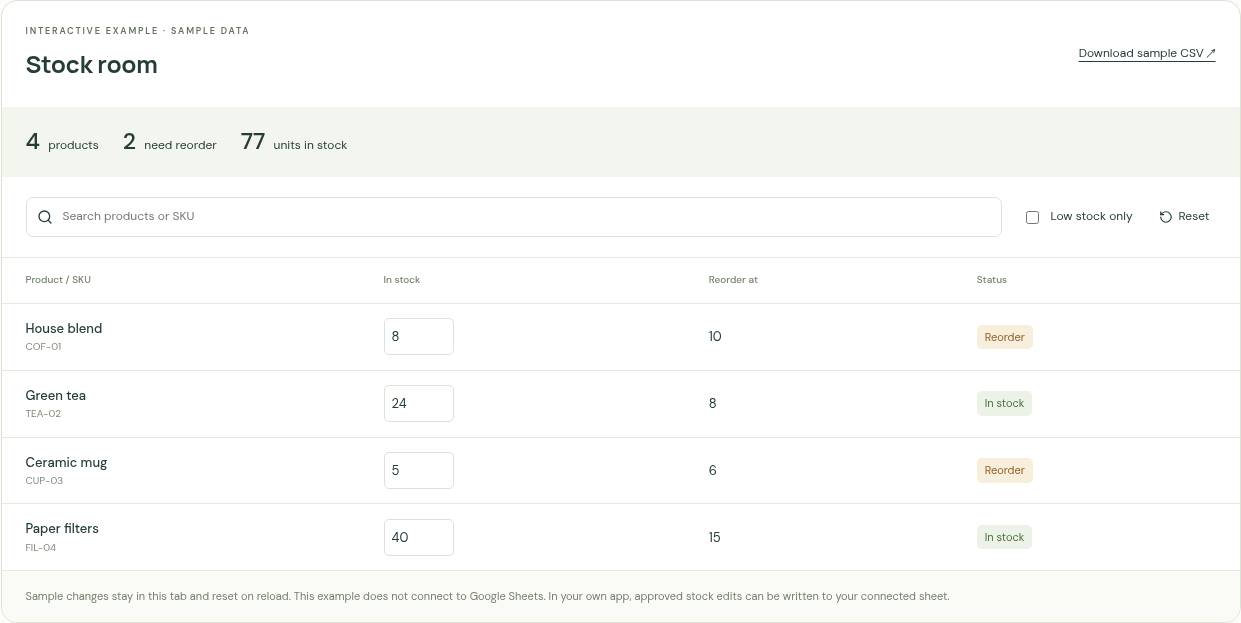
Spreadsheet to App is the right pick for non-technical teams who already live in Google Sheets and want a shareable web app without touching code. The Google Sheets-as-database constraint is both its strength and its ceiling: you get zero migration friction, but you also inherit Sheets' row limits and sync latency. Teams that need native mobile apps, offline access, or a proper relational database should look elsewhere.
What is Spreadsheet to App?
Spreadsheet to App is an AI-powered web app builder that uses existing spreadsheet data as its foundation. Users upload Excel or CSV files, or connect Google Sheets links directly, then describe their desired workflow in plain language. The AI generates a hosted web app, which users can refine through conversation, inspect at the code level, and preview privately before publishing to a shareable URL.
The tool is built around a Google Sheets-as-database model: uploaded files are imported into the user's own Google account as Sheets, and all connected apps read and write back to those Sheets. It supports up to five spreadsheets per app and is aimed at small teams building inventory trackers, customer lists, dashboards, and internal tools without writing code.
How we scored Spreadsheet to App
Capability scores 16 because the tool covers the core job (spreadsheet to hosted web app via AI conversation) but has hard limits that named competitors do not: no native mobile output, no relational database, Excel macros silently excluded, and formula propagation broken for new rows. Ease of use scores 18 because the five-step workflow is genuinely clear, no API key is required, and the Studio preview-before-publish model reduces risk for non-technical users. Value scores 12 because paid tier names and prices are hidden behind sign-up, making it impossible to budget; a tool that withholds pricing from prospective buyers creates a real friction cost even if the free tier is generous. Delivery scores 12 because no user sentiment or third-party reviews were findable to confirm the AI output quality, the sync is explicitly not instantaneous (a documented limitation), and the opaque pricing model is a mild trust concern for a tool asking for Google account access.
Pros and cons
What we liked
- Google Sheets stays the database, so there is no data migration and your team keeps using the tools they already know.
- Supports up to five spreadsheets per app and lets you mix uploaded files with live Google Sheets links in a single build.
- Code is inspectable and editable inside Studio before publishing, giving technically inclined users a real escape hatch rather than a locked black box.
Where it falls short
- Excel macros are not converted into app logic, and formula cells are read-only with no automatic formula propagation to new rows, which breaks common spreadsheet workflows silently.
- The app is web-only with no native iOS or Android packaging, and the sync between the app and Google Sheets is not instantaneous due to a caching layer, making it unsuitable for real-time or offline use cases.
- Paid tier names and prices are not publicly listed on the pricing page, making it impossible to budget before signing up and creating a trust gap for teams evaluating the tool seriously.
Key features
Who should use Spreadsheet to App?
Small business owners and operations managers who already track inventory, client lists, or project status in Google Sheets and want to give their team a cleaner interface without hiring a developer. A five-person logistics team sharing a single messy spreadsheet is a textbook fit: the app handles data entry and viewing while Sheets stays the source of truth.
Freelancers or consultants who need to hand a client a working internal tool quickly, without setting up a database or a hosting environment, will also find the workflow fast. That said, anyone who needs offline access, native mobile apps, or a backend that can handle tens of thousands of rows with complex relational logic should look at Cursor instead, which gives developers the full code control to build exactly that. Teams already inside the Microsoft 365 world, where data lives in Excel and SharePoint rather than Google Workspace, will hit friction immediately since the entire architecture depends on Google Sheets.
Skip it if: Teams needing native iOS/Android apps or a real relational database backend
Spreadsheet to App alternatives
Frequently asked questions
Does my data leave my Google account?+
No. Uploaded Excel and CSV files are imported into your own Google account as Sheets, and Google Sheets links connect to your original files. The app reads and writes those Sheets directly.
Can I use this to build an iPhone or Android app?+
No. Spreadsheet to App generates hosted web apps that open in a browser. It does not package or submit native apps to the iOS App Store or Google Play.
What happens to my Excel formulas?+
Formula cells become read-only in the generated app, and new rows do not automatically copy formulas. Excel macros are not converted into app logic. Google handles the Excel-to-Sheets conversion, so checking important calculations after import is advised.
How much does it cost beyond the free tier?+
The tool is free to start with no credit card required, but paid plan names and prices are not publicly listed on the pricing page. You would need to sign up to see upgrade options.
How many spreadsheets can one app use?+
Up to five spreadsheets per app. You can mix uploaded Excel or CSV files with Google Sheets links in the same build.
Is the generated code accessible?+
Yes. The Studio environment lets you inspect and edit the generated code before publishing. This means a developer can review or modify what the AI produced rather than accepting it as a black box.
More AI Coding & Dev Tools
See all categoriesGet your tool listed on 300+ directories.
One listing here is a strong start. But the founders who get discovered everywhere are listed everywhere. Our sister site, Free AI Directories, submits your tool to 300+ AI directories for you, every single one by hand, by a real person.
It is a one-time payment of $49, no subscription, and you can follow along as the submissions land. Prefer the slow route? The same site keeps a free list of 450+ directories you can work through yourself.
Get my tool listed on 300+ directoriesOne-time payment, no subscription · 100% human submissions · Free list of 450+ directories included.