
Tea App Checker
A pay-per-post web tool that lets men search Tea dating app posts by name, city, age, or face photo without creating an account.
Are you the maker? Claim this listing to keep info, pricing and screenshots current. Verified via your tool's domain email.
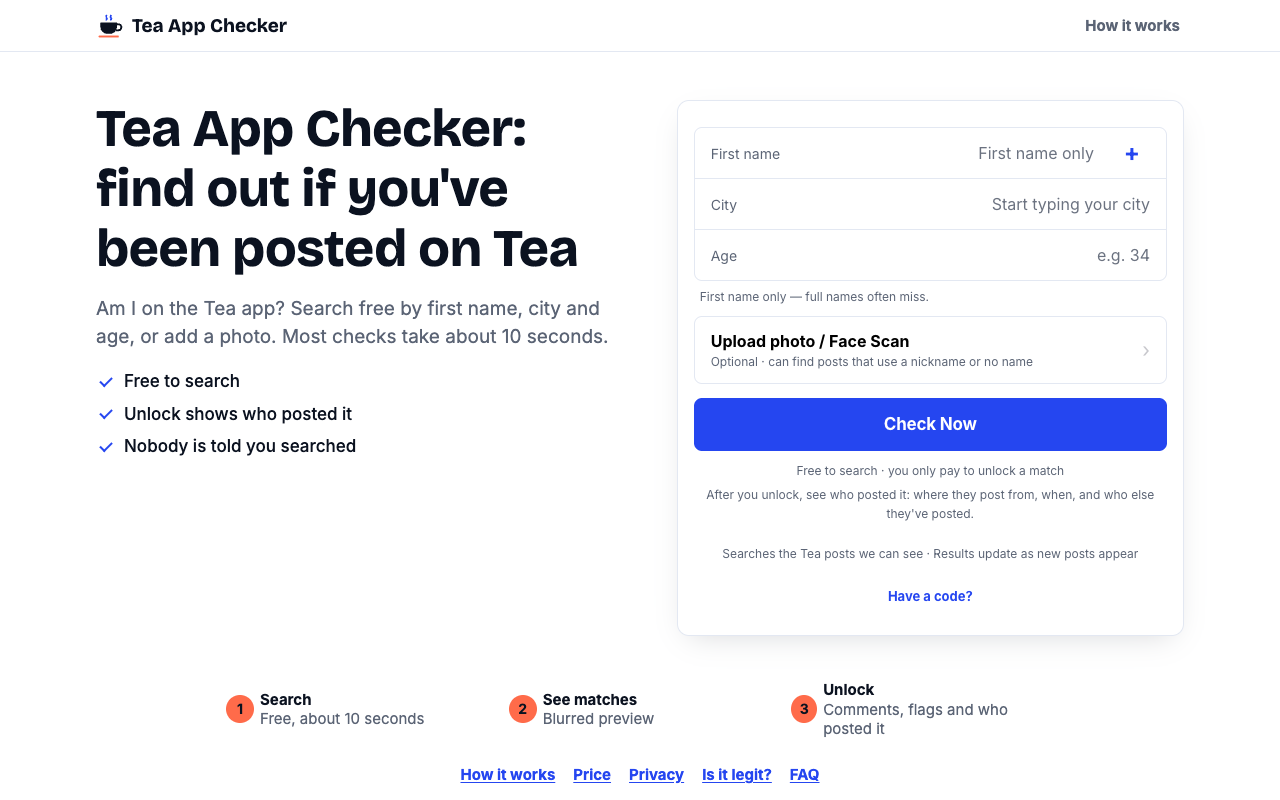
Tea App Checker is the right pick for a man who wants a fast, no-account way to see whether he appears on the Tea dating app, with no subscription risk. The pay-per-post model is honest about costs upfront, but the tool's coverage is limited to posts it can currently see, so a clean result is not a guarantee. Anyone wanting broader background-check coverage or monitoring across multiple platforms should look at a general people-search service instead.
What is Tea App Checker?
Tea App Checker answers one question: have you been posted on the Tea dating app? Enter a first name, city and age, or upload a photo and let AI face matching compare it with the Tea posts we can see. Results take about 10 seconds, with no account and no download, and the search is free. If something comes up, you can choose to unlock the full results. Photos are kept in encrypted storage.
How we scored Tea App Checker
Capability scores 16 because the tool does one narrow job adequately: free previews plus AI face matching is a genuine feature advantage over pure name-search competitors, but coverage is self-admittedly incomplete, the new-post alert is not live, and there is no API, mobile app, or monitoring dashboard. Ease of use scores 20 because the flow is genuinely simple: no account, results in 10 seconds, and a clear preview-before-you-pay model that most users will understand immediately. Value scores 14 because the per-post enable price is hidden until after you search, making it impossible to budget in advance, and the 7-day browser-locked access window means paying again if you switch devices. Delivery scores 12 because no independent user reviews could be found for teaappchecker.app specifically, the coverage limitation is significant and openly admitted, and the promised alert feature remains unlaunched with no stated timeline.
Pros and cons
What we liked
- Genuinely free search with unblurred match previews: photo, name, age, city, and flag counts visible before any payment decision.
- AI face matching catches posts that use a nickname or omit a name entirely, a gap that name-only search tools miss.
- No account, no subscription, and no auto-renewal; each post enable is a one-time charge with the price shown before you pay.
Where it falls short
- Coverage is explicitly limited to posts the tool can currently see, so a clean result is not proof of absence; new posts appear constantly and the promised new-post alert feature is not yet live.
- The exact per-post enable price is not published anywhere on the pricing page or in the FAQ, making it impossible to budget before you run a search.
- Web-only with no mobile app; the tool stores an enabled post for 7 days in a single browser, so switching devices means losing access to posts you already paid to read.
Key features
Tea App Checker pricing
Free to search and view match previews (photo, name, age, city, flag counts). Each post costs a per-post enable fee shown on the button before payment. No subscription, no account required. Exact per-post price not published on the pricing page; the page confirms a pay-once-per-post model with no recurring charge.
| Plan | Price | Who it is for |
|---|---|---|
| Free Search | Free | Search by first name, city, and age, or add a face photo. View all possible match previews including unblurred photo, name, age, city, date, flag counts, and comment count. No account required. |
| Post Enable | Per post (price shown on enable button before payment) | Full post text, all comments, who flagged it, and the Tea account behind the post. Access stays open for 7 days in the same browser with free updates during that period. One-time charge, no subscription. |
Pricing reflects what we saw at time of review (2026-11). Always confirm current pricing on the tool's own site.
Who should use Tea App Checker?
This tool is built for men who suspect they may have been posted on Tea and want a fast, private answer. It fits someone who has noticed unexplained friction in their dating life and wants to check before drawing conclusions, or someone who simply wants peace of mind after hearing that Tea exists. The no-account, no-subscription model makes it low-commitment: you can search for free and decide post by post whether the result is worth paying to read.
Anyone who needs ongoing monitoring, wants results delivered by email, or needs to check multiple people regularly will find the current feature set thin. The new-post alert feature is listed as coming soon but is not yet available. For broader people-search needs that go beyond Tea specifically, a general background-check service would serve better. Within our directory, none of the current lifestyle tools are direct substitutes, but OpenFate covers a different kind of personal-insight use case for users whose concern is more reflective than investigative.
Skip it if: Users wanting ongoing monitoring, guaranteed coverage, or post removal
Tea App Checker alternatives
Tags
Frequently asked questions
Is the search really free, or is that a bait-and-switch?+
The search and match previews are genuinely free. You see the post photo, name, age, city, date, and flag counts at no cost. You only pay if you choose to enable a specific post's full text and comments, and the price is shown on the enable button before you commit.
How much does it cost to enable a post?+
The pricing page does not publish a fixed per-post price. The cost appears on each post's enable button when you view your results, so you will not know the exact figure until you run a search.
Does a clean result mean I have never been posted on Tea?+
No. The tool only searches posts it can currently access. The site explicitly states that new posts appear constantly and a clean result is not proof that no post exists or ever existed. It recommends checking again later.
Will the person who posted about me know I searched?+
No. The site states that nobody is told you searched, and no Tea account is created on your behalf.
What does the face photo option actually do?+
Uploading a photo runs the tool's own face-matching layer against Tea posts. This is useful because some posts use a nickname or no name at all, which a name-and-city search would miss.
Can I access an enabled post on a different device?+
No. Enabled posts are stored for 7 days in the browser where you paid. Switching browsers or devices means you would need to pay again to re-read that post.
More AI Lifestyle Tools
See all categoriesGet your tool listed on 300+ directories.
One listing here is a strong start. But the founders who get discovered everywhere are listed everywhere. Our sister site, Free AI Directories, submits your tool to 300+ AI directories for you, every single one by hand, by a real person.
It is a one-time payment of $49, no subscription, and you can follow along as the submissions land. Prefer the slow route? The same site keeps a free list of 450+ directories you can work through yourself.
Get my tool listed on 300+ directoriesOne-time payment, no subscription · 100% human submissions · Free list of 450+ directories included.