
Tip Toeing in My Jordans
A one-trick web app that drops your face into the viral Rumpelstiltskin tiptoe meme as a 12-second AI video.
Are you the maker? Claim this listing to keep info, pricing and screenshots current. Verified via your tool's domain email.
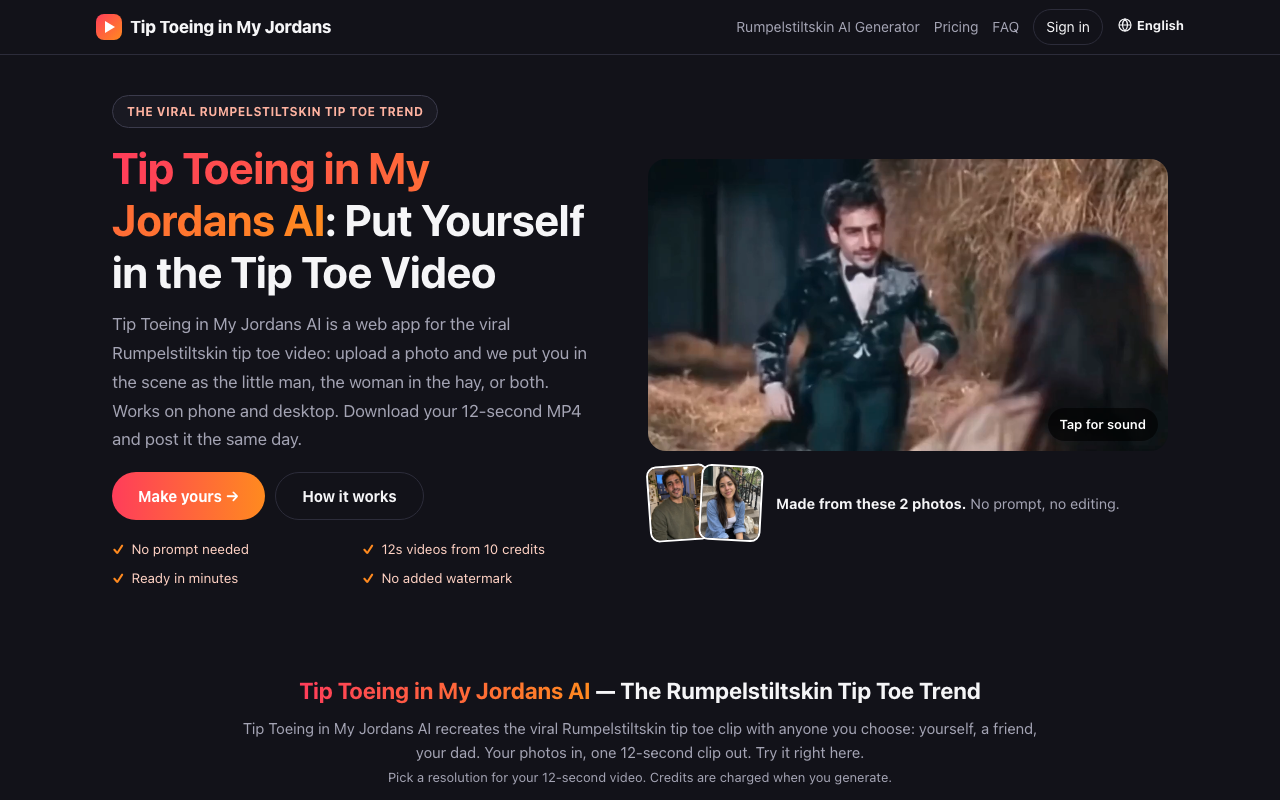
Best for someone who wants the Rumpelstiltskin meme video once and has no interest in a subscription. The tool does exactly one thing, and the $9.99 entry price is higher than several near-identical competitors in the same niche. Anyone who wants general AI video creation, face-swap flexibility, or a free trial before paying should look elsewhere.
What is Tip Toeing in My Jordans?
Tip Toeing in My Jordans is a web app for the viral Rumpelstiltskin tip toe meme. In the original AI clip, a little man in a velvet tailcoat tiptoes through a barn toward a woman sitting in the hay, shushes the camera and breaks into a tiptoe dance. Upload a photo and the app makes a new 12-second version of the scene with your face as the little man; add a friend's photo to play the woman in the hay if you like. Any role without a photo stays as in the original clip.
How it works: 1) upload a clear, front-facing photo for one or both roles; 2) pick Standard 720p or HD 1080p; 3) sign in and generate. The video is usually ready in a few minutes as a 16:9 MP4 with AI-generated sound and no added watermark.
Pricing: credit packs, no free credits. A 720p video costs 10 credits; packs start at $9.99 for 10 credits. Uploaded photos are deleted automatically 60 days after upload.
Independent fan-made tool, not affiliated with Riff Raff, Nike or Jordan Brand.
How we scored Tip Toeing in My Jordans
Capability scores 12 because the tool does exactly one thing: one meme template, one scene, 12 seconds, two resolutions. Every named directory competitor does more, and even within the single-meme niche, competitors offer free previews and comparable or higher resolutions. Ease of use scores 16 because the workflow is genuinely simple: upload, pick resolution, pay, wait; there is no learning curve for a tool with one function, though the absence of any preview before payment adds friction. Value scores 10 because $9.99 for a single 720p video with no free trial is expensive relative to direct competitors in the same niche charging less per video, and the monthly plan's lapsing credits punish irregular users. Delivery scores 10 because no user sentiment data exists for this specific domain, the niche is flooded with near-identical sites creating brand confusion, and the no-preview-before-payment model means buyers cannot assess output quality before committing money.
Pros and cons
What we liked
- No watermark on any paid download, even the cheapest $9.99 pack.
- Pack credits never expire, so buying the $49.99 six-video pack carries no time pressure.
- 14-day full refund on packs and the first monthly period if no credits have been used, which is a clear and fair policy.
Where it falls short
- No free tier or preview of any kind before purchase: you pay $9.99 before seeing how your photo renders, which is a real risk given that AI face-swap results vary significantly by photo quality.
- The $9.99 entry price for a single 720p video is higher than several direct competitors in the same niche who charge less per video at the same resolution.
- Monthly plan credits lapse at the end of each billing period, meaning unused credits are lost, which punishes anyone who does not generate videos at a steady pace.
Key features
Tip Toeing in My Jordans pricing
No free tier. Credit packs only: $9.99 for 10 credits (one 720p video), $19.99 for 20 credits (two 720p or one 1080p video), $49.99 for 60 credits (six 720p or three 1080p videos). A monthly subscription is also available at $29.99 per month for 40 credits. All prices include tax. Packs and the first month of the monthly plan are refundable within 14 days if no credits are used.
| Plan | Price | Who it is for |
|---|---|---|
| Try one video | $9.99 | 10 credits, one-time payment. Covers one Standard 720p 12-second video (10 credits) or put toward an HD 1080p video (which costs 20 credits). Credits never expire. No watermark. |
| 2 videos | $19.99 | 20 credits, one-time payment. Covers two Standard 720p videos or one HD 1080p video. Credits never expire. No watermark. |
| 6 videos | $49.99 | 60 credits, one-time payment. Covers six Standard 720p videos or three HD 1080p videos. Equivalent to $8.33 per Standard video. Credits never expire. No watermark. |
| Monthly | $29.99/month | 40 credits per billing period, renewing monthly. Covers four Standard 720p videos or two HD 1080p videos per month. Credits lapse at end of each period. Cancel anytime from account page. |
Pricing reflects what we saw at time of review (2026-10). Always confirm current pricing on the tool's own site.
Who should use Tip Toeing in My Jordans?
This tool fits someone who saw the Rumpelstiltskin tiptoe meme in their feed, wants to send a personalized version to a group chat, and is happy paying roughly $10 for a one-time laugh. The monthly plan at $29.99 makes sense only if you plan to generate at least four videos per month consistently, which is an unusual use case for a single meme format.
Anyone who wants to try before they buy should skip this tool entirely: there is no free preview, no trial credit, and no watermarked sample. Competitors in the same niche offer free 2-second previews or lower entry prices. For broader AI video work, Runway handles everything from text-to-video to multi-scene editing and is a far better fit. For face-swap video or talking-photo content beyond a single meme, HeyGen covers those use cases with more depth.
Skip it if: General AI video creation, free-trial seekers, or anyone needing more than meme clips
Tags
Frequently asked questions
Is there a free trial or free video before I pay?+
No. Tiptoeinjordans.com has no free tier, no trial credits, and no preview. You pay at least $9.99 before seeing how your photo renders.
How much does a single video cost?+
A Standard 720p video costs 10 credits. The smallest pack is $9.99 for 10 credits, making the minimum spend $9.99 per video. HD 1080p costs 20 credits, so the minimum spend for one HD video is $19.99 using the 20-credit pack.
Do credits expire?+
Credits from one-time packs never expire. Credits from the $29.99 monthly subscription lapse at the end of each billing period and do not roll over.
What happens if my video fails to generate?+
Credits are returned to your balance automatically if a video fails or is blocked. Credits spent on videos that rendered successfully are not refunded.
Can I get a refund?+
Yes, within 14 days of purchase, provided no credits have been used. This applies to credit packs and to the first month of the monthly plan.
What video format and resolution does the tool produce?+
Every video is a 12-second 16:9 MP4 with AI-generated sound. Standard output is 720p (10 credits); HD output is 1080p (20 credits). No watermark is added to any paid download.
More AI Video Tools
See all categoriesGet your tool listed on 300+ directories.
One listing here is a strong start. But the founders who get discovered everywhere are listed everywhere. Our sister site, Free AI Directories, submits your tool to 300+ AI directories for you, every single one by hand, by a real person.
It is a one-time payment of $49, no subscription, and you can follow along as the submissions land. Prefer the slow route? The same site keeps a free list of 450+ directories you can work through yourself.
Get my tool listed on 300+ directoriesOne-time payment, no subscription · 100% human submissions · Free list of 450+ directories included.