
Tok Live Recorder
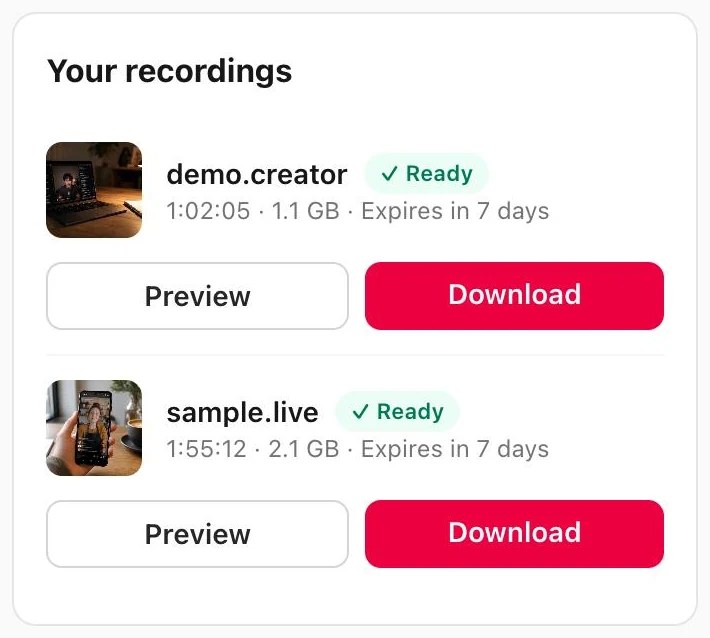
Browser-based cloud recorder that captures public TikTok LIVE streams and delivers a watermark-free MP4 when the stream ends.
Are you the maker? Claim this listing to keep info, pricing and screenshots current. Verified via your tool's domain email.
Tok Live Recorder is the right pick for TikTok fans and creators who want hands-off, cloud-based auto-recording without installing software. The free tier's 20-minute cap and 3-day file window are tight enough to push most real users toward a paid plan quickly. Anyone who records across multiple platforms or needs files kept longer than 30 days should look at a desktop solution instead.
What is Tok Live Recorder?
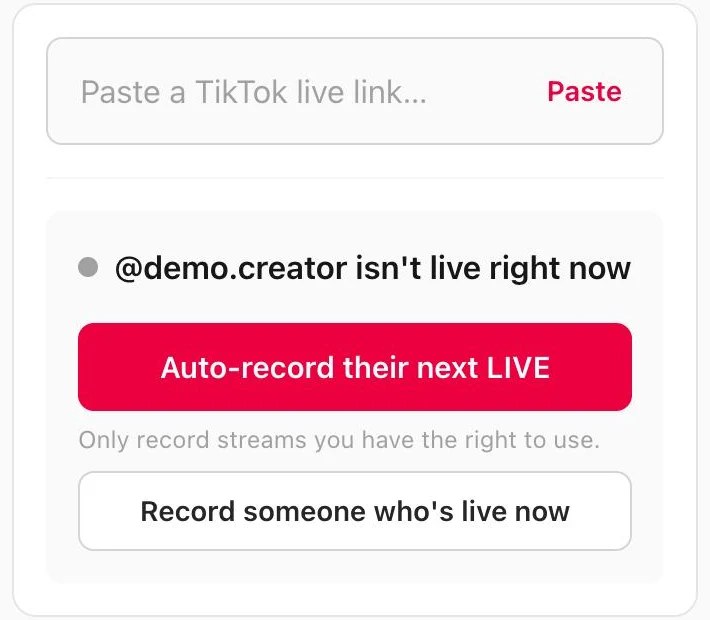
Tok Live Recorder records public TikTok LIVE streams on cloud servers while they are on air. Paste a LIVE link-or enable auto-record for a creator-then download an HD MP4 without a watermark when the stream finishes. Free plan available. https://tokliverecorder.com/
How we scored Tok Live Recorder
Ease of use is the tool's genuine strength: no install, works on mobile, and the auto-record plus email notification loop is well thought out for its target use case. Capability scores lower because the cloud recording is effectively TikTok-only (other platforms require a separate desktop app), the free tier's 20-minute cap is too short to be genuinely useful, and there is no editing, transcription, or export beyond a plain MP4 download. Value is hurt by the file retention model: at $9.99/month Pro, files disappear after 7 days, which means users are paying a recurring fee for temporary storage rather than a permanent archive, and the Studio plan's 30-day window at $19.99/month is still short for anyone who records regularly and does not download immediately. Delivery scores low because the tool is very new (founded 2025), has no verifiable user sentiment, no documented track record, and the about page contains a retention figure that conflicts with the pricing page, which raises questions about how carefully the product details are maintained.
Pros and cons
What we liked
- Genuine cloud recording means the user's device does not need to stay on or connected during a LIVE, which no screen-recorder approach can match.
- Auto-record polls a creator every 5 minutes and starts capturing the moment they go live, then sends an email notification when the MP4 is ready, covering the full hands-off workflow.
- No watermark on any plan, including the free tier, and no re-encoding, so the downloaded MP4 reflects the original stream quality.
Where it falls short
- File retention caps are short and non-negotiable: 3 days on Free, 7 days on Pro, and 30 days on Studio. Miss the download window and the recording is gone permanently, with no way to extend retention on any plan.
- The cloud recording service is effectively TikTok-first. Twitch, YouTube, and X require downloading and running a separate desktop app, which breaks the no-install promise for anyone recording outside TikTok.
- The free plan's 20-minute per-recording cap makes it nearly useless for any LIVE that runs longer than a short session, which is most of them, pushing users to a paid plan faster than the 'free to try' framing implies.
Key features
Tok Live Recorder pricing
Free plan at $0 allows 1 recording per day up to 20 minutes, with files kept 3 days. Pro is $9.99/month for 30 hours/month, up to 3 hours per recording, and 7-day file retention. Studio is $19.99/month for 120 hours/month, up to 6 hours per recording, and 30-day file retention. A one-time pay-per-recording option exists at $2.99 for a single LIVE up to 3 hours.
| Plan | Price | Who it is for |
|---|---|---|
| Free | $0 | 1 recording per day, up to 20 minutes per recording, 1 recording at a time, auto-record for 1 creator, no watermark, files kept 3 days. |
| Pro | $9.99/month | 30 hours of recording per month, up to 3 hours per recording, 3 simultaneous recordings, auto-record up to 5 creators, no watermark, files kept 7 days. |
| Studio | $19.99/month | 120 hours of recording per month, up to 6 hours per recording, 6 simultaneous recordings, auto-record up to 20 creators, no watermark, files kept 30 days. |
| One-Time Recording | $2.99 | Single LIVE recorded in full, up to 3 hours, original quality, no subscription required. |
Pricing reflects what we saw at time of review (2026-11). Always confirm current pricing on the tool's own site.
Who should use Tok Live Recorder?
This tool fits TikTok viewers who follow creators that go live at unpredictable hours and want a permanent copy without babysitting a browser tab. A fan who follows a handful of creators and wants every LIVE saved automatically will get real value from the Pro plan at $9.99/month, particularly the 5-creator auto-record and 3-hour per-recording limit. Marketers and social media analysts who need to archive competitor or influencer TikTok LIVEs for review will also find the cloud approach cleaner than screen recording.
Anyone who records across Twitch, YouTube, and TikTok simultaneously, or who needs files stored for more than 30 days without downloading them, should look elsewhere. CaptionBolt, already in this directory, is a better fit if the goal is to caption and publish short clips from that footage rather than just archive the raw stream. Users who primarily edit and repurpose video content rather than archive it will find Descript, also in this directory, a more capable environment once the raw file is in hand.
Skip it if: Multi-platform heavy recorders or anyone needing permanent cloud storage
Tags
Frequently asked questions
Does the free plan actually let me record a full TikTok LIVE?+
Only if the LIVE runs under 20 minutes. The free tier caps each recording at 20 minutes and allows 1 recording per day. Most TikTok LIVEs run longer, so the free plan is better treated as a trial than a working solution.
What happens if a LIVE runs past my plan's per-recording limit?+
The recording stops cleanly at the limit and the MP4 up to that point remains valid and downloadable. The stream does not fail; you simply get a truncated file.
How much does it cost to record just one LIVE without a subscription?+
A one-time payment of $2.99 records a single LIVE in full, up to 3 hours, in original quality. No subscription is needed.
How long are my recorded files kept before they are deleted?+
3 days on Free, 7 days on Pro, and 30 days on Studio. After that window the file is deleted automatically. Download the MP4 within the window and it is yours permanently with no DRM.
Can I record Twitch or YouTube streams, not just TikTok?+
Yes, but not through the cloud service. Twitch, YouTube, and X require the free desktop app for Windows or Mac, which records locally to your own drive. Only TikTok LIVE and Kick are supported by the cloud recorder.
Is there a refund policy if I subscribe and change my mind?+
The pricing page states that first purchases are refundable within 7 days if you have recorded less than 2 hours total.
More AI Video Tools
See all categoriesGet your tool listed on 300+ directories.
One listing here is a strong start. But the founders who get discovered everywhere are listed everywhere. Our sister site, Free AI Directories, submits your tool to 300+ AI directories for you, every single one by hand, by a real person.
It is a one-time payment of $49, no subscription, and you can follow along as the submissions land. Prefer the slow route? The same site keeps a free list of 450+ directories you can work through yourself.
Get my tool listed on 300+ directoriesOne-time payment, no subscription · 100% human submissions · Free list of 450+ directories included.