ttsanything
Browser-based text-to-speech that converts PDFs, ebooks, and web pages into downloadable MP3s, free up to 10,000 characters a day.
Are you the maker? Claim this listing to keep info, pricing and screenshots current. Verified via your tool's domain email.
ttsanything is the right pick for students, accessibility users, and casual readers who need to turn a PDF or ebook into audio without paying anything. The free tier is real and functional, but the tool has only two pricing tiers and 16 supported languages, which puts it well behind ElevenLabs and Murf AI on voice quality and language depth. If you need commercial-grade narration, voice cloning, or more than 500,000 characters a month, look elsewhere.
What is ttsanything?
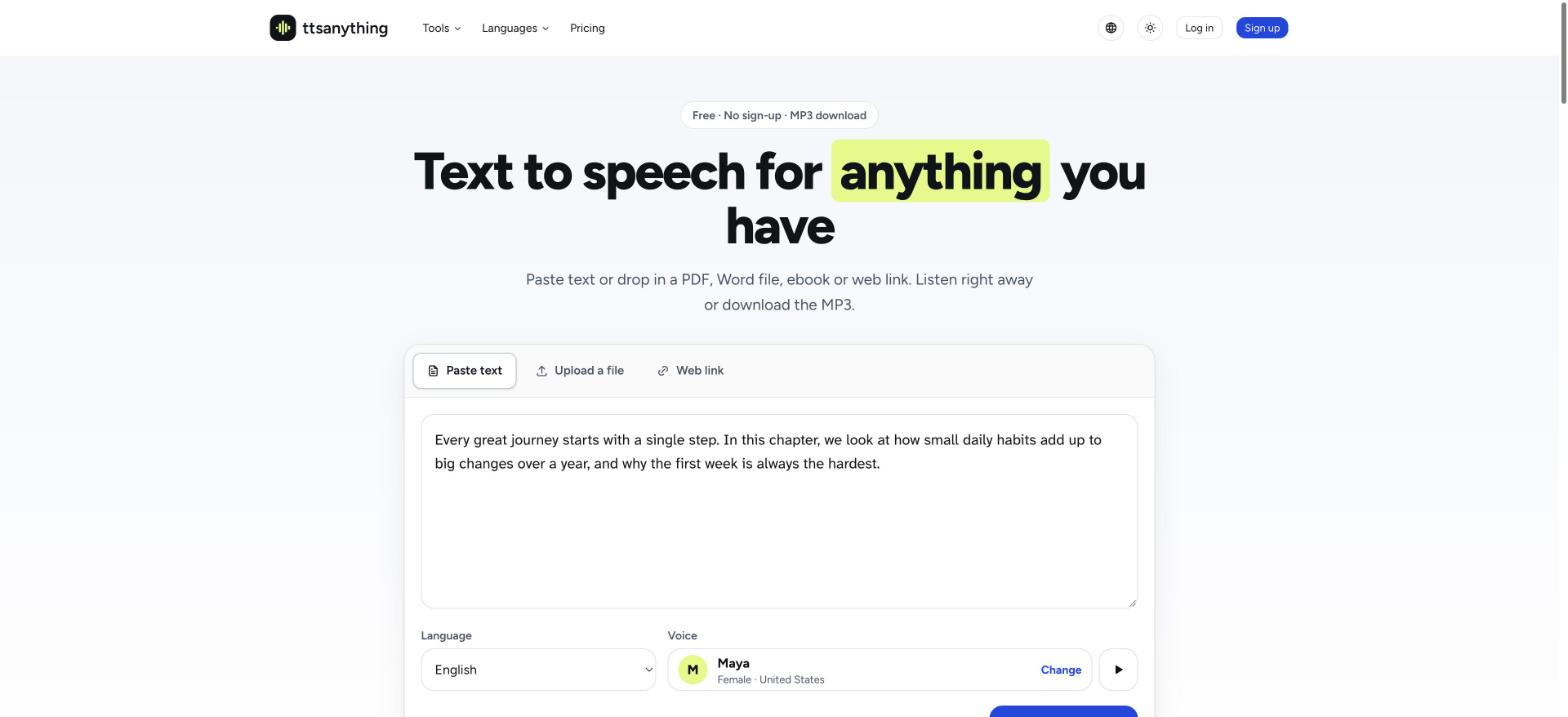
ttsanything turns text you already have into speech. You can paste text, upload a PDF, Word document, EPUB ebook, SRT subtitle or plain-text file, or paste a web link. Then pick a language and voice and listen in the browser while each passage is highlighted, or download a single MP3. Long documents are split into parts and joined automatically. Without an account you can convert 3,000 characters a day, and a free account gets 10,000. Pro adds a monthly allowance, longer conversions and commercial use.
How we scored ttsanything
Capability lands at 15 because the tool does its narrow job (document to MP3) cleanly, but it lacks voice cloning, API access, and scanned PDF support that named competitors like ElevenLabs and Murf AI all offer, and 16 languages is a thin roster by current standards. Ease of use scores 21 because the interface is genuinely minimal and a first-time user can convert a file without any onboarding friction. Value scores 17: the free tier at 10,000 characters per day is a real strength, but Pro at $9.99/month caps out at 500,000 characters with no higher tier and no API, which is thin compared to what ElevenLabs offers at similar price points. Delivery scores 9 because no independent user reviews or third-party coverage could be found to verify that the tool performs as claimed, and the absence of any social presence or press coverage makes it impossible to assess track record or trust signals beyond the tool's own pricing page.
Pros and cons
What we liked
- Free tier is genuinely functional: 10,000 characters per day with MP3 download, no credit card required and no watermark mentioned in the pricing page.
- Files are processed locally in the browser before text is sent, so the source document never leaves the user's device, which matters for sensitive reading material.
- Handles the full document-to-audio pipeline automatically: long files are split, converted in parts, and joined into a single MP3 without manual intervention.
Where it falls short
- Scanned PDFs and image-based text are explicitly not supported yet, which rules out a large share of real-world PDF documents that are photo scans rather than selectable text.
- Only two pricing tiers with no API access at either level, meaning developers or teams with programmatic needs have no path forward within the product.
- 500,000 characters per month on Pro (roughly 9 hours of audio) is a hard ceiling with no higher tier, so heavy audiobook producers or podcast creators will outgrow the plan with no upgrade option short of contacting the company.
Key features
ttsanything pricing
Free plan gives 10,000 characters per day (3,000 without an account) with MP3 download. Pro is $9.99 per month, covering 500,000 characters per month (roughly 9 hours of audio), up to 300,000 characters per conversion, and commercial use rights. No enterprise or team tier listed.
| Plan | Price | Who it is for |
|---|---|---|
| Free | Free | 10,000 characters per day (3,000 per day without an account), up to 10,000 characters per single conversion, HD voices, MP3 download, audio library, PDF/Word/EPUB/web page support. Personal use only. |
| Pro | $9.99/month | 500,000 characters per month (approximately 9 hours of audio), up to 300,000 characters per single conversion, HD voices for every conversion, commercial use rights for videos, podcasts, and products. |
Pricing reflects what we saw at time of review (2026-11). Always confirm current pricing on the tool's own site.
Who should use ttsanything?
Students who want to listen to lecture notes or textbook chapters while commuting will find the free tier covers most daily needs without any cost. People with visual impairments or reading difficulties who need a reliable document-to-audio pipeline will appreciate that files are processed in the browser and the text itself never leaves the device. Audiobook hobbyists who want to convert a personal EPUB library for private listening can do so on the free plan, though anything longer than a short chapter will hit the 10,000-character-per-conversion ceiling and require Pro.
Content creators who need commercial narration for videos, podcasts, or products should look at Murf AI instead, which offers a dedicated voiceover studio with a much larger voice library and studio-grade output suited to professional production. Developers who need programmatic TTS access should go to ElevenLabs, which provides a full API, voice cloning, and far higher character limits at comparable price points.
Skip it if: Creators needing commercial-grade voice quality, voice cloning, or API access
Tags
Frequently asked questions
Is the free plan actually free, or does it require a credit card?+
No credit card is required. Without an account you get 3,000 characters per day; a free account raises that to 10,000 characters per day, and every result can be downloaded as an MP3.
Can ttsanything read an entire book?+
Yes, but with limits. Long files are split into parts, converted in sequence, and joined into one MP3. On the free plan each conversion is capped at 10,000 characters at a time, so a full-length book requires the Pro plan, which allows up to 300,000 characters per conversion.
Does uploading a file send it to ttsanything's servers?+
Files are opened in the browser locally. Only the extracted text is sent when you trigger conversion, so the source file itself never leaves your device.
Can I use the audio commercially, for example in a YouTube video or podcast?+
Commercial use requires the Pro plan at $9.99 per month. The free plan is restricted to personal use only.
Does it work with scanned PDFs?+
Not yet. The tool reads only text that can be selected in a document. Support for scanned pages and photos of text is listed as a future feature.
How many languages are supported?+
16 languages, including English, Spanish, Portuguese, French, German, Hindi, Indonesian, Vietnamese, Japanese, Korean, Chinese, and Arabic. Most have several accents and voices that can be previewed before converting.
More AI Voice, Audio & Music tools
See all categoriesGet your tool listed on 300+ directories.
One listing here is a strong start. But the founders who get discovered everywhere are listed everywhere. Our sister site, Free AI Directories, submits your tool to 300+ AI directories for you, every single one by hand, by a real person.
It is a one-time payment of $49, no subscription, and you can follow along as the submissions land. Prefer the slow route? The same site keeps a free list of 450+ directories you can work through yourself.
Get my tool listed on 300+ directoriesOne-time payment, no subscription · 100% human submissions · Free list of 450+ directories included.