Whisper AI Transcribe
Browser-based transcription tool that turns audio, video, meetings, and public URLs into editable transcripts and subtitles in 145+
Are you the maker? Claim this listing to keep info, pricing and screenshots current. Verified via your tool's domain email.
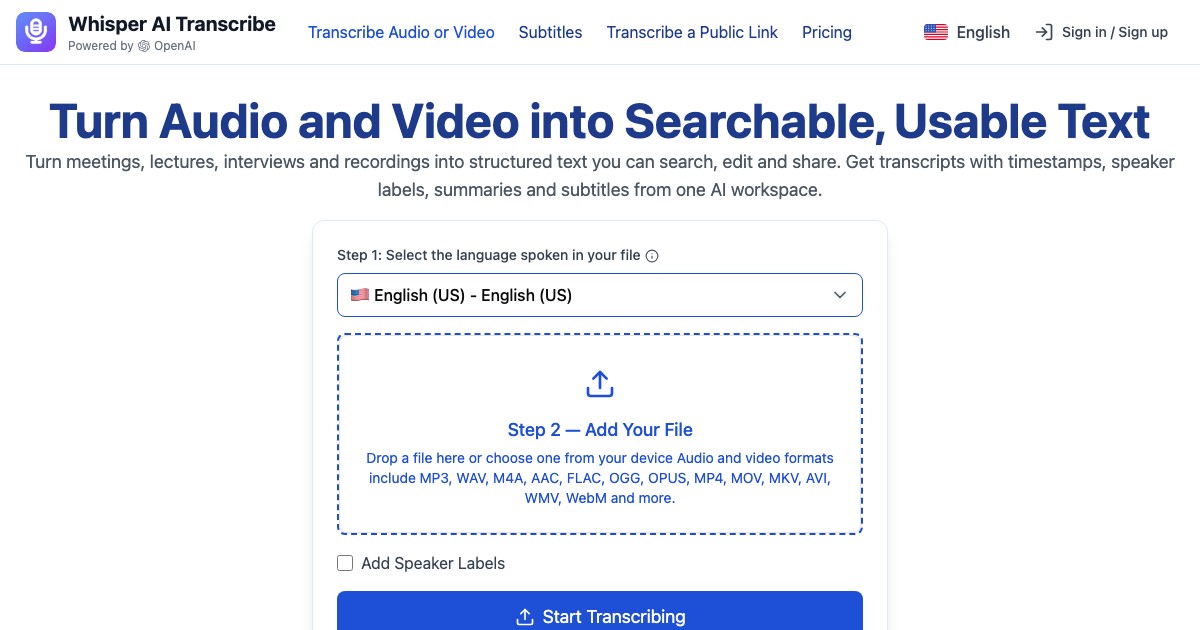
Whisper AI Transcribe suits professionals who need high-volume transcription with built-in meeting summaries and subtitle export, all without installing software. Its minute-bucket pricing model means heavy users pay a predictable monthly rate, but there is no free tier at all, which puts it at a disadvantage against tools that let you try before committing. Teams needing voice generation, dubbing, or translation beyond transcription should look elsewhere.
What is Whisper AI Transcribe?
Whisper AI Transcribe is a voice recorder with AI transcription that turns audio, video, meetings and public links into editable transcripts, summaries, translations and subtitles. Its blog publishes guides on transcription and subtitle workflows. Finished work is stored in a searchable library for later review. It is used to review meetings, digest lectures and caption videos. Free to try, with paid plans for heavier use.
How we scored Whisper AI Transcribe
Capability scores 17 because the core feature set (URL transcription, browser recording, 10-hour file support, 145+ languages, SRT/VTT export, AI summaries) is genuinely broad for a transcription tool, but the absence of any native conferencing integrations is a real gap that tools like Tremigos address, and the tool does nothing that a competitor with calendar sync cannot match. Ease of use scores 18 because a browser-only workflow with no installation and multiple input methods (upload, URL, record) is low-friction by design, though the lack of a free tier means onboarding friction is entirely financial. Value scores 14 because the Pro plan at $9.99/month annual is competitively priced on paper, but the complete absence of a free tier, the unconfirmed rollover policy, and the fact that team and top-up pricing is unpublished make it hard to recommend without reservation, especially for buyers who cannot test accuracy before committing. Delivery scores 14 because no independent user sentiment data specific to whisperaitranscribe.com was found, the FREEMIUM claim on the submitted description directly contradicts the live pricing page, and the brand similarity to multiple other services raises questions about transparency that the human editor must resolve before this score can rise.
Pros and cons
What we liked
- Accepts files up to 10 hours long, covering full-day recordings that most competing tools cap well below this.
- URL transcription and in-browser recording are included on all plans, removing the need to download and re-upload files from video platforms.
- AI meeting summaries with key points and action items are built into every tier, not reserved for a premium add-on.
Where it falls short
- No free tier exists despite the tool being marketed as FREEMIUM in some directories; buyers must pay before testing accuracy on their own content.
- Minute buckets expire monthly with no published rollover policy, meaning a user who transcribes 5 hours one month and 50 the next will either overpay or run short.
- The tool has no native integrations with calendar or video-conferencing platforms (Zoom, Google Meet, Teams), so meeting recordings must be manually downloaded and uploaded rather than synced automatically.
Key features
Whisper AI Transcribe pricing
Three paid annual tiers: Pro at $9.99/month (billed $119.99/year, 24,000 transcription minutes), Business at $19.99/month (billed $239.88/year, 72,000 minutes), and Ultra at $73.99/month (billed $883.99/year, 360,000 minutes). Monthly billing is also available at higher rates. No free tier exists despite the submitted pricing model claiming FREEMIUM. One-time top-up packs and team seat plans are listed on the pricing page but specific prices were not captured in the pre-fetched content.
| Plan | Price | Who it is for |
|---|---|---|
| Pro | $9.99/month | Annual billing at $119.99/year (list $239.88). 24,000 transcription minutes per month. Unlimited audio and video uploads, unlimited meeting recordings, AI summaries and action items, speaker identification, SRT and VTT subtitle export, files up to 10 hours, 145+ languages, DOCX/PDF/TXT/CSV export. |
| Business | $19.99/month | Annual billing at $239.88/year (list $359.88). 72,000 transcription minutes per month. All Pro features included. |
| Ultra | $73.99/month | Annual billing at $883.99/year (list $1,319.88). 360,000 transcription minutes per month. All Business features included. Suited to large teams or agencies with very high transcription volume. |
Pricing reflects what we saw at time of review (2026-11). Always confirm current pricing on the tool's own site.
Who should use Whisper AI Transcribe?
A solo consultant who records client calls and needs clean, searchable transcripts with action items pulled out automatically will get real value here. The same goes for a content producer who publishes weekly video and needs SRT subtitle files without a separate captioning tool. The 10-hour file limit and 24,000 minutes per month on the entry plan mean neither of these users will hit a ceiling in normal operation.
Anyone who wants to test accuracy on their own audio before paying should look elsewhere. Tremigos, also in this directory, offers transcription alongside translation and dubbing and may suit multilingual teams who need more than a transcript. Teams whose primary need is voiceover production rather than transcription are better served by Murf AI or ElevenLabs, both of which are in this directory and purpose-built for voice synthesis.
Skip it if: Anyone who wants a free trial before paying, or who needs voice synthesis or dubbing alongside transcription
Frequently asked questions
Is there a free plan or trial?+
No. The live pricing page lists no free tier. The entry-level Pro plan starts at $9.99/month on annual billing, and there is no published free trial period.
How many transcription minutes do I get per month?+
Pro gives 24,000 minutes (400 hours), Business gives 72,000 minutes (1,200 hours), and Ultra gives 360,000 minutes (6,000 hours) per month. No rollover policy is published.
What file formats and lengths are supported?+
The tool accepts audio and video files up to 10 hours long. Exports are available as DOCX, PDF, TXT, CSV, SRT, and VTT.
Does it work with Zoom or Google Meet recordings automatically?+
No native calendar or conferencing integrations are listed on the site. Meeting recordings must be downloaded from those platforms and uploaded manually, or recorded directly in the browser using the built-in recorder.
How many languages does it support?+
The pricing page states 145+ languages and accents, with automatic speaker identification included on all plans.
Are there team or one-time top-up options?+
The pricing page footer references team plans for multiple seats and one-time extra transcription hour packs, but specific prices for these are not listed on the main pricing page.
More AI Voice, Audio & Music tools
See all categoriesGet your tool listed on 300+ directories.
One listing here is a strong start. But the founders who get discovered everywhere are listed everywhere. Our sister site, Free AI Directories, submits your tool to 300+ AI directories for you, every single one by hand, by a real person.
It is a one-time payment of $49, no subscription, and you can follow along as the submissions land. Prefer the slow route? The same site keeps a free list of 450+ directories you can work through yourself.
Get my tool listed on 300+ directoriesOne-time payment, no subscription · 100% human submissions · Free list of 450+ directories included.