AI Style Transfer Explained: How It Works and Uses
Learn what ai style transfer is, how it separates content from style, which methods and controls shape the result, and where it is used.
A folder of vacation photos sits next to a saved painting. One image has the right subjects. The other has the right mood. Combining them by hand would take hours in an image editor, and the result might still look like a collage. AI style transfer is the shortcut people reach for in that moment, and it helps to know what the shortcut does.
AI style transfer takes two images, a content photo and a style reference, and produces a new image. The new image keeps the content photo's subjects and layout. It takes on the reference's colors, textures, and brushwork. The useful skill is learning which parts of that mix can be controlled, and which parts will fight back.
Table of Contents
- What AI Style Transfer Is and How It Looks
- How the Main Methods Differ in Speed and Detail
- Controls That Change the Result
- How to Judge a Stylized Image
- Where AI Style Transfer Gets Used
- Copyright and Attribution Risks to Check
- Pick Your Tool and Settings Before You Start
What AI Style Transfer Is and How It Looks
Say a photographer has a clean portrait of a friend and a favorite watercolor of a harbor. The friend should stay recognizable. The harbor's paint handling should carry over. A skilled illustrator would keep the sitter's pose, expression, and likeness, then repaint the surface with washes, blooms, and visible paper texture. AI style transfer aims at the same split.
The software does not paste the painting onto the photo. It generates a new image, using the photo as a map of what goes where and the painting as a set of instructions for how the surface should look. That distinction explains why the output can look painted rather than collaged.
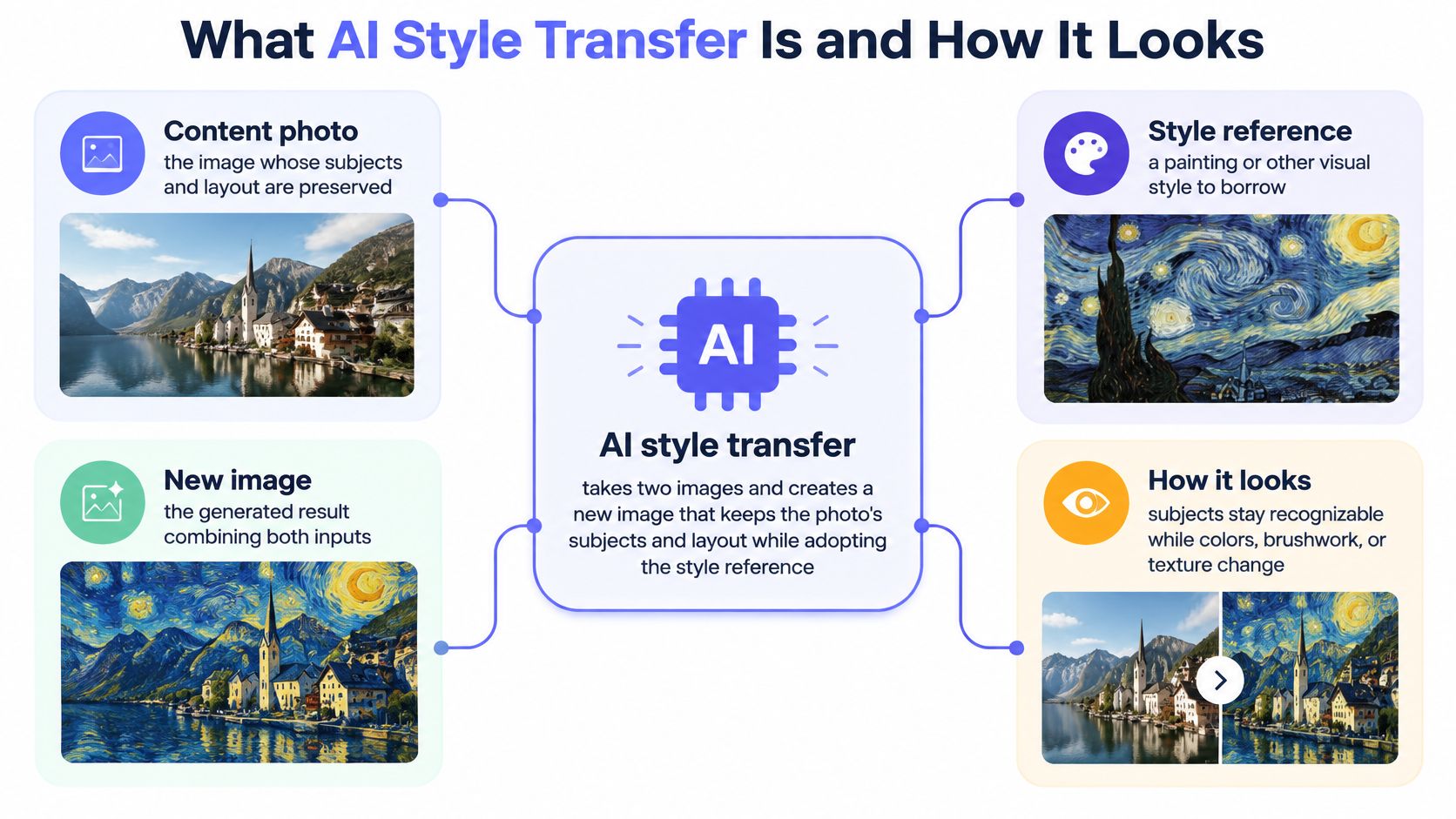
The two inputs and the model between them
Four parts do the work. The content photo supplies the subjects and their arrangement. The style reference supplies color, texture, and brush behavior. The model decides how much of each input survives. The output is a new image, not a modified copy of either source.
A useful analogy is commissioning a portrait. The sitter keeps the same face and posture. The paint handling changes. One artist might use tight, smooth strokes. Another might use loose, visible ones. The person in the chair does not become a different person.
Why a filter is not style transfer
A filter applies one fixed rule to every pixel. Sepia turns the whole frame brown. A sharpen filter adds edge contrast everywhere, whether the edge belongs to a face or a lamppost. Style transfer reads patterns from the reference and applies them in the context of the scene. Brush marks can follow a cheek. Texture can respect the boundary between hair and sky.
People meet the technique in phone photo apps, design tools, and video frames. The surface changes, but the scene remains readable. That is the promise in one sentence.
The short version: The content stays, and the style moves.
How the Main Methods Differ in Speed and Detail
Speed and detail pull in opposite directions. A method that spends minutes refining one image can produce a carefully balanced result. A method built for batches trades some of that control for throughput. The right choice starts with the job, not with a leaderboard.
The modern technique traces to Leon Gatys, Alexander Ecker, and Matthias Bethge. Their paper, "A Neural Algorithm of Artistic Style," was released as an arXiv preprint in August 2015 and later accepted at the IEEE Conference on Computer Vision and Pattern Recognition in 2016, as a review of neural style transfer describes. The method used a 19-layer VGG network pretrained for object recognition on ImageNet. Higher-level convolutional features represented content. Correlations among features, calculated with Gram matrices, represented style.
That split made style a measurable target. It also made the original method slow. The algorithm optimized the pixels of each output image step by step, and one image could take several minutes to process.
AdaIN and WCT in plain terms
AdaIN, or Adaptive Instance Normalization, works in feature space. The original AdaIN paper describes standardizing the content image's feature channels, then applying the style image's channel means and variances. A decoder turns the adjusted features back into an image. One trained network can handle many styles without a separate optimization for each image.
The limit is representational. Matching means and variances captures broad color and contrast. It can miss fine content details and detailed brush structure. WCT, or Whitening and Coloring Transform, goes further. It whitens content features and recolors them with the style covariance matrix, which transfers second-order statistics.
A benchmark comparison of AdaIN and WCT shows why no single score settles the question. In one reported evaluation, AdaIN scored 0.065 on an ArtFID-style measure with a perceptual distance of 13.222 ± 0.549, while WCT scored 0.050 and 25.495 ± 0.665. The preferred method changed with the content and style pair.
| Method | Core idea | Speed | Main trade-off |
|---|---|---|---|
| Gatys optimization (2015) | Iteratively optimizes output pixels using deep features, content loss, and Gram-matrix style loss | Several minutes per image | Strong per-image control, but must rerun for every image |
| AdaIN | Matches channel mean and variance of content features to the style image, then decodes | Fast after training, no per-image optimization | Captures global color and contrast, may lose fine detail and brush structure |
| WCT | Whitens content features and recolors them with the style covariance matrix | Fast after training, with a heavier second-order step than AdaIN | Transfers second-order statistics, but results vary by content and style pair |
Choose by the job, not by the leaderboard
A one-off piece of art can accept slow optimization. A batch of product shots, video frames, or social posts cannot. Feed-forward models such as AdaIN-style systems exist because repetition changes the economics. When the same look must hold across many images, consistency and speed matter more than squeezing out the last bit of brush detail.
Controls That Change the Result
A street photo with a watercolor reference is a useful stress test. The scene has faces, signs, windows, and shadows. A strong style signal can turn a face into a wash and a sign into texture. The controls below are how that risk gets managed.
| Control | What it adjusts | Turned up | Use it when |
|---|---|---|---|
| Content loss weight | Keeps the source structure | Layout and subjects stay closer to the photo | The scene must stay recognizable |
| Style loss weight | Matches reference patterns | Color and texture follow the reference more strongly | A stronger look is the goal |
| Strength slider (Adobe Firefly style reference) | Adherence to the reference image | Output follows the reference look more closely | Fine-tuning how much of the look carries over |
| Structure Reference (Adobe Firefly) | Composition and layout | Output follows the reference arrangement | One image should set the layout |
| Style Reference (Adobe Firefly) | Visual appearance | Output adopts the reference visual look | A new scene should take on a chosen look |
Classical neural style transfer separates the result into two measurable objectives, as a 2025 Scientific Reports description explains. The content objective compares high-level feature maps from the source and the generated image. The style objective uses Gram matrices to summarize relationships among feature channels at several network levels. Raising the content weight favors the photo's structure. Raising the style weight favors the reference's patterns.
Adobe's tools expose the same trade-off through reference images and sliders. Adobe's Firefly help page says the Strength slider increases adherence to the reference image when moved right and decreases it when moved left. Adobe's announcement of Firefly Image 3 describes Structure Reference as guidance for matching a reference image's structure, with Style Reference guiding visual style. The two can be combined, so one image sets layout and another sets appearance.
A routine for the street photo
Start with both controls near the middle. Change one control at a time and keep notes on what moved. If faces and signs blur, lower style strength first. If the layout drifts, add a structure reference instead of pushing style harder. If the color feels flat, raise style strength in small steps.
One change at a time: If two controls move together, the next run teaches nothing.
Before committing to a workflow, compare how tools handle the same reference. The AI image editor reviews on AI Tool Seekers group tools by task and link each one to its own write-up. These tools generate new images. They do not produce exact copies of the reference.
How to Judge a Stylized Image
A high style score can hide a broken image. A model can match the reference's palette while melting a face, bending a doorway, or smearing text into noise. Style similarity alone is a weak test because it rewards the very changes that damage the scene.
A quality database for arbitrary style transfer evaluates three human-centered dimensions, according to research on style transfer evaluation: content preservation, style resemblance, and overall visual quality. That separation matters because increasing stylization can improve resemblance while damaging object identity, geometry, or scene readability.
The three checks
- Content preservation: Subjects, object edges, and scene layout should stay readable. A warning sign is a face, hand, or product edge that melts into texture.
- Style resemblance: Color, texture, and brush pattern should match the reference. A warning sign is a flat filter look with no surface variation.
- Overall visual quality: Edges, backgrounds, and small details should be free of artifacts. A warning sign is a halo around the subject, texture leaking into the background, or a distorted object.
A test routine that catches artifacts
Choose three photos: a portrait, a wide shot, and one with text. Run each at low, medium, and high style strength. Put the outputs side by side and check the same details in every version. Look at eyes and mouths, then edges, then background separation. Text is a harsh test because letterforms expose smearing quickly.
Traditional measures such as PSNR and SSIM may not correspond consistently to what people prefer, the same quality research notes. A number can improve while the image looks worse to a viewer. Human review still decides.
Rejection rule: Discard any setting that gains style match by adding halos, texture leakage, or distorted objects.
Where AI Style Transfer Gets Used
A batch of portraits fails differently than a thirty-frame clip. The job sets which trade-off matters: how much structure must survive, how strongly the reference should show, and how fast the result has to be produced.

| Use | Typical input | Expected output | Main check |
|---|---|---|---|
| Photo and social editing | Batch of photos | Consistent painterly or film look | Faces and key subjects stay accurate |
| Design and moodboards | Sample subjects | Preview of a style on new subjects | Style reads clearly before final art is commissioned |
| Product and marketing mockups | One product photo | Several visual treatments | Exact product color is preserved |
| Video and animation | Frame sequence | Steady look across frames | No flicker between frames |
| Game and concept art | Scene sketches | Palettes and textures for scenes | Scene stays readable |
| Education and practice | Painting reference | Study of color and brushwork | Study notes match the reference's color and brushwork |
Everyday edits and client previews
Photo and social editing works like a preset with consequences. One painterly or film treatment is spread across a batch, so a small error repeats everywhere. If skin turns into canvas texture or eyes lose their shape, the look has crossed from stylized into damaged.
Design and moodboards use the technique earlier, when the question is still "which direction should this take." A narrower preview tool such as garden ai design shows the same decision pattern in outdoor planning: try a visual treatment early, then judge whether it helps a client choose. For style transfer, the check is whether the reference reads clearly enough to guide that decision. Teams comparing software for this kind of task can browse the AI image generators category on AI Tool Seekers.
Commercial and moving images
Product mockups leave less room for mood. One product photo may be given several treatments, but the brand color is part of the object. A warmer background can pass; a red bottle drifting toward orange cannot.
Video and animation add time to the same problem. A single frame can look finished while the sequence flickers, because the eye catches change between frames faster than it catches texture inside one frame. Game and concept art push the other way: palettes and textures can be loose, as long as the scene stays readable at a glance.
Education and practice use a painting reference to study how a painter handles color and brushwork. The aim is close observation, not a vague impression. Across these uses, the pattern is stable: pick the use first, then let structure, style strength, and speed compete for priority.
Copyright and Attribution Risks to Check
A designer avoids typing any artist's name into the prompt, picks "vintage poster look" instead, and assumes the legal risk is gone. Then the output comes back with a composition that closely mirrors a specific protected artwork. The name was never the problem. What the system was asked to copy, and where the reference came from, is what matters.
Style itself is not automatically protected by copyright. Specific expressive elements, trademarks, source images, and training practices can each create separate risks, so a single stylized image can carry several different exposures at once.
The legal picture is also jurisdiction-dependent. Copyright, moral rights, publicity rights, and text-and-data-mining rules differ across major markets. The Getty Images dispute with Stability AI shows the shape of the problem: allegations in this area can concern both unauthorized training data and infringing outputs, and courts have not produced a single global rule.
The misconception about names
Naming a creator is one signal among several. A prompt can avoid every name and still reproduce a protected character, a trademark, or a distinctive composition. Two questions capture the core risk: what is the system being asked to copy, and where did that reference come from.
A risk order from low to high
Sort the risk by reference source, because the same tool and settings carry very different exposure depending on what goes in.
| Reference source | Main concern | Practical step |
|---|---|---|
| Your own photo or artwork | Lower risk from the source itself, but the tool's terms on training and output still apply | Keep the original file and read the tool's terms |
| Licensed or public-domain image | The license must cover modification and commercial use | Save the license terms with the project file |
| Living artist's name or signature look | Output may resemble a specific creator's work, which raises similarity questions | Describe visual traits instead of naming the artist |
| Protected character or artwork | Reproducing expressive elements or trademarks | Avoid recognizable characters and logos as references |
| Culturally sensitive motif or tradition | Output may borrow or misrepresent a community's sacred or owned forms | Ask whether the source belongs to a community and avoid it for commercial work without clear permission |
| Model trained on unlicensed material | Disputes over training data and resulting outputs | Check the vendor's training disclosures before commercial use |
Reading the table top to bottom works like a ladder. Each rung adds a party whose rights or interests might be affected: first the tool's terms, then a licensor, then an identifiable creator, then trademark or character rights holders, then a community, then everyone affected by the training data question.
What to document
Keep the source file, the license, and the tool's terms with the project. Write down how the reference was used. For commercial publishing, add attribution and disclosure where the audience would reasonably expect it. When a reference is culturally specific, ask whether it belongs to a community before treating it as a texture.
Safer habit: Describe the look, not the name. "Loose ink lines, limited palette, visible paper grain" travels further than a living artist's name.
This is general information, not legal advice. A contract, a jurisdiction, or a specific output can change the answer.
Pick Your Tool and Settings Before You Start
A short checklist prevents most wasted runs.
- Define the job. Decide whether the goal is mood, surface change, or exact composition. The use table above maps each job to its main check.
- Choose the method family. Slow optimization fits one-off art where time is acceptable. Feed-forward models such as AdaIN-style systems fit many images.
- Confirm rights for each reference. Run the reference through the risk table before commercial use.
- Run the three checks. Test a portrait, an outdoor scene, and an image with text at low, medium, and high strength.
- Save the settings that worked. Record the tool, the reference, the strength, and any structure guidance so the result can be repeated.
Where to check current details
AI Tool Seekers lists image tools by task and links each one to its own review. Its guide to choosing an AI image generator covers the trade-offs that matter before a subscription decision. AI Tool Seekers has 0 pay-to-rank slots, so placement does not buy a higher score.
Pricing and trial terms change. Check each vendor's site for current details, and treat any price shown on a review as coming from the vendor's site, then confirm it there. A free trial is a trial, not a free plan.
AI Tool Seekers is a directory for comparing AI software by task, with human-reviewed listings, editorial scores, and side-by-side comparisons. For style transfer, that means checking how a tool handles content preservation, style strength, and commercial use before committing a project to it. Visit AI Tool Seekers to compare image tools and read the review for each one.