Website Visibility Checker: How to Test and Fix Your Site
Learn how a website visibility checker reads indexing, impressions and clicks, and which fixes to make first.
The most popular advice about website visibility is to run a check and watch the score climb. Take it from 42 to 78, the reasoning goes, and the traffic follows. That advice fails in practice because a visibility score folds several unrelated failures into one number, and two sites can carry an identical score for reasons that need opposite fixes. One site isn't crawled. The other is crawled, indexed, and loses every click to the results above it.
Visibility is a pipeline, not a grade. A search engine has to reach a URL, process and index it, keep it eligible, and then show it on a results page where somebody chooses it. Four different steps, four different fixes, and a single score hides which one broke. Read the indicators separately and the failing step names itself.
Table of Contents
- Visibility Indicators and What They Prove
- How to Run a Visibility Check Step by Step
- Fixing Pages That Never Reach the Index
- Tracking Crawl Health and Trends Over Time
- Checking Visibility in AI-Generated Answers
- Confirm Your Findings Before You Act
Visibility Indicators and What They Prove
Here's the set of indicators a competent checker reports, and where each one lives inside Google Search Console.
| Indicator | What it tells you | Where to read it |
|---|---|---|
| Crawling | Whether Google requests your pages and how fast your server replies | Crawl Stats report |
| Indexing | Whether a URL is in Google's index and the reason when it is not | Page indexing report |
| Eligibility | Whether robots.txt, status codes, noindex or canonical tags block a URL | URL Inspection tool and a crawl of your own site |
| Impressions | How often a result from your site appeared on a results page | Search performance report |
| Clicks | How many searchers chose your result | Search performance report |
| Click-through rate | Clicks divided by impressions for the same segment | Search performance report |
| Average position | Position of the topmost result for the site or page | Search performance report |
Crawling and indexing sit upstream of every other row. When crawl requests fall or average response time climbs, Google is reaching fewer URLs and refreshing the ones it already holds less often. That's an infrastructure problem, not a content problem, and rewriting meta descriptions won't touch it. When crawl volume holds steady and the indexed count drops, the cause has moved to eligibility: a noindex directive, a canonical aimed at another URL, a disallowed path, or pages now returning an error.
Eligibility is the row most checkers skip. A page can return HTTP 200, sit in the sitemap, and still be ineligible because a staging tag survived the deploy. The report should name the exact directive, the exact status code, or the exact blocked resource. A category label like "indexing issue" can't be actioned by anyone.
The performance rows only mean something once those first three are clean. Impressions falling while clicks and position hold points to lost coverage or softer demand. Impressions holding while clicks fall usually means the listing stopped competing against the results around it. Position slipping while impressions stay flat is the expensive pattern, because the site keeps appearing and wins a smaller share of the clicks.
Click-through rate is the only row computed rather than collected: clicks divided by impressions for the same segment. It's the fastest way to spot a title or description that lost ground, and the fastest way to be misled if the segment isn't held constant.
What an Impression Does and Does Not Prove
Google's note on impression counting settles most arguments in this area. A results page containing a link to your site counts as an impression even when the link was never scrolled into view. A page-two result the user never reached does not count at all. An impression is an eligibility and results-page event, not evidence that a person saw the listing.
That distinction matters when a checker reports a large impression count beside a weak click-through rate. Impressions can grow because coverage widened, not because attention did. Treat the number as a measure of appearances and nothing more.
Average Position Is the Topmost Result, Not an Average
Google's definitions of impressions, clicks and average position calculate average position from the topmost result for the site or page across impressions, rather than from every ranking the site might occupy. A page that appears at position 4 and again at position 19 doesn't average to 11.5. Only the higher result feeds the figure.
Read a position shift with that rule in mind. Averages that improve while clicks fall usually mean the site gained exposure for queries nobody clicks, or lost a high-intent query where it used to rank well but still appears for something else.
Property Level and Page Level Answer Different Questions
Search Console's data aggregation rules count repeated appearances of the same site on one results page once at property level, while page-level reports count distinct result URLs separately. Many variations also get assigned to a selected canonical URL, which can make traffic look concentrated on one page when it isn't.
So a drop in a page-level report and a flat line in the property report can both be accurate readings of the same week. Comparing the two levels directly is one of the most common analytical errors in this work.
Segment Before You Compare Two Periods
Read order beats a score. Crawling, indexing and eligibility come first, because a URL that isn't indexed can't rank no matter how strong its position looks in a cached export.
Compare like with like: same country, same device, same search type, same date window. Mixing mobile and desktop averages, or combining branded and non-branded queries, produces a trend that describes the filter rather than the site. The practical test is reproducibility. The same filters applied on two different days should yield the same story, and any anomaly should be visible rather than averaged into a composite.
How to Run a Visibility Check Step by Step
Work through the checks in order. Each one answers a different question, and skipping ahead produces confident answers to the wrong problem. The sequence below follows Google's technical requirements guide, which frames the whole thing as a pipeline rather than a single verdict.
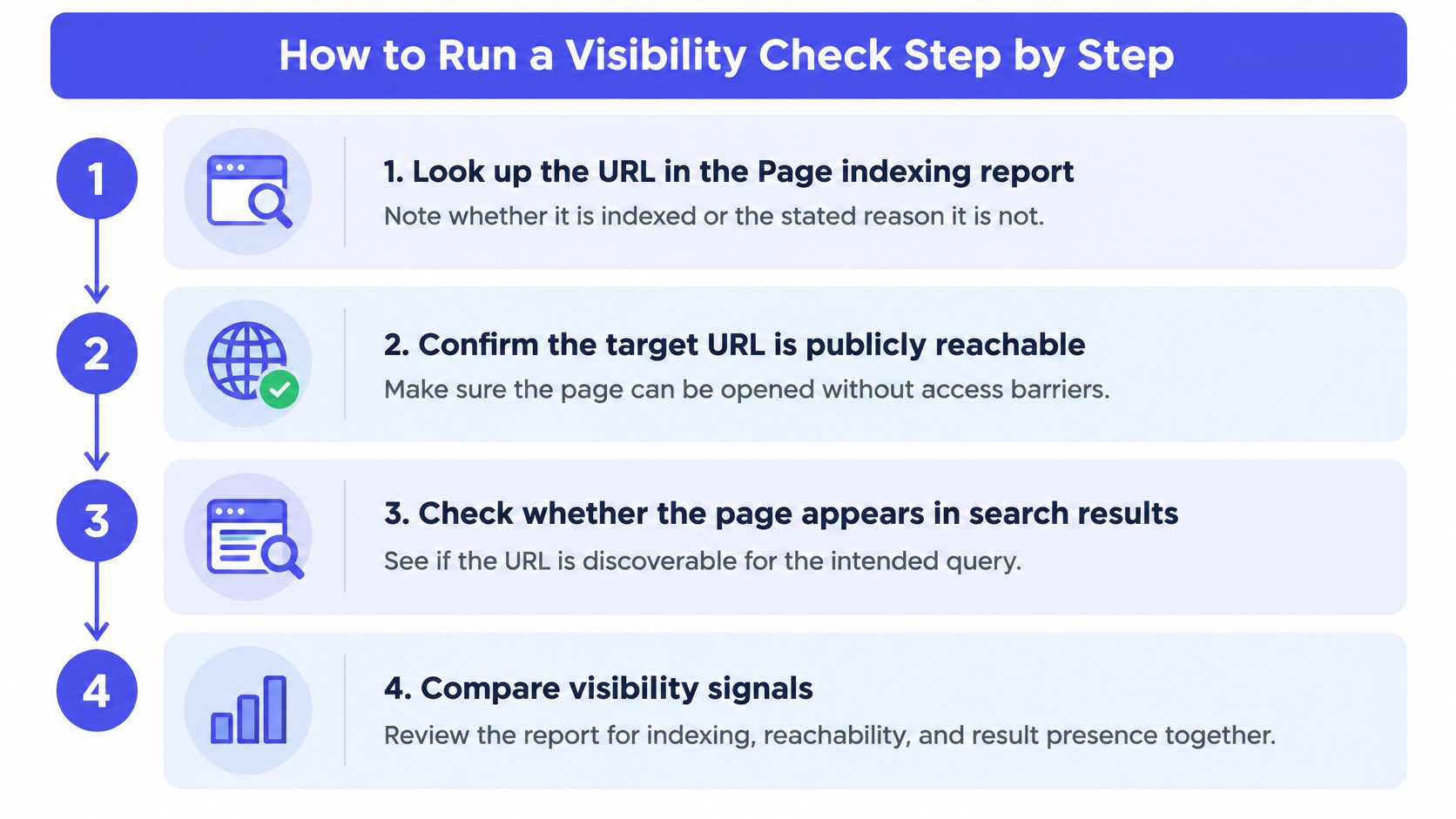
Start in the Page indexing report. Look up the URL and record whether it is indexed, or the reason Google gives when it is not. The common slip is starting a technical audit before reading this, when the blocker is a page-level directive.
Confirm the URL is publicly reachable and returns HTTP 200. Google does not index pages that return client or server errors. The trap here is treating a 200 response as proof of indexing, which it never is.
Check robots.txt against the page and its assets. A Disallow rule on the path stops crawling, which is a different thing from stopping indexing. A rule covering CSS or JavaScript stops the page rendering properly. Test the exact URL rather than reading the file and guessing.
Look for noindex directives and canonical tags. A meta robots tag left over from a staging environment is one of the most common causes of a page that never appears. A canonical pointed at a different URL is the quieter version, because it doesn't block the page, it just tells Google to consolidate the signal elsewhere.
Compare raw HTML with rendered HTML. JavaScript-only navigation, metadata, structured data and links can be missing from the initial response and appear only after rendering. Fetching the raw response alone will report missing content that visitors can see.
Confirm the URL is listed in the XML sitemap. A sitemap entry helps discovery and proves nothing about indexing, so treat it as one input rather than an answer.
Run URL Inspection and compare it with your own findings. The URL Inspection tool documentation notes that the tool reports on Google's indexed version of a page and can test whether a URL might be indexable, while an "on Google" result doesn't cover every requirement, including quality and security rules.
Log every issue with its evidence. Each finding needs the exact URL, the directive, the status code or the blocked resource, plus a severity. Without that, the report is a mood, not a work order.
A clean result presents crawlability, indexability and ranking visibility as three separate outcomes. A single pass or fail label tells you nothing about which of the three needs the work.
Fixing Pages That Never Reach the Index
Google's indexing requirements come down to three conditions: Googlebot must not be blocked, the page must return HTTP 200, and the page must contain indexable content. Meeting all three makes a page eligible. It doesn't guarantee Google will index it, and that gap is where most confusion starts.
| Symptom | Likely cause | Fix |
|---|---|---|
| Crawled but not indexed | Thin or duplicate content, or a canonical pointing to another URL | Add unique content, or point the canonical to the preferred URL |
| Blocked by robots.txt | A Disallow rule covers the path | Remove or narrow the rule, then test the URL again |
| Has a noindex tag | Meta robots or X-Robots-Tag set to noindex | Remove the tag if the page should appear in results |
| Key content missing from raw HTML | Content loaded only by JavaScript | Render key content on the server or confirm it in the rendered HTML |
| Listed in sitemap but not indexed | Page fails another check even though the sitemap includes it | Fix the failing check, since a sitemap entry is not proof of indexing |
| CSS or JavaScript blocked | Resources disallowed in robots.txt | Allow those resources so Google can render the page |
The first row is the one that gets misdiagnosed most often. Crawled but not indexed is not a technical failure in most cases. It's a judgement about quality or duplication, and the fix is editorial: better content, a clearer canonical, or consolidation of several thin pages into one.
Priority rule: fix pages that carry traffic or revenue first, because one template error can hide hundreds of URLs at once and the template fix repairs all of them together.
For pages that pass every check and still sit outside the index, submitting the URL is a reasonable next move. Rapid Indexer is listed in the AI Tool Seekers directory among the tools that handle recrawl requests, and its listing is worth reading before you rely on it, since a request asks Google to look again rather than promising inclusion. Record the date of every change you make. Recrawling takes days, and without a date stamp you'll be judging a fix against data collected before it landed.
Tracking Crawl Health and Trends Over Time
Visibility accumulates. A crawler has to reach a URL, process it, index it, and only then can the page appear. Crawl Stats report documentation makes the operational side measurable through crawl requests, downloaded bytes, average response time, host status, crawl responses and Googlebot type. Those are the numbers that explain why pages aren't discovered or refreshed on schedule.
One expectation to kill early: most sites shouldn't count on same-day discovery. Newly published pages can take several days at minimum to be noticed, and time-sensitive publishers are the exception rather than the rule. Sitemaps and individual indexing requests help Google find new or updated pages, and neither one guarantees ranking or inclusion.
Keep a dated log with a handful of columns:
- Crawl request volume, week over week, so a sudden drop shows up next to the deploy that caused it.
- Average response time and failed responses, because a slow server throttles crawling.
- Host status, which surfaces verification and access problems before they show up as lost pages.
- Indexed page count, the single best proxy for whether the site is growing or leaking.
Baseline first. Three or four weeks of stable readings make every later spike readable. Without a baseline, a migration looks identical to a normal Tuesday.
The pattern that proves the point: a site migration leaves a chain of redirects two hops deep, and three weeks later the indexed page count falls by a fifth while impressions sag in one country. A single snapshot shows a dip with no cause. The trend line points straight at the redirect work. Large catalogs, frequently updated publishers and international sites with many technical dependencies gain the most from this discipline, and a roundup of AI tools for SEO covers the software side once the routine is in place.
Checking Visibility in AI-Generated Answers
Search Console answers the rankings question and stays silent on the newer one: whether a site is discovered, cited, or accurately described inside an AI-generated answer. Its reports cover impressions, clicks, queries, pages, countries, devices and search appearance, a complete picture of traditional search and nothing about a chatbot reply.
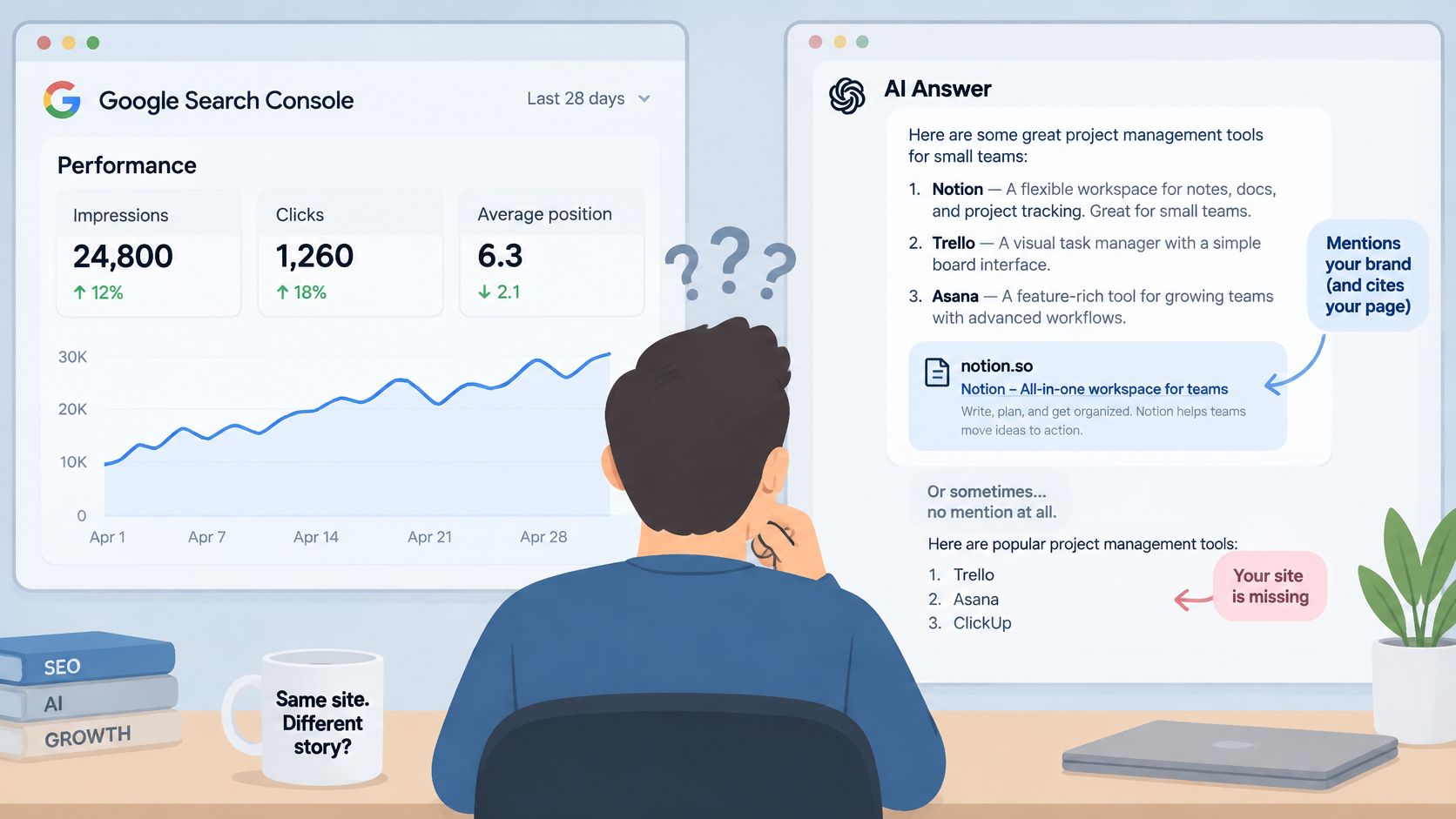
AI visibility sits at the far end of the same pipeline as organic visibility. A page has to be crawled, indexed and eligible before any answer engine can quote it, so a missing citation can mean a retrieval failure, a selection failure or a description failure. Each cause calls for different work, which is why a single visibility score that lumps them together tells you something is wrong without telling you where.
A useful check separates four outcomes rather than blending them:
- Presence. Did the site appear in the answer at all?
- Citation. Was the site named or linked as a source?
- Accuracy. Was the description of the business factually right?
- Downstream behavior. Did the mention produce visits, signups or sales?
The intent gap explains why that last row deserves its own line. AI-referred visits tend to arrive further along in the decision, so a smaller volume can still be worth more than a larger volume of organic visits. A raw traffic count understates the channel.
Uncertainty is the other half of the picture. Answers shift with the prompt, the geography, the user's history, the model and the day. A single snapshot reads like a weather report, and the climate record needs repeated runs. Test several prompts across more than one engine, log the date and location for each run, and treat the output as volatile. For the mechanics of getting cited in the first place, the insights on generative engine optimization explain how retrieval and citation work. Practitioners who want a structural starting point can run a free AI readiness check before changing anything.
A 2025 study cited in Originality.ai's AI search statistics roundup found that 40% of citations in Google AI Overviews came from pages ranking positions 11 to 20 in organic search. Citations and rankings overlap without matching, so the pages worth testing for AI visibility extend well past the top performers.
The practical takeaway: log which of the four outcomes failed on each run. A score of zero means different fixes depending on whether the page was never retrieved, retrieved and ignored, or cited and described badly.
Confirm Your Findings Before You Act
Verification follows a fixed routine. Re-run URL Inspection on the changed page, request indexing once the page is ready, then wait several days for a recrawl. Pull the Page indexing report and the Search performance report again with the same country, device and date range you used before.
One day of data proves nothing.
A checker run helps at this stage, but read it against the reports rather than on its own. Keep the limits in view: a checker result, a score or a directory listing does not guarantee traffic, rankings, citations by AI systems or sales. If you want a wider view of how different tools measure presence in AI answers, compare AI search visibility platforms before committing to one.
The next decision is simple. If indexing is clean and impressions are stable, the problem sits with content and position, and the work moves to titles, coverage and query intent. If indexing is failing, return to the symptom table and fix the blocking cause first. Nothing else on the list matters until that is done.
AI Tool Seekers runs a hand-verified directory of AI software alongside four free tools, including an AI visibility checker that works as a quick first pass before a full Search Console review. Start with one page that matters to the business, compare the checker's output against the indexing and performance reports for the same URL, and fix the earliest broken step in the pipeline rather than the most visible symptom. Visit AI Tool Seekers to try the free tools and browse the directory.