
AI Room Design
A photo-upload interior visualizer that generates style concepts for your actual room before you redecorate.
Are you the maker? Claim this listing to keep info, pricing and screenshots current. Verified via your tool's domain email.
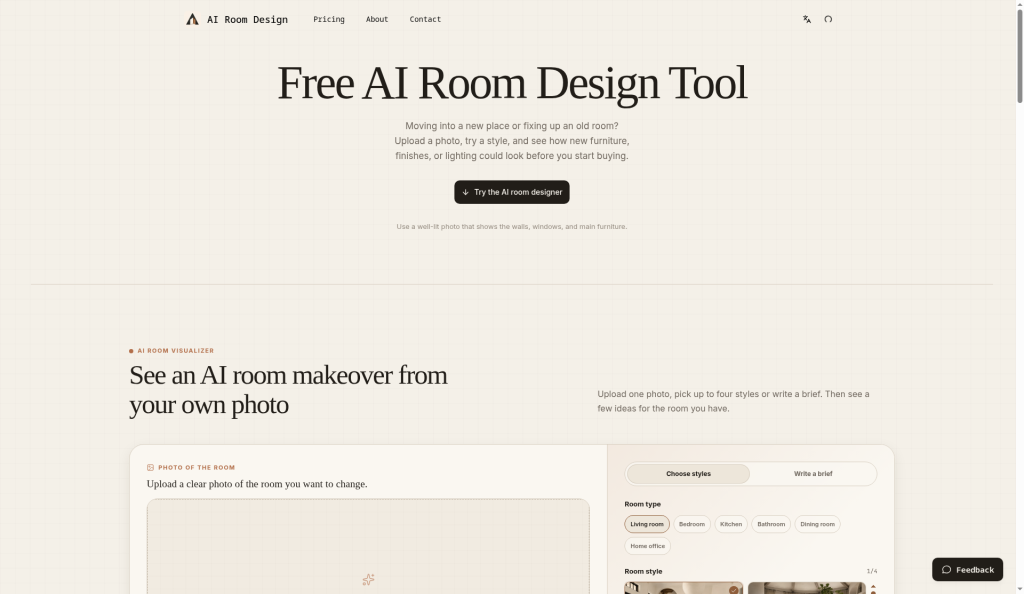
AI Room Design suits homeowners who want a quick visual sanity-check before buying furniture or paint, and the credit-based model keeps casual use affordable at $9.99 a month for 120 designs. It lacks the layout-preservation and shoppable-furniture features that more capable competitors offer, making it a thin choice for anyone doing serious design iteration. If you need more than inspiration images, look elsewhere.
What is AI Room Design?
AI Room Design is a photo-based interior design visualizer. Upload a picture of your actual room, choose from different design styles, or describe the changes you want to explore. The tool generates room-specific makeover concepts to help you compare ideas for furniture, materials, color, and lighting before making real-world decisions. Results are for design inspiration only.
How we scored AI Room Design
Capability scores 13 because the tool lacks layout preservation, point-edit controls, and shoppable furniture matching that comparable tools in this category already offer, leaving it as a basic image generator with a room photo as input. Ease of use scores 18 because the workflow is genuinely minimal and requires no technical setup, which is a real strength for its target audience. Value scores 15 because there is no confirmed free tier to test output quality before paying, the Starter plan at $9.99/month is mid-range for what is essentially a single-function image generator, and one-time pack pricing details are not publicly listed. Delivery scores 12 because the freemium label on third-party directories does not match the live pricing page, no user sentiment or trust signals were findable for this specific domain, and the tool appears recently launched with thin public track record.
Pros and cons
What we liked
- One-time credit packs let single-project users pay once without committing to a subscription, a practical option most competitors do not offer.
- The Studio plan at $39.99/month allows up to 600 room designs per month, giving high-volume users a predictable per-design cost of under $0.07.
- The workflow is genuinely simple: upload a photo, choose a style, get a concept image, with no floor-plan setup or 3D modeling required.
Where it falls short
- No free tier exists despite the freemium label on third-party directories: the live pricing page shows only paid subscriptions and credit packs, so new users cannot test output quality before spending money.
- The tool has no layout-preservation mode, point-edit brush, or shoppable furniture matching, features that comparable tools in this space already offer, which limits its usefulness beyond a first-pass inspiration image.
- Credits expire at the end of each billing cycle on subscription plans, meaning unused designs from a slow month are lost with no rollover.
Key features
AI Room Design pricing
Three monthly subscription tiers: Starter at $9.99/month (1,200 credits, 120 room designs), Pro at $19.99/month (3,000 credits, 300 room designs), and Studio at $39.99/month (6,000 credits, 600 room designs). Each room design costs 10 credits. A yearly option saves 17%. One-time credit packs are also available. The submitted pricing model says freemium, but the live pricing page lists no free tier; only paid subscriptions and one-time credit purchases are shown.
| Plan | Price | Who it is for |
|---|---|---|
| Starter | $9.99/month | 1,200 credits per month, enough for 120 room designs. Billed monthly, renews automatically. Yearly option available at a 17% discount. |
| Pro | $19.99/month | 3,000 credits per month, enough for 300 room designs. Billed monthly, renews automatically. Yearly option available at a 17% discount. |
| Studio | $39.99/month | 6,000 credits per month, enough for 600 room designs. Billed monthly, renews automatically. Yearly option available at a 17% discount. |
| One-Time Credits | Varies | Non-expiring credit packs available for users who prefer a single purchase over a recurring subscription. Exact pack sizes and prices not listed on the visible pricing page text. |
Pricing reflects what we saw at time of review (2026-10). Always confirm current pricing on the tool's own site.
Who should use AI Room Design?
A homeowner deciding between two paint colors or furniture styles before buying anything will get real value here. The same goes for a renter who wants to visualize a new sofa arrangement without hiring anyone. The one-time credit pack option makes it practical for a single-project user who does not want a subscription.
Anyone doing professional interior design work, managing multiple client projects, or needing to preserve exact room geometry should look elsewhere. Canva, already in our directory, covers broader visual design needs with more output control. For users who specifically need layout-aware room generation with shoppable furniture results, neither this tool nor Canva is the right fit, and a dedicated tool like Plnty (also in our directory) offers a more capable creative canvas for iterative professional work.
Skip it if: Interior design professionals or anyone needing precise layout control or furniture sourcing
AI Room Design alternatives
Frequently asked questions
Is there a free trial or free tier?+
The live pricing page at ai-room.design/pricing lists no free tier. Only paid monthly subscriptions and one-time credit packs are shown. Third-party listings describe the tool as freemium, but this could not be confirmed from the pricing page itself.
How many room designs do I get per month?+
Each design costs 10 credits. The Starter plan gives 120 designs per month, the Pro plan gives 300, and the Studio plan gives 600.
Do unused credits roll over to the next month?+
Based on the pricing page structure, subscription credits renew monthly and the prior month's allowance does not appear to roll over. One-time credit packs are described as non-expiring, so those do carry forward.
Can I use this for a single room project without subscribing?+
Yes. The pricing page lists one-time credit packs alongside the subscription tiers, so you can buy credits once for a single project without committing to a monthly charge.
Does the tool preserve my room's actual layout, like windows and doorways?+
The tool's own description and pricing page do not mention layout-preservation features. Third-party sources note that layout-preserving generation is a feature of other tools in this category, not this one.
What does the yearly billing discount save me?+
Switching to annual billing saves 17% across all three subscription tiers compared to paying month to month.
More AI Design & Art tools
See all categoriesGet your tool listed on 300+ directories.
One listing here is a strong start. But the founders who get discovered everywhere are listed everywhere. Our sister site, Free AI Directories, submits your tool to 300+ AI directories for you, every single one by hand, by a real person.
It is a one-time payment of $49, no subscription, and you can follow along as the submissions land. Prefer the slow route? The same site keeps a free list of 450+ directories you can work through yourself.
Get my tool listed on 300+ directoriesOne-time payment, no subscription · 100% human submissions · Free list of 450+ directories included.