
FrameThrower
A film-still reference library with visual search, REST API, MCP server, SDK, and lookbook tools for filmmakers and AI builders.
Are you the maker? Claim this listing to keep info, pricing and screenshots current. Verified via your tool's domain email.
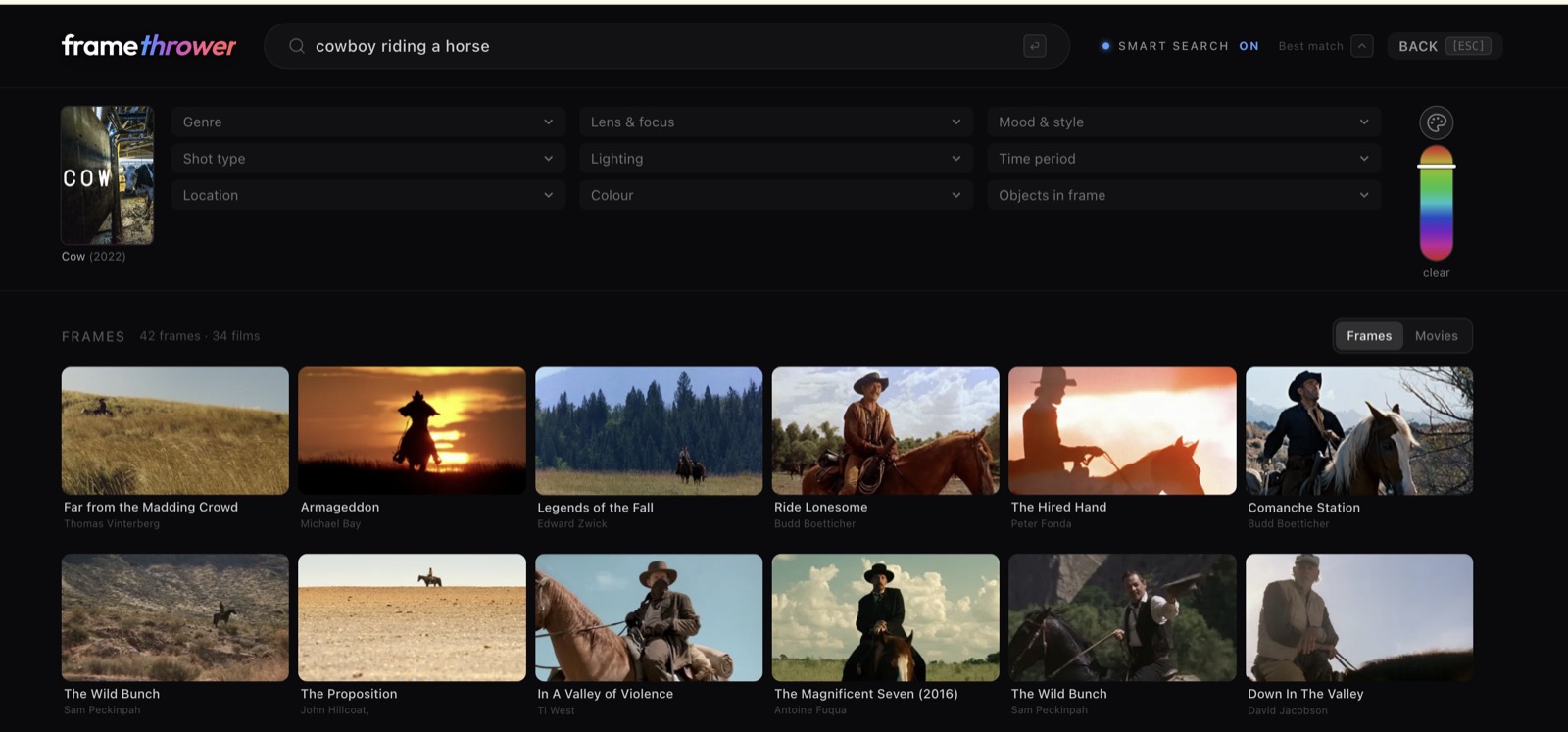
FrameThrower works best for filmmakers, advertising creatives, and AI developers who need richly tagged film-still references and flexible integration via API or MCP. It delivers deep metadata, depth maps, and composable prompts, but it does not license images and forbids AI ingestion of frames, which may limit reuse. If you need licensed assets or broader design features, consider Canva instead.
What is FrameThrower?
FrameThrower is the world’s largest library of film stills for inspiration, learning, and making movies faster. Find movie screenshots and cinematography references with AI-powered visual search. Explore lighting, composition, colour and shot size, then organise your references into lookbooks and export PDF boards for pitches and production.
Built for filmmakers and advertising creatives. Search thousands of films by lighting, lens character, shot size, colour grade, time of day and who is in the shot. Describe a shot out loud, save references to a lookbook, export a PDF or download the board as a ZIP.
Builders can access eleven REST endpoints, an MCP server for Claude and ChatGPT, an npm SDK, and a ComfyUI node that places a frame on the canvas with a ready-made depth map. Give agents and image pipelines real cinematographic reference.
Built by senior filmmakers and advertising creatives who have shot, cut and pitched for a living. Free and paid plans available.
How we scored FrameThrower
FrameThrower earns high marks for capability with rich metadata, depth maps, and multiple integration options. Ease of use is strong thanks to SDKs and UI, though credit tracking adds friction. Value is fair: free tier is generous and Pro is affordable, but credit costs add complexity. Delivery is solid, features match claims and privacy/security is clear, but the lack of licensing and incomplete team features hold it back slightly.
Pros and cons
What we liked
- Rich metadata and depth maps included with every frame at no extra cost
- Multiple integration options. REST API, MCP server, npm SDK, ComfyUI node
- Flexible pricing: free tier plus affordable Pro and team Studio plans
Where it falls short
- Frames are reference-only; no licensing or rights clearance provided
- Credit-based API/MCP usage adds complexity and cost tracking
- Shared moodboards in Studio are marked “coming soon,” so collaboration features may be incomplete
Key features
FrameThrower pricing
Free tier allows browsing and 50 searches/day, 20 HD downloads/month, 10 image searches/month, and up to 3 moodboards. Pro costs $14/month (or $7/month billed annually) for unlimited searches, downloads, 200 image searches/month, unlimited moodboards, bulk ZIP downloads, and priority support. Studio is $115 per seat/year (≈$29/month) for teams of 3 - 10, includes everything in Pro plus shared moodboards and per-seat limits. API/MCP usage is metered via credits: new accounts get $2 (2,000 credits), and $1 buys 1,000 credits; image search costs 10 credits, most calls cost 2 credits.
| Plan | Price | Who it is for |
|---|---|---|
| Free | $0/month | 50 searches/day, 20 HD downloads/month, 10 image searches/month, up to 3 moodboards |
| Pro | $14/month or $7/month billed annually | Unlimited searches and downloads, 200 image searches/month, unlimited moodboards, bulk ZIP download, priority support |
| Studio | $115 per seat/year | Everything in Pro per seat, unlimited downloads per seat, 500 image searches/month per seat, shared moodboards (coming soon) |
Pricing reflects what we saw at time of review (2026-09). Always confirm current pricing on the tool's own site.
Who should use FrameThrower?
Filmmakers, cinematographers, and advertising creatives who need quick access to real film references for lighting, composition, or mood will find FrameThrower useful. AI developers and tool builders can embed its search and depth-map outputs into pipelines via API, MCP, or ComfyUI. Teams working collaboratively on lookbooks or pitches benefit from the Studio plan with shared moodboards. If you need licensed images or broader design features like templates or vector editing, Canva is a better fit.
Skip it if: Users needing licensed image assets or broad design tools
FrameThrower alternatives
Frequently asked questions
How much does the Pro plan cost?+
Pro costs $14 per month or $7 per month when billed annually.
What does the free tier include?+
The free tier gives 50 searches per day, 20 HD downloads per month, 10 image searches per month, and up to 3 moodboards.
How is API usage billed?+
API and MCP usage is metered via credits: new accounts get $2 worth (2,000 credits), and $1 buys 1,000 credits; most calls cost 2 credits, image search costs 10 credits.
Are depth maps included?+
Yes, every frame response includes a precomputed depth map at no extra cost.
Can I use frames in AI generation?+
No, frames are for reference only and cannot be used as inputs to AI systems under the terms of service.
More AI Design & Art tools
See all categoriesGet your tool listed on 300+ directories.
One listing here is a strong start. But the founders who get discovered everywhere are listed everywhere. Our sister site, Free AI Directories, submits your tool to 300+ AI directories for you, every single one by hand, by a real person.
It is a one-time payment of $49, no subscription, and you can follow along as the submissions land. Prefer the slow route? The same site keeps a free list of 450+ directories you can work through yourself.
Get my tool listed on 300+ directoriesOne-time payment, no subscription · 100% human submissions · Free list of 450+ directories included.