
Aureon
A Mac-only AI layer that rewrites, translates, or summarizes selected text and routes the result into Apple Notes, Obsidian, Notion, or
Are you the maker? Claim this listing to keep info, pricing and screenshots current. Verified via your tool's domain email.
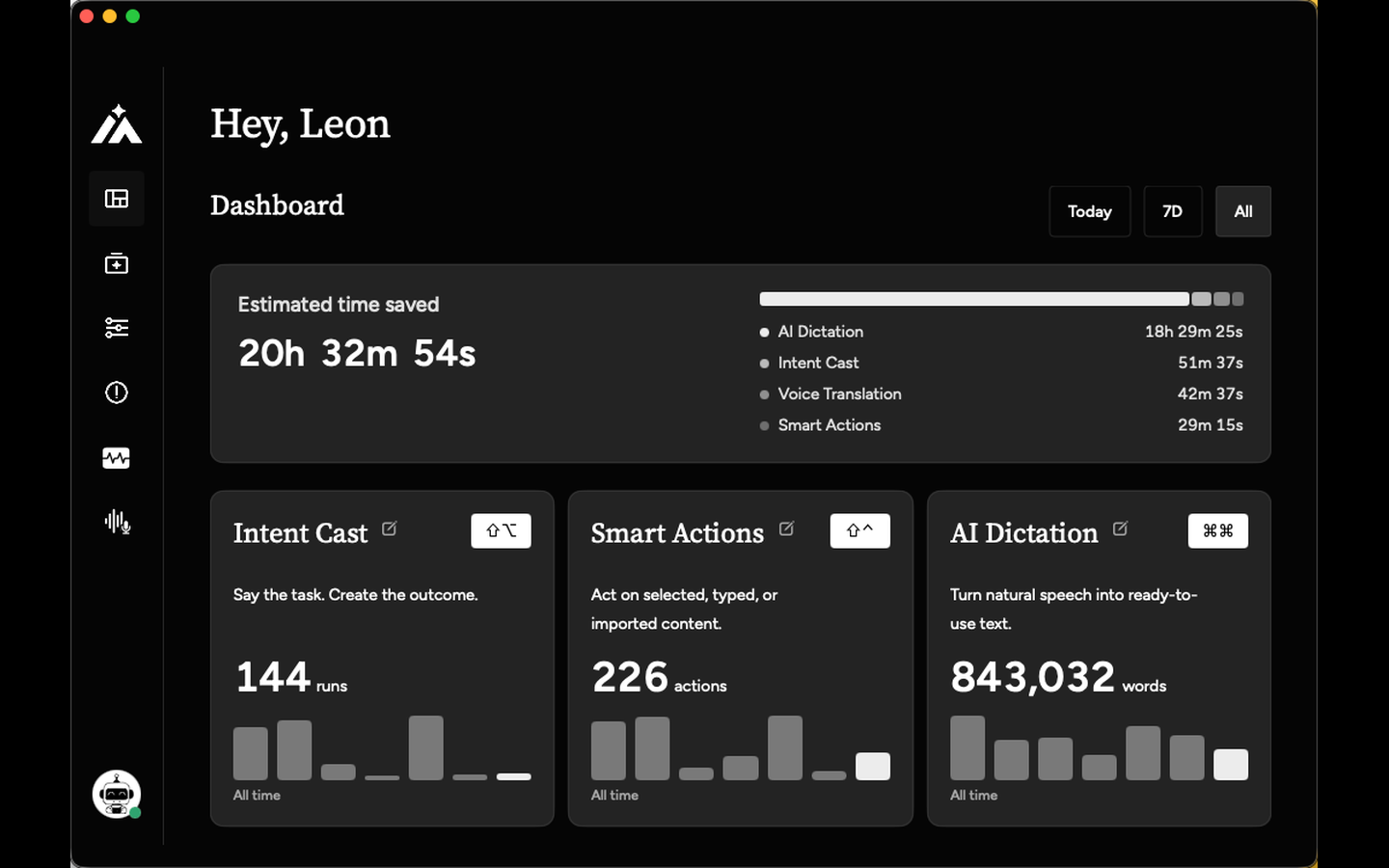
Aureon suits Mac-first solo writers who want a lightweight bridge between voice dictation and their note or calendar apps, without anything being sent or saved automatically. Its create-only, review-before-commit design is genuinely distinctive, but the 5,000 AI character daily cap on the Plus plan and the Mac-only requirement will frustrate heavier users or anyone on Windows. If you need cross-platform AI writing assistance with grammar and tone feedback, Grammarly covers far more ground.
What is Aureon?
Apple Intelligence Writing Tools improve selected text in place. Aureon Smart Actions starts there, then lets you add a typed or spoken instruction and optionally create one reviewed item in Apple Notes, Obsidian, Notion, Flomo, or Apple Calendar. Create-only: no send, edit, delete, or overwrite. macOS 14+, paid with free trial. Guide: https://inaureon.com/apple-intelligence-writing-tools-alternative
How we scored Aureon
Capability scores 17 because the create-only workflow routing and voice translation are genuinely distinctive, but the integration list covers only eight apps and there is no browser, email, or Google Docs support, leaving the feature set narrow compared to Grammarly's cross-platform reach. Ease of use scores 18 because the 7-day full-Max trial removes onboarding friction and the Mac-native design keeps the interface simple, though the macOS 14 hard requirement limits who can even start. Value scores 16 because the Plus plan's 5,000 character daily cap is tight for regular use, and the Max plan at $19.99/month is a significant jump for a single-platform tool with eight integrations and no mobile companion. Delivery scores 15 because no independent user reviews, App Store ratings, or third-party coverage appeared in search, making it impossible to verify that the product delivers on its claims at scale; the absence of any public sentiment record is itself a risk signal for a paid subscription tool.
Pros and cons
What we liked
- Create-only workflow design means nothing is sent or saved without your review, a genuine safety constraint absent from most AI writing tools.
- Voice Translation preserves tone while producing output in a different language, useful for bilingual writers or anyone communicating across language boundaries.
- Custom Agents let you save reusable instruction sets, so repeated tasks like 'clean up and file to Obsidian in my weekly review format' become a single voice command.
Where it falls short
- The Plus plan caps AI output at 5,000 characters per day shared across all features, which a moderately active writer can hit before lunch.
- Mac-only with a macOS 14 minimum: no web app, no iOS, no Windows, no Android. The entire product is inaccessible to anyone outside that single platform.
- The extension and integration list covers only eight apps, all in the Apple and indie productivity space. There is no Slack, no Google Docs, no email client, and no browser integration, so anyone whose work lives outside that narrow set gets nothing from the workflow layer.
Key features
Aureon pricing
7-day free trial with full Max access, no credit card required. Plus plan starts at $1.99 for the first month, then $6.99/month (or $59.99/year). Max plan is $19.99/month or $159.99/year. No permanent free tier.
| Plan | Price | Who it is for |
|---|---|---|
| 7-Day Free Trial | Free | Full Max access for 7 days with no subscription required. Lets you test unlimited AI output, unlimited extensions, and up to 5 devices before committing to a paid plan. |
| Plus Monthly | $1.99 | First month at $1.99, then $6.99/month. Includes 5,000 AI output characters per day shared across Input and Workflow, up to 10 extensions (official and custom), and up to 3 devices. Requires macOS 14+. |
| Plus Yearly | $59.99 | Annual billing for the Plus plan. Same feature set as Plus Monthly: 5,000 AI output characters per day, up to 10 extensions, up to 3 devices. |
| Max Monthly | $19.99 | Unlimited AI output across Input, Agents, and Workflows (subject to reasonable use policy), unlimited extensions, and up to 5 devices. Month-to-month with no annual commitment required. |
| Max Yearly | $159.99 | Annual billing for the Max plan. Same unlimited AI output and extensions as Max Monthly, up to 5 devices, at a lower effective monthly rate than the monthly plan. |
Pricing reflects what we saw at time of review (2026-10). Always confirm current pricing on the tool's own site.
Who should use Aureon?
Aureon fits a specific kind of Mac user: someone who thinks out loud, dictates rough notes, and wants a reviewed draft waiting in Obsidian or Apple Notes rather than a raw transcript. A freelance writer who records ideas while walking and wants them cleaned up and filed without touching the keyboard is a natural fit. So is a consultant who wants to say a task once and have a calendar event or Todoist item created for review, not auto-committed.
Anyone who needs Windows support, a mobile app, or AI that actively edits existing documents should look elsewhere. Grammarly is the better call for writers who want grammar, tone, and clarity feedback across browsers, desktop apps, and mobile, with a free tier that covers basic use. LinguaPilot AI is the closer Windows equivalent for selected-text improvement inside everyday desktop apps.
Skip it if: Windows users, teams, or anyone needing AI that edits or sends content automatically
Tags
Frequently asked questions
Does Aureon have a free plan?+
No permanent free tier exists. Aureon offers a 7-day free trial with full Max access and no subscription or credit card required. After the trial you must subscribe to Plus (from $6.99/month) or Max ($19.99/month) to continue.
What is the daily AI output limit on the Plus plan?+
Plus subscribers get 5,000 AI output characters per day, shared across all features including Input and Workflow. The Max plan removes this cap, subject to a reasonable use policy.
Can Aureon edit or delete content in my connected apps?+
No. Aureon is create-only in all connected apps. It can add new notes, tasks, reminders, or calendar events for your review, but it cannot edit, delete, send, or overwrite any existing content.
Which Mac version does Aureon require?+
Aureon requires macOS 14 or later. There is no web app, iOS app, or Windows version.
Which apps does Aureon integrate with?+
The current integration list covers Apple Notes, Apple Reminders, Apple Calendar, Things 3, Obsidian, Flomo, Notion, and Todoist. The Plus plan supports up to 10 extensions; the Max plan supports unlimited extensions.
Is the yearly plan meaningfully cheaper than monthly?+
Yes. Plus Yearly at $59.99 works out to about $5/month versus $6.99/month on the monthly plan. Max Yearly at $159.99 is roughly $13.33/month versus $19.99/month, a saving of about 33% annually.
More AI Writing & Content tools
See all categoriesGet your tool listed on 300+ directories.
One listing here is a strong start. But the founders who get discovered everywhere are listed everywhere. Our sister site, Free AI Directories, submits your tool to 300+ AI directories for you, every single one by hand, by a real person.
It is a one-time payment of $49, no subscription, and you can follow along as the submissions land. Prefer the slow route? The same site keeps a free list of 450+ directories you can work through yourself.
Get my tool listed on 300+ directoriesOne-time payment, no subscription · 100% human submissions · Free list of 450+ directories included.