
BG Remover
A web-based AI background removal tool offering batch exports, transparent PNG output, and API access for product and design workflows.
Are you the maker? Claim this listing to keep info, pricing and screenshots current. Verified via your tool's domain email.
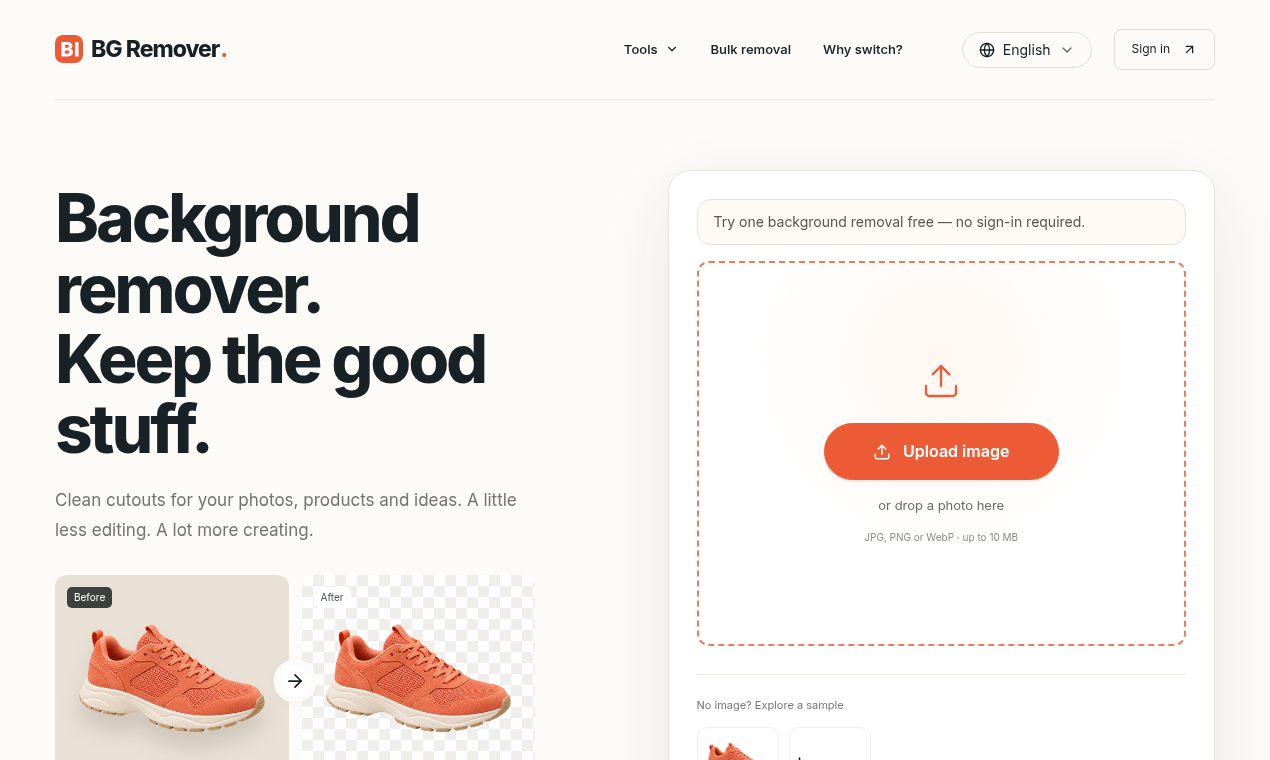
BG Remover suits small e-commerce sellers and designers who need clean, original-resolution cutouts without touching Photoshop. Its API access on the Pro plan and batch ZIP downloads give it a practical edge over purely manual tools, but the complete absence of a free tier puts it behind well-established competitors like remove.bg that let you test before paying. Anyone processing more than 1,000 images a month or needing desktop apps should look elsewhere.
What is BG Remover?
Instead of tracing edges with a pen tool for every photo, you can use BG Remover to remove the background from a photo and export it as transparent, white, or color.
Where does it help? Photo collections: run a batch of up to 20 images and download a ZIP. Documents: turn a scanned signature into a transparent PNG.
With BG Remover, you can connect through an API on higher plans. The Pro plan includes API access, and there is a migration guide for remove.bg API users. Users can remove backgrounds from product photos for listings and catalogs. A further option: make logos and scanned signatures transparent.
Paid plans cover HD, original-resolution exports, with API access from the Pro plan.
It is a good match for designers and small businesses, especially those who want a reusable transparent master.
That makes BG Remover a straightforward choice for designers. To try BG Remover, click here (https://bg-remove.net).
How we scored BG Remover
Capability scores 15 because BG Remover covers the core job (AI cutouts, batch ZIP, API) but lacks desktop apps, a Photoshop plugin, and the erase-and-restore editing layer that remove.bg and Canva both offer at comparable or lower price points. Ease of use scores 18 because a single-purpose web tool with three clear tiers and a documented API migration path is genuinely easy to start with, though web-only delivery limits where it fits. Value scores 12 because the $9/month Starter entry with no free tier or pay-as-you-go option is a harder ask than competing tools that offer free low-res previews or one-off credit packs; the 100-export Starter cap is also tight for anyone shipping product photos weekly. Delivery scores 13 because the tool is new enough that independent user sentiment and review volume are thin, the social presence could not be confirmed, and the pricing page omits key details like overage policy and annual discount options, which raises questions about how fully the product is built out.
Pros and cons
What we liked
- API access at the $19/month Pro tier, with a documented migration path for remove.bg API users, makes pipeline integration practical for small dev teams.
- Batch processing of up to 20 images with ZIP download is built into paid plans, cutting repetitive manual work for catalog and e-commerce workflows.
- All three paid tiers include original-resolution HD exports, so you are not paying extra just to get full-size output.
Where it falls short
- No free tier and no pay-as-you-go option: every user must commit to at least $9/month before seeing a single HD export, which is a harder ask than remove.bg's free low-res previews or credit packs.
- The Business plan caps at 1,000 HD exports per month with no published pricing for higher volumes, leaving high-throughput e-commerce teams without a clear upgrade path.
- Web-only delivery with no desktop app, browser extension, or Photoshop plugin means it cannot fit into the local editing workflows that tools like remove.bg support natively.
Key features
BG Remover pricing
Three paid tiers only: Starter at $9/month (100 HD exports), Pro at $19/month (300 HD exports, API access), and Business at $49/month (1,000 HD exports, custom integrations). No free tier and no pay-as-you-go option.
| Plan | Price | Who it is for |
|---|---|---|
| Starter | $9.00/mo | 100 HD exports per month, original-resolution downloads, email support. No API access. |
| Pro | $19.00/mo | 300 HD exports per month, original-resolution downloads, priority support, API access. |
| Business | $49.00/mo | 1,000 HD exports per month, original-resolution downloads, priority support, custom integrations. |
Pricing reflects what we saw at time of review (2026-10). Always confirm current pricing on the tool's own site.
Who should use BG Remover?
A solo product photographer uploading 50 to 80 SKUs a week to an online store will get real value from the Starter or Pro tier: original-resolution exports, batch ZIP downloads, and no manual masking. Graphic designers who need to make logos or scanned signatures transparent for client decks will find the workflow direct enough to justify the monthly cost.
Anyone who wants to test the output quality before committing money should look elsewhere. Canva, which is already in this directory, includes background removal as part of its free and Pro plans alongside a full design canvas, making it a better starting point for designers who also need to composite and publish. Teams processing more than 1,000 images a month will hit the Business cap and need a custom arrangement the pricing page does not describe.
Skip it if: High-volume pipelines or users who want to test before paying
BG Remover alternatives
Frequently asked questions
Is there a free plan or trial?+
No. The pricing page lists three paid tiers only, starting at $9/month. There is no free tier, no free trial, and no pay-as-you-go credit option mentioned.
What is the monthly export limit on each plan?+
Starter allows 100 HD exports per month, Pro allows 300, and Business allows 1,000. All are original-resolution downloads.
Which plan includes API access?+
API access is available from the Pro plan ($19/month) and above. The site also provides a migration guide for teams currently using the remove.bg API.
Can I process multiple images at once?+
Yes. BG Remover supports batch uploads of up to 20 images and delivers the results as a downloadable ZIP file.
What output formats does BG Remover support?+
Processed images can be exported as transparent PNGs, or placed on a white or custom solid-color background before download.
Is there a desktop app or browser extension?+
No. BG Remover is web-only. There is no desktop application, browser extension, or Photoshop plugin listed on the site.
More AI Design & Art tools
See all categoriesGet your tool listed on 300+ directories.
One listing here is a strong start. But the founders who get discovered everywhere are listed everywhere. Our sister site, Free AI Directories, submits your tool to 300+ AI directories for you, every single one by hand, by a real person.
It is a one-time payment of $49, no subscription, and you can follow along as the submissions land. Prefer the slow route? The same site keeps a free list of 450+ directories you can work through yourself.
Get my tool listed on 300+ directoriesOne-time payment, no subscription · 100% human submissions · Free list of 450+ directories included.