Blank Calendar
Free browser-based monthly calendar maker that exports print-ready PDFs, PNGs, and SVGs with no account required.
Are you the maker? Claim this listing to keep info, pricing and screenshots current. Verified via your tool's domain email.
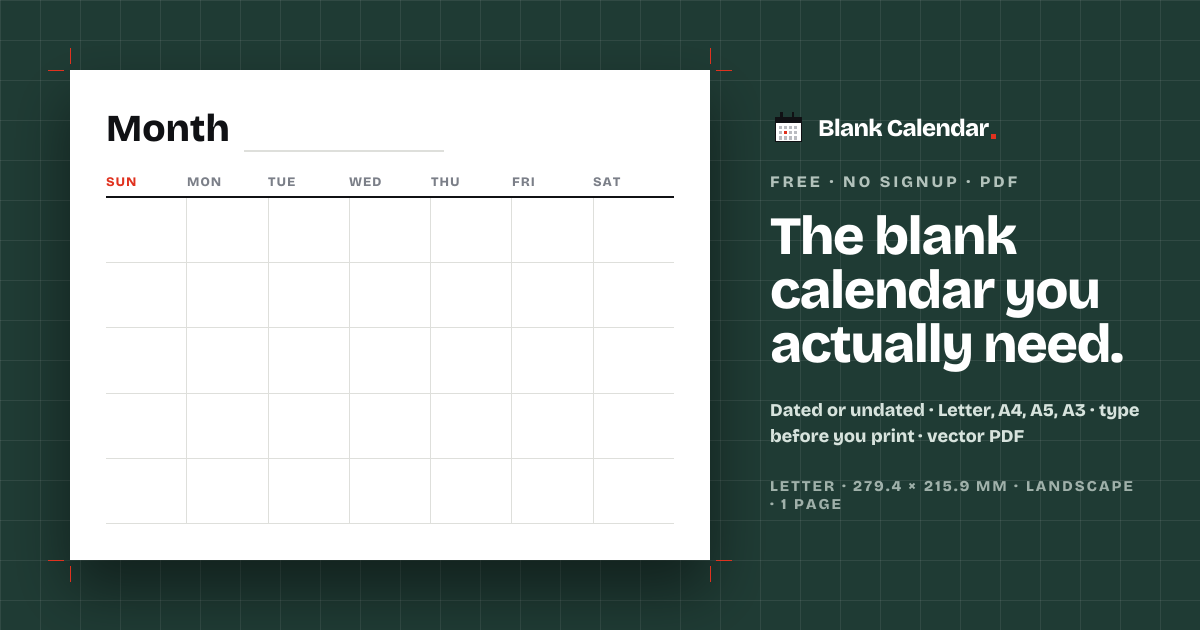
Blank Calendar is the right pick for anyone who needs a clean, print-ready monthly calendar fast, with zero friction: no account, no paywall, no watermark. It does one thing and does it well, but it stops at monthly layouts, so anyone needing weekly or daily views will hit a wall immediately. If you want a richer set of calendar formats or editable Word and Excel exports, look elsewhere.
What is Blank Calendar?
Free web productivity tool that makes printable blank calendars as a PDF. Choose dated or undated layout, custom week start, paper size, and notes. No account required.
How we scored Blank Calendar
Ease of use scores very high: the tool requires zero signup, loads immediately, and the six-step configuration is self-explanatory, making it about as frictionless as a web tool can be. Value also scores high because the $0 price with no watermark and no hidden tier is genuinely rare. Capability scores in the low teens because the tool covers monthly calendars only, with no weekly, daily, or yearly formats, no save or sync, and no features that named competitors like EveryTool4U or 101planners do not also offer for free. Delivery is scored at 0 because the tool was submitted and categorized as an AI Productivity Tool but contains no AI features whatsoever, which is a direct mismatch between the claim and the reality; a directory reader clicking through expecting AI assistance would find a plain PDF generator, which is a delivery failure on the category promise.
Pros and cons
What we liked
- Genuinely free with no watermark, no signup, and no hidden paid tier: the $0 price covers every feature including PDF, PNG, and SVG export.
- Six paper sizes built to exact ISO 216 and ANSI Y14.1 dimensions, so the PDF prints at 100% without scaling on any printer from A5 planners to A3 wall sheets.
- In-browser typing lets you place text directly into day cells before downloading, removing the need for a separate PDF editor to annotate the calendar.
Where it falls short
- Monthly calendars only: there is no weekly, daily, or yearly layout, which rules out the tool for anyone whose planning needs go beyond a single-month grid.
- No save or sync: every session starts from scratch, so a layout you configured last month cannot be recalled or reused without rebuilding it manually.
- No AI features despite being submitted under AI Productivity Tools: the tool is a rules-based PDF generator with no AI-assisted scheduling, suggestions, or automation of any kind.
Key features
Blank Calendar pricing
Completely free. The pricing page lists a single offer at $0 USD. No paid tiers, no signup, no watermark.
| Plan | Price | Who it is for |
|---|---|---|
| Free | $0 | All features: dated and undated layouts, all six paper sizes, all day-box styles, notes column, holidays for 15 countries, PDF, PNG, and SVG export. No account required. |
Pricing reflects what we saw at time of review (2026-11). Always confirm current pricing on the tool's own site.
Who should use Blank Calendar?
A teacher who prints a fresh classroom calendar each month, a parent who posts a family schedule on the fridge, or an office manager who needs a shift-planning sheet in a specific paper size will find Blank Calendar genuinely useful. The no-signup, no-cost model means it works for one-off needs without any commitment, and the six paper sizes cover everything from A5 planner inserts to A3 wall posters.
Anyone who needs weekly or daily calendar formats, multi-year planning, or editable files in Word or Excel should skip this tool. EveryTool4U, which offers 100-plus browser-based productivity utilities at no cost, is a better starting point if your needs extend beyond a single monthly grid.
Skip it if: Anyone needing weekly, daily, or multi-year calendar formats, or editable file types like Word or Excel
Blank Calendar alternatives
Frequently asked questions
Is Blank Calendar really free, or is there a paid tier for extra features?+
It is fully free. The pricing page lists a single offer at $0 USD. Every feature, including all paper sizes, export formats, holidays, and the notes column, is available without payment or signup.
What file formats can I download?+
You can download a vector PDF, a 300 dpi PNG, or an SVG. The PDF is built at the exact paper size you chose, so it prints correctly at 100% without scaling.
Can I make a calendar for a month other than the current one?+
Yes. The dated mode covers all 12 months of 2026. The undated mode produces a perpetual template with no year or day numbers, which can be reused for any month.
Does it support weekly or daily calendar formats?+
No. Blank Calendar generates monthly grids only. If you need a weekly or daily layout, this tool has nothing to offer.
Which countries' public holidays are included?+
The site states holidays for 15 countries are available, printed inside the dated day boxes. The specific country list is not enumerated on the main page.
Can I save my calendar layout to reuse it next month?+
No. There is no account system and no saved sessions. Each visit starts from default settings, so you would need to reconfigure your preferred options each time.
More AI Productivity Tools
See all categoriesGet your tool listed on 300+ directories.
One listing here is a strong start. But the founders who get discovered everywhere are listed everywhere. Our sister site, Free AI Directories, submits your tool to 300+ AI directories for you, every single one by hand, by a real person.
It is a one-time payment of $49, no subscription, and you can follow along as the submissions land. Prefer the slow route? The same site keeps a free list of 450+ directories you can work through yourself.
Get my tool listed on 300+ directoriesOne-time payment, no subscription · 100% human submissions · Free list of 450+ directories included.