
Paneherd
VS Code and Cursor extension that runs Claude Code, Codex, Copilot, Gemini, and more in a single agent grid.
Are you the maker? Claim this listing to keep info, pricing and screenshots current. Verified via your tool's domain email.
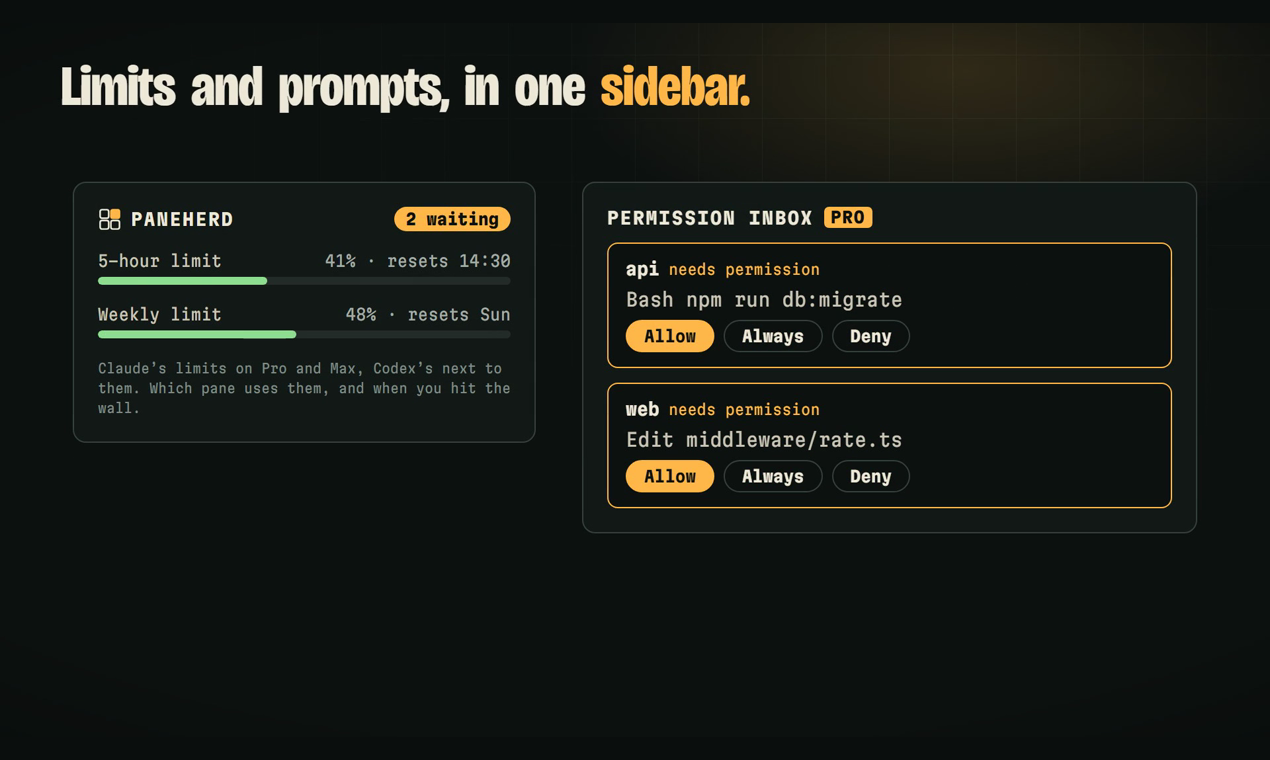
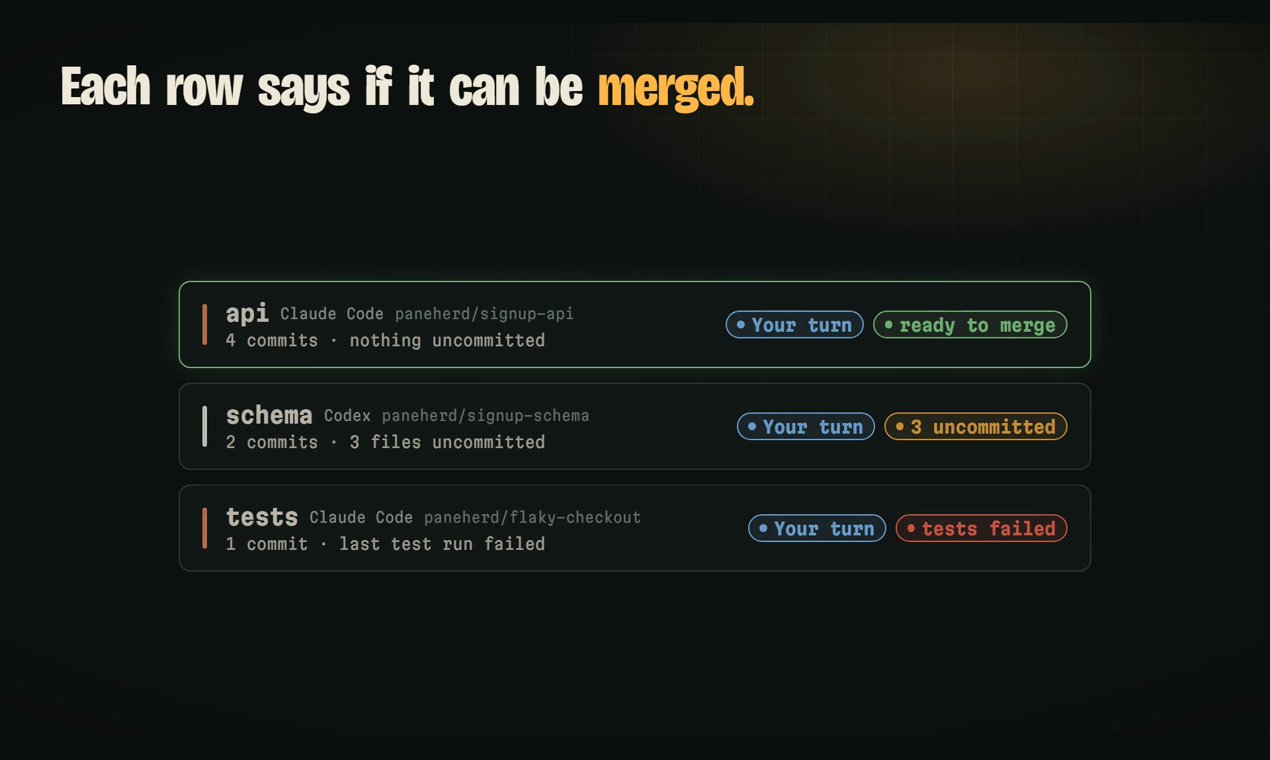
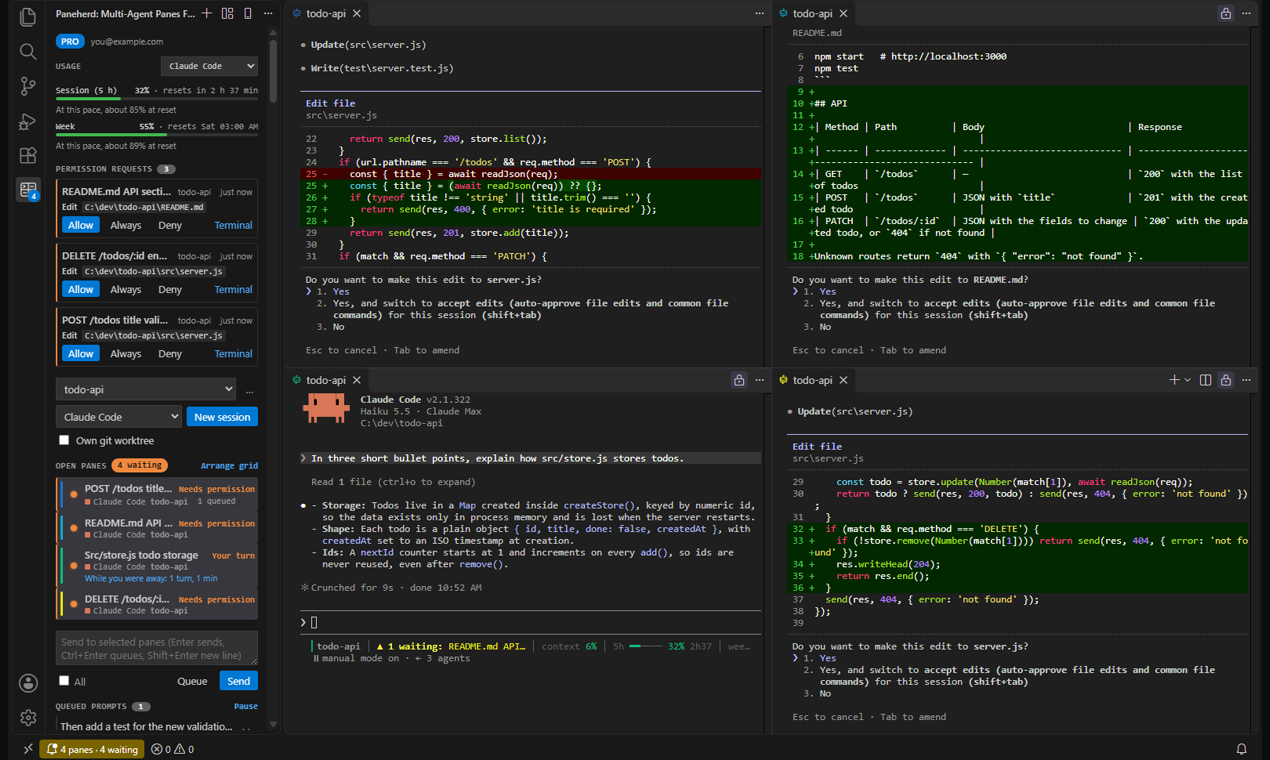
Paneherd is the right pick for developers already juggling two or more AI coding agents who are tired of hunting through scattered terminals for the one waiting on a permission prompt. The permission inbox and conflict guard are genuinely useful, but both are locked behind Pro, and the extension only runs inside VS Code or Cursor, so JetBrains and Neovim users are out. If you use a single agent and want a full AI-first editor rather than an orchestration layer, Cursor is the better fit.
What is Paneherd?
Run Claude Code, Codex and other agent CLIs in a grid in VS Code or Cursor. See which session waits on you and how much of your 5-hour limit is left. Pro ($2.99 once) warns before two sessions edit the same file and forecasts when you'll hit the limit.
Free, with no limit on sessions: your Claude 5-hour and weekly limits in the sidebar with Codex's next to them, a notification when a session needs you, a git worktree per session with a "ready to merge" chip, and a phone page to see status and send a prompt (no app).
Pro, $2.99 once: conflict guard (Claude asks you before editing a file another session just changed), a forecast of when you'll hit the 5-hour limit, a task queue, and lead sessions that split work across worktrees.
No account, no telemetry: hooks talk to the extension over localhost.
New in 0.17: a merge queue that lands finished worktrees only after their tests pass, and a review of each branch by the other vendor's agent.
How we scored Paneherd
Capability scores 20 because the multi-agent grid, conflict guard, merge queue, and phone remote are genuinely novel features no individual agent CLI provides, but the permission inbox and conflict guard only work for Claude Code sessions, leaving other agents as dumb terminals with status display only. Ease of use scores 19 because the install path is a standard VS Code extension with no account setup, the QR-code phone pairing is three steps, and the free trial removes purchase friction, though the feature gating between free and Pro requires reading documentation to understand. Value scores a full 25: a one-time $2.99 license with offline validation, no subscription, no seats, and a 14-day refund is genuinely exceptional pricing for the category, and the free tier is meaningfully functional. Delivery scores 8 because the VS Code Marketplace listing shows zero user reviews and a very low install count at the time of this review, meaning there is no independent evidence base for real-world reliability; the tool is very new and unproven in production, which is a material risk for a buyer considering it for daily multi-agent workflows.
Pros and cons
What we liked
- One-time $2.99 Pro license with no subscription, no seats, and offline license validation means the cost never scales against you.
- Conflict guard actively intercepts edits when two agents are about to modify the same file, a problem no individual agent CLI solves on its own.
- Phone remote works via browser with end-to-end encryption and no app install, letting you answer permission prompts and send prompts from away from your desk.
Where it falls short
- The permission inbox and conflict guard, the two features most likely to justify the tool for multi-agent users, are both Pro-only; the free tier shows status but cannot intercept or answer prompts remotely.
- Paneherd only runs inside VS Code 1.95 or later and Cursor; developers on JetBrains IDEs, Neovim, or any other editor have no path to use it.
- The VS Code Marketplace listing shows zero reviews and a very low install count, so there is little independent user evidence about real-world reliability or edge-case behavior.
Key features
Paneherd pricing
Free tier with unlimited panes. Pro is a one-time $2.99 purchase with a perpetual license key, a 7-day free trial, and a 14-day refund window. No subscription, no per-seat fee, no account required.
| Plan | Price | Who it is for |
|---|---|---|
| Free | $0 | Unlimited panes across all supported agents, live status display for every pane, usage limits sidebar for Claude and Codex, prompt broadcasting to multiple panes, phone remote for status viewing and prompt sending, git worktree per session with merge-ready chip. No account required. |
| Pro | $2.99 one-time | Everything in Free, plus: permission inbox for Claude Code prompts, conflict guard before same-file edits, task queue, lead sessions that split work across worktrees, merge queue (tests must pass before landing), phone remote permission answering, loop alarms, and usage forecasting. Perpetual license key checked offline. 7-day free trial available; 14-day refund window. |
Pricing reflects what we saw at time of review (2026-11). Always confirm current pricing on the tool's own site.
Who should use Paneherd?
Paneherd is built for developers who already run Claude Code alongside at least one other agent CLI and find themselves constantly switching terminals to check which session needs attention. A solo developer running Claude Code for architecture work and Codex for a second opinion on the same codebase gets immediate value from the shared inbox and conflict guard. Teams using git worktrees per feature branch will find the merge queue in 0.17 particularly useful, since it holds a branch until tests pass before landing it.
If you use a single agent and want deep editor integration, autocomplete, and inline suggestions rather than a terminal grid, look at Cursor instead. Cursor is an AI-first editor that understands your whole codebase and handles the full editing loop natively. If you want an autonomous agent that takes a GitHub Issue all the way to a tagged release without manual terminal management, Orbi is the more appropriate tool.
Skip it if: Single-agent users, JetBrains or Neovim users, or anyone wanting a fully integrated AI editor rather than a terminal grid manager.
Paneherd alternatives
Tags
Frequently asked questions
Does Paneherd require me to create an account?+
No. The free tier needs no account at all. The Pro license key is purchased at paneherd.com and activated directly in VS Code or Cursor; the license check runs offline with no network call required after activation.
How much does Pro cost and is there a trial?+
Pro is a one-time $2.99 purchase with a perpetual license key. There is a 7-day free trial you can start from the sidebar without entering payment details, and a 14-day refund window after purchase.
Which editors does Paneherd support?+
Paneherd runs in VS Code 1.95 or later and in Cursor and other editors built on the VS Code platform. It is not available for JetBrains IDEs, Neovim, or any editor outside the VS Code family.
Does Paneherd proxy my API calls or see my model credentials?+
No. Paneherd runs each agent's own CLI locally and communicates with the extension over localhost. It does not proxy model calls, does not handle API keys, and has no telemetry.
Which agents does Paneherd support?+
As of version 0.17, Paneherd supports Claude Code, OpenAI Codex, GitHub Copilot CLI, Cursor CLI, Gemini CLI, OpenCode, Qwen Code, Antigravity, and Factory Droid. The permission inbox and conflict guard are Claude Code-specific features; other agents get status display and prompt broadcasting.
What does the phone remote actually let me do for free versus Pro?+
On the free tier, the phone remote shows every pane's status and lets you send prompts to selected panes. Pro adds the ability to answer Claude Code permission prompts (Allow, Always, or Deny) from the phone and receive a buzz when a pane needs attention.
More AI Coding & Dev Tools
See all categoriesGet your tool listed on 300+ directories.
One listing here is a strong start. But the founders who get discovered everywhere are listed everywhere. Our sister site, Free AI Directories, submits your tool to 300+ AI directories for you, every single one by hand, by a real person.
It is a one-time payment of $49, no subscription, and you can follow along as the submissions land. Prefer the slow route? The same site keeps a free list of 450+ directories you can work through yourself.
Get my tool listed on 300+ directoriesOne-time payment, no subscription · 100% human submissions · Free list of 450+ directories included.