PDF to JPG Converter
A free, browser-based tool on UtiliVox that converts PDF pages to JPG images without uploading your files to any server.
Are you the maker? Claim this listing to keep info, pricing and screenshots current. Verified via your tool's domain email.
Best for anyone who needs a fast, private PDF-to-image conversion without creating an account or sending files to a server. It does the one job it promises, but it lacks batch-page selection, OCR, and any output format beyond JPG, which puts it behind more capable free alternatives. If you regularly convert large or complex PDFs, or need PNG or TIFF output, look elsewhere.
What is PDF to JPG Converter?
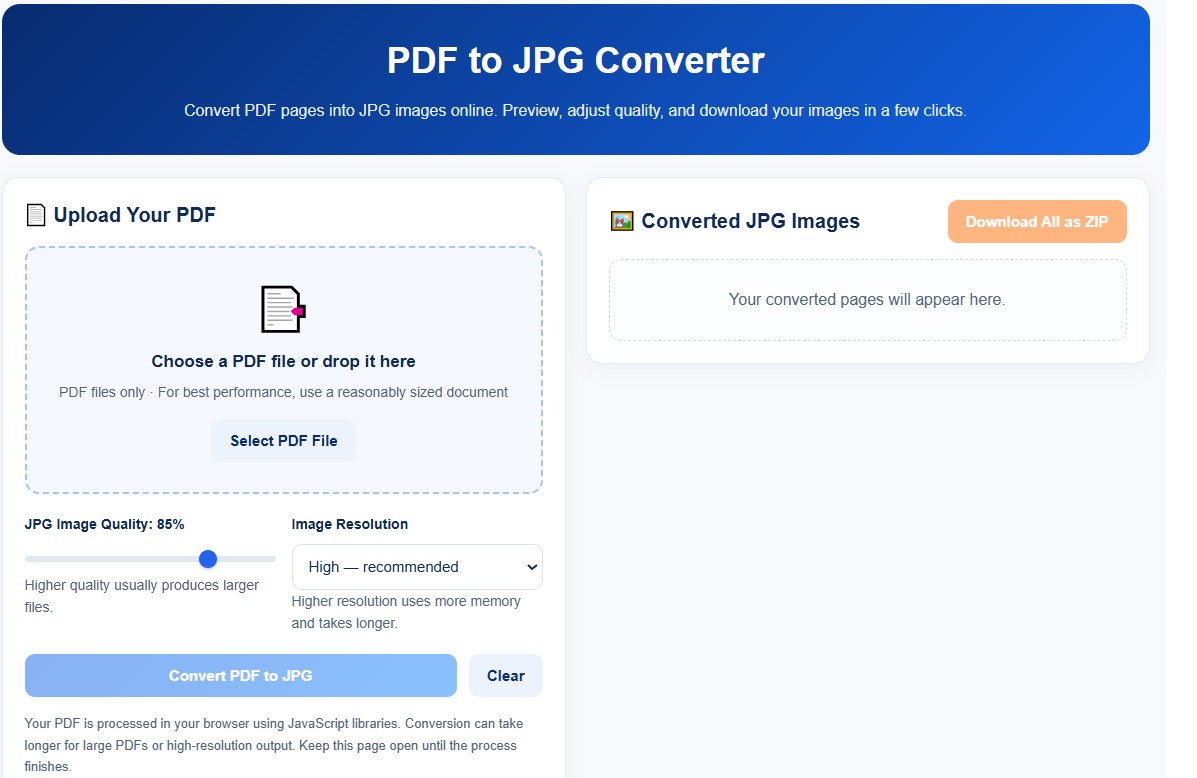
UtiliVox PDF to JPG Converter is a free, lightweight, and privacy-first online tool that allows you to instantly convert PDF document pages into high-quality JPG images. Unlike traditional online converters, it processes all files locally within your web browser using client-side JavaScript, meaning your sensitive documents are never uploaded to any external server. Users can easily adjust the image output resolution, preview converted pages, and download all images together as a single ZIP file or save them individually, making it the perfect distraction-free utility for everyday document workflows.
How we scored PDF to JPG Converter
Capability lands at 12 out of 25 because the tool does exactly one thing (PDF to JPG) with no page selection, no alternative output formats, and no OCR, while named competitors like EveryTool4U cover 100+ tools including broader format support. Ease of use scores 20 out of 25 because the interface is genuinely simple: upload, adjust two settings, click convert, download ZIP, with no account friction. Value scores 20 out of 25 because the tool is free with no stated limits and no upsell, which is hard to fault even for a thin feature set. Delivery drops to 3 out of 25 because the tool is Engine Version 1.0 with a review date of October 30, 2026, has zero third-party coverage or user reviews, carries no documented track record, and is categorized as an AI tool when no AI component exists anywhere on the page, suggesting the submission itself may be misleading.
Pros and cons
What we liked
- Fully client-side processing means PDF files never leave the user's device, a genuine privacy advantage over server-based converters.
- Three resolution presets plus an adjustable quality slider (default 85%) give meaningful control over output size without requiring technical knowledge.
- Zero cost, zero account creation, and zero stated usage limits make it genuinely accessible for one-off tasks.
Where it falls short
- No page selection: the tool converts every page in the PDF, so users who want only pages 3 and 7 of a 50-page document must delete the unwanted images manually after downloading.
- Output is locked to JPG only. Competing free browser tools support PNG, TIFF, and other formats; UtiliVox offers none of those alternatives.
- Engine Version 1.0 with a review date of October 30, 2026 indicates very new software. Performance on large PDFs or high-resolution output is explicitly flagged on the page itself as potentially slow, and there is no documented track record to assess reliability.
Key features
PDF to JPG Converter pricing
Completely free. The tool carries a $0 price tag with no paid tiers, no account required, and no usage limits stated on the page.
| Plan | Price | Who it is for |
|---|---|---|
| Free | $0 | Full access to the PDF-to-JPG converter with all resolution presets, quality slider, page previews, and ZIP download. No account required and no stated page or file-size limits, though the page warns that large PDFs or very high resolution output may be slow. |
Pricing reflects what we saw at time of review (2026-11). Always confirm current pricing on the tool's own site.
Who should use PDF to JPG Converter?
This tool suits students, office workers, and casual users who occasionally need to pull pages out of a PDF as images and do not want to hand their documents to a cloud service. A teacher saving lecture slides as shareable JPGs, or a freelancer extracting a signed contract page to paste into an email, will find the workflow fast and friction-free.
Anyone processing PDFs regularly, working with large or high-page-count documents, or needing PNG, TIFF, or selectable-page output should look at EveryTool4U instead. EveryTool4U is already in this directory and offers a broader browser-based toolkit that also runs locally with no uploads, covering more file types and conversion directions without the single-format limitation UtiliVox imposes here.
Skip it if: Power users needing batch processing, OCR, or multi-format image output
PDF to JPG Converter alternatives
Tags
Frequently asked questions
Does UtiliVox PDF to JPG Converter upload my files to a server?+
No. The tool processes everything in the browser using JavaScript. The page explicitly states that your PDF is processed locally and never sent to an external server.
What does it cost?+
Nothing. The tool is free with no paid tiers, no account, and no stated usage limits. The schema.org pricing data on the page lists $0 USD.
Can I convert only specific pages instead of the whole PDF?+
No. The current version converts all pages in the uploaded PDF. There is no page-selection feature. You would need to delete unwanted images after downloading.
What resolution options are available?+
Three presets: Standard (faster), High (recommended by the tool), and Very High (larger files, more memory use). A separate quality slider defaults to 85% and can be adjusted before conversion.
Can I convert to PNG or other image formats?+
No. The tool outputs JPG only. If you need PNG, TIFF, or other formats, you will need a different converter.
How do I download all converted images at once?+
After conversion, a 'Download All as ZIP' button appears above the image previews, bundling every converted page into a single archive file.
More AI Productivity Tools
See all categoriesGet your tool listed on 300+ directories.
One listing here is a strong start. But the founders who get discovered everywhere are listed everywhere. Our sister site, Free AI Directories, submits your tool to 300+ AI directories for you, every single one by hand, by a real person.
It is a one-time payment of $49, no subscription, and you can follow along as the submissions land. Prefer the slow route? The same site keeps a free list of 450+ directories you can work through yourself.
Get my tool listed on 300+ directoriesOne-time payment, no subscription · 100% human submissions · Free list of 450+ directories included.