
Remove Your Ex
A browser-based AI tool that removes any person from a photo using plain-language descriptions, no masking required.
Are you the maker? Claim this listing to keep info, pricing and screenshots current. Verified via your tool's domain email.
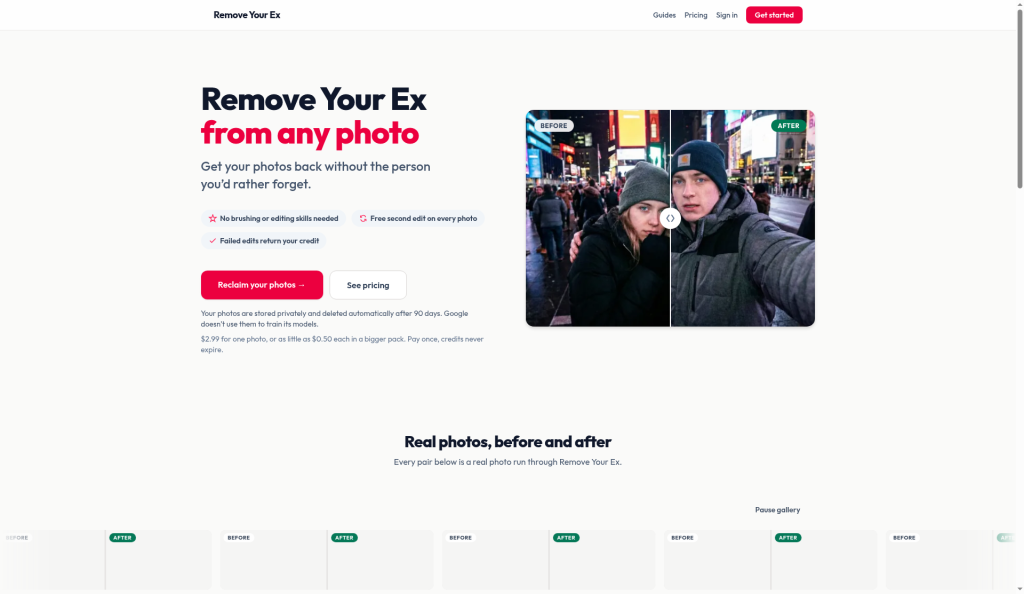
Remove Your Ex is the right pick for someone who has a handful of personal photos to clean up and wants to skip Photoshop entirely. It does one thing and keeps the workflow genuinely simple, but at $2.99 per single photo it gets expensive fast for anyone with more than a few edits to make, and Canva's broader AI toolkit covers similar ground for users who already pay for a design subscription. Anyone needing batch processing, fine-grained inpainting control, or a free trial should look elsewhere.
What is Remove Your Ex?
Remove Your Ex removes one person from your photos. Upload up to 10 photos, then say who should go: the guy, the girl, the person on the left or right, or a description in your own words like "the man on the right in the grey hoodie". There's no brush or mask. The edit is made by Google's Gemini image model on Vertex AI. Every photo includes a free second edit, and if the person is still there you can report it and get the credit back. Works in the browser and accepts iPhone HEIC files. Pay per photo with no subscription: $2.99 for 1, $9.99 for 15, $24.99 for 50. Photos are deleted automatically after 90 days, and Google doesn't use them to train its models.
How we scored Remove Your Ex
Ease of use is the clear strength: no masking, plain-language targeting, browser-only with HEIC support, and a free second edit per photo make this one of the lowest-friction person-removal tools available. Capability scores in the mid-teens because the tool does exactly one thing and has no answer for multi-person removal in a single pass, no batch workflow, and a hard 20-edit daily cap; Canva covers adjacent ground for users already on a design subscription. Value is weak: the single-credit price of $2.99 per photo is steep for casual use, and the absence of any free trial means buyers must commit money before seeing a result on their own images. Delivery takes a hit because no independent user review corpus was found to validate output quality claims, the 90-day server storage of personal photos is a real concern for the tool's core audience, and the credit-refund policy (capped at three reports per 30 days) limits recourse for users who hit repeated failures.
Pros and cons
What we liked
- No masking or brushing required: plain-language person selection works for complex multi-person shots where you need to keep some people and remove others.
- Credit-based pricing with no expiry and automatic credit refunds for failed edits reduces the risk of paying for a result that does not work.
- Accepts HEIC files directly from iPhone without conversion, and processes up to 10 photos per upload session.
Where it falls short
- No free tier and no free trial: new accounts start with zero credits, so buyers must pay before seeing a single result on their own photos.
- The 20-edit-per-day cap and single-person-removal focus mean the tool cannot handle bulk cleanup jobs or remove multiple people from one photo in a single operation.
- Photos are routed through Google Gemini on Vertex AI and stored on Remove Your Ex servers for up to 90 days, which is a meaningful privacy consideration for anyone uploading sensitive personal images.
Key features
Remove Your Ex pricing
Pay-per-credit, no subscription. Quick Fix: $2.99 for 1 credit (1 photo). Breakup Bundle: $9.99 for 15 credits ($0.67 per photo). Deep Clean: $24.99 for 50 credits ($0.50 per photo). Credits never expire. No free tier; new accounts start with 0 credits.
| Plan | Price | Who it is for |
|---|---|---|
| Quick Fix | $2.99 | 1 credit, edits 1 photo. Includes one free second edit on that photo. Credits never expire. |
| Breakup Bundle | $9.99 | 15 credits at $0.67 per photo (78% saving versus single-credit rate). Each credit edits one photo with a free second edit included. |
| Deep Clean | $24.99 | 50 credits at $0.50 per photo (83% saving versus single-credit rate). Same per-photo terms as other tiers; daily cap of 20 edits applies. |
Pricing reflects what we saw at time of review (2026-10). Always confirm current pricing on the tool's own site.
Who should use Remove Your Ex?
Remove Your Ex fits someone who has a small number of personal photos to fix and no interest in learning photo editing software. A person clearing out a few hundred vacation shots after a breakup, or someone who wants a clean solo photo from a group picture, will find the three-step flow genuinely fast. The ability to describe the target in plain words ("the woman on the left in the red jacket") is useful when multiple people are in the frame and you need to keep some of them.
Anyone who needs more than occasional edits will feel the per-credit cost quickly. At $2.99 per photo on the single-credit plan, twenty photos costs $59.80 before tax. Professional photographers, social media managers, or anyone running a content workflow should look at Canva instead, which bundles AI-powered background and object removal inside a broader design subscription that already covers many adjacent tasks.
Skip it if: Power users or anyone needing batch processing, free trials, or manual inpainting control
Remove Your Ex alternatives
Frequently asked questions
Is there a free trial or free credits when I sign up?+
No. Creating an account is free, but new accounts start with zero credits. You must buy a credit pack before editing any photos.
What happens if the edit does not remove the person correctly?+
Every photo includes one free second edit. If the person is still visible after a paid edit, you can report it and get the credit refunded automatically, up to three times per 30-day period.
How much does it cost to remove a person from 50 photos?+
The Deep Clean pack covers 50 photos for $24.99 total, which works out to $0.50 per photo. Buying single credits at $2.99 each would cost $149.50 for the same volume.
Can I remove one person from a photo while keeping others in it?+
Yes. Use a specific description such as "the man on the right in the grey hoodie" to target one person. The tool is designed to act on the described person only, leaving others untouched.
What file formats and sizes does it accept?+
JPEG, PNG, WebP, AVIF, and HEIC files up to 20 MB each. You can upload up to 10 photos at a time and make up to 20 edits per day.
Are my photos used to train AI models?+
According to the site, photos sent to Google Gemini through Vertex AI are not used to train Google's models. Originals and results are stored on Remove Your Ex servers for up to 90 days, then deleted automatically.
More AI Design & Art tools
See all categoriesGet your tool listed on 300+ directories.
One listing here is a strong start. But the founders who get discovered everywhere are listed everywhere. Our sister site, Free AI Directories, submits your tool to 300+ AI directories for you, every single one by hand, by a real person.
It is a one-time payment of $49, no subscription, and you can follow along as the submissions land. Prefer the slow route? The same site keeps a free list of 450+ directories you can work through yourself.
Get my tool listed on 300+ directoriesOne-time payment, no subscription · 100% human submissions · Free list of 450+ directories included.