
ToHD
Browser-based AI video upscaler that processes footage locally with no upload, no signup, and no watermark.
Are you the maker? Claim this listing to keep info, pricing and screenshots current. Verified via your tool's domain email.
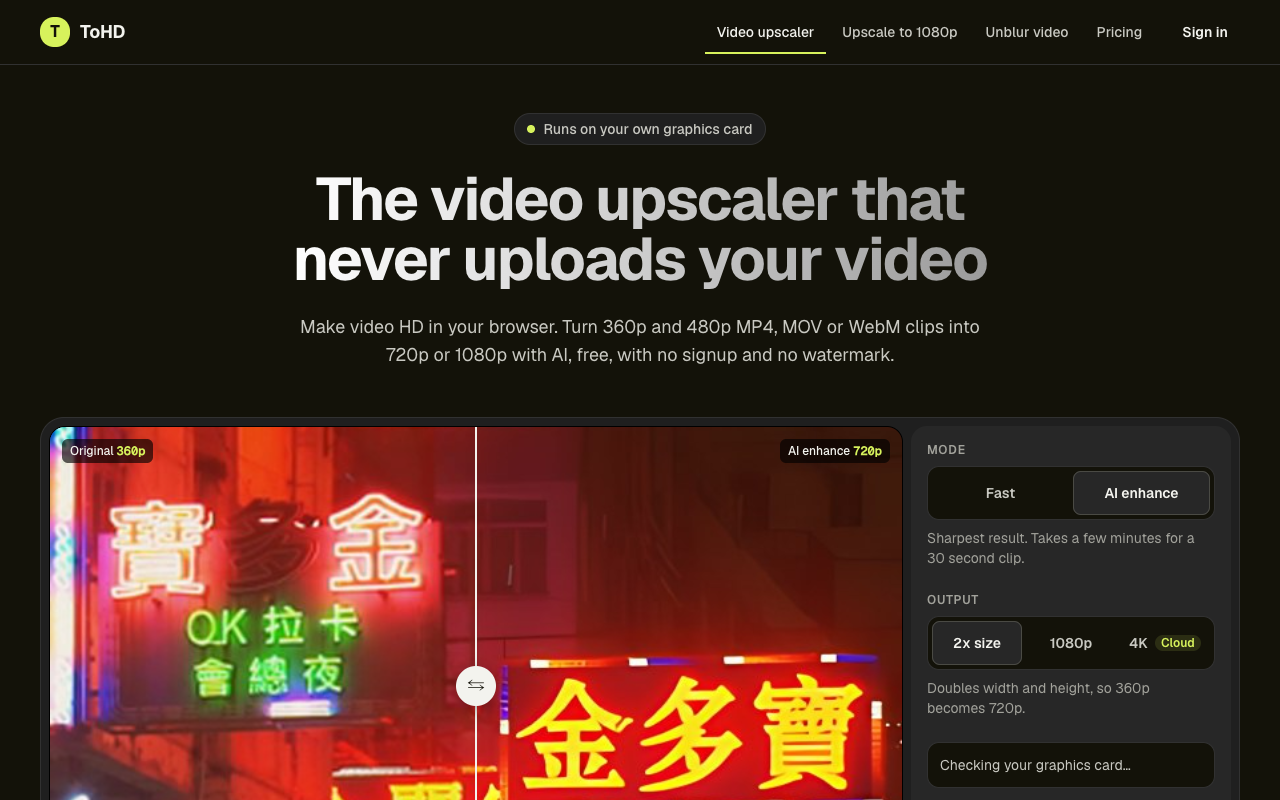
ToHD is the right pick for anyone who needs to upscale personal or sensitive footage without sending it to a server, since the free browser tool runs Real-ESRGAN locally via WebGPU and imposes no watermark or length cap on a capable desktop GPU. The cloud tier fills the gap for phones and long clips, but at $50 for the largest one-time pack it is a pay-as-you-go model with no subscription option, which gets expensive for anyone processing video regularly. Teams or creators who need generative editing, timeline tools, or subscription-based access should look at Runway instead.
What is ToHD?
ToHD is a web-based AI video upscaler that runs entirely in the browser using WebGPU, processing footage on the user's own GPU so no video data is uploaded to a server. It accepts MP4, MOV, and WebM files and can upscale 360p, 480p, and 720p clips to 720p, 1080p, or 4K. Beyond upscaling, the tool includes AI sharpening, old video restoration for VHS and camcorder footage, deinterlacing, 60 fps frame interpolation, slow motion, video stabilization, background noise removal, and a photo upscaler.
The free browser tool requires no account and adds no watermark. An optional cloud tier handles mobile devices, longer clips, batch jobs, and outputs like 8K or old tape restoration that exceed what local WebGPU processing can manage. Cloud jobs are purchased as one-time credit packs with no subscription required, and credits do not expire.
How we scored ToHD
Capability scores 20 because the feature breadth is genuinely unusual for a free browser tool: nine distinct processing modes including VHS restoration, deinterlacing, and 60 fps interpolation put it ahead of single-purpose upscalers, though it cannot match Runway's generative depth. Ease of use scores 21 because the no-account, drop-and-process interface is about as low-friction as a web tool gets, though mobile users hit a hard wall immediately. Value scores 20 because the free local tier is exceptional for desktop users, and the one-time credit model with never-expiring credits is fair for occasional use; the absence of any subscription option hurts volume users who would pay a worse effective rate. Delivery scores 13 because no independent user sentiment data was available to verify output quality claims, the social presence could not be confirmed, and the tool is small enough that trust signals are thin; there is no documented controversy, but the lack of verifiable third-party validation keeps this score cautious rather than generous.
Pros and cons
What we liked
- Free tier runs Real-ESRGAN locally via WebGPU with no upload, no watermark, and no length limit on compatible desktop hardware.
- Unusually broad restoration toolkit for a free tool: covers upscaling, unblur, sharpening, VHS/camcorder restoration, deinterlacing, 60 fps interpolation, slow motion, stabilization, and noise removal.
- Cloud credits never expire and are sold as one-time purchases, so occasional users pay only for what they actually process without committing to a monthly fee.
Where it falls short
- The free local tier requires a WebGPU-compatible desktop GPU; users on older hardware, integrated graphics, or mobile get no free processing at all and must pay for cloud credits immediately.
- No subscription option means high-volume users pay a worse effective rate than a flat monthly plan would offer, and there is no team or commercial license tier listed.
- Cloud result retention is short: files are deleted after just 7 days on the two entry-level packs ($5 and $10), which is a tight window if you are processing a large batch over several sessions.
Key features
ToHD pricing
Free in the browser with no upload, no watermark, and no length limit on a desktop with a compatible GPU. Cloud processing is pay-once: 300 credits for $5, 900 credits for $10, 2,100 credits for $20, and 6,000 credits for $50. Credits never expire. No subscription option exists.
| Plan | Price | Who it is for |
|---|---|---|
| Free (Browser) | Free | Full local upscaling to 1080p and 4K via WebGPU on compatible desktop hardware. No upload, no watermark, no account required. Most tools (stabilization, noise removal, frame interpolation, slow motion) also free. Old tape restoration and 8K are cloud-only. |
| 300 Credits | $5 | One-time purchase. Covers roughly 5 videos of 1 minute upscaled to 1080p. Videos up to 5 minutes each, 1 video processed at a time, results kept 7 days. Credits never expire. |
| 900 Credits | $10 | One-time purchase, includes 300 bonus credits. Covers roughly 15 videos of 1 minute upscaled to 1080p. Videos up to 15 minutes each, 2 at a time, results kept 7 days. Credits never expire. |
| 2,100 Credits | $20 | One-time purchase, includes 900 bonus credits. Covers roughly 35 videos of 1 minute upscaled to 1080p. Videos up to 30 minutes each, 4 at a time, results kept 14 days. Credits never expire. |
| 6,000 Credits | $50 | One-time purchase, includes 3,000 bonus credits. Covers roughly 100 videos of 1 minute upscaled to 1080p. Videos up to 60 minutes each (restoration capped at 30 minutes), 8 at a time, results kept 30 days. Credits never expire. |
Pricing reflects what we saw at time of review (2026-11). Always confirm current pricing on the tool's own site.
Who should use ToHD?
The clearest fit is someone with a library of old family footage: VHS transfers, early phone clips, or camcorder recordings that need resolution and quality work before sharing or archiving. The local processing model means a parent or archivist can run hours of personal video through the tool without handing it to a third-party server. Hobbyist video editors on desktop who want a no-cost, no-account upscaling pass before final export will also find the free tier genuinely useful, not a crippled demo.
Anyone producing content at volume, working on mobile as their primary device, or needing generative AI features should look elsewhere. Runway is the better fit for creators who want a subscription-based studio with generation, editing, and effects in one place. Descript suits anyone whose primary need is transcript-based editing rather than resolution enhancement.
Skip it if: Regular-volume creators who need a subscription workflow or generative editing tools
ToHD alternatives
Frequently asked questions
Does the free version really have no watermark or length limit?+
Yes, on a desktop with a WebGPU-compatible GPU. The free browser tool adds no watermark and imposes no enforced length limit. The practical limit is your hardware's ability to process the file without running out of memory or time.
How much does cloud processing actually cost per minute of video?+
One credit covers one second of finished video up to 1080p, and each video uses at least 5 credits. At the $5 pack rate that is roughly $0.0167 per credit; at the $50 pack rate the effective cost drops because of the included bonus credits. 4K, restoration, and 60 fps modes consume more credits per second.
Can I use ToHD on an iPhone or Android phone?+
The free local processing requires a desktop GPU via WebGPU and does not run on mobile. Mobile users must use the cloud tier, which starts at $5 for 300 credits.
Do credits expire?+
No. The pricing page states explicitly that credits never expire, regardless of which pack you buy.
What file formats does ToHD accept?+
The tool accepts MP4, MOV, and WebM input files for video upscaling.
Is there a refund policy for cloud credits?+
Yes. The pricing page states that if you have not used any credits from a pack, ToHD will refund it in full within 14 days of purchase.
More AI Video Tools
See all categoriesGet your tool listed on 300+ directories.
One listing here is a strong start. But the founders who get discovered everywhere are listed everywhere. Our sister site, Free AI Directories, submits your tool to 300+ AI directories for you, every single one by hand, by a real person.
It is a one-time payment of $49, no subscription, and you can follow along as the submissions land. Prefer the slow route? The same site keeps a free list of 450+ directories you can work through yourself.
Get my tool listed on 300+ directoriesOne-time payment, no subscription · 100% human submissions · Free list of 450+ directories included.