Tradocket
Export shipping document generator that turns one shipment entry into up to 18 document types across 16 languages.
Are you the maker? Claim this listing to keep info, pricing and screenshots current. Verified via your tool's domain email.
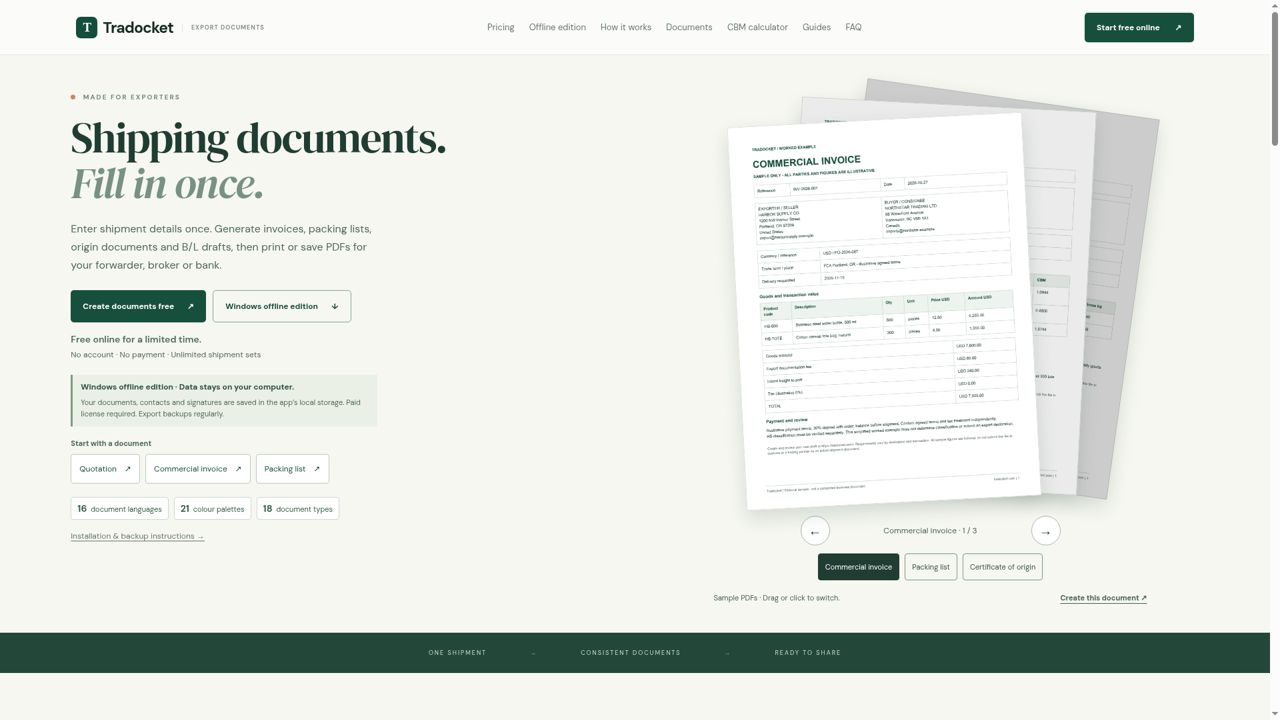
Tradocket is the right pick for small and mid-size exporters who need consistent, print-ready shipping paperwork fast, without setting up an account. The online edition is free for now but carries no guarantee of staying that way, and the Windows offline edition requires a paid license with no automatic sync to the web version. Teams needing ERP integrations, API access, or collaborative editing should look elsewhere.
What is Tradocket?
Export shipping-document generator. Enter shipment details once; generate commercial invoices, packing lists, proforma invoices, certificates of origin, B/L drafts and more; preview and print/save PDFs. Online free limited time, no account. Paid Windows offline edition available.
How we scored Tradocket
Capability scores 18 because the 18-document-type coverage with 16 languages is genuinely broad for its niche, but the tool has no API, no integrations, no AI features, and no multi-user workflow, which limits its ceiling compared to any modern document automation platform. Ease of use scores 20 because the no-account, browser-only entry point and live preview are as low-friction as a document tool gets. Value scores 15 because the online edition is free but explicitly temporary, the Windows edition has an undisclosed price, and there is no stated path for users if the free tier ends, making the value proposition uncertain rather than strong. Delivery scores 9 because no independent user reviews, third-party coverage, or trust signals were findable, the 'free for a limited time' framing is a documented bait-and-switch risk, and the manual-only sync between editions is a real data-loss vector the site itself warns about.
Pros and cons
What we liked
- Single-entry workflow generates all 18 document types consistently, eliminating the re-keying errors common with separate templates.
- 16 document languages with proper right-to-left layout for Arabic, covering markets where localised document headings are a practical requirement.
- Offline Windows edition keeps all shipment data, contacts, and signatures on the user's own machine with no cloud account required.
Where it falls short
- The online edition is explicitly described as free only 'for a limited time,' meaning current users have no pricing certainty and no stated transition plan if a paywall is introduced.
- No API, no integrations, and no multi-user collaboration: every document set is a manual, single-user operation with no way to connect to a TMS, ERP, or customs platform.
- The web and Windows editions do not sync automatically; moving data between them requires manual JSON backup exports, which creates real risk of data loss if a user forgets to export before clearing browser storage or updating the app.
Key features
Tradocket pricing
The online workspace is free with no account required, described as free 'for a limited time.' The Windows offline desktop edition requires a paid license; the exact price was not surfaced by the live pricing page text provided. No subscription tiers with named prices were listed on the pricing page.
| Plan | Price | Who it is for |
|---|---|---|
| Online Workspace (Free) | Free | All 18 document types, 16 languages, 21 colour palettes, live preview, PDF export, CBM calculator. No account required. Described as free 'for a limited time' with no stated end date. |
| Windows Offline Edition | Paid license (exact price not published on the pricing page) | All 18 document types, Excel import, CBM calculator, local data storage with no cloud upload, one-time activation per computer. Does not sync automatically with the web edition. |
Pricing reflects what we saw at time of review (2026-11). Always confirm current pricing on the tool's own site.
Who should use Tradocket?
A small export business or sole-trader freight broker who currently maintains a folder of Word templates will get immediate value here. The single-entry workflow removes the most common source of errors in export paperwork: re-keying the same exporter address, buyer details, and line items across six or more separate documents. The 16-language support is particularly useful for exporters dealing with buyers in Japan, Korea, or Arabic-speaking markets where document headings in the buyer's language are expected.
Anyone running a larger operation with a TMS, ERP, or customs platform should look elsewhere. Tradocket has no API, no integrations, and no multi-user collaboration. For businesses that need AI-assisted data extraction, automated compliance checks, or team-level document workflows, the directory's other AI Business Tools options are a better fit. ClearCRM, for instance, covers the broader client and order management context that Tradocket deliberately leaves out.
Skip it if: Teams needing cloud collaboration, API access, or ERP/TMS integrations
Tradocket alternatives
Frequently asked questions
Do I need to create an account to use Tradocket?+
No. The online workspace requires no account and no payment during its current free-access period. You can start generating documents immediately from the browser.
How much does the Windows offline edition cost?+
The pricing page does not publish a specific price for the Windows edition. A paid license is required and must be confirmed before installation. Check the Tradocket website directly for the current figure.
Will the online version stay free?+
The site describes the online edition as free 'for a limited time,' which means the current free access is not guaranteed to continue. No transition timeline or future pricing is stated.
Can I use Tradocket without an internet connection?+
Yes, but only with the paid Windows offline edition. After a one-time activation, it runs fully offline. The web edition requires a browser and internet access.
Does Tradocket sync between the web and Windows editions?+
No. The two editions do not sync automatically. You must manually export a JSON backup from one edition and import it into the other. The site recommends exporting backups regularly before clearing browser data, updating, or switching computers.
Which document languages does Tradocket support?+
Tradocket supports 16 languages: English, Chinese, Spanish, French, German, Arabic, Portuguese, Russian, Italian, Dutch, Japanese, Korean, Turkish, Polish, Indonesian, and Vietnamese. Arabic documents use a right-to-left layout.
More AI Business Tools
See all categoriesGet your tool listed on 300+ directories.
One listing here is a strong start. But the founders who get discovered everywhere are listed everywhere. Our sister site, Free AI Directories, submits your tool to 300+ AI directories for you, every single one by hand, by a real person.
It is a one-time payment of $49, no subscription, and you can follow along as the submissions land. Prefer the slow route? The same site keeps a free list of 450+ directories you can work through yourself.
Get my tool listed on 300+ directoriesOne-time payment, no subscription · 100% human submissions · Free list of 450+ directories included.