
UI Discovery
A searchable library of 111,083 real UI sections with palette, font, and AI build-prompt data for designers and developers.
Are you the maker? Claim this listing to keep info, pricing and screenshots current. Verified via your tool's domain email.
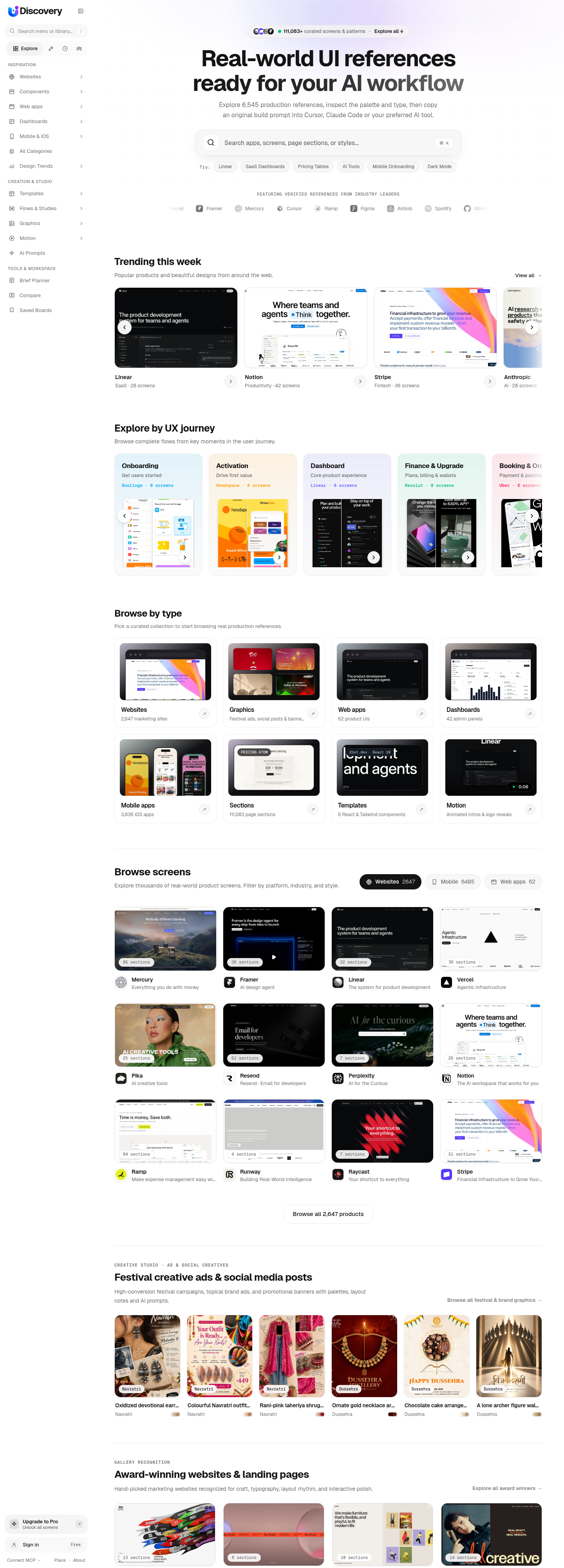
UI Discovery is the right pick for product designers and vibe-coders who want real, shipped interfaces rather than curated mockups, especially when they are already working inside Cursor, Claude, or ChatGPT via MCP. Its library skews heavily toward iOS apps (3,836 entries) and marketing sites, so web-app and dashboard coverage is thin compared to what a dedicated component library offers. Teams expecting shared workspaces or member invitations should look elsewhere; those features are explicitly not available yet.
What is UI Discovery?
UI Discovery is a design reference platform that captures real production interfaces from marketing websites, web apps, iOS apps, and dashboards, then organizes them into searchable sections with extracted color palettes, typefaces, and AI-ready build prompts. The library currently holds over 111,083 sections from more than 6,545 sites and apps, with new entries added weekly.
The platform targets product designers and developers who use AI coding tools. Its MCP connector lets users pipe the library directly into ChatGPT, Claude, Cursor, or Codex so an AI assistant can reference real shipped interfaces while generating code. A public REST API is available on all plans, with daily request limits that scale by tier.
How we scored UI Discovery
Capability scores 18 because the MCP integration and AI build prompts are genuinely useful and differentiated, but the web-app (62 entries) and dashboard (42 entries) coverage is too thin to serve a large slice of its stated audience, and there is no component-level code export or design-system tooling. Ease of use scores 21 because the free tier requires no credit card, the MCP setup is a single URL paste, and the catalog search is straightforward. Value scores 20 because the free tier is genuinely functional and Pro at $15/month is fairly priced for unlimited AI prompts and clean downloads, though the Team plan at $39/month delivers almost nothing extra beyond a higher API cap. Delivery scores 13 because the Team plan is marketed with a name implying collaboration that the product explicitly cannot yet deliver, shared workspaces and member invitations are absent on every tier, and the tool is early-stage enough that key promised features remain on a vague roadmap rather than a ship date.
Pros and cons
What we liked
- MCP connector is free on every plan and works with ChatGPT, Claude, Cursor, and Codex, letting AI editors query 111,083 real sections mid-session without leaving the editor.
- Free tier is genuinely usable: full catalog browsing, palette and font data for every site, and 200 API requests per day with no credit card required.
- AI build prompts describe layout, palette, and typography in a format designed for Cursor, v0, Claude, and Codex, giving developers a structured starting point rather than a raw screenshot.
Where it falls short
- Web app and dashboard coverage is sparse: only 62 web-app UIs and 42 admin dashboards in the entire library, which makes it a poor reference source if your project is a data-heavy product UI rather than a marketing site or iOS app.
- The Team plan at $39/month includes one account and a higher API limit but no shared workspaces, member invitations, or comments, making the tier name misleading for anyone expecting actual team collaboration.
- Free users are capped at 3 full-size views, AI prompts, and code exports per day, which is enough for occasional browsing but forces a paid upgrade for any sustained design research session.
Key features
UI Discovery pricing
Three tiers: Free at $0 (3 designs per day, 200 API requests/day), Pro at $15/month (unlimited designs, AI prompts, high-res downloads, 5,000 API requests/day), and Team at $39/month (50,000 API requests/day, one account included). Annual billing gives two months free. No shared workspaces on any plan yet.
| Plan | Price | Who it is for |
|---|---|---|
| Free | $0 | Full catalog browsing of 6,545+ sites and 111,083 sections, palette and font data for every site, 3 full-size views plus AI prompts and code exports per day, MCP connector and API access at 200 requests per day, collections synced across devices. No credit card required. |
| Pro | $15/month | Everything in Free plus unlimited full-size views, AI prompts, and code exports; clean downloads without watermarks; high-res downloads and design kits; design briefs over MCP for Cursor, Claude, and Codex; API at 5,000 requests per day. Annual billing available at two months free. |
| Team | $39/month | Everything in Pro plus API at 50,000 requests per day. One account included. Shared workspaces and extra seats are explicitly listed as not yet available. |
Pricing reflects what we saw at time of review (2026-10). Always confirm current pricing on the tool's own site.
Who should use UI Discovery?
A solo product designer who starts every project by hunting for pricing-page or onboarding-flow references will get immediate value from the free tier, and the Pro plan at $15/month makes sense the moment they need more than three full-size views per day. Developers using Cursor or Claude to scaffold UI components are the other clear audience: the MCP connector means they can ask their editor to look at how ten real SaaS products built their hero section before generating one.
Anyone who needs a full design system, collaborative review, or component-level code export should look elsewhere. Canva (in this directory) covers creation and brand-kit work that UI Discovery does not touch. Teams that need shared boards and member invitations should wait for those features to ship or consider a dedicated tool, since the Team plan at $39/month currently delivers one account with a higher API cap, not a real multi-seat workspace.
Skip it if: Teams needing shared workspaces, collaborative annotation, or deep component-level code export
UI Discovery alternatives
Frequently asked questions
What does the free plan actually let me do?+
The free plan gives full catalog browsing across all 6,545+ sites and 111,083 sections, palette and font data for every entry, and 3 full-size views with AI prompts and code exports per day. The MCP connector and API (200 requests per day) are also free. No credit card is needed to start.
How does the MCP connector work?+
Paste uidiscovery.com/mcp into ChatGPT, Claude, Cursor, Claude Code, or Codex. Your AI assistant can then call search functions to pull real UI sections from the library while it builds. The connector is free on every plan.
Is the Team plan worth it for an actual team?+
Not yet. The Team plan at $39/month includes one account and raises the API limit to 50,000 requests per day, but shared workspaces, member invitations, and comments are explicitly listed as unavailable. It is currently a high-volume solo API tier, not a multi-seat workspace.
Where do the screenshots come from, and is using them legal?+
UI Discovery captures public homepages with its own crawler, cuts each page into sections, and extracts palette and font data. The site states that captured designs belong to their respective owners and are for inspiration only. A content removal process is listed on the site.
What is an AI build prompt and how do I use it?+
Each section includes a text description of its layout, palette, typography, and headings written so that Cursor, v0, Claude, or Codex can rebuild the structure using original copy. On the free plan you get 3 of these per day; Pro enables unlimited prompts.
Does annual billing save money?+
Yes. Paying annually gives two months free compared to monthly billing on both Pro ($15/month) and Team ($39/month) plans. The annual amount is billed once upfront.
More AI Design & Art tools
See all categoriesGet your tool listed on 300+ directories.
One listing here is a strong start. But the founders who get discovered everywhere are listed everywhere. Our sister site, Free AI Directories, submits your tool to 300+ AI directories for you, every single one by hand, by a real person.
It is a one-time payment of $49, no subscription, and you can follow along as the submissions land. Prefer the slow route? The same site keeps a free list of 450+ directories you can work through yourself.
Get my tool listed on 300+ directoriesOne-time payment, no subscription · 100% human submissions · Free list of 450+ directories included.