AI Agent Meaning: What an Agent Is and How It Works
AI Agent Meaning in Plain English: what an AI agent is, how it plans and uses tools, and how it differs from chatbots and workflows.
An AI agent is software that takes a goal, plans the steps toward it, uses tools to act, and checks the results as it goes.
If a chatbot can write a convincing reply, does that mean it can resolve the problem behind the message? Not necessarily. Producing words and completing work are different abilities. Understanding that gap makes the term AI agent much easier to judge without relying on product labels.
Table of Contents
- What an AI Agent Means in Plain English
- How an AI Agent Works Step by Step
- How AI Agents Differ from Chatbots and Workflows
- How Much Autonomy an AI Agent Has
- Examples of AI Agents Doing Real Work
- Common Misconceptions About AI Agents
- Check Whether a Tool Is Really an AI Agent
What an AI Agent Means in Plain English
A chatbot answers. An agent acts toward a goal.
Say a customer asks about a missing order. A chatbot can draft a polite reply. An agent can read the request, look up the order, check its delivery status, prepare a response, and send it after approval. The important difference isn't how human the response sounds. It's whether the software can carry out the work behind it.
The AI Wiki entry on agents describes the underlying idea as a perception-action loop: receive information, choose an action, and affect the environment. For business software, that environment might be an order database, an email inbox, or a calendar.
The goal matters more than the conversation
A useful request gives an agent an outcome, such as resolving an address-change request. The system then needs access to relevant information and permitted actions. Without those connections, it may explain the process but can't complete it.
Plain-English test: An agent doesn't merely describe the next step. It can take permitted steps toward an outcome.
The phrase AI agent meaning becomes confusing when marketers apply it to anything with a chat window. Clear product descriptions should explain the actions available, the decisions the system makes, and the points where a person stays involved. Those details matter more than the label.
How an AI Agent Works Step by Step
Consider a customer asking to change a delivery address. The agent works like a clerk who reads a screen, decides what to do, clicks, and checks the screen again.
IBM's explanation of AI agents describes task decomposition, planning, tool use, and memory as parts of this process. Task decomposition means breaking a larger goal into manageable tasks.
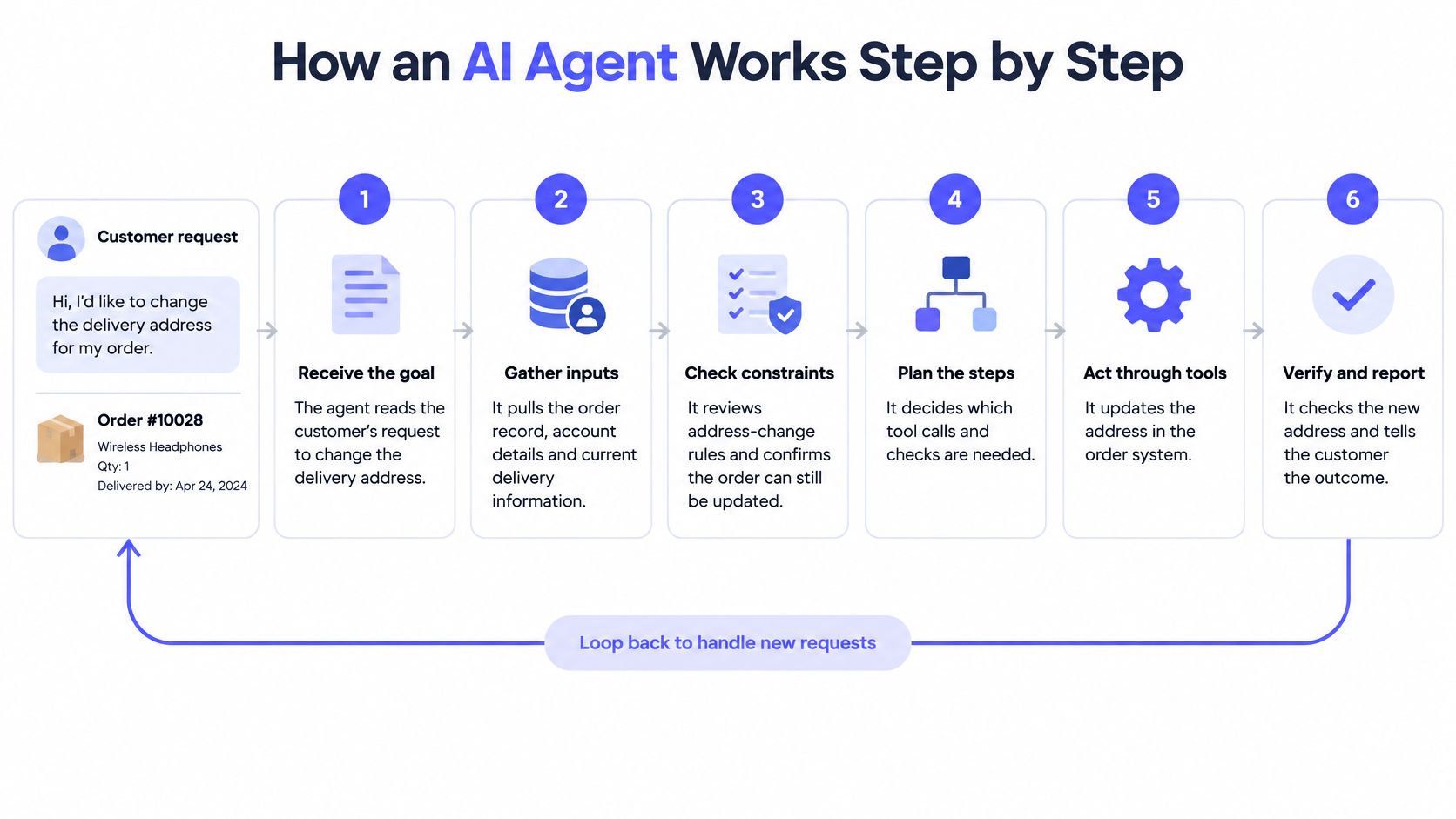
Receive the goal. The agent reads the customer's request and identifies the intended outcome. It must distinguish changing the current order from updating the account's default address.
Gather inputs. Connected tools return the order record, account details, and delivery information. The agent should use those records rather than guess missing details.
Check constraints. It checks shipping rules and whether the order has already shipped. If identity verification is required, the agent must complete that check before making changes.
Plan the steps. The agent breaks the task into checking eligibility, updating the address, verifying the saved record, and notifying the customer. It selects an available tool and prepares the required inputs, such as the order identifier and new address.
Act through tools. The agent submits the change through the order system's interface or application programming interface. Permission rules determine whether it can perform that action directly or must request approval.
Verify and report. It reads the saved record to confirm that the update succeeded. If the tool fails or the order has shipped, it changes course, requests help, or reports that the task can't be completed.
What holds the process together
Memory keeps relevant context available across the task. That might include the order being discussed, the proposed address, and the result of the eligibility check. Memory doesn't guarantee accuracy, so important facts still need confirmation against authoritative records.
Builders can connect these components through approaches such as low-code and no-code automation. The language model is only part of the system. Tool connections, stored state, permission rules, and completion checks determine whether a plan becomes a correctly finished task.
How AI Agents Differ from Chatbots and Workflows
Who picks the next step? Does the system act on outside systems? These questions reveal more than whether a product has a conversational interface.
A chatbot usually answers or drafts text and stops. A copilot works alongside a person, offering suggestions that the person accepts or rejects. Neither label alone establishes that the software can independently organize and execute a task.
AI system types compared
| System type | Main job | Who picks the next step | Acts on outside systems | Typical example |
|---|---|---|---|---|
| Chatbot | Answers questions or drafts text | The user | Only if connected to tools | Explains a contract clause |
| AI copilot | Suggests steps inside a user's task | The user, who accepts or rejects suggestions | Only after the user accepts | Suggests code lines in an editor |
| Workflow automation | Runs fixed steps in a set order | Predefined rules | Yes, on fixed paths | Sends a confirmation email when a form is submitted |
| AI workflow | Uses a language model inside fixed code paths | Predefined code paths | Yes, on fixed paths | Classifies a support ticket, then routes it to a queue |
| AI agent | Pursues a goal through planned steps | The model, within set limits | Yes, through tools and permissions | Reads a request, checks records, drafts a reply and files it |
The architectural distinction in Building Effective Agents is useful: AI workflows follow predefined code paths, while agents let a model dynamically direct the process and choose tools.
A workflow can contain branches and still follow a fixed design. For example, an invoice process might route matching invoices for payment and send mismatches to an employee. The software designer has already specified those paths.
An agent has more discretion during execution. When investigating an invoice discrepancy, it might decide to inspect the purchase order, retrieve a delivery record, or request missing information based on what it finds.
Choose the least complex suitable system
Fixed paths suit well-defined tasks where consistent execution matters. Matching invoices to purchase orders doesn't automatically need an agent. A structured workflow may be easier to inspect and maintain.
Agents fit tasks where the path changes with the evidence. That flexibility is useful only when the organization can control and review the resulting actions. Practical AI automation examples can help separate tasks that need judgment from those that need dependable repetition.
The practical verdict is straightforward: choose a chatbot for text, a workflow for stable procedures, and an agent for changing paths with reviewable actions. Product labels aren't standardized, so the stated capabilities should decide the classification.
How Much Autonomy an AI Agent Has
Autonomy is a spectrum, not a yes-or-no label. An agent may choose its own investigative steps while still needing permission to change a record.
Google Cloud's guide to AI agents describes autonomy as a level that can vary. Tool access, permissions, approval requirements, and system design establish the boundaries.
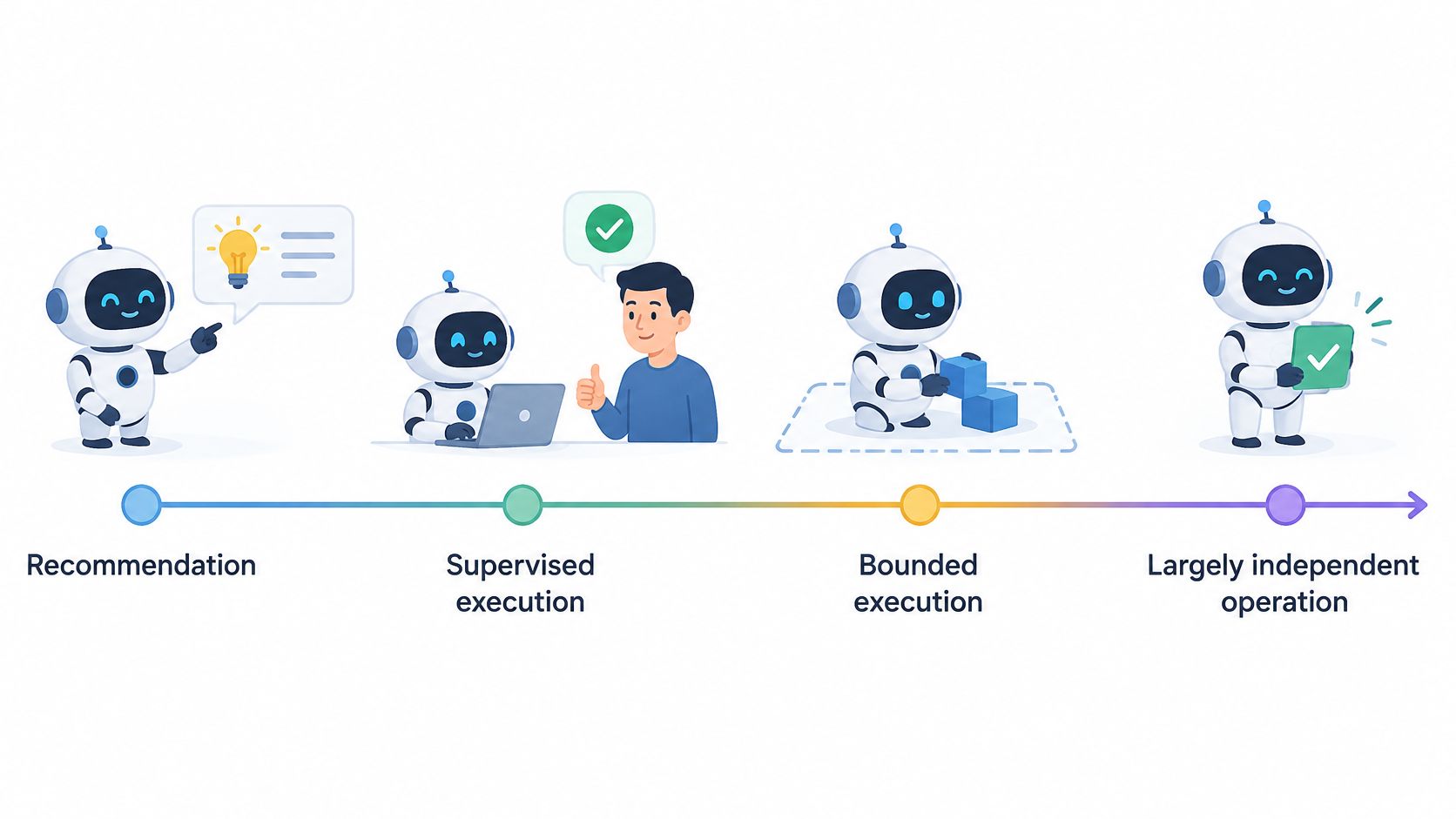
Autonomy levels and where approval gates belong
These are practical evaluation categories, not a universal certification system.
| Autonomy level | What the agent does | Human role | Typical approval gate |
|---|---|---|---|
| Recommendation | Proposes an action and explains why | A person decides and acts | Every action is taken by a person |
| Supervised execution | Carries out each step after a person approves it | A person approves each step | Sending messages and changing records |
| Bounded execution | Acts alone inside set permissions and spending or change limits | A person reviews outcomes and exceptions | Purchases above a set amount and code changes outside a test branch |
| Largely independent operation | Runs long tasks and escalates only unusual cases | A person sets goals and audits logs | Low-risk, reversible tasks with full audit trails |
At the recommendation level, a system may function more like a copilot than an executing agent. Supervised execution adds action, but retains approval before each step. Bounded execution delegates routine decisions inside explicit limits.
Largely independent operation should remain narrow in scope. It doesn't mean unrestricted access or permission to handle every exception without help.
Put gates before consequential actions
Customer messages, account changes, purchases, and production code changes deserve deliberate approval rules. A person should see the proposed action and supporting evidence before approving it, not merely receive a vague request to continue.
Long tasks create more opportunities for mistakes. An incorrect order selection can lead to an incorrect address change and then an inaccurate customer notification. Planning evaluation work published by the Association for Computational Linguistics supports evaluating execution quality and using controls such as permission scopes, validation, audit logs, retries, and approval thresholds.
Retries also need limits. After a payment tool times out, the agent should check whether payment succeeded before submitting another request.
Approval rule: Independence should expand only within actions that are permitted, observable, and recoverable.
Generating an answer is assistance. Planning and executing actions toward a goal is agentic behavior. Requiring approval for consequential steps means the system isn't fully autonomous, and that can be the appropriate design.
Examples of AI Agents Doing Real Work
Concrete scenarios make the distinction easier to recognize. These examples describe possible implementations, not promises about a particular product.
Customer service and sales
A customer support agent handles a refund request. It reads the ticket, retrieves the order from the commerce system, and checks the refund policy. It can issue an eligible refund below an authorized limit, while sending larger requests to a person for approval. The outcome is a recorded refund or a documented escalation.
A sales research agent prepares a lead. It gathers public company information through search tools, drafts an outreach message, and presents the supporting details for review. After a person reviews the draft, it saves the lead and approved material to the customer record. Sending outreach can remain a separate approval step.
Internal operations
An IT help desk agent handles a password reset. It guides an employee through the organization's identity-verification process, calls an authorized identity-management tool, and logs the reset. Failed verification goes to a help desk employee rather than triggering a workaround. The outcome is restored access or a clear escalation.
An expense agent reconciles receipts. It collects receipt files, extracts purchase details, and compares them with card-statement entries. It sends mismatched amounts to a manager instead of approving them automatically. The outcome is a prepared expense record with exceptions clearly identified.
More AI agent examples can help readers map these patterns to specific tasks. Founders researching potential investors for related software can also use the Gritt.io AI investor directory as a starting point for an investor shortlist, separate from evaluating product reliability.
Adoption doesn't mean universal readiness
McKinsey's 2025 global survey found that 23% of respondents said their organizations were scaling an agentic AI system in at least one business function, while 39% had begun experimenting, as summarized in Cloudera's enterprise AI agents report.
Those results describe movement from experimentation toward deployment, but adoption remained uneven. Surveys use different definitions and respondent groups, so their percentages shouldn't be combined into a single market-size estimate. An organization's deployment decision also says little about whether a particular task can safely run without review.
Common Misconceptions About AI Agents
Independence and tool access
An agent is fully independent. Many deployments retain human intervention. In Zapier's survey of organizations using agents, only 30% reported that agents completed more than 60% of assigned tasks without human intervention. A meeting agent may find suitable times while leaving invitations for approval.
Any chatbot with a plugin is an agent. Access to a calendar doesn't prove goal-directed execution. A tool might display availability but still require a person to choose every next action. An agent can coordinate the permitted work needed to arrange the meeting.
Accuracy and system design
Agents don't make mistakes. An agent can misunderstand a request or act on incomplete information. A ticket-filing agent needs a way to detect a failed submission and avoid creating duplicates. Logs should show what happened.
A bigger model automatically makes a better agent. Model capability doesn't repair a poorly documented tool or an unsafe permission setting. A scheduling system still needs valid calendar inputs, clear conflict rules, and a recovery path when a booking fails.
Labels and capabilities
- Agent has one agreed technical meaning. Terminology remains unsettled, as discussed in this technical evaluation of agentic behavior. A product description should specify multi-step execution, visible state, and control boundaries rather than rely on the category name.
The word agent is often a marketing label. A useful evaluation follows a task from request to confirmed outcome. Whether the software books a meeting or files a ticket, its actual actions and limits matter more than its conversational style.
Check Whether a Tool Is Really an AI Agent
A product page should make its operating behavior understandable. A polished demonstration isn't enough to establish dependable performance. Research on agent reliability and security supports examining repeated performance, permissions, error recovery, and resistance to malicious instructions.
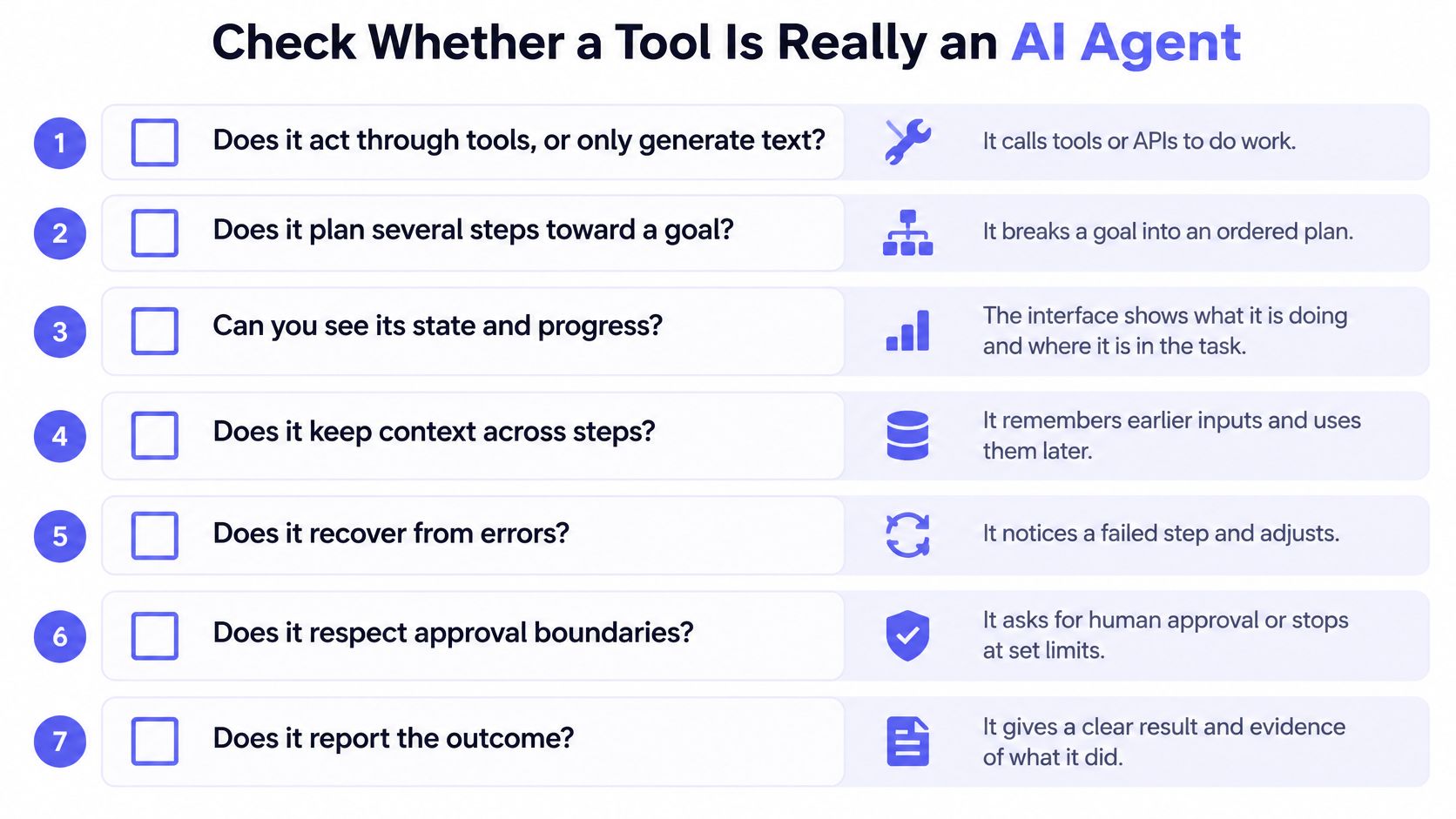
Questions for any product page
- Tool action. Does it call tools to do work, or only generate text about the work?
- Planning. Can it organize several steps toward an outcome rather than respond to isolated prompts?
- Visible state. Do logs show the current task, attempted actions, tool results, and completion status?
- Permission scopes. Can access be restricted to specific records, tools, and permitted changes?
- Approval gates. Does it pause before consequential actions and show what a person is approving?
- Failure handling. Can it recover from a failed tool call, or stop and escalate clearly?
- Consistency. Does it complete representative tasks across repeated runs, including missing information and tool failures?
Missing planning or tool execution suggests an assistant or workflow rather than an agent. Missing logs, permissions, and recovery controls suggests an agent that may not be ready for deployment. These are different problems and shouldn't be confused.
Continue with task-based research
The right choice follows the job. Changing paths can justify an agent when review is possible. Stable procedures often call for simpler automation.
AI Tool Seekers is a hand-verified AI tools directory. Its glossary explains RAG, fine-tuning, embeddings, AI agents, and 17 more AI terms, each tied to the tools that use it. Listings reflect hand-verified review and editorial opinion, not professional advice, so readers should compare each listing against the task and checklist.
AI Tool Seekers offers editorial reviews and comparison pages for researching software beyond its marketing label. Visit the directory, shortlist tools for a specific task, and compare their planning, tool access, approval boundaries, and recovery features before granting access to live systems.