How to Use AI in Marketing: A Practical Workflow Guide
How to use AI in marketing across research, content, campaigns and analytics, with the controls and tests that keep results measurable.
A marketing team can now draft a week of ads, emails, and social posts in an afternoon. Reviewing them takes longer. Claims need checking, prices go stale, and no one can say whether the extra output sold anything. That's the usual starting point for learning how to use AI in marketing well. The fix isn't a better prompt. It's governance rules and a control group, set before the first workflow runs, so a team scales only after it can prove lift.
Table of Contents
- Where AI Fits Across Marketing Work
- Choosing Tools for Each Marketing Task
- Publishing Rules for AI-Assisted Content
- Governance Controls for Marketing Teams
- Measuring Whether AI Actually Helped
- How to Run Your First AI Workflow
- Start a Low-Risk AI Pilot This Week
Where AI Fits Across Marketing Work
The issue is rarely AI itself. It is checking. Drafts arrive faster than editors, analysts, and approvers can clear them, and errors slip through in the gap. Mapping AI to specific tasks, with a named human check for each, keeps that gap small.
| Marketing function | Typical AI task | What a person must check |
|---|---|---|
| Research | Summarize customer reviews, interviews and search queries | Source accuracy and sample bias |
| Content | Draft ad variants, email subject lines and social posts | Factual claims, brand voice and legal wording |
| Campaigns | Adapt messages to audience segments | Targeting fairness, consent and suppression lists |
| Paid media | Build search ad assets from approved product data | Current pricing and platform policy compliance |
| Analytics | Summarize reports and flag anomalies | Whether a metric shows cause or only correlation |
| Operations | Draft campaign briefs and route or tag leads | Data access rules and approval steps |
What the productivity estimate actually means
The scale of the opportunity is real, but it's an estimate, not a promise. McKinsey's analysis of generative AI's economic potential estimated that generative AI could raise marketing-function productivity by the equivalent of 5% to 15% of total marketing spending, tied to personalized campaign development, content creation, and customer insight generation. Those figures describe potential value across many companies. They don't guarantee a return for any single team.
Actual results depend on data quality, workflow integration, and whether the team measures business outcomes such as conversion rate, customer acquisition cost, and revenue per campaign. A team that feeds a model stale product data and never compares results against its old process won't see that value. It'll see more drafts.
Working rule: Start with repetitive, high-volume tasks where errors are easy to catch, and keep claims, pricing, and targeting decisions with a human reviewer.
Operations work follows the same logic. Teams weighing account-based platforms can compare 6sense alternatives with Docket to see how vendors differ on data and workflow fit before committing. Multi-step automations raise the stakes further, which is why reviewing examples of AI agents in practice helps a team see where an agent acts on its own and where an approval step belongs.
Choosing Tools for Each Marketing Task
Name the job first, then pick the tool. A research summary, an ad copy draft, a reporting digest, and a lead routing rule are four different jobs. One general chatbot forced into all four usually does none of them under proper control.
A short checklist for narrowing the list
- Confirm the core job: The tool does the one task the workflow needs, based on what its own website describes.
- Read the data terms: Check what the vendor says about data handling, access controls, and whether outputs can be exported or logged for audit.
- Check connections: The tool connects to systems already in use, such as the CRM or ad accounts, without manual copying of customer data.
- Verify pricing on the vendor's site: Prices and trial terms come from the vendor and change. A trial is a trial, not a free plan.
- Compare before deciding: Where a tool has a review, read it for current details, then check its alternatives or comparison page.
A roundup of the best AI marketing tools helps sort candidates by task category before a shortlist takes shape. Niche workflows benefit from the same discipline. A playbook on AI-powered content planning for culinary professionals, for instance, shows how a specific field frames its content jobs before choosing software.
Keep the shortlist to two or three tools per workflow. More than that muddies the baseline, because the team can't tell which tool caused which result. Skip any tool that promises to hide AI use or bypass detection. That's a policy risk dressed up as a feature, and no tool pays to be mentioned or ranked in a fair comparison.
Publishing Rules for AI-Assisted Content
Many teams misread the search rule. They assume Google bans AI-assisted content. It doesn't. Google's guidance on using generative AI content defines scaled content abuse as generating many pages mainly to manipulate search rankings rather than help users, and lists using generative AI to create many pages without adding user value as an example. The rule applies regardless of whether pages were made by AI, automation, scraping, or other methods.
High publishing volume alone isn't the stated violation. The deciding issue is whether content is unoriginal or provides little to no value. So AI can draft, research topics, and produce variations. An editor then adds original facts, examples, and judgment, and verifies each claim. A method to fact check AI content claim by claim gives editors a repeatable way to work through a draft before it goes live.
Disclosure duties for teams serving the EU
The European Union adds transparency duties on top of quality rules. EU guidance on Article 50 transparency obligations states that providers of systems interacting directly with people, such as chatbots, must inform users they're interacting with AI unless that's obvious in context, and that these obligations apply from August 2, 2026. Providers of systems generating synthetic audio, images, video, or text must also ensure outputs carry machine-readable marks.
Deepfake audio, images, and video need a clear label when people first see them. AI-generated text on matters of public interest needs human review or editorial control before publication. Teams can sort every asset four ways: visible label, provenance support, editorial review, or source check. Teams outside the EU should still check local rules, since privacy and accuracy problems cross borders.
Governance Controls for Marketing Teams
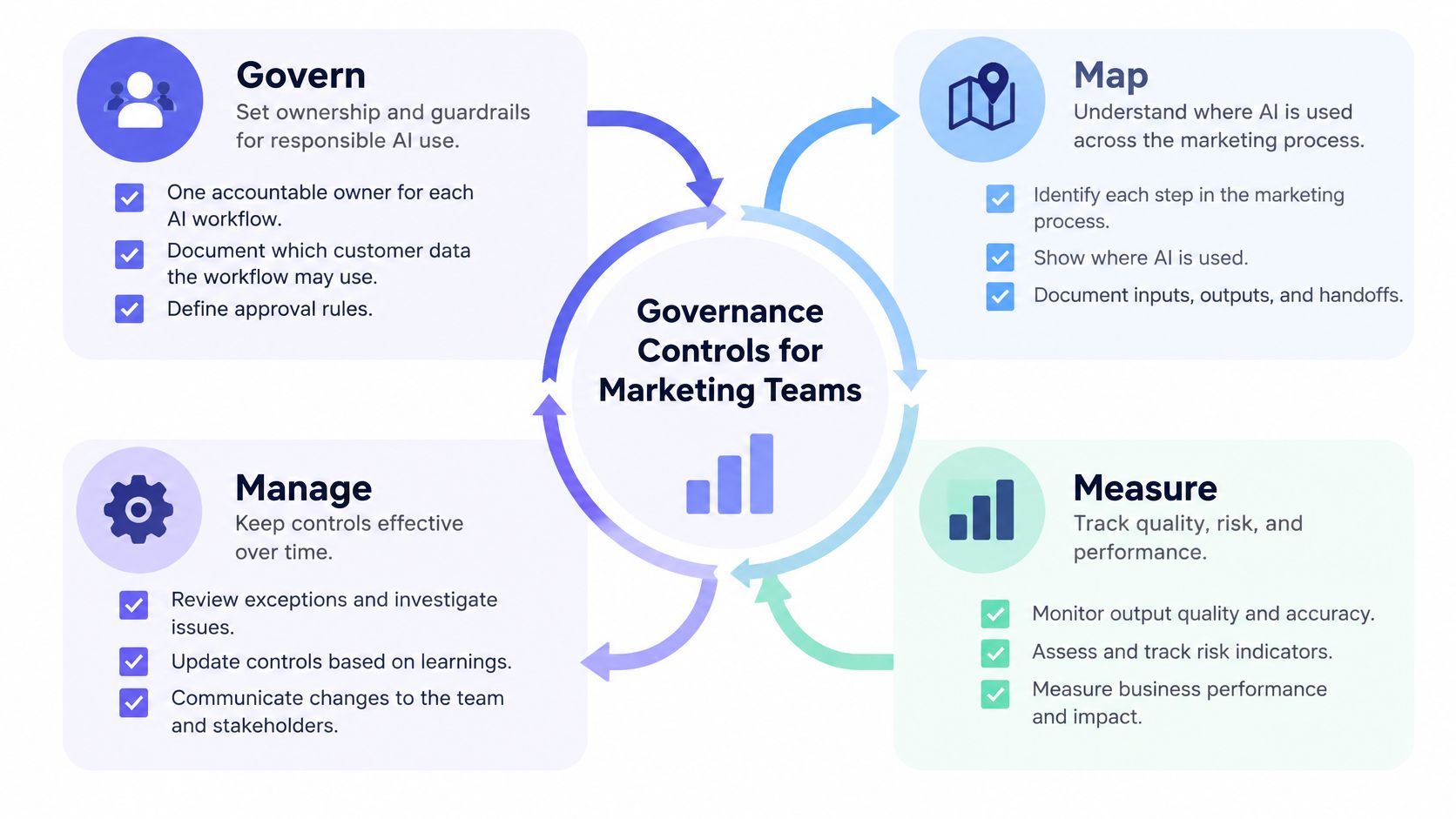
Governance sounds heavy. In practice it's four habits repeated for each workflow. The NIST guidance on generative AI risk frames the loop as Govern, Map, Measure, and Manage, and each stage fits on a workflow sheet.
The four stages in plain terms
- Govern: Assign one accountable owner per workflow. Document which customer data the workflow may use, and define which claims, regulated messages, and high-impact communications always need human approval.
- Map: List inputs, audiences, connected data sources, and failure modes. Name them plainly: hallucinated claims, discriminatory targeting, privacy leakage, copyright issues, and prompt injection through a connected source.
- Measure: Test on data that looks like real deployment, including local language, minority audience segments, and current prices. Track factual accuracy, bias rates, latency, human-edit rate, and business lift against a control. Note benchmark limits and any overlap between training and test data.
- Manage: Add guardrails such as retrieval from approved brand and product sources, PII minimization, confidence thresholds, and post-launch monitoring for errors and complaints.
A strong demo is not proof of production reliability. A model can handle generic prompts well and still fail on current pricing or adversarial inputs.
Close the loop with an escalation rule. Any reviewer should know who can pause an AI output, how fast, and where that decision gets logged. If pausing requires three approvals, the control exists only on paper.
Measuring Whether AI Actually Helped
Cheaper output isn't the same as better marketing. A team can cut draft time in half and still lose money if the drafts convert worse. The strongest test is a holdout or randomized control group: one audience gets the AI-assisted campaign, a comparable group gets the usual process, and the difference shows what AI caused.
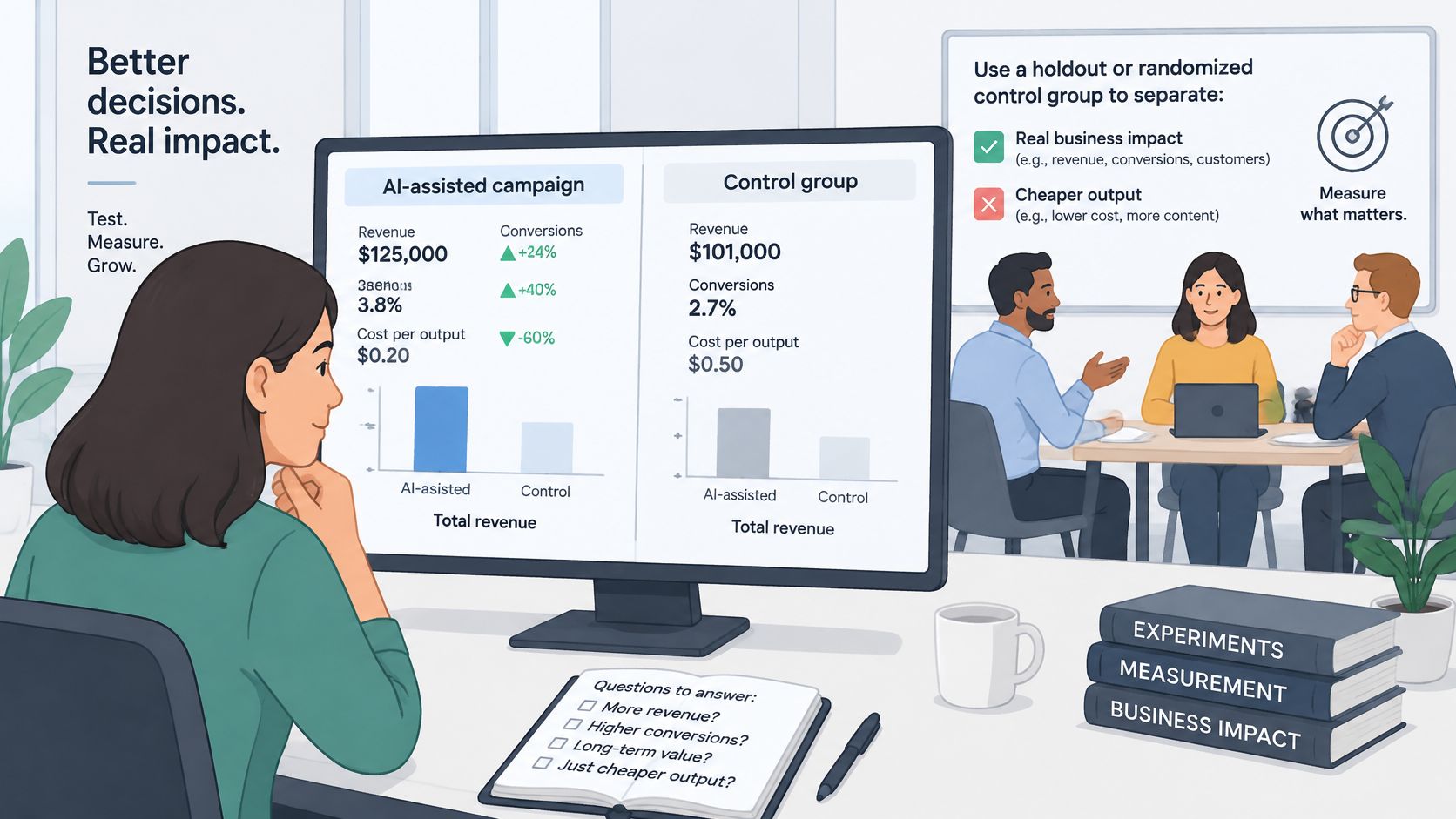
Judge lift on the primary business metric, such as revenue per campaign or customer acquisition cost. Clicks, leads, and content volume describe activity, not profit. The methods below answer different questions, and confusing them leads teams to scale work that never paid off.
| Method | What it answers | Main limit |
|---|---|---|
| Holdout or randomized control group | Whether AI-assisted campaigns beat a comparable group | Needs enough volume and clean splits |
| Media-mix modeling | How channels and spend contribute over time | Coarse results and a long history of data |
| Multi-touch attribution | Which touchpoints receive credit for a conversion | Assigns credit but does not prove cause |
| Platform-reported conversions | What each ad platform claims it drove | Self-reported and often overlaps across platforms |
Operating metrics to track beside lift
Business lift alone can hide a workflow that's expensive to run. Track cost per asset, review time per asset, error rate found in audits, and human-edit rate next to revenue results. If editors rewrite most of every draft, the tool isn't saving labor. It's moving labor to a later step.
The question every review should answer is direct. Did AI create additional revenue, or did it relabel conversions that would have happened anyway? Check the answer against margin, retention, and brand trust before scaling. A campaign can lift one number while hurting another, and only the control group makes that visible.
How to Run Your First AI Workflow
One workflow, run end to end, teaches a team more than a broad rollout. The steps below keep the test clean enough to trust.
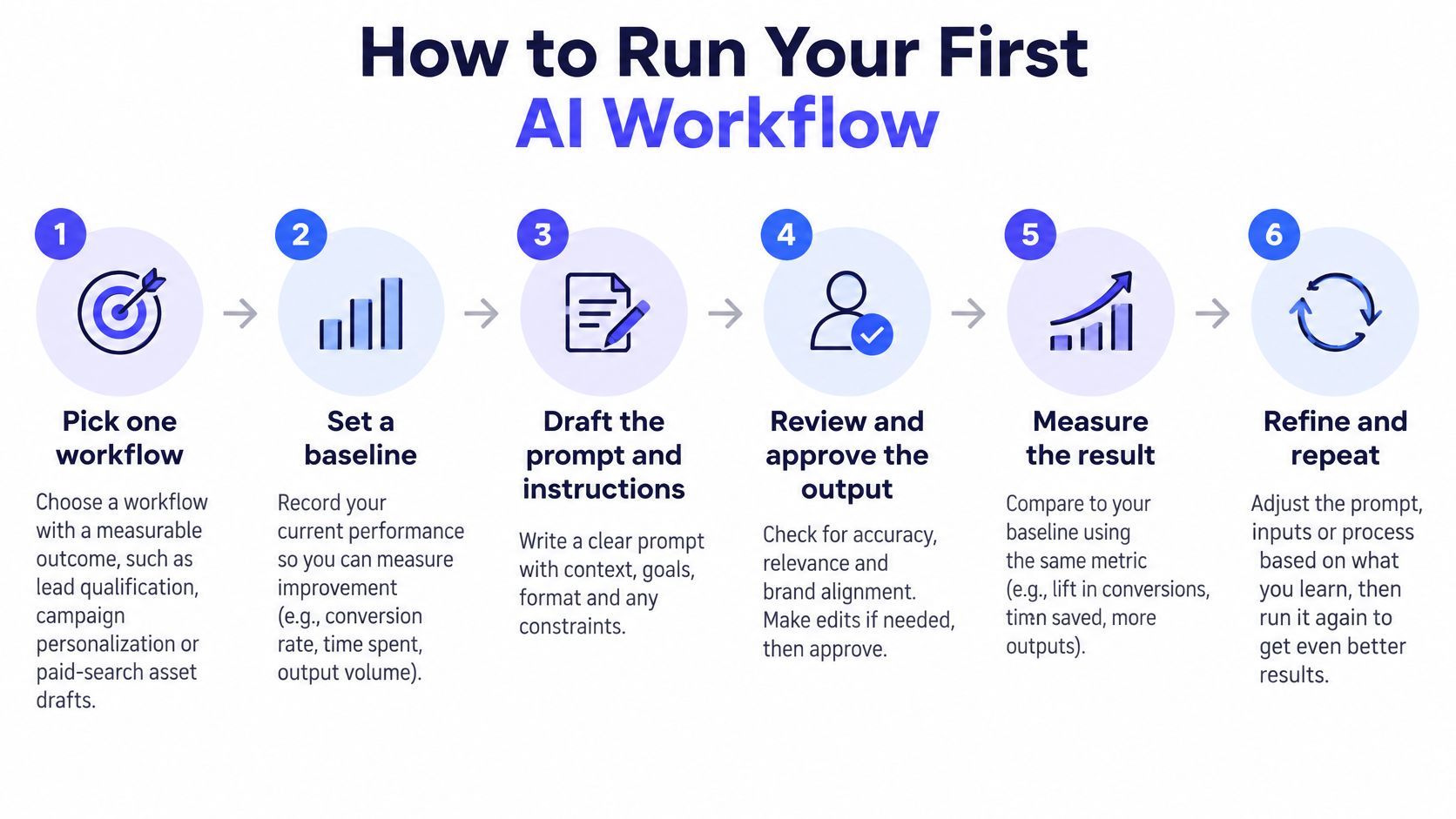
Six steps from baseline to scale gate
- Pick one workflow with a measurable outcome. Lead qualification, campaign personalization, or paid-search asset drafts all work. Don't start with a general-purpose chatbot, because its outcome is too vague to measure.
- Record a baseline before any AI use. Note conversion rate, cost per acquisition, revenue per lead, response time, and error rate. Without a baseline, every later number is an opinion.
- Write the operating rules. State which data sources the AI may use, where a person must approve output, and when a case escalates to a senior reviewer.
- Run the AI on past or shadow traffic. Compare outputs against approved sources and the baseline while nothing reaches customers. This stage catches stale prices and invented claims at no cost.
- Split live traffic into two groups. One group gets the AI-assisted process. The control group follows the usual process. Keep everything else identical.
- Scale only at the gate. Expand when the AI group improves the main metric without worsening unsubscribe rate, complaint rate, or sales-qualified-lead quality.
Say a team tests AI-drafted subject lines on one product line. The control list receives the current copy, and the team compares revenue per email between groups. If revenue rises but unsubscribes rise faster, the workflow fails the gate even though the headline metric improved.
Scale gate: Incremental lift on the primary metric, with no material harm to guardrail metrics, is the only pass mark. Content volume never is.
Three mistakes ruin most first tests. Teams measure clicks instead of profit. They let training and test data overlap, so the model looks smarter than it is. They generalize from one audience segment to the whole list. Wiring steps together doesn't need custom code, and a guide to low-code and no-code automation covers how teams connect tools without engineering help.
End with paper, not intentions. A one-page workflow sheet should list the goal, baseline, data rules, approval points, and scale gate. If it doesn't fit on one page, the workflow is too broad for a first run.
Start a Low-Risk AI Pilot This Week
Choose one low-risk workflow, such as internal research summaries or draft ad variants an editor reviews before use. Internal work carries no customer exposure, so errors cost time, not trust. Complete the workflow sheet before the first run: baseline, owner, approval points, control group, and scale gate.
Name the one metric that decides whether the pilot scales. Set the review date now, before results arrive, so the team can't move the goalposts later. After the first run, review the audit error count, human-edit time per asset, and the primary business metric against the control.
Teams narrowing their options can use four free tools from AI Tool Seekers: an AI readiness checker, an AI tool finder, an AI cost calculator, and an AI visibility checker. The directory is a reference, not a guarantee. Being listed does not guarantee traffic, rankings, citations, sales, or any other outcome. Check each tool's current pricing and terms on the tool's own site before committing.
Ready to pick the right software for a first controlled pilot? AI Tool Seekers lists hand-reviewed AI marketing tools by task, with comparisons and free utilities such as a tool finder and cost calculator to help a team shortlist options. Visit the directory, compare two or three candidates against the workflow sheet, and start the baseline before the first run.