
Ipek
A local-first desktop IDE for founders that turns AI-written workflows into scheduled, inspectable data operations on your own machine.
Are you the maker? Claim this listing to keep info, pricing and screenshots current. Verified via your tool's domain email.
Ipek is the right pick for a solo technical founder who wants AI-built data pipelines that run entirely on their own machine with no per-task fees and no cloud vendor holding their data. Its bring-your-own-AI model (Claude Code, Codex, Cursor) means you pay only for the AI you already use, but that also means setup requires you to have and configure an MCP-compatible client before you get anything running. Teams expecting a polished SaaS experience or non-technical users who cannot configure API keys should look elsewhere.
What is Ipek?
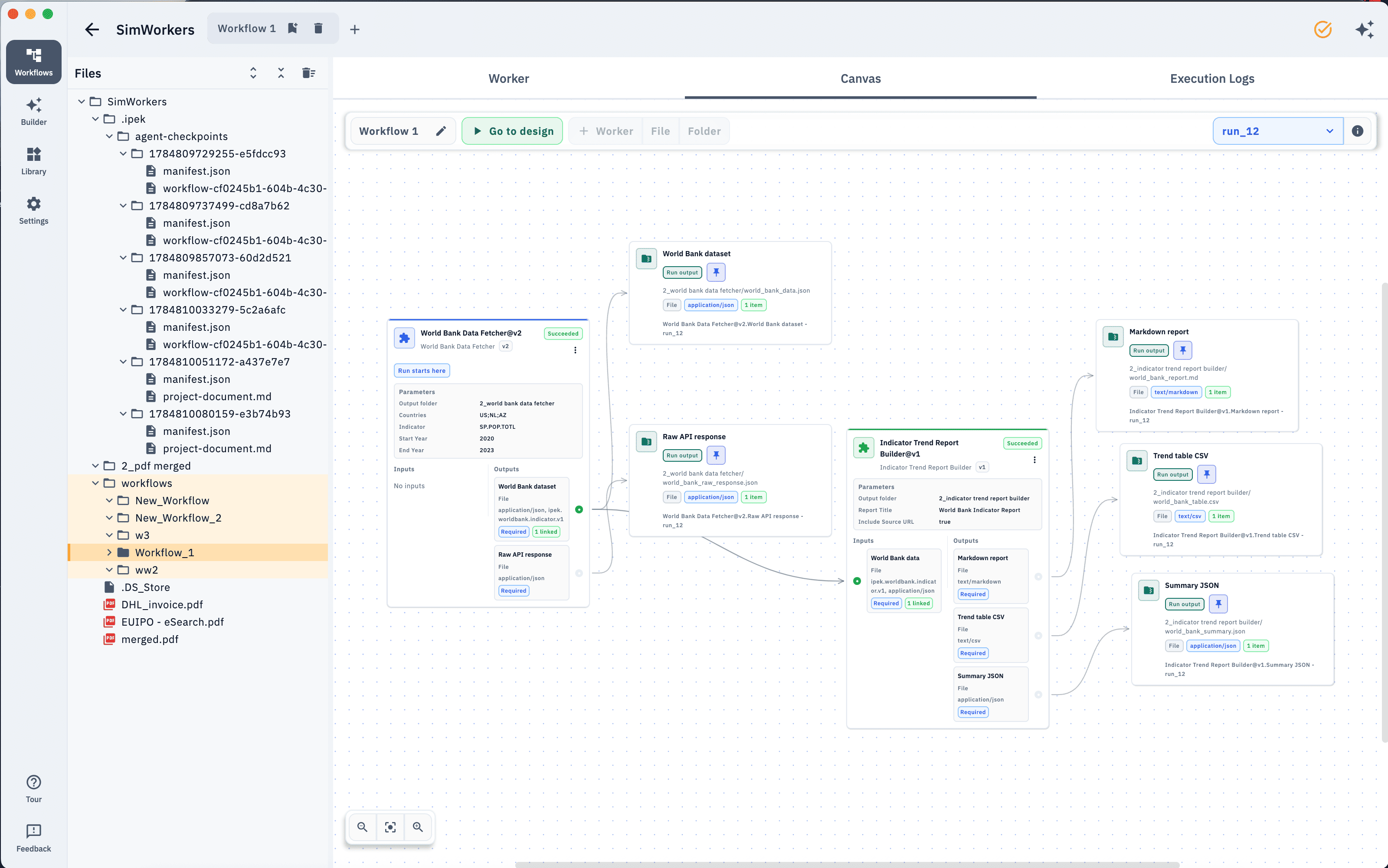
Ipek is an IDE for automating repetitive data tasks. Users can talk to their own AI and automate: combining APIs, extracting from PDFs & spreadsheets, cleaning up exports, and more. The visual canvas hosts the deterministic workers that user can execute without per-task fees.
Workers can fetch from or post to APIs, process local files, transform, merge or de-duplicate data, generate structured outputs, and use configured AI or OCR services when needed. Workflows run on the user’s own computer without per-task fees. Every worker’s outputs-including API responses-are saved as files in inspectable run folders, making workflows easier to test, review, revise, rerun and schedule.
How we scored Ipek
Capability lands at 17 because the local execution model, per-run inspectable folders, SQLite state persistence, and screen-to-context recording are genuinely differentiated features, but the tool is at v1.1 with no team collaboration, no cloud fallback for missed schedules, and a build path that requires a separately configured MCP client before anything works. Ease of use scores 13 because the entire onboarding assumes you already have Claude Code, Codex, or Cursor set up with API keys; a founder who does not will hit a hard wall before seeing a single workflow run. Value scores 22 because the tool is completely free with no per-task fees and no account required, which is genuinely strong for its target user, even accounting for the bring-your-own-AI cost. Delivery scores 10 because there is no user sentiment, no third-party coverage, and the terms of service explicitly warn that the product is free for now with no SLA or support commitment; additionally, AI-generated worker code runs with full OS user account privileges, which is a real trust and safety consideration the terms flag but do not mitigate.
Pros and cons
What we liked
- Fully free with no per-task fees and no account required; you pay only for the AI and API keys you already use.
- Complete local execution: every project file, run output, and API response is stored on your own machine, with no backend server receiving your data.
- Per-run output folders with saved API responses make debugging and rerunning from any step concrete and practical, not a log-stream guessing game.
Where it falls short
- Schedules only run while Ipek is open and the machine is awake, meaning any workflow that needs to fire overnight or on an unattended machine will silently miss its window.
- The entire build path depends on having a configured MCP-compatible AI client (Claude Code, Codex, or Cursor); there is no built-in editor or manual workflow builder for users who do not have one set up.
- No paid tier exists yet, which means no SLA, no support commitment, and no roadmap guarantee; the terms of service explicitly warn that the product is provided free of charge for now, with paid plans possible later.
Key features
Ipek pricing
Ipek is currently free with no account required. The terms of service state that paid plans may be introduced in the future, but no tiers or prices are listed as of November 2026.
| Plan | Price | Who it is for |
|---|---|---|
| Free | $0 | Full application with no account required. All features available. No per-task fees. Paid plans may be introduced in the future per the terms of service. |
Pricing reflects what we saw at time of review (2026-11). Always confirm current pricing on the tool's own site.
Who should use Ipek?
Ipek fits a specific profile: a technical solo founder or small-team operator who already pays for an AI coding assistant (Claude Code, Codex, or Cursor), wants to automate data pulls from APIs like Linear or Zendesk, and cares enough about data privacy to prefer local execution over a hosted service. The screen-recording-to-context feature is genuinely useful for someone who wants to show their AI what to automate rather than describe it in text. If you are already running an MCP client and want scheduled, inspectable pipelines without a monthly SaaS bill, Ipek is worth the setup time.
If you need a no-code tool your whole team can use without touching API keys or a terminal, Ipek is not ready for you. Notion AI is a better fit for teams that want AI assistance embedded in a shared workspace they already use daily. For pure file and data utility work that does not require scheduling or AI-written code, EveryTool4U covers many browser-based tasks with zero setup.
Skip it if: Non-technical users or teams wanting a hosted, no-config SaaS automation tool
Ipek alternatives
Tags
Frequently asked questions
Does Ipek cost anything to use?+
Ipek is currently free with no account required and no per-task fees. The terms of service state that paid plans may be introduced in the future, but no pricing tiers exist as of November 2026.
Do I need to provide my own AI subscription to use Ipek?+
Yes. Ipek connects to your own AI client (Claude Code, Codex, Cursor, or any MCP-compatible tool) over localhost. You supply your own API keys for AI providers like Anthropic or Google. Ipek itself does not include an AI model.
Where does my data go when I run a workflow?+
Everything stays on your machine. Ipek operates no backend server that receives or stores your projects, inputs, or outputs. API responses and run outputs are saved as files in local folders on your computer.
What happens if my computer is asleep when a scheduled workflow is supposed to run?+
The workflow will not run. Schedules execute locally only while Ipek is open and the machine is awake. There is no cloud fallback to trigger missed runs.
Which operating systems does Ipek support?+
Ipek v1.1 supports macOS (Apple Silicon and Intel) and Windows 10 and 11. There is no Linux build, web app, or mobile version.
Can I edit the worker code Ipek's AI writes?+
Yes. Workers are plain compiled Kotlin files you can open and read. Parameters like date ranges can be changed without touching the code, and the full source is accessible for manual edits.
More AI Productivity Tools
See all categoriesGet your tool listed on 300+ directories.
One listing here is a strong start. But the founders who get discovered everywhere are listed everywhere. Our sister site, Free AI Directories, submits your tool to 300+ AI directories for you, every single one by hand, by a real person.
It is a one-time payment of $49, no subscription, and you can follow along as the submissions land. Prefer the slow route? The same site keeps a free list of 450+ directories you can work through yourself.
Get my tool listed on 300+ directoriesOne-time payment, no subscription · 100% human submissions · Free list of 450+ directories included.