
MCPGRAM
A unified MCP gateway that lets AI agents share one governed tool catalog across Claude Code, Cursor, Codex, and Windsurf.
Are you the maker? Claim this listing to keep info, pricing and screenshots current. Verified via your tool's domain email.
MCPGRAM is the right pick for an independent developer or small team who wants one place to manage OAuth connections and external MCP servers across multiple agent clients without wiring each client separately. Compared to Composio, which offers 100K free tool calls and a larger connector library, MCPGRAM's free tier caps at 25K runs and 20 native connectors, so heavy users will hit limits faster. Teams that need SSO, SCIM, or audit-grade compliance today should look elsewhere; those features are listed as 'Soon' even on the Custom tier.
What is MCPGRAM?
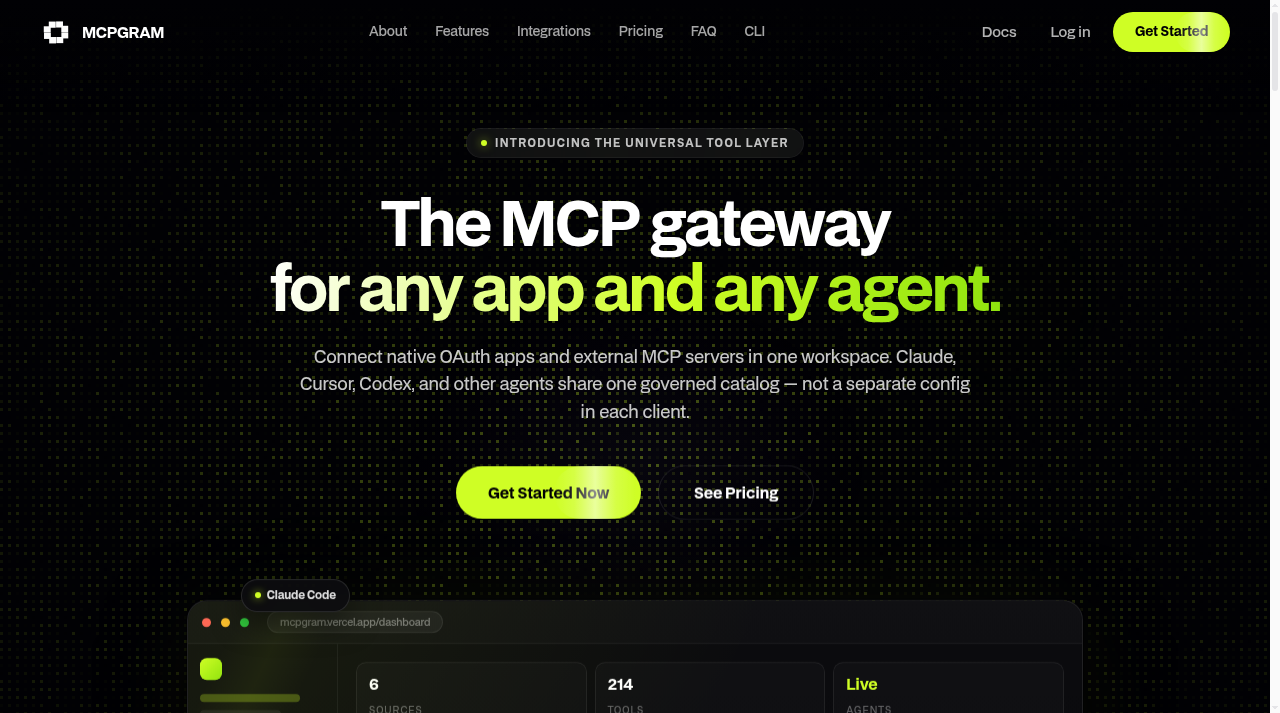
MCPGRAM is a cloud-hosted MCP gateway that centralizes tool access for AI coding agents. Developers connect OAuth-authenticated apps such as GitHub, Slack, Notion, and Linear alongside their own external MCP servers in a single workspace, and every supported agent client, including Claude Code, Cursor, Codex, Windsurf, and Cline, reads from that shared tool catalog instead of requiring separate per-client configuration. The platform is accessible via a web dashboard, a CLI published on npm as @mcpgram/cli, and a JS/TS SDK.
Launched in July 2026 by an independent founder, MCPGRAM targets individual developers and small engineering teams who manage multiple AI agent clients and want centralized OAuth governance, per-workspace toggle controls, and usage visibility without maintaining separate credential stores per tool. The free Hobby plan requires no credit card and includes 25K tool runs per month; paid plans extend run limits, seat counts, and workspace quotas.
How we scored MCPGRAM
Capability scores 16 because the core gateway concept works and the CLI/SDK differentiate it from purely dashboard-based competitors, but the native connector count of 20 on the free tier and the absence of SSO, SCIM, and compliance features that named competitors already ship puts it clearly behind more mature options for anything beyond solo use. Ease of use scores 18 because the free tier requires no credit card, the CLI is on npm for immediate install, and the workspace model is straightforward, though the single-founder support structure and community-only help on Hobby limit how quickly problems get resolved. Value scores 19 because $0 for 25K runs with no card and $19 flat for 150K runs with 5 seats is genuinely fair pricing for the target audience, and the 'no surprise overages' soft-enforcement policy is a real buyer-friendly commitment. Delivery scores 9 because the tool is hosted on a Vercel subdomain rather than a custom domain, is built and maintained by a single undisclosed-funding founder with no public user sentiment or third-party coverage found, and lists its most-requested enterprise features (SSO, SCIM, DPA, VPC) as 'Soon' with no committed dates, all of which create meaningful delivery uncertainty for any buyer beyond a hobbyist.
Pros and cons
What we liked
- Free Hobby plan includes 20 native connectors and 25K tool runs per month with no credit card, making it genuinely usable for side projects without a trial clock.
- Universal layer architecture means one OAuth connection serves Claude Code, Cursor, Codex, Windsurf, and Cline simultaneously, eliminating per-client credential duplication.
- CLI on npm and JS/TS SDK allow workspace management to be scripted and embedded in CI pipelines, which most comparable hosted gateways do not offer at the free tier.
Where it falls short
- SSO, SCIM provisioning, DPA, and VPC deployment are all listed as 'Soon' even on the Custom enterprise tier, meaning any team with compliance or identity management requirements cannot use MCPGRAM today regardless of budget.
- Billing for paid plans processes through Razorpay in INR, which introduces currency conversion friction and potential card-decline issues for buyers outside India who expect straightforward USD Stripe billing.
- The tool is built and maintained by a single independent founder, which creates real continuity risk: connector additions, bug fixes, and roadmap execution all depend on one person with no disclosed funding or team behind them.
Key features
MCPGRAM pricing
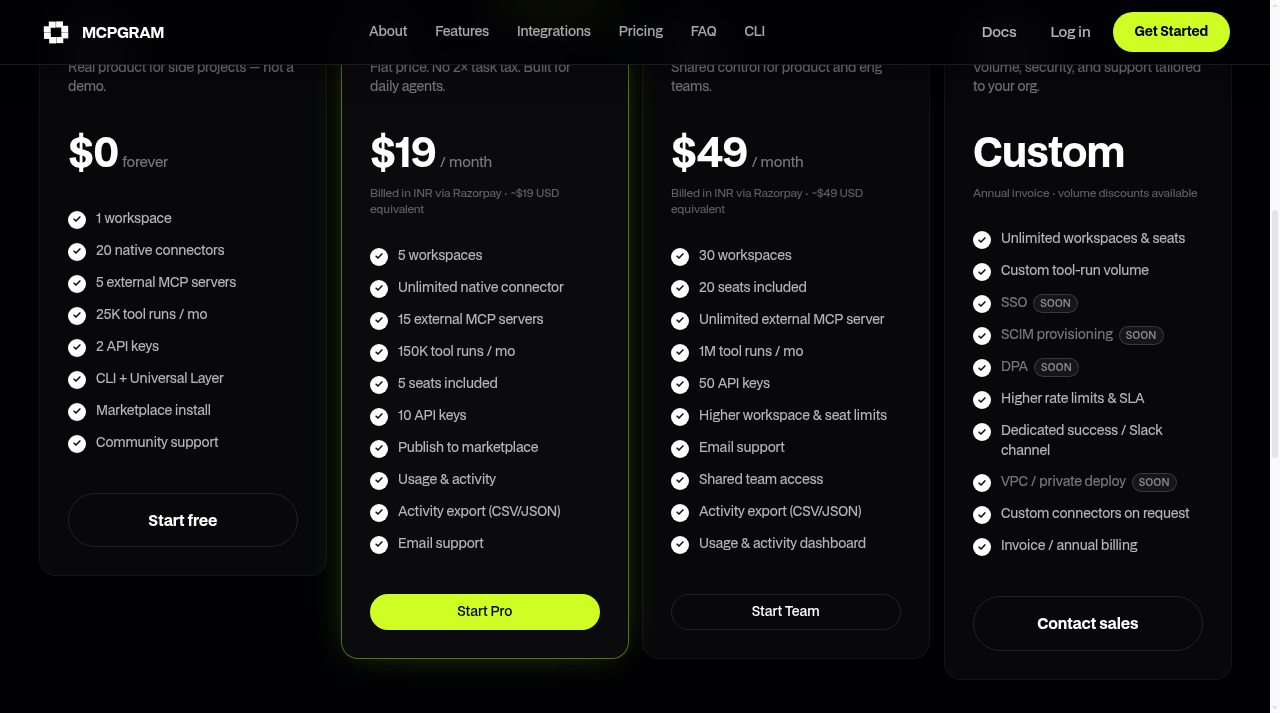
Free Hobby plan forever at $0 with 25K tool runs/month and 20 native connectors. Pro is $19/month (billed in INR via Razorpay) with 150K runs, 15 external MCP servers, and 5 seats. Team is $49/month with 1M runs, 20 seats, and 30 workspaces. Custom tier pricing requires contacting sales.
| Plan | Price | Who it is for |
|---|---|---|
| Hobby | $0 | 1 workspace, 20 native connectors, 5 external MCP servers, 25K tool runs per month, 2 API keys, CLI and universal layer access, community support. No credit card required. |
| Pro | $19/mo | 5 workspaces, unlimited native connectors, 15 external MCP servers, 150K tool runs per month, 5 seats, 10 API keys, marketplace publishing, activity export (CSV/JSON), email support. Billed in INR via Razorpay at approximately $19 USD equivalent. |
| Team | $49/mo | 30 workspaces, 20 seats, unlimited external MCP servers, 1M tool runs per month, 50 API keys, shared team access, activity export, usage dashboard, email support. Billed in INR via Razorpay at approximately $49 USD equivalent. |
| Custom | Custom | Unlimited workspaces and seats, custom tool-run volume, SSO (soon), SCIM provisioning (soon), DPA (soon), higher rate limits and SLA, dedicated success manager or Slack channel, VPC/private deploy (soon), custom connectors on request, annual invoice billing. |
Pricing reflects what we saw at time of review (2026-10). Always confirm current pricing on the tool's own site.
Who should use MCPGRAM?
A solo developer running Claude Code and Cursor side by side will get the most immediate value here. Instead of maintaining two separate GitHub OAuth tokens and two MCP server config files, they connect once in MCPGRAM and both clients pull from the same workspace. The free tier's 25K monthly runs is enough for moderate daily agent use, and the $19 Pro plan covers a small team of up to 5 people with 150K runs.
Product and engineering teams of 5 to 20 people who are already standardizing on MCP-compatible agents and want shared activity logs and CSV/JSON export for auditing will find the Team plan at $49/month reasonable. Anyone who needs SSO for identity management, SCIM for user provisioning, or a signed DPA for compliance should look elsewhere for now. Qveris, which is already in this directory, is worth evaluating if your primary need is routing agents to a broad catalog of real-world APIs rather than managing OAuth credentials across coding clients specifically.
Skip it if: Enterprise teams needing SSO, SCIM, or compliance controls now
MCPGRAM alternatives
Tags
Frequently asked questions
Does the free Hobby plan require a credit card?+
No. The Hobby plan is free forever and explicitly requires no credit card to start.
What counts as a tool run?+
A tool run is a successful MCP or connector execution. Failed calls do not count against the monthly quota. The pricing page notes that limits are soft-enforced while the product scales, so there are no surprise overages without notice.
Can I use MCPGRAM with Cursor and Claude Code at the same time?+
Yes. The universal layer is designed so that Claude Code, Cursor, Codex, Windsurf, Cline, and other MCP-compatible clients all connect to the same workspace endpoint and share the same tool catalog.
Is SSO available?+
Not yet. SSO is listed as 'Soon' on the Custom enterprise tier. It is not available on Hobby, Pro, or Team plans as of October 2026.
How does billing work for paid plans?+
Pro ($19/month) and Team ($49/month) are billed in INR through Razorpay at approximately the USD equivalent shown. The Custom tier supports annual invoicing with volume discounts.
Can I publish my own MCP server to the marketplace?+
Yes, but only on Pro and above. The Hobby plan does not include marketplace publishing rights, though it does allow installing community-published servers.
More AI Coding & Dev Tools
See all categoriesGet your tool listed on 300+ directories.
One listing here is a strong start. But the founders who get discovered everywhere are listed everywhere. Our sister site, Free AI Directories, submits your tool to 300+ AI directories for you, every single one by hand, by a real person.
It is a one-time payment of $49, no subscription, and you can follow along as the submissions land. Prefer the slow route? The same site keeps a free list of 450+ directories you can work through yourself.
Get my tool listed on 300+ directoriesOne-time payment, no subscription · 100% human submissions · Free list of 450+ directories included.