
Muze
A personal AI agent for iOS that handles research, file tasks, and background monitoring using a daily credit allowance.
Are you the maker? Claim this listing to keep info, pricing and screenshots current. Verified via your tool's domain email.
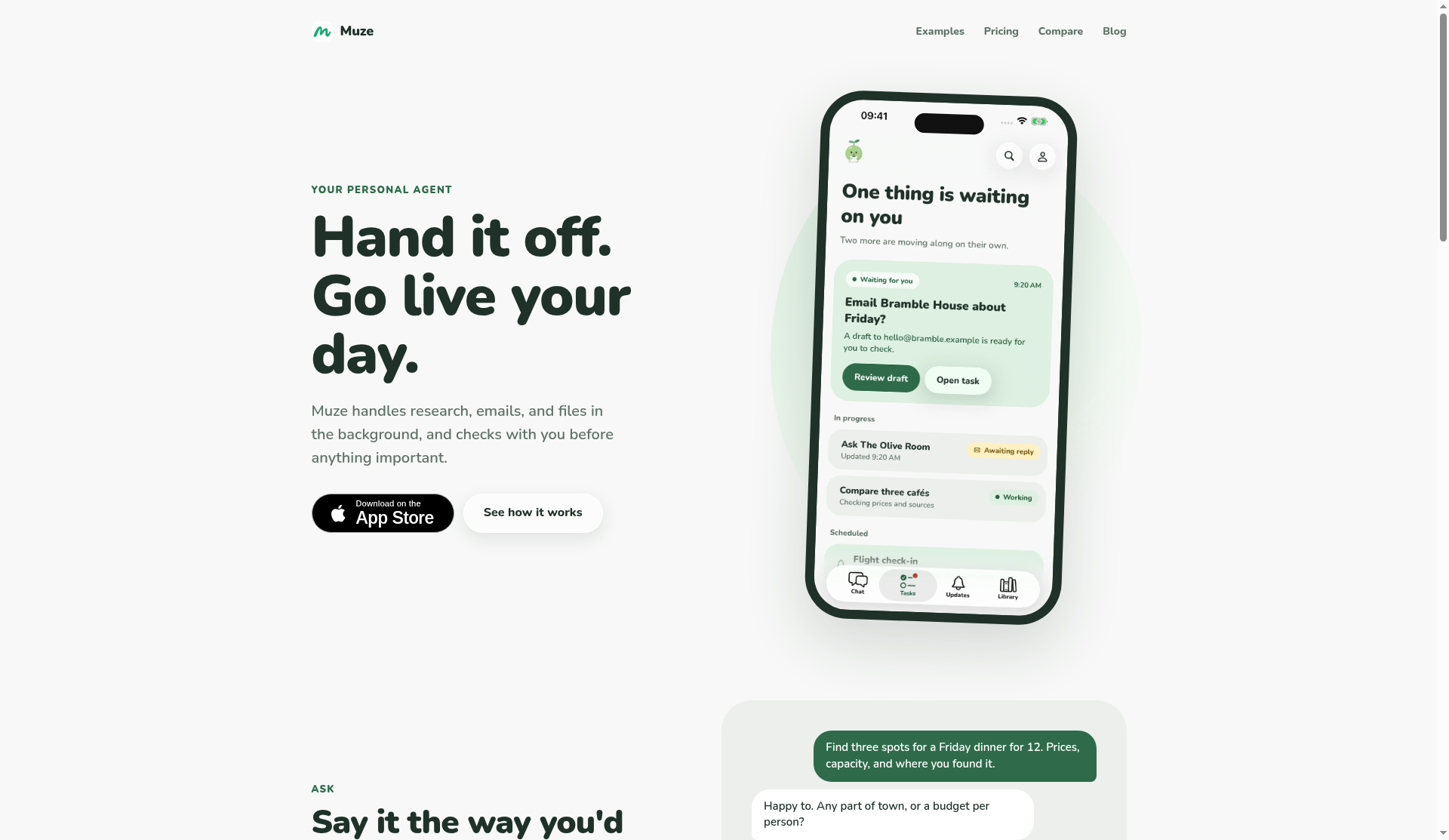
Muze suits solo users who want a personal AI agent that works in the background without requiring prompt engineering or form-filling. Its credit-based model is genuinely free to start, but the absence of any paid tier means heavy users hit a hard daily ceiling with no way to buy more capacity. Anyone needing a web or desktop experience should look elsewhere; Muze is iOS-only.
What is Muze?
Muze is a personal AI agent for iOS, developed by qthink Company, that runs research, file analysis, and background monitoring tasks on the user's behalf. Users hand off tasks in plain language, attach files or links, and Muze works inside an isolated environment, storing results in a personal Library. Tasks can run for hours or pause and resume over up to 14 days while waiting for external inputs like email replies.
The app operates on a daily credit system: every account receives 200 credits at midnight, enough for roughly 13 typical tasks. It monitors ongoing topics such as flight prices or news without requiring repeated prompts. Muze is aimed at individuals who want to offload recurring research and information tasks without learning prompt syntax or configuring automation workflows.
How we scored Muze
Capability scores 17 because the background task model, file processing, and 14-day email-wait window are genuinely differentiated features, but the iOS-only constraint and the absence of any paid tier cap the tool's practical depth for most users; no third-party evidence of output quality could be found. Ease of use scores 20 because the no-prompt, no-form intake model and the plain daily-credit counter are unusually low-friction for an AI agent. Value scores 18 because 200 free daily credits covering roughly 13 tasks is a fair starting allowance, but the complete absence of a paid upgrade path means the tool has a hard ceiling with no way to pay through it, which limits its value for anyone with above-average needs. Delivery scores 7 because no independent user reviews, app store ratings, or third-party coverage of muze.bot could be confirmed during research; the tool's claims about background execution and file isolation cannot be verified from available evidence, and the undocumented bonus-credit system adds a further trust gap.
Pros and cons
What we liked
- Genuinely free to start with 200 daily credits and no credit card required, covering roughly 13 typical tasks per day.
- Background task execution with up to 14-day email-wait windows means tasks continue without the user staying in the app.
- Isolated computer environment for file and link processing reduces the risk of cross-task data bleed and requires no prompt engineering from the user.
Where it falls short
- No paid tier exists: once 200 daily credits are exhausted, tasks pause until midnight with no option to purchase additional capacity, making Muze unsuitable for any day with above-average workload.
- iOS-only availability at launch excludes Android users entirely and offers no web or desktop interface for users who work primarily on a computer.
- Bonus credits are mentioned on the pricing page but their source, amount, and expiry terms are not publicly documented, making it impossible to plan around them.
Key features
Muze pricing
Muze is free. Every account receives 200 credits per day, refreshing at midnight in the account's time zone. A typical task costs about 15 credits, covering roughly 13 tasks per day. Bonus credits are available but terms are not publicly detailed. No paid tier is listed on the pricing page.
| Plan | Price | Who it is for |
|---|---|---|
| Free (Daily Credits) | Free | 200 credits per day, refreshing at midnight in the account's time zone. Covers roughly 13 typical tasks per day at ~15 credits each. Unused daily credits do not roll over. Bonus credits available on unspecified terms. No paid upgrade tier currently listed. |
Pricing reflects what we saw at time of review (2026-11). Always confirm current pricing on the tool's own site.
Who should use Muze?
Muze fits the individual who regularly loses time to repetitive research: checking whether a flight price dropped, tracking a product launch, pulling key facts from a PDF before a meeting. The background-task model means you can hand something off before bed and find the result waiting in your Library in the morning. The 14-day email-wait window is genuinely useful for anyone who needs an agent to follow up on slow-moving threads.
If you need more than about 13 tasks a day, work on Android or the web, or need your AI assistant to live inside an existing workspace, Muze is not the right fit. Notion AI is the stronger choice for users who already live in Notion and want AI that drafts, summarizes, and searches within their existing notes and documents rather than running standalone background tasks.
Skip it if: Teams, power users who need more than ~13 tasks per day, or anyone without an iPhone
Muze alternatives
Frequently asked questions
Is Muze actually free, or does it require a credit card?+
Muze is free to start and the pricing page states it never charges you on its own. No credit card is mentioned as a requirement to create an account.
What happens when I run out of credits mid-task?+
A task that exhausts credits pauses and retains its progress. It resumes automatically when daily credits refresh at midnight or when valid bonus credits become available.
How many tasks can I realistically do per day?+
About 13 typical tasks, since each costs roughly 15 credits out of the 200 daily allowance. Quick fact-checks cost fewer credits; illustrated multi-source research reports cost more.
Is Muze available on Android or the web?+
Based on the pricing page and submitted information, Muze is currently available only on iOS via the App Store. No Android or web app is listed.
Can Muze handle files and attachments?+
Yes. You can attach a PDF, a recording, or a link; Muze processes the content inside its own isolated computer environment and stores the result in your Library.
Is there a paid plan for users who need more than 200 credits a day?+
As of November 2026, the pricing page lists no paid tier. The only way to get additional capacity beyond the 200 daily credits is through bonus credits, whose terms are not publicly detailed.
More AI Productivity Tools
See all categoriesGet your tool listed on 300+ directories.
One listing here is a strong start. But the founders who get discovered everywhere are listed everywhere. Our sister site, Free AI Directories, submits your tool to 300+ AI directories for you, every single one by hand, by a real person.
It is a one-time payment of $49, no subscription, and you can follow along as the submissions land. Prefer the slow route? The same site keeps a free list of 450+ directories you can work through yourself.
Get my tool listed on 300+ directoriesOne-time payment, no subscription · 100% human submissions · Free list of 450+ directories included.