
QuickPlanX
Apple-native Gantt chart and project planning app for Mac, iPad, and iPhone with iCloud sync and one universal subscription.
Are you the maker? Claim this listing to keep info, pricing and screenshots current. Verified via your tool's domain email.
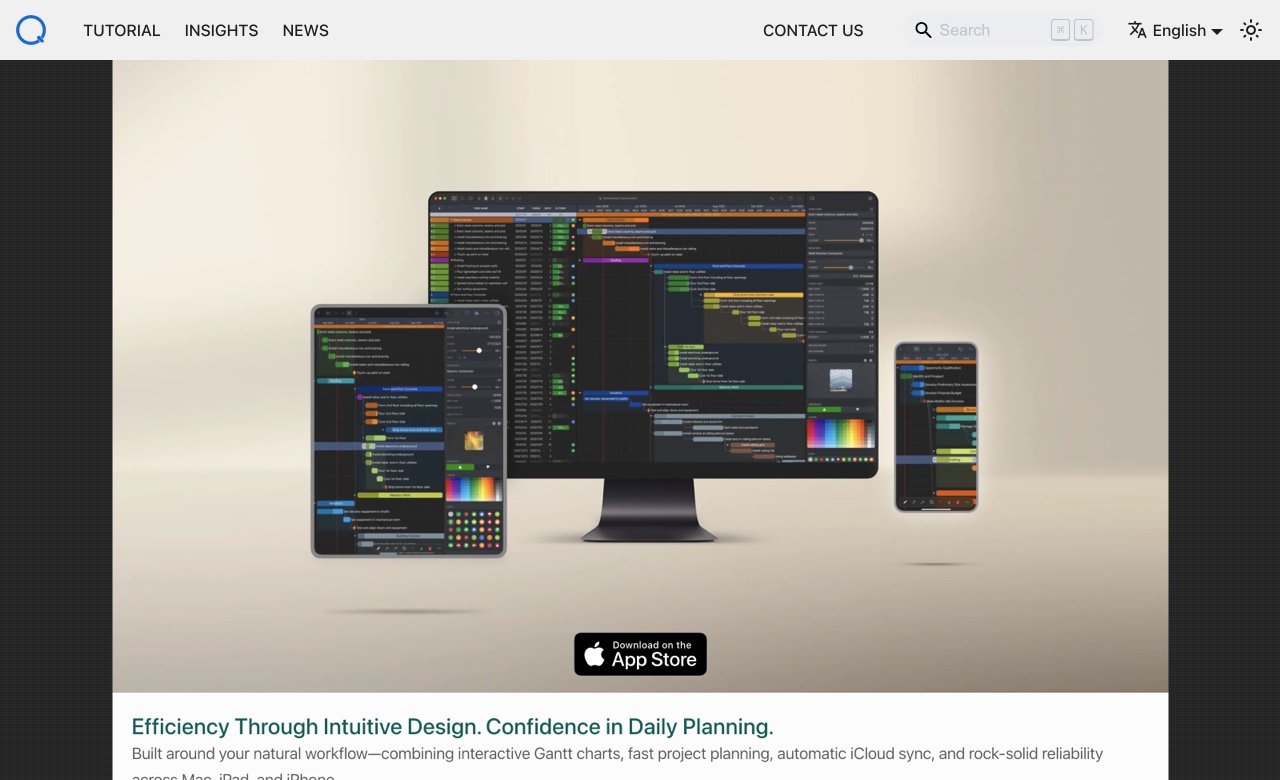
QuickPlanX is the right pick for Apple-only project managers who want a clean, native Gantt experience without the bloat of enterprise tools. At $15.99 per year it undercuts most competitors on price, but it has no web or Windows client, which makes it a dead end for mixed-platform teams. Anyone needing real-time team collaboration, comment threads, or a browser-based fallback should look elsewhere.
What is QuickPlanX?
QuickPlanX is a project planning application for Mac, iPad, and iPhone that centers on interactive Gantt charts and work breakdown structures. A single subscription covers all three Apple platforms, with automatic iCloud CloudKit sync keeping project data consistent across devices. Core capabilities include task dependencies, critical path tracking, four switchable views (Table, Gantt, Tree, and Column), project baselines, S-Curve and bar progress charts, and export to PDF, CSV, and Gantt image formats.
The app also supports Microsoft Project XML import and export for cross-platform handoffs, OPML mind-map exchange, CostX estimate import for construction and quantity-takeoff workflows, and ICS calendar export for milestones. An AI planning feature can generate a structured project outline from a plain-text prompt or pasted notes. QuickPlanX targets individual project managers and small teams working entirely within the Apple ecosystem who want professional scheduling tools without the overhead of enterprise platforms.
How we scored QuickPlanX
Capability scores 20 because the feature depth is genuine: critical path, baselines, S-Curve charts, CostX import, and Microsoft Project XML exchange go well beyond typical App Store Gantt tools, though the hard Apple-only constraint and absence of a real collaboration layer keep it from the top tier. Ease of use scores 20 because the four-view layout, CloudKit sync, and native Apple design reduce onboarding friction significantly, though the lack of a web fallback means any non-Apple device creates a hard stop. Value scores 22 because $15.99 per year for three Apple platforms is genuinely low; few project tools at any quality level match that price. Delivery scores 8 because the App Store listing for the current QuickPlanX app shows only 7 ratings, making it impossible to assess real-world reliability with confidence, and the iCloud-only collaboration model does not match what many buyers expect from a 'sync' feature. A tool with thin public evidence of delivery cannot score higher here regardless of its stated feature list.
Pros and cons
What we liked
- At $15.99 per year for Mac, iPad, and iPhone combined, the subscription price is low enough that it pays for itself against most per-seat project tools within a month.
- Microsoft Project XML import and export, CostX estimate import, OPML mind-map exchange, and ICS calendar export give it more data interoperability than most App Store Gantt tools.
- Status Day workflow (added in version 3.0) gives a structured, single-session process for reconciling delayed tasks against the current plan, which most lightweight Gantt apps skip entirely.
Where it falls short
- No web or Windows client: the entire product is Apple-only, so a single Windows user on a team breaks the workflow and forces manual XML handoffs.
- iCloud CloudKit sync stores data inside the user's own Apple ID, which means there is no shared team workspace; true multi-user collaboration requires workarounds via iCloud Drive file sharing rather than a purpose-built collaboration layer.
- The App Store listing shows only 7 ratings for the current QuickPlanX app, making it very difficult to assess real-world reliability or support quality for a new buyer.
Key features
QuickPlanX pricing
Free to download with a trial period. Full access costs $3.99 per month or $15.99 per year, covering Mac, iPad, and iPhone under one subscription.
| Plan | Price | Who it is for |
|---|---|---|
| Free Trial | Free | Free to download from the App Store with a trial period. Full feature access is limited until a subscription is purchased. |
| Universal Subscription (Monthly) | $3.99/month | Full access to QuickPlanX across Mac, iPad, and iPhone under one subscription. |
| Universal Subscription (Annual) | $15.99/year | Full access to QuickPlanX across Mac, iPad, and iPhone under one subscription. Equivalent to about $1.33 per month. |
Pricing reflects what we saw at time of review (2026-11). Always confirm current pricing on the tool's own site.
Who should use QuickPlanX?
QuickPlanX fits a solo project manager or a small Apple-only team that needs real Gantt scheduling without paying for a full enterprise platform. A freelance construction manager who already uses CostX for estimates will find the direct import genuinely useful. An independent consultant who plans on Mac at the desk and reviews on iPad in the field gets a coherent, consistent experience across both devices for $15.99 a year.
If your team includes Windows users, or if stakeholders need to view or comment on plans in a browser, QuickPlanX will frustrate you quickly. For that situation, Notion AI is a better fit: it runs in any browser, supports collaborative editing, and handles lightweight project tracking alongside documents and wikis in one shared workspace.
Skip it if: Mixed Windows/Mac teams or anyone needing browser-based access or real-time collaborative editing.
QuickPlanX alternatives
Frequently asked questions
How much does QuickPlanX cost?+
QuickPlanX is free to download with a trial. Full access costs $3.99 per month or $15.99 per year. One subscription covers Mac, iPad, and iPhone.
Does QuickPlanX work on Windows or in a browser?+
No. QuickPlanX is Apple-only and available exclusively through the App Store for Mac, iPad, and iPhone. There is no web client or Windows version.
Can I collaborate with teammates in real time?+
Not in the way most collaboration tools work. Sync happens via iCloud CloudKit within a single Apple ID. Team sharing relies on iCloud Drive file sharing rather than a built-in multi-user workspace.
Can I import a Microsoft Project file?+
Yes. QuickPlanX supports Microsoft Project XML import and export, so you can bring in an existing.xml schedule and send updated timelines back to Windows-based colleagues.
Does QuickPlanX have AI features?+
Yes. You can paste a plain-text prompt or rough notes and the app will generate a structured WBS task tree. It also accepts outlines produced by external AI tools via indented text paste.
Is my project data stored on the developer's servers?+
No. Projects are stored on your device and in your private iCloud via Apple's CloudKit. The developer does not operate a server that holds your project data.
More AI Productivity Tools
See all categoriesGet your tool listed on 300+ directories.
One listing here is a strong start. But the founders who get discovered everywhere are listed everywhere. Our sister site, Free AI Directories, submits your tool to 300+ AI directories for you, every single one by hand, by a real person.
It is a one-time payment of $49, no subscription, and you can follow along as the submissions land. Prefer the slow route? The same site keeps a free list of 450+ directories you can work through yourself.
Get my tool listed on 300+ directoriesOne-time payment, no subscription · 100% human submissions · Free list of 450+ directories included.