
3D Valley Tools
Twelve free browser and AI tools for creating, fixing, converting, and inspecting 3D models, with no account required.
Are you the maker? Claim this listing to keep info, pricing and screenshots current. Verified via your tool's domain email.
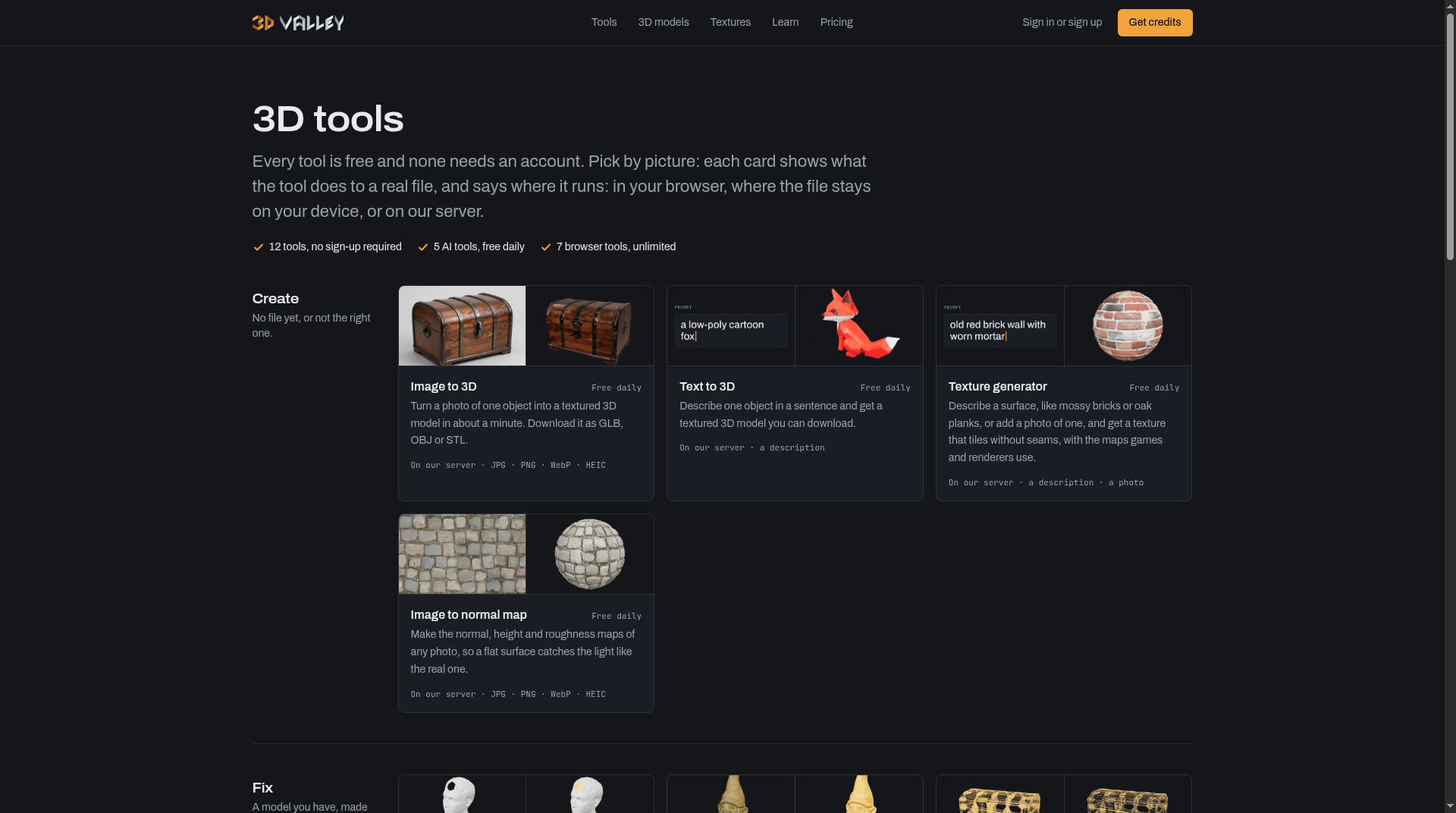
3D Valley Tools is the fastest on-ramp for hobbyists, print enthusiasts, and indie game devs who need a quick AI-generated mesh or a clean format conversion without installing anything or handing over an email address. The AI tools are genuinely useful but gated behind a daily free allowance that resets per visitor, and there is no way to know exactly how many free runs you get before the counter runs out. Anyone who needs parametric modeling, sculpting, or a full 3D pipeline should look at dedicated desktop software instead.
What is 3D Valley Tools?
3D Valley Tools groups free AI and browser utilities for making and fixing 3D assets. Create covers image-to-3D, text-to-3D, seamless PBR textures and normal maps. Fix covers hole-filling repair, QuadriFlow remesh, polygon reduce, compress and retexture. Check includes an offline viewer and a print-cost calculator; Convert handles STL, OBJ, PLY, GLB and glTF with unit scaling for printers. AI runs on a free daily allowance without sign-up; most mesh jobs never leave the device.
How we scored 3D Valley Tools
Capability lands at 19 because the 12-tool set covers a genuinely useful range for hobbyists and indie devs, and using TRELLIS.2 for Image to 3D is a real technical choice, but the AI tools are limited to single symmetric objects and the tool has no sculpting, parametric, or animation capability that named competitors in adjacent categories offer. Ease of use scores 23 out of 25 because the no-account, open-and-use design is about as frictionless as a web tool gets, and the card-based UI clearly labels which tools upload files and which run locally. Value scores 21 because the browser tools are genuinely unlimited and free, which is rare, though the opaque credit pricing (not publicly listed, requires sign-in) prevents a higher score. Delivery scores 7 because the daily AI run limit is undisclosed, credit costs are hidden behind a login wall, and no independent user sentiment was findable to verify that the tools perform as described at scale; the combination of hidden pricing and unverifiable daily limits is a meaningful trust gap even if no active controversy was found.
Pros and cons
What we liked
- All 12 tools are genuinely free with no account required, and the 7 browser-based tools are unlimited with no queue or file upload.
- The Image to 3D tool uses TRELLIS.2 on shared Hugging Face GPUs and outputs in three formats (GLB, OBJ, STL) in roughly one minute, which is competitive with paid tools in the same category.
- The browser tools support five formats (STL, OBJ, PLY, GLB, glTF) and the Convert tool handles eight specific format pairs with unit scaling, a detail that saves real headaches when moving files between slicers and renderers.
Where it falls short
- The exact number of free AI runs per day is not published anywhere on the site, so users have no way to plan around the limit before hitting it mid-session.
- Credit pack prices and per-run costs are not listed publicly; you have to create an account and reach the pricing page after sign-in to see what you will pay, which makes cost comparison impossible upfront.
- The AI tools are limited to single-object inputs and symmetric shapes produce the best results, meaning complex scenes, characters with fine detail, or multi-part assemblies will disappoint.
Key features
3D Valley Tools pricing
All 12 tools are free with no account required. The 7 browser-based tools (Repair, Reduce, Compress, Viewer, Print Cost, Convert, Remesh) are unlimited. The 5 AI tools (Image to 3D, Text to 3D, Texture Generator, Image to Normal Map, Retexture) have a free daily allowance per visitor. Beyond the daily limit, runs cost credits purchased as one-time top-ups via Stripe. Credits expire 12 months from the last purchase. No subscription exists.
| Plan | Price | Who it is for |
|---|---|---|
| Free (no account) | Free | All 12 tools with no sign-up. The 7 browser tools (Repair, Reduce, Compress, Viewer, Print Cost, Convert, and the browser portion of Remesh) are unlimited. The 5 AI tools (Image to 3D, Text to 3D, Texture Generator, Image to Normal Map, Retexture) have a daily free allowance per visitor; the exact run count is not published. |
| Credits (top-up) | Not publicly listed | One-time credit purchases via Stripe for AI tool runs beyond the daily free allowance. Credits are valid for 12 months from the last purchase and reset the expiry clock on the full balance with each new purchase. Per-run costs and pack prices require signing in to view. |
Pricing reflects what we saw at time of review (2026-10). Always confirm current pricing on the tool's own site.
Who should use 3D Valley Tools?
A 3D printing hobbyist who found a model online with broken geometry will get real value from the browser-based Repair tool: drop in the STL, get a report on what changed, download the fixed file, and never create an account. The same person can use the Print Cost calculator to price a job from G-code before committing filament.
Indie game developers and digital artists who want a quick textured mesh from a photo or a prompt will find the Image to 3D and Text to 3D tools genuinely useful for prototyping, as long as they can work within the daily free limit. The Retexture tool is a practical shortcut for reskinning existing assets without touching the geometry.
Anyone who needs parametric CAD, high-resolution sculpting, or a collaborative pipeline should look elsewhere. Plnty, which is in our directory, covers a much broader creative canvas including video, vector, and audio alongside 3D, and suits professional creators who need more than mesh utilities. Canva, also in our directory, is the better pick for teams that need AI-assisted design across formats with a polished sharing workflow.
Skip it if: Professional studios or anyone needing parametric CAD, sculpting tools, or a full production pipeline
Frequently asked questions
Do I need to create an account to use any of the tools?+
No account is required for any of the 12 tools. The AI tools run on a daily free allowance per visitor without sign-up; an account is only needed if you want to buy credits and re-download past results.
How many free AI runs do I get per day?+
The site does not publish the exact daily run count. When the allowance is used up, the page displays when it resets. The browser-based tools (Repair, Reduce, Compress, Viewer, Print Cost, Convert) are unlimited and unaffected.
What does it cost to run AI tools beyond the free daily limit?+
Additional runs use credits bought as one-time purchases through Stripe. The specific pack prices and per-run costs are not listed publicly and require signing in to view, so upfront cost comparison is not possible.
Do my files get stored on 3D Valley's servers?+
Only the tools marked 'On our server' upload files: Image to 3D, Text to 3D, Texture Generator, Image to Normal Map, Retexture, and Remesh. The site states input files are sent for the run and discarded afterwards. All other tools run in the browser and files never leave the device.
What file formats are supported?+
The tools support STL, OBJ, PLY, GLB, and glTF. The Convert tool handles eight specific format pairs including GLB to STL, OBJ to GLB, and PLY to STL, with unit scaling. The Repair tool accepts files up to 100 MB.
Do credits expire?+
Yes. Credits are valid for 12 months from the last purchase. Each new purchase restarts the 12-month clock for the entire balance. Credits cannot be transferred, refunded, or paid out.
More AI Design & Art tools
See all categoriesGet your tool listed on 300+ directories.
One listing here is a strong start. But the founders who get discovered everywhere are listed everywhere. Our sister site, Free AI Directories, submits your tool to 300+ AI directories for you, every single one by hand, by a real person.
It is a one-time payment of $49, no subscription, and you can follow along as the submissions land. Prefer the slow route? The same site keeps a free list of 450+ directories you can work through yourself.
Get my tool listed on 300+ directoriesOne-time payment, no subscription · 100% human submissions · Free list of 450+ directories included.